
If you think the project is good, welcome ⭐ also welcome PR cooperation, if you have any questions, please raise an issue for discussion.
A video automatic slicing tool that supports GPU acceleration calculation, command line usage, and API usage.
- Detect the dense period of danmaku based on the sliding window algorithm.
- Slice the video based on the density of danmaku.
- Support GPU accelerated calculation.(Automatically choose whether to use GPU acceleration)
- Support custom quantity slicing videos.
- Support custom slice duration.
- Add detailed log information.
- Support cli usage and api usage.
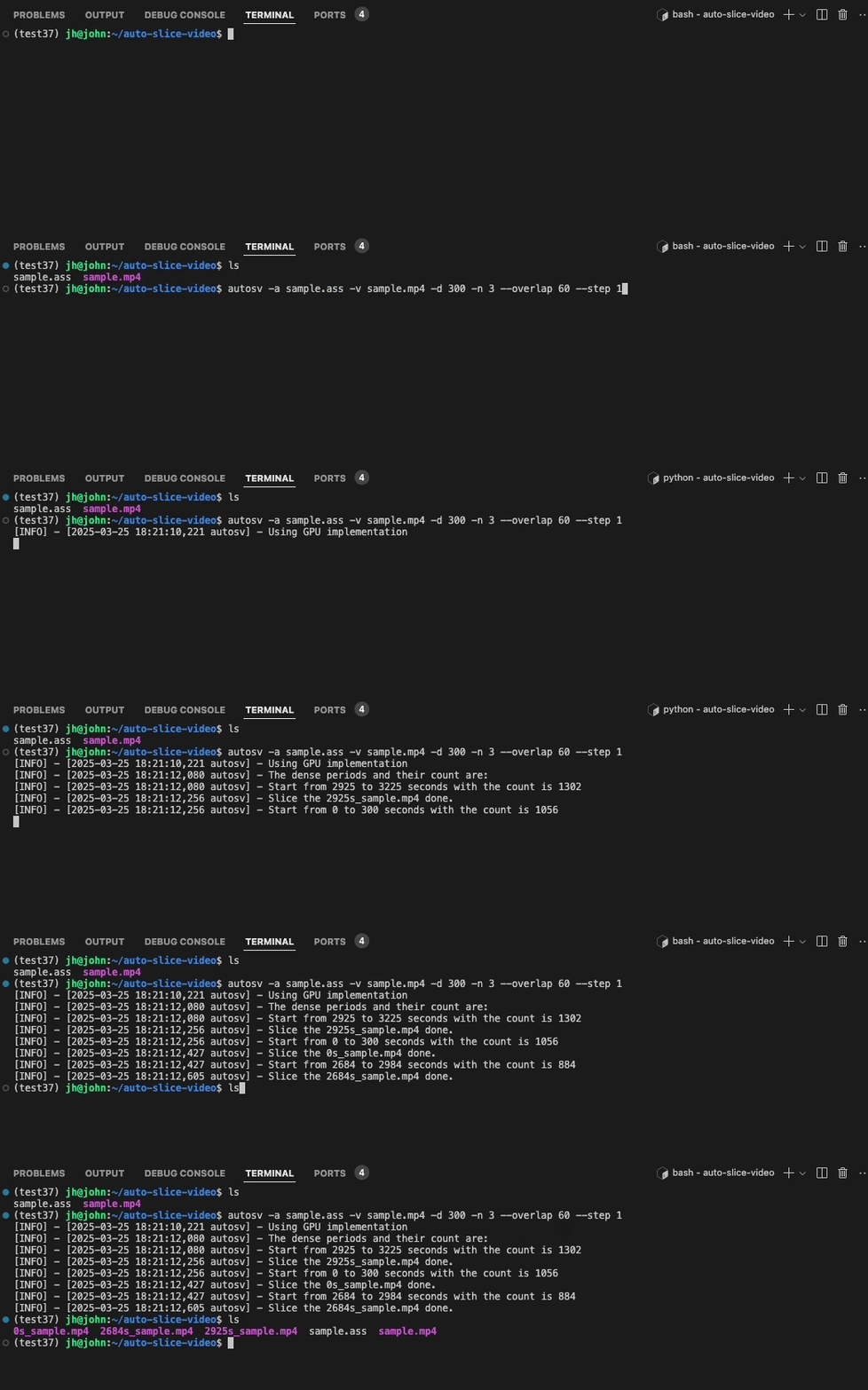
As shown above, extract 3 highlight videos from a video, each video is 300 seconds long, and the maximum overlap is 60 seconds. Then calculate and slice out 3 highlight videos. The format is xxxs_original video name, xxx represents the starting time of the slice in the original video, which is convenient for the user to locate.
To use this tool, you need to install ffmpeg first.
- Windows:
choco install ffmpeg(via Chocolatey) or other methods. - macOS:
brew install ffmpeg(via Homebrew). - Linux:
sudo apt install ffmpeg(Debian/Ubuntu).
More OS please refer to the official website.
Then install the autosv package.
pip install autosv# eg. The default parameters are shown in autosv -h
autosv -a sample.ass -v sample.mp4
autosv -a sample.ass -v sample.mp4 -d 300 -n 3 --overlap 60 --step 1
autosv -h
# optional arguments:
# -h, --help show this help message and exit
# -V, --version Print version information
# -a ASS, --ass ASS The input ass file of the danmaku
# -v VIDEO, --video VIDEO
# The input video file
# -d DURATION, --duration DURATION
# The duration(seconds) of the sliced highlight video, default is 60
# -n TOP_N, --top_n TOP_N
# The number of the top dense periods to return, default is 1
# --overlap OVERLAP The overlapped(seconds) between the sliced highlight videos, default is 30
# --step STEP The step(seconds) of the sliding window, default is 1from autosv import slice_video_by_danmaku
# The default parameters are the same as the cli usage
slice_video_by_danmaku(ass_path, video_path, duration=300, top_n=3, max_overlap=60, step=1)Generally speaking, the gpu implementation is faster and more efficient than the cpu implementation due to the parallel computing. In my practice, when the input data is around 30k(Try test/sample2.ass), the gpu implementation only takes 2 seconds, while the cpu implementation takes 33 seconds, which is 16.5 times faster with only 55 MB VRAM occupied.
The autosv will detect whether the cuda is available on the machine via nvcc -V, if your machine has nvidia gpu, please make sure your driver is installed and the cuda is available. Meanwhile, make sure you have installed the numba and numpy with the right version.