| theme | seriph | |
|---|---|---|
| background | https://images.squarespace-cdn.com/content/v1/571882d6044262cdb2304461/1529544418628-65KCO5PTE1MN32FML9AT/image-asset.jpeg?format=2500w | |
| class | text-center | |
| highlighter | shiki | |
| lineNumbers | false | |
| info | ## Containers, Docker and Kubernetes For Developers | |
| drawings |
|
|
| css | unocss |
For Developers
Containers are a streamlined way to build, test, deploy, and redeploy applications on multiple environments from a developer’s local laptop to an on-premises data center and even the cloud.
- Agility and productivity
- Less overhead
- Operational consistency
- Scalability and infrastructure optimization
- Component portability
<style> h1 { background-color: #2B90B6; background-image: linear-gradient(45deg, #4EC5D4 10%, #146b8c 20%); background-size: 100%; -webkit-background-clip: text; -moz-background-clip: text; -webkit-text-fill-color: transparent; -moz-text-fill-color: transparent; } </style>
The two main kernel features that give us containers are namespaces and control groups or cgroups. The namespaces provide isolation, and cgroups determine the resources allocated for each container.
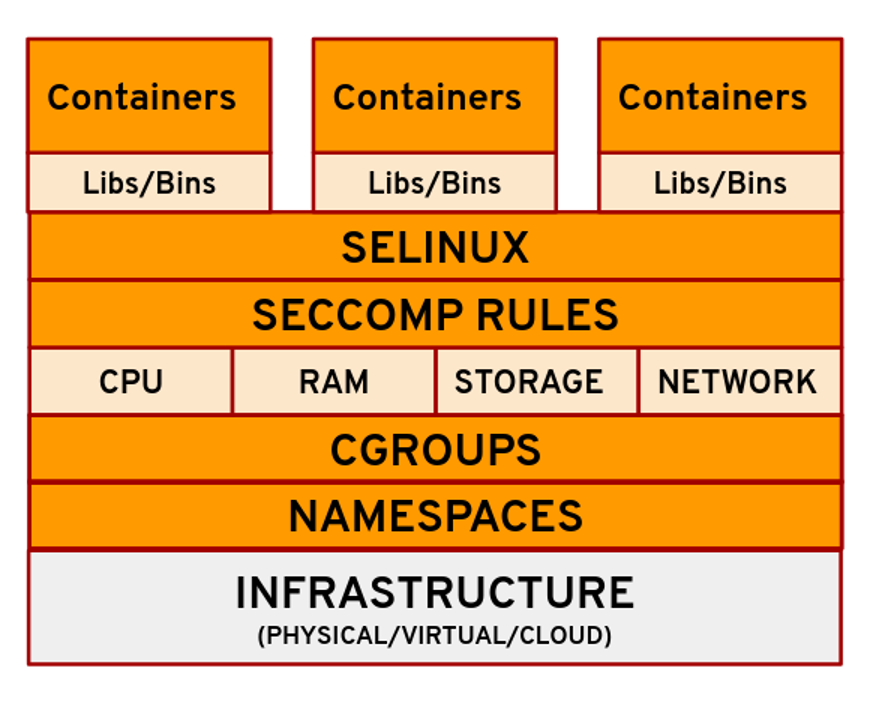
Containers may seem like a technology that came out of nowhere to transform IT, but in truth they are anything but new.
- 1970: Unix V7
- 2000: FreeBSD Jails
- 2001: Linux VServer
- 2004: Solaris Containers
- 2005: Open VZ
- 2006: Process Containers
- 2008: LXC - Linux Containers
- 2011: Warden
- 2013: LMCTFY(Let Me Contain That For You)
- 2013: Docker
Docker is an open platform for developing, shipping, and running applications. Docker enables you to separate your applications from your infrastructure so you can deliver software quickly.


Docker is written in the Go programming language and takes advantage of several features of the Linux kernel to deliver its functionality.
Docker technology was initially built on top of the LXC technology—what most people associate with “traditional” Linux containers—though it’s since moved away from that dependency. LXC was useful as lightweight virtualization, but it didn’t have a great developer or user experience. The Docker technology brings more than the ability to run containers—it also eases the process of creating and building containers, shipping images, and versioning of images (among other things).
-
Docker Daemon
-
Dockerfile
-
Docker Objects -> Images and Containers
-
Docker Client
-
Docker Hub & Docker Registries
-
Docker Desktop
Take a look at how is easy to start an infrastructure component or an app with Docker.
Postgres
docker run -d --name my-postgres -p 5432:5432 -e POSTGRES_PASSWORD=Secret#Password123 -d postgresRabbitMQ
docker run -d --name my-rabbit -p 15672:15672 -e RABBITMQ_DEFAULT_USER=user -e RABBITMQ_DEFAULT_PASS=password rabbitmq:3-managementNexus
docker run -d --name my-nexus -p 8081:8081 --name nexus sonatype/nexus3Docker Compose is a tool for defining and running multi-container Docker applications. With Compose, you use a YAML file to configure your application’s services. Then, with a single command, you create and start all the services from your configuration.
version: "3.9"
services:
  web:
    build: .
    ports:
      - "8000:5000"
    volumes:
      - .:/code
      - logvolume01:/var/log
    depends_on:
      - redis
  redis:
    image: redis
volumes:
  logvolume01: {}
Docker Swarm is an orchestration management tool that runs on Docker applications. It helps end-users in creating and deploying a cluster of Docker nodes.
A native clustering system for Docker. It turns a pool of Docker hosts into a single, virtual host using an API proxy system. (Deprecated)
If you have Docker installed, you already have Docker Swarm, it's integrated into Docker.
- High Scalability
- High-level Security
- Automatic Load Balancing
The Open Container Initiative is an open governance structure for the express purpose of creating open industry standards around container formats and runtimes.

All tools listed below generate images following the OCI specifications
- Buildah
- Kaniko
- Docker
- BuildPacks
- Jib
- SpringBoot Image Build uses BuildPack.
All tools listed below can run OCI Images
Docker is not compatible with CRI specification
> **Docker uses containerd internally to run OCI Images**
Podman is a daemonless container engine for developing, managing, and running OCI Containers on your Linux System.
- Containers can be run as root or in rootless mode
- Support multiple image formats including the OCI and Docker image formats.
- Support for multiple means to securely download images including trust & image verification.
- Container image management (managing image layers, overlay filesystems, etc).
- Full management of container lifecycle.
- Support for pods to manage groups of containers together.
- Resource isolation of containers and pods.
- Simply put: alias docker=podman
- Podman as Docker does not follow the CRI specification
- Can run OCI images
- It is not compatible with Docker Compose and Docker Swarm(Podman team believes that Kubernetes is the de facto standard for composing Pods and for orchestrating containers)
Docker introduced a new product subscription, Docker Business, for organizations using Docker at scale for application development and require features like secure software supply chain management, single sign-on (SSO), container registry access controls, and more.
- Docker Desktop remains free for small businesses (fewer than 250 employees AND less than $10 million in annual revenue), personal use, education, and non-commercial open source projects.
- It requires a paid subscription (Pro, Team or Business), starting at $5 per user per month, for professional use in larger businesses. You may directly purchase here, or share this post and our solution brief with your manager.
- Started at August 31, 2021
Kubernetes, also known as K8s, is an open-source system for automating deployment, scaling, and management of containerized applications.
- Automated rollouts and rollbacks
- Service discovery and load balancing
- Storage orchestration
- Secret and configuration management
- Automatic bin packing
- Batch execution
- IPv4/IPv6 dual-stack
- Horizontal scaling
- Self-healing
- Designed for extensibility
A Kubernetes cluster consists of a set of worker machines, called nodes, that run containerized applications. Every cluster has at least one worker node.
The worker node(s) host the Pods that are the components of the application workload. The control plane manages the worker nodes and the Pods in the cluster. In production environments, the control plane usually runs across multiple computers and a cluster usually runs multiple nodes, providing fault-tolerance and high availability.
- kube-apiserver
- etcd
- kube-scheduler
- kube-controller-manager
- cloud-controller-manager
- kubelet
- kube-proxy
- Container runtime
The components of a Kubernetes cluster

Kubernetes is a system with several concepts. Many of these concepts get manifested as “objects” in the RESTful API (often called “resources” or “kinds”).

The Pod object is the fundamental building block in Kubernetes
Comprised of one or more (tightly related) containers, a shared networking layer, and shared filesystem volumes. Similar to containers, pods are designed to be ephemeral - there is no expectation that a specific, individual pod will persist for a long lifetime.

A workload is an application running on Kubernetes. Whether your workload is a single component or several that work together, on Kubernetes you run it inside a set of pods. In Kubernetes, a Pod represents a set of running containers on your cluster.
A Deployment provides declarative updates for Pods and ReplicaSets.
- Deployment provides declarative updates for Pods (Identical Pods) and ReplicaSets.
- Deployment creates a management object one level higher than a replica set, and enables you to deploy and manage updates for pods in a cluster.
- Deployment handles the ReplicaSet, it gets automatically created with Deployment.
- Deployment is the most common way to get your app on Kubernetes.
- You describe a desired state in a Deployment, and the Deployment Controller changes the actual state to the desired state at a controlled rate.
- Deployment has details of how to roll out (or roll back) across versions of your application.
Example of a Deployment manifest
apiVersion: apps/v1
kind: Deployment
metadata:
  name: spring-kubernetes-app
spec:
  selector:
    matchLabels:
      app: spring-kubernetes-app
  replicas: 2
  template:
    metadata:
      labels:
        app: spring-kubernetes-app
    spec:
      containers:
        - name: spring-kubernetes-app
          image: spring-boot-kubernetes
          imagePullPolicy: IfNotPresent
          ports:
- containerPort: 8080A ReplicaSet's purpose is to maintain a stable set of replica Pods running at any given time. As such, it is often used to guarantee the availability of a specified number of identical Pods.
- ReplicaSet’s purpose is to maintain a stable set of replica Pods (Identical Pods) running at any given time.
- ReplicaSet ensures a defined number of pods are always running.
- Kubernetes supports self-healing applications through ReplicaSets and Replication Controllers. The replication controller helps in ensuring that a - POD is re-created automatically when the application within the POD crashes. It helps in ensuring enough replicas of the application are running at all times.
- Usually, ReplicaSet should not created directly. However, Deployment is a higher-level concept that manages ReplicaSets and provides declarative updates to Pods.
- It is recommend using Deployments instead of directly using ReplicaSets.
StatefulSet is the workload API object used to manage stateful applications.
- StatefulSet is used to manage stateful applications with persistent storage.
- Storage stays associated with replacement pods. Volumes persist when pods are deleted. Pods are deployed/updated individually and in order.
- StatefulSet runs stateful pods with a stable identity and provides guarantees about the ordering and uniqueness of these Pods. Pod names are are retained when rescheduled (app-0, app-1).
- Like a Deployment, a StatefulSet manages Pods that are based on an identical container spec. Unlike a Deployment, a StatefulSet maintains a sticky identity for each of their Pods.
- Pods have fixed DNS names, unlike deployments.
- Pods are created from same specification, but not interchangeable.
- Each Pod has own storage.
Example of a StatefulSet manifest
apiVersion: apps/v1
kind: StatefulSet
metadata:
  name: postgres-statefulset
  labels:
    app: postgres
spec:
  serviceName: "postgres"
  replicas: 1
  selector:
    matchLabels:
      app: postgres
  template:
    metadata:
      labels:
        app: postgres
    spec:
      containers:
      - name: postgres
        image: postgres:12
        envFrom:
        - configMapRef:
            name: postgres-configuration
        ports:
        - containerPort: 5432
          name: postgresdb
        volumeMounts:
        - name: pv-data
          mountPath: /var/lib/postgresql/data
      volumes:
      - name: pv-data
        persistentVolumeClaim:
claimName: postgres-pv-claimA DaemonSet ensures that all (or some) Nodes run a copy of a Pod. As nodes are added to the cluster, Pods are added to them. As nodes are removed from the cluster, those Pods are garbage collected. Deleting a DaemonSet will clean up the Pods it created.
- DaemonSet implements a single instance of a pod on all (or filtered subset of) worker node(s).
- Node monitoring daemon which provides node information to Prometheus. Other monitoring options with DaemonSets include collectd, Ganglia gmond or Instana agent.
- Daemon which does logs rotation and cleaning log files.
- Troubleshooting using the node-problem-detector. This is a daemon that runs on each node, detects node problems and reports them to the api-server.
- Running a cluster storage daemon, such as glusterd or ceph, on each node.
- Running a logs collection daemon, such as fluentd or logstash , on each node.
Job and CronJob define tasks that run to completion and then stop. Jobs represent one-off tasks, whereas CronJobs recur according to a schedule.
- Job runs pods that perform a completable task.
- Job creates one or more Pods and will continue to retry execution of the Pods until a specified number of them successfully terminate.
- Job ensures a pod properly runs to completion.
- Deleting a Job will clean up the Pods it created. Suspending a Job will delete its active Pods until the Job is resumed again.
- CronJob creates Jobs on a repeating schedule.
- One CronJob object is like one line of a crontab (cron table) file. It runs a job periodically on a given schedule, written in Cron format.
- CronJobs are meant for performing regular scheduled actions such as backups, report generation, and so on.
Example of a Job manifest
apiVersion: batch/v1
kind: Job
metadata:
  name: pi
spec:
  template:
    spec:
      containers:
      - name: pi
        image: perl:5.34.0
        command: ["perl",  "-Mbignum=bpi", "-wle", "print bpi(2000)"]
      restartPolicy: Never
backoffLimit: 4Example of a CronJob manifest
apiVersion: batch/v1
kind: CronJob
metadata:
  name: hello
spec:
  schedule: "* * * * *"
  jobTemplate:
    spec:
      template:
        spec:
          containers:
          - name: hello
            image: busybox:1.28
            imagePullPolicy: IfNotPresent
            command:
            - /bin/sh
            - -c
            - date; echo Hello from the Kubernetes cluster
restartPolicy: OnFailureIn Kubernetes, namespaces provides a mechanism for isolating groups of resources within a single cluster. Names of resources need to be unique within a namespace, but not across namespaces. Namespace-based scoping is applicable only for namespaced objects (e.g. Deployments, Services, etc) and not for cluster-wide objects (e.g. StorageClass, Nodes, PersistentVolumes, etc).
- Namespaces provides a mechanism for isolating groups of resources within a single cluster.
- Names of resources need to be unique within a namespace, but not across namespaces.
- Namespace-based scoping is applicable only for namespaced objects (e.g. Deployments, Services, etc) and not for cluster-wide objects (e.g. - - StorageClass, Nodes, PersistentVolumes, etc).
- Namespaces enable organizing resources into non-overlapping groups (for example, per tenant, per environment, per project, per team)
Example of a Namespace manifest
kind: Namespace
apiVersion: v1
metadata:
  name: test
  labels:
    name: test
Kubernetes best practices: Organizing with Namespaces
Every Pod in a cluster gets its own unique cluster-wide IP address. This means you do not need to explicitly create links between Pods and you almost never need to deal with mapping container ports to host ports. This creates a clean, backwards-compatible model where Pods can be treated much like VMs or physical hosts from the perspectives of port allocation, naming, service discovery, load balancing, application configuration, and migration.
An abstract way to expose an application running on a set of Pods as a network service. With Kubernetes you don't need to modify your application to use an unfamiliar service discovery mechanism. Kubernetes gives Pods their own IP addresses and a single DNS name for a set of Pods, and can load-balance across them.
- Service is used to expose an application deployed on a set of pods using a single endpoint. i.e. It maps a fixed IP address to a logical group of pods.
- Service provides stable networking for pods (ephemeral pods) by bringing stable IP addresses and DNS names, and provide a way to Kubernetes to configuring a proxy to forward traffic to a set of pods.
- Service enables communication between nodes, pods, and users of app, both internal and external, to the cluster. Service also provides load balancing when you have Pod replicas.
- There are four types of Kubernetes services — ClusterIP, NodePort, LoadBalancer and ExternalName.
Example of a Service manifest
apiVersion: v1
kind: Service
metadata:
  name: my-nginx
  labels:
    run: my-nginx
spec:
  ports:
  - port: 80
    protocol: TCP
  selector:
    run: my-nginx
An ingress controller is the primary method of exposing a cluster service (usually http) to the outside world. These are load balancers or routers that usually offer SSL termination, name-based virtual hosting etc…
- Ingress manages external access to the services in a cluster, typically HTTP/S.
- Ingress may provide load balancing, SSL termination and name-based virtual hosting.
- Ingress exposes one or more services to external clients through a single externally reachable IP address.
- Traffic routing is controlled by rules defined on the Ingress resource.
- Ingress controller is responsible for fulfilling the Ingress, usually with a load balancer.
Example of a Ingress manifest
apiVersion: extensions/v1beta1
kind: Ingress
metadata:
  name: test-ingress
  annotations:
    nginx.ingress.kubernetes.io/rewrite-target: /
spec:
  rules:
  - http:
      paths:
      - path: /test
        backend:
          serviceName: test
          servicePort: 80
A PersistentVolume (PV) is a piece of storage in the cluster that has been provisioned by an administrator or dynamically provisioned using Storage Classes. It is a resource in the cluster just like a node is a cluster resource. PVs are volume plugins like Volumes, but have a lifecycle independent of any individual Pod that uses the PV
- PV is a low level representation of a storage volume. It is an abstraction for the physical storage device that attached to the cluster.
- PV can be mounted into a pod through a PVC.
- PV is resource in the cluster that can be provisioned dynamically using Storage Classes, or they can be explicitly created by a cluster administrator.
- PV is independent of the lifecycle of the Pods. It means that data represented by a PV continue to exist as the cluster changes and as Pods are deleted and recreated.
Example of a PV manifest
apiVersion: v1
kind: PersistentVolume
metadata:
  name: task-pv-volume
  labels:
    type: local
spec:
  storageClassName: manual
  capacity:
    storage: 10Gi
  accessModes:
    - ReadWriteOnce
  hostPath:
path: "/mnt/data"PVs are resources in the cluster. PVCs are requests for those resources and also act as claim checks to the resource. The interaction between PVs and PVCs follows this lifecycle.
- PVC is binding between a Pod and PV. Pod request the Volume through the PVC.
- PVC is the request to provision persistent storage with a specific type and configuration.
- PVCs describe the storage capacity and characteristics a pod requires, and the cluster attempts to match the request and provision the desired - - persistent volume.
- PVC must be in same namespace as the Pod. For each Pod, a PVC makes a storage consumption request within a namespace.
- PVC is similar to a Pod. Pods consume node resources and PVC consume PV resources.
PVs are resources in the cluster. PVCs are requests for those resources and also act as claim checks to the resource. The interaction between PVs and PVCs follows this lifecycle.
- PVC is binding between a Pod and PV. Pod request the Volume through the PVC.
- PVC is the request to provision persistent storage with a specific type and configuration.
- PVCs describe the storage capacity and characteristics a pod requires, and the cluster attempts to match the request and provision the desired - - persistent volume.
- PVC must be in same namespace as the Pod. For each Pod, a PVC makes a storage consumption request within a namespace.
- PVC is similar to a Pod. Pods consume node resources and PVC consume PV resources.
Example of a PVC manifest
apiVersion: v1
kind: PersistentVolumeClaim
metadata:
  name: pvc-claim-2
spec:
  storageClassName: manual
  accessModes:
    - ReadWriteOnce
  resources:
    requests:
storage: 3GiA StorageClass provides a way for administrators to describe the "classes" of storage they offer. Different classes might map to quality-of-service levels, or to backup policies, or to arbitrary policies determined by the cluster administrators.
A storage class in Kubernetes defines different storage types, which allows the user to request a specific type of storage for their workloads. Storage classes also allow the cluster administrator to control which type of storage is used for specific workloads by specifying a type of storage.
- StorageClass allows dynamic provisioning of Persistent Volumes, when PVC claims it.
- StorageClass abstracts underlying storage provider.
- StorageClass is used in conjunction with PVC that allow Pods to dynamically request a new storage.
Example of a Storage Classe manifest
apiVersion: storage.k8s.io/v1
kind: StorageClass
metadata:
  name: standard
provisioner: kubernetes.io/aws-ebs
parameters:
  type: gp2
reclaimPolicy: Retain
allowVolumeExpansion: true
mountOptions:
  - debug
volumeBindingMode: Immediate
Kubernetes Configuration - Config Maps
A ConfigMap is an API object used to store non-confidential data in key-value pairs. Pods can consume ConfigMaps as environment variables, command-line arguments, or as configuration files in a volume.
A ConfigMap allows you to decouple environment-specific configuration from your container images, so that your applications are easily portable.
Caution: ConfigMap does not provide secrecy or encryption. If the data you want to store are confidential, use a Secret rather than a ConfigMap, or use additional (third party) tools to keep your data private.
Kubernetes Configuration - Config Maps
Example of a Config Map manifest
apiVersion: v1
kind: ConfigMap
metadata:
  name: app-config
data:
  db_host: "https://database.example.com"
  default_user_status: "suspended"
  max_invoice_date: "2022-12-31"
Kubernetes Configuration - Secrets
A Secret is an object that contains a small amount of sensitive data such as a password, a token, or a key. Such information might otherwise be put in a Pod specification or in a container image. Using a Secret means that you don't need to include confidential data in your application code.
Because Secrets can be created independently of the Pods that use them, there is less risk of the Secret (and its data) being exposed during the workflow of creating, viewing, and editing Pods. Kubernetes, and applications that run in your cluster, can also take additional precautions with Secrets, such as avoiding writing secret data to nonvolatile storage.
Secrets are similar to ConfigMaps but are specifically intended to hold confidential data.
Kubernetes Configuration - Secrets
Example of a Secret manifest
apiVersion: v1
kind: Secret
metadata:
  name: mysecret
type: Opaque
data:
  username: YWRtaW4=
  password: MTIzNDU2
Secrets are stores as base64 String, you need to run bellow comand to generate the encoded value.
echo -n 'admin' | base64
echo -n '123456' | base64When a user asks Kubernetes to create a deployment using kubectl like below, this is how the process works.
kubectl apply -f k8s-deployment.yml- kubectl converts the yaml resource into JSON and sends it to API Server inside the master node or control plane
- API Server receives the request & persists the deployment details or object definition to the database.
- etcd is a highly-available key value store used to store the data by Kubernetes.
- etcd is a crucial component for Kubernetes as it stores the entire state of the cluster: its configuration, specifications, and the statuses of the running workloads.
- When a new deployment resource is stored in etcd store, the controller manager is notified and it creates enough Pod resources to match the replicas in the Deployment.
- At this point the state of the deployment in etcd is Pending state
- Scheduler sees the Pending state and inspect the status of the infrastructure and does filtering and ranking of nodes to decide where to schedule the Pods and then executes its business logic to fill out the nodeName field in the pod’s Spec with the name of the Schedulable Node and persists the scheduled Pods object in etcd with Scheduled state
- At this stage , no Pods have been created just the objects are created, updated and stored in etcd.
- On each worker Node , there is a kubelet which is in charge of talking to the master Node or control plane. It provides an interface between the Kubernetes control plane and the container runtime on each server in the cluster.
- The kubelet makes sure containers are running in a pod. When the control plane needs something to happen in a node, the kubelet executes the action.
- If our deployment spec had instruction to create 3 replicas. At this stage each of this will be marked as scheduled in etcd.
- Kubelet retrieves the template for the Pods and delegates creating the container to the CRI.
- When CRI completes the task, the kubelet checks readiness and liveness probes and the Pod is finally marked as running.

kubectl is the main way in which you will interact with your Kubernetes cluster
Kubectl is a command line tool used to run commands against Kubernetes clusters. It does this by authenticating with the Master Node of your cluster and making API calls to do a variety of management actions. If you’re just getting started with Kubernetes, prepare to be spending a lot of time with kubectl!
kubectl[command][type][name][flags]- [command]: specifies the action you want to perform like create, delete, get, apply
- [type]: any Kubernetes resource, whether automatically provided by Kubernetes (like a service or a pod) or created by you with a Custom Resource Definition
- [name]: the name you have given the resource — if you omit the name, kubectl will return every resource specified by the type
- [flags]: specify any additional global or command specific options such as the output format
```bash kubectl get pods hello-world -o yaml kubectl apply -f hello-world.yaml ```
- kubectx and kubens https://github.com/ahmetb/kubectx
- kubectl-aliases https://github.com/ahmetb/kubectl-aliases
- kube-ps1 https://github.com/jonmosco/kube-ps1
- kube-shell https://github.com/cloudnativelabs/kube-shell
- kubespy https://github.com/pulumi/kubespy
- Stern https://github.com/wercker/stern
- Kustomize https://kustomize.io/
- Helmhttps://helm.sh/
- k9s https://k9scli.io/
- Popeye https://github.com/derailed/popeye
- CertManager https://cert-manager.io/
- ArgoCD https://argo-cd.readthedocs.io/en/stable/
- Prometheus and Grafana for Metrics
- cAdvisor for Monitoring resources usage and performance https://github.com/google/cadvisor
Kustomize is a standalone tool to customize Kubernetes objects through a kustomization file.
kubectl apply -k <kustomization_directory>

- Reusability
- Fast Generation
- Easier to Debug
Docker was the first container runtime used by Kubernetes. This is one of the reasons why Docker is so familiar to many Kubernetes users and enthusiasts. Docker support was hardcoded into Kubernetes – a component the project refers to as dockershim
Dockershim deprecation announcement

Maintaining dockershim has become a heavy burden on the Kubernetes maintainers. The CRI standard was created to reduce this burden and allow smooth interoperability of different container runtimes. Docker itself doesn't currently implement CRI, thus the problem.
GitOps is an operational framework that takes DevOps best practices used for application development such as version control, collaboration, compliance, and CI/CD tooling, and applies them to infrastructure automation.
With GitOps, organizations can manage their entire infrastructure and application development lifecycle using a single, unified tool. This allows for greater collaboration and coordination between teams and results in fewer errors and faster problem resolution. In addition, GitOps enables organizations to take advantage of the latest DevOps practices and tools, such as containerization and microservices.
GitOps is a branch of DevOps that focuses on using git repositories to manage infrastructure and application code deployments. The main difference between the two is that in GitOps, the git repository is the source of truth for the deployment state, while in DevOps, it is the application or server configuration files.
Example of a app that uses the gitops concept
- The Git repository is the source of truth for the application configuration and code.
- The CD pipeline is responsible for building, testing, and deploying the application.
- The deployment tool is used to manage the application resources in the target environment.
- The monitoring system tracks the application performance and provides feedback to the development team.
Argo CD is a declarative, GitOps continuous delivery tool for Kubernetes.
Argo CD follows the GitOps pattern of using Git repositories as the source of truth for defining the desired application state.
Argo CD automates the deployment of the desired application states in the specified target environments. Application deployments can track updates to branches, tags, or pinned to a specific version of manifests at a Git commit. See tracking strategies for additional details about the different tracking strategies available.

I can manage all my K8s config in git, except Secrets.
Version control system gives you more advantage by managing the code versions. However here you will face a big problem. That is storing the passwords as plain text in the version control. It is not safe to store plain passwords in Git. And also not recommended. Because someone can misuse if they got the passwords. Say, for example, if you are deploying MySQL in Kubernetes, then you need to pass the passwords in the Kubernetes Secret object. The Secret object requires the sensitive information as base64 encoded and stored in Git. However, it is not safe. Because you can easily decode the base64 encoded data.
The solution for this is problem is use sealed secrets.
-
You can easily roll back to the previous version if any error occurs in the new update. This can be done easily with a few clicks. If you are not using version control then definitely it will cost you more time to fix/roll back. Then the client will be unhappy if the error causes any business loss to them.
-
You can identify who did the changes and who approved the changes. So everything is trackable.
Bitnami sealed secrets is a popular tool that enables sealed secrets in a Kubernetes cluster
Dind is a tool mainly used in CI pipelines allowing containers to build Docker images.
- Docker in Docker (dind) doesn't handle concurrency well
- Needs privileged access to run
- Needs Docker installed in the Kubernetes Worker Node
The reason why you shouldn't use dind for CI is because Docker was designed to have exclusive access to the directory it uses for storage (normally /var/lib/docker)

kaniko is a tool to build container images from a Dockerfile, inside a container or Kubernetes cluster.
kaniko doesn't depend on a Docker daemon and executes each command within a Dockerfile completely in userspace. This enables building container images in environments that can't easily or securely run a Docker daemon, such as a standard Kubernetes cluster.
build:
  stage: build
  image:
    name: gcr.io/kaniko-project/executor:v1.9.0-debug
    entrypoint: [""]
  script:
    - /kaniko/executor
      --context "${CI_PROJECT_DIR}"
      --dockerfile "${CI_PROJECT_DIR}/Dockerfile"
      --destination "${CI_REGISTRY_IMAGE}:${CI_COMMIT_TAG}"
  rules:
- if: $CI_COMMIT_TAGSince its debut in 2015, Kubernetes has achieved mainstream adoption at IT organizations running containers. But the effort and skill necessary to run the platform can be difficult for organizations to handle on their own. Rather than struggle with cluster management overhead, organizations should consider paying for a managed Kubernetes service instead.
- Amazon Elastic Kubernetes Service (EKS) https://aws.amazon.com/eks/
- Microsoft Azure Kubernetes Service (AKS) https://azure.microsoft.com/en-us/products/kubernetes-service/
- Google Kubernetes Engine (GKE) https://cloud.google.com/kubernetes-engine
- Digital Ocean Managed Kubernetes https://www.digitalocean.com/products/kubernetes
- Linode Kubernetes Engine (LKE) https://www.linode.com/products/kubernetes/
Installing, deploying, and managing Kubernetes is easier said than done. 75% of users cite complexity of implementation and operations as the top blocker to using Kubernetes in production. Enterprises need to consider security, multitenancy, and integration with existing investments when evaluating whether to use Kubernetes.
- Red Hat OpenShift https://www.redhat.com/en/technologies/cloud-computing/openshift
- Rancher https://www.rancher.com/
- Tanzu https://tanzu.vmware.com/tanzu
Tools for creating an effective local development when building and deploying apps to Kubernetes
- MiniKube https://github.com/kubernetes/minikube
- Kind https://github.com/kubernetes-sigs/kind
- k3d https://k3d.io/v5.4.6/
- Microk8s https://microk8s.io/
- Rancher Desktop https://rancherdesktop.io/
- Docker Desktop https://www.docker.com/products/docker-desktop/
- Skaffold https://skaffold.dev/
- DevSpace https://www.devspace.sh/
- Tilt https://tilt.dev/
- Garden https://garden.io/
- Draft https://github.com/Azure/draft
git clone https://github.com/trigaud/container-images.git./mvnw spring-boot:build-image -Dspring-boot.build-image.imageName=container-images -DskipTests./mvnw clean package jib:dockerBuild -DskipTests./mvnw clean package -DskipTests
docker build -t container-images:0.1.0-dockerfile-layer ../mvnw clean package -DskipTests
docker build -f DockerfileNoLayers -t container-images:0.1.0-dockerfileNoLayer .A tool for exploring a docker image, layer contents, and discovering ways to shrink the size of your Docker/OCI image.
- Indicate what's changed in each layer
- Estimate "image efficiency"
- Quick build/analysis cycles
- CI Integration
The developer experience is the workflow a developer uses to develop, test, deploy, and release software.
The inner dev loop is where writing and testing code happens, and time is critical for maximum developer productivity and getting features in front of end users. The faster the feedback loop, the faster developers can refactor and test again.
The outer dev loop is everything else that happens leading up to release. This includes code merge, automated code review, test execution, deployment, controlled (canary) release, and observation of results. The modern outer dev loop might include, for example, an automated CI/CD pipeline as part of a GitOps workflow and a progressive delivery strategy relying on automated canaries, i.e. to make the outer loop as fast, efficient and automated as possible.
- Automate repetitive steps like building code, containers, and deploying to target cluster.
- Easily working with remote and local clusters, and supporting local tunnel debugging for hybrid setup.
- Allow handling of microservice dependencies.
- Hot reloading, port forwarding, log, and terminal access
Building and deploying containers can slow the inner dev experience and impact team productivity. Cloud-native development teams will benefit from a robust inner dev loop framework. Inner dev loop frameworks assist in the iterative process of writing code, building, and debugging.

Depending on the maturity and complexity of the service, dev teams determine which cluster setup they will use to accelerate the inner dev loop:
- Completely local
- Completely remote
- Hybrid
Telepresence is an open source tool that lets developers code and test microservices locally against a remote Kubernetes cluster. Telepresence facilitates more efficient development workflows while relieving the need to worry about other service dependencies
Telepresence works by deploying a two-way network proxy in a pod running in a Kubernetes cluster. This pod proxies data from the Kubernetes environment (e.g., TCP connections, environment variables, volumes) to the local process. This proxy can intercept traffic meant for the service and reroute it to a local copy, which is ready for further (local) development.
The intercept proxy works thanks to context propagation, which is most frequently associated with distributed tracing but also plays a key role in controllable intercepts and preview URLs.
Telepresence Architecture

- Telepresence CLI
- Telepresence Daemon
- Traffic Manager
- Traffic Agent
- Ambassador Cloud