| title | description | addedAt | pageClass |
|---|---|---|---|
Immax 07732L control via MQTT |
Integrate your Immax 07732L via Zigbee2MQTT with whatever smart home infrastructure you are using without the vendor's bridge or gateway. |
2023-11-30 11:41:12 -0800 |
device-page |
| Model | 07732L |
| Vendor | Immax |
| Description | Radiator valve with thermostat |
| Exposes | lock (state), switch (state), window_open, battery_low, position, climate (current_heating_setpoint, local_temperature, system_mode, local_temperature_calibration, preset, running_state), away_preset_days, boost_time, comfort_temperature, eco_temperature, force, max_temperature, min_temperature, away_preset_temperature, week, workdays_schedule, holidays_schedule, linkquality |
| Picture | 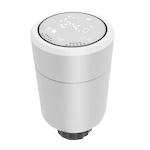 |
This device supports OTA updates, for more information see OTA updates.
The current state of this lock is in the published state under the child_lock property (value is LOCK or UNLOCK).
To control this lock publish a message to topic zigbee2mqtt/FRIENDLY_NAME/set with payload {"child_lock": "LOCK"} or {"child_lock": "UNLOCK"}.
It's not possible to read (/get) this value.
The current state of this switch is in the published state under the window_detection property (value is ON or OFF).
To control this switch publish a message to topic zigbee2mqtt/FRIENDLY_NAME/set with payload {"window_detection": "ON"}, {"window_detection": "OFF"} or {"window_detection": "TOGGLE"}.
It's not possible to read (/get) this value.
Window open?.
Value can be found in the published state on the window_open property.
It's not possible to read (/get) or write (/set) this value.
If value equals true window open is ON, if false OFF.
Indicates if the battery of this device is almost empty.
Value can be found in the published state on the battery_low property.
It's not possible to read (/get) or write (/set) this value.
If value equals true battery low is ON, if false OFF.
The current state of this switch is in the published state under the valve_detection property (value is ON or OFF).
To control this switch publish a message to topic zigbee2mqtt/FRIENDLY_NAME/set with payload {"valve_detection": "ON"}, {"valve_detection": "OFF"} or {"valve_detection": "TOGGLE"}.
It's not possible to read (/get) this value.
Position.
Value can be found in the published state on the position property.
It's not possible to read (/get) or write (/set) this value.
The unit of this value is %.
This climate device supports the following features: current_heating_setpoint, local_temperature, system_mode, local_temperature_calibration, preset, running_state.
current_heating_setpoint: Temperature setpoint. To control publish a message to topiczigbee2mqtt/FRIENDLY_NAME/setwith payload{"current_heating_setpoint": VALUE}whereVALUEis the °C between5and35. Reading (/get) this attribute is not possible.local_temperature: Current temperature measured on the device (in °C). Reading (/get) this attribute is not possible.system_mode: Mode of this device, in theheatmode the TS0601 will remain continuously heating, i.e. it does not regulate to the desired temperature. If you want TRV to properly regulate the temperature you need to use modeautoinstead setting the desired temperature.. To control publish a message to topiczigbee2mqtt/FRIENDLY_NAME/setwith payload{"system_mode": VALUE}whereVALUEis one of:heat,auto,off. Reading (/get) this attribute is not possible.preset: Mode of this device (similar to system_mode). To control publish a message to topiczigbee2mqtt/FRIENDLY_NAME/setwith payload{"preset": VALUE}whereVALUEis one of:schedule,manual,boost,complex,comfort,eco,away. Reading (/get) this attribute is not possible.running_state: The current running state. Possible values are:idle,heat. Reading (/get) this attribute is not possible.local_temperature_calibration: Offset to add/subtract to the local temperature. To control publish a message to topiczigbee2mqtt/FRIENDLY_NAME/setwith payload{"local_temperature_calibration": VALUE}.The minimal value is-9and the maximum value is9with a step size of0.5.
The current state of this switch is in the published state under the auto_lock property (value is AUTO or MANUAL).
To control this switch publish a message to topic zigbee2mqtt/FRIENDLY_NAME/set with payload {"auto_lock": "AUTO"}, {"auto_lock": "MANUAL"} or {"auto_lock": "undefined"}.
It's not possible to read (/get) this value.
The current state of this switch is in the published state under the away_mode property (value is ON or OFF).
To control this switch publish a message to topic zigbee2mqtt/FRIENDLY_NAME/set with payload {"away_mode": "ON"}, {"away_mode": "OFF"} or {"away_mode": "undefined"}.
It's not possible to read (/get) this value.
Away preset days.
Value can be found in the published state on the away_preset_days property.
It's not possible to read (/get) this value.
To write (/set) a value publish a message to topic zigbee2mqtt/FRIENDLY_NAME/set with payload {"away_preset_days": NEW_VALUE}.
The minimal value is 0 and the maximum value is 100.
Boost time.
Value can be found in the published state on the boost_time property.
It's not possible to read (/get) this value.
To write (/set) a value publish a message to topic zigbee2mqtt/FRIENDLY_NAME/set with payload {"boost_time": NEW_VALUE}.
The minimal value is 0 and the maximum value is 900.
The unit of this value is s.
Comfort temperature.
Value can be found in the published state on the comfort_temperature property.
It's not possible to read (/get) this value.
To write (/set) a value publish a message to topic zigbee2mqtt/FRIENDLY_NAME/set with payload {"comfort_temperature": NEW_VALUE}.
The minimal value is 0 and the maximum value is 30.
The unit of this value is °C.
Eco temperature.
Value can be found in the published state on the eco_temperature property.
It's not possible to read (/get) this value.
To write (/set) a value publish a message to topic zigbee2mqtt/FRIENDLY_NAME/set with payload {"eco_temperature": NEW_VALUE}.
The minimal value is 0 and the maximum value is 35.
The unit of this value is °C.
Force the valve position.
Value can be found in the published state on the force property.
It's not possible to read (/get) this value.
To write (/set) a value publish a message to topic zigbee2mqtt/FRIENDLY_NAME/set with payload {"force": NEW_VALUE}.
The possible values are: normal, open, close.
Maximum temperature.
Value can be found in the published state on the max_temperature property.
It's not possible to read (/get) this value.
To write (/set) a value publish a message to topic zigbee2mqtt/FRIENDLY_NAME/set with payload {"max_temperature": NEW_VALUE}.
The minimal value is 16 and the maximum value is 70.
The unit of this value is °C.
Minimum temperature.
Value can be found in the published state on the min_temperature property.
It's not possible to read (/get) this value.
To write (/set) a value publish a message to topic zigbee2mqtt/FRIENDLY_NAME/set with payload {"min_temperature": NEW_VALUE}.
The minimal value is 1 and the maximum value is 15.
The unit of this value is °C.
Away preset temperature.
Value can be found in the published state on the away_preset_temperature property.
It's not possible to read (/get) this value.
To write (/set) a value publish a message to topic zigbee2mqtt/FRIENDLY_NAME/set with payload {"away_preset_temperature": NEW_VALUE}.
The minimal value is -10 and the maximum value is 35.
The unit of this value is °C.
Week format user for schedule.
Value can be found in the published state on the week property.
It's not possible to read (/get) this value.
To write (/set) a value publish a message to topic zigbee2mqtt/FRIENDLY_NAME/set with payload {"week": NEW_VALUE}.
The possible values are: 5+2, 6+1, 7.
Workdays schedule, 6 entries max, example: "00:20/5°C 01:20/5°C 6:59/15°C 18:00/5°C 20:00/5°C 23:30/5°C".
Value can be found in the published state on the workdays_schedule property.
It's not possible to read (/get) this value.
To write (/set) a value publish a message to topic zigbee2mqtt/FRIENDLY_NAME/set with payload {"workdays_schedule": NEW_VALUE}.
Holidays schedule, 6 entries max, example: "00:20/5°C 01:20/5°C 6:59/15°C 18:00/5°C 20:00/5°C 23:30/5°C".
Value can be found in the published state on the holidays_schedule property.
It's not possible to read (/get) this value.
To write (/set) a value publish a message to topic zigbee2mqtt/FRIENDLY_NAME/set with payload {"holidays_schedule": NEW_VALUE}.
Link quality (signal strength).
Value can be found in the published state on the linkquality property.
It's not possible to read (/get) or write (/set) this value.
The minimal value is 0 and the maximum value is 255.
The unit of this value is lqi.