Release testing instructions: Storefront 3.8.0
Remove skip-link-focus-fix.js (#1653)
- Open any StoreFront page in Safari (which is the only major browser using webkit).
- Tab to skip link.
- Press Enter to activate it.
- Make sure keyboard focus has moved to the first focusable area.
- Repeat this process for Opera and the other major browsers.
Minor edits to readme (#1711)
- Read the readme to see if it makes sense.
Remove full width image mobile margin and remove full width image block margins on mobile (#1713)
- Add an Image block to a new page, set it to full width;
- Make sure the page's template is also set to Full Width, and save/publish the changes;
- Open the created page on a browser with at least 1064px width. Verify that the image is full width.
- Switch to browser responsive mode and reduce the screen size to 1063px width or less. Verify that there are margins on both sides.
Fix hidden disclosure arrow on <summary> tags (#1727)
- Create a page with a custom HTML block containing the following markup:
<details>
  <summary>Summary</summary>
  <ul>
    <li>Details</li>
    <li>Details</li>
    <li>Details</li>
</ul>
</details>
- The summary should show, complete with a disclosure arrow to indicate that it is expandable:
Removed superfluous slashes from Star and WooCommerce fonts urls (#1754)
- View the source of your website, and find
star.eot - Check if the url contains a duplicate slash
- Check if all icons are displayed properly
Prevent search widget styles leaking into the Search block when added to a widget area (#1755)
- With WordPress 5.8, go to Appearance > Widgets.
- Add the Search block into the sidebar.
- Go to the frontend, and verify there isn't a magnifier icon which overlaps the label:
| Before | After |
|---|---|
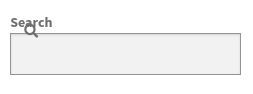 |
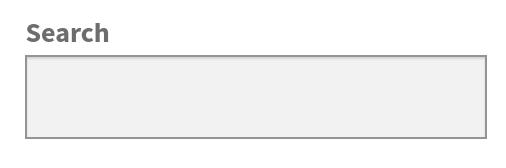 |
- Try toggling some attributes of the Search block and verify it's displayed as expected in the frontend.