Add/Edit/Remove from Table Example #404


-
|
Could you share an example of adding, editing and removing rows from a table? I know that creating the table you can set the rowData, but after that I'm lost. Any help would be greatly appreciated. -Al |
Beta Was this translation helpful? Give feedback.
Replies: 4 comments 9 replies

-
|
The RowData property is basically a list, so to do the operations you asked about, it's simply using the .list methods in python. Then, just modify the list that can be accessed via |
Beta Was this translation helpful? Give feedback.
-
|
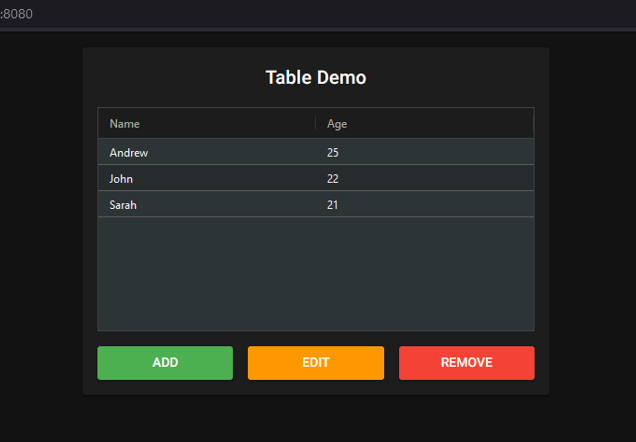
Thank you very much, that helped. This is what I came up with. Not sure it is the best implementation. The data isn't persistent obviously. Maybe it could help someone though and be included in the examples. -Allen from nicegui import ui
table_data = []
def validate_age(age_str):
if age_str == None:
return True
try:
age = float(age_str)
if not age.is_integer():
return False
except ValueError:
pass
try:
age = int(age_str)
if 1 <= age <= 120:
return True
except ValueError:
pass
return False
def add():
if not add_name.value or not add_age.value:
ui.notify("Invalid entry!")
return
table_data.append({'name': add_name.value, 'age': add_age.value})
table.options['rowData'] = sorted(table_data, key=lambda data: data['name'])
table.update()
add_name.value = None
add_age.value = None
add_dialog.close()
async def open_edit():
row = await table.get_selected_row()
if row == None:
return
edit_name.value = row['name']
edit_age.value = row['age']
edit_dialog.open()
async def edit():
if not edit_name.value or not edit_age.value:
ui.notify("Invalid entry!")
return
row = await table.get_selected_row()
table_data.remove(row)
table_data.append({'name': edit_name.value, 'age': edit_age.value})
table.options['rowData'] = sorted(table_data, key=lambda data: data['name'])
table.update()
edit_name.value = None
edit_age.value = None
edit_dialog.close()
# FIXED
async def remove():
row = await table.get_selected_row()
if row == None:
return
table_data.remove(row)
table.options['rowData'] = sorted(
table_data, key=lambda data: data['name'])
table.update()
with ui.dialog() as add_dialog, ui.card().classes("m-auto"):
add_name = ui.input("Name")
add_age = ui.number("Age", validation={'Invalid Age': validate_age}, format='%d')
with ui.row():
ui.button('Submit', on_click=add).props("color=green")
ui.button('Close', on_click=add_dialog.close).props("color=red")
with ui.dialog() as edit_dialog, ui.card().classes("m-auto"):
edit_name = ui.input("Name")
edit_age = ui.number("Age", validation={'Invalid Age': validate_age}, format='%d')
with ui.row():
ui.button('Submit', on_click=edit).props("color=green")
ui.button('Close', on_click=edit_dialog.close).props("color=red")
with ui.card().classes("m-auto").style("width: 500px"):
ui.label("Table Demo").classes("text-h6 m-auto")
table = ui.table({
'columnDefs': [
{'headerName': 'Name', 'field': 'name'},
{'headerName': 'Age', 'field': 'age'},
],
'rowData': [
],
'rowSelection': 'single',
}, theme="balham-dark").classes('max-h-60')
with ui.row().classes("m-auto row").style("width: 100%;"):
ui.button("Add", on_click=add_dialog.open).props("color=green").classes("col")
ui.button("Edit", on_click=open_edit).props("color=orange").classes("col")
ui.button("Remove", on_click=remove).props("color=red").classes("col")
ui.run(title="Table Demo", dark=True)
|
Beta Was this translation helpful? Give feedback.

-
|
@allen-taylor Thanks for the example. It will be handy for me for sure. |
Beta Was this translation helpful? Give feedback.

-
I forgot a line sorry. |
Beta Was this translation helpful? Give feedback.
-
|
thanks now work (last line |
Beta Was this translation helpful? Give feedback.
-
If you can send me the instructions I can do it. I honestly have never done a pull request before. |
Beta Was this translation helpful? Give feedback.

-
|
Sure. A good instruction can be found here: https://docs.github.com/en/pull-requests/collaborating-with-pull-requests/proposing-changes-to-your-work-with-pull-requests/creating-a-pull-request What you basically do is clone the nicegui repo in your GitHub account, commit and push the changes you want to make and then create a pull request against the original nicegui repo. Reach out if you have any more questions or need help. Your latest addition with the search bar is wonderful. Make sure to include it in the example. |
Beta Was this translation helpful? Give feedback.
-
|
This is a searchable table with add, edit and remove.
from nicegui import ui
import re
table_data = [
{'name': 'Alice', 'age': 58},
{'name': 'Bob', 'age': 37},
{'name': 'Charlie', 'age': 23},
{'name': 'David', 'age': 54},
{'name': 'Eve', 'age': 18},
{'name': 'Frank', 'age': 59},
{'name': 'Gina', 'age': 24},
{'name': 'Henry', 'age': 23},
{'name': 'Isaac', 'age': 56},
{'name': 'Julia', 'age': 39},
{'name': 'Karen', 'age': 56},
{'name': 'Liam', 'age': 34},
{'name': 'Mia', 'age': 43},
{'name': 'Nathan', 'age': 51},
{'name': 'Olivia', 'age': 18},
{'name': 'Penny', 'age': 48},
{'name': 'Quinn', 'age': 56},
{'name': 'Ryan', 'age': 36},
{'name': 'Samantha', 'age': 62},
{'name': 'Tina', 'age': 51},
{'name': 'Uma', 'age': 24},
{'name': 'Vincent', 'age': 61},
{'name': 'Willow', 'age': 52},
{'name': 'Xavier', 'age': 40},
{'name': 'Yvonne', 'age': 65},
{'name': 'Zack', 'age': 45},
{'name': 'Avery', 'age': 59},
{'name': 'Bailey', 'age': 24},
{'name': 'Cameron', 'age': 44},
{'name': 'Dylan', 'age': 56},
{'name': 'Ella', 'age': 61},
{'name': 'Finn', 'age': 50},
{'name': 'Grace', 'age': 32},
{'name': 'Harper', 'age': 29},
{'name': 'Ivy', 'age': 51}
]
def validate_age(age_str):
if age_str == None:
return True
try:
age = float(age_str)
if not age.is_integer():
return False
except ValueError:
pass
try:
age = int(age_str)
if 1 <= age <= 120:
return True
except ValueError:
pass
return False
def filter_table():
query = search_field.value
if query == None:
table.options['rowData'] = sorted(
table_data, key=lambda data: data['name'])
table.update()
try:
escaped_query = re.escape(query)
pattern = re.compile("\\b" + escaped_query + "\\w*", re.IGNORECASE)
filtered_data = [n for n in table_data if pattern.search(n['name'])]
table.options['rowData'] = sorted(
filtered_data, key=lambda data: data['name'])
table.update()
except TypeError:
pass
def add():
if not add_name.value or not add_age.value:
ui.notify("Invalid entry!")
return
table_data.append({'name': add_name.value, 'age': add_age.value})
table.options['rowData'] = sorted(
table_data, key=lambda data: data['name'])
table.update()
add_name.value = None
add_age.value = None
search_field.value = None
add_dialog.close()
async def open_edit():
row = await table.get_selected_row()
if row == None:
return
edit_name.value = row['name']
edit_age.value = row['age']
edit_dialog.open()
async def open_remove():
row = await table.get_selected_row()
if row == None:
return
remove_label.text = f"Are you sure you want to remove \"{row['name']}\"?"
remove_dialog.open()
async def edit():
if not edit_name.value or not edit_age.value:
ui.notify("Invalid entry!")
return
row = await table.get_selected_row()
table_data.remove(row)
table_data.append({'name': edit_name.value, 'age': edit_age.value})
table.options['rowData'] = sorted(
table_data, key=lambda data: data['name'])
table.update()
edit_name.value = None
edit_age.value = None
search_field.value = None
edit_dialog.close()
async def remove():
    row = await table.get_selected_row()
    if row == None:
        return
    table_data.remove(row)
    table.options['rowData'] = sorted(
        table_data, key=lambda data: data['name'])
    table.update()
    remove_dialog.close()
search_field.value = None
async def get_row_data():
row = await table.get_selected_row()
if row == None:
return
return row
with ui.dialog() as add_dialog, ui.card().classes("m-auto"):
add_name = ui.input("Name")
add_age = ui.number("Age", validation={
'Invalid Age': validate_age}, format='%d')
with ui.row():
ui.button('Submit', on_click=add) \
.props("color=green")
ui.button('Close', on_click=add_dialog.close)\
.props("color=red")
with ui.dialog() as edit_dialog, ui.card().classes("m-auto"):
edit_name = ui.input("Name")
edit_age = ui.number("Age", validation={
'Invalid Age': validate_age}, format='%d')
with ui.row():
ui.button('Submit', on_click=edit) \
.props("color=green")
ui.button('Close', on_click=edit_dialog.close)\
.props("color=red")
with ui.dialog() as remove_dialog, ui.card().classes("m-auto"):
remove_label = ui.label().classes("m-auto")
with ui.row().classes("m-auto row").style("width: 100%;"):
ui.button('Yes', on_click=remove) \
.props("color=green").classes("col")
ui.button('No', on_click=remove_dialog.close)\
.props("color=red").classes("col")
with ui.card().classes("m-auto").style("width: 500px"):
ui.label("Table Demo").classes("text-h6 m-auto")
with ui.row().classes('items-center'):
search_field = ui.input(on_change=filter_table) \
.props('autofocus outlined rounded item-aligned') \
.classes('w-96 self-center')
ui.icon('search').props("size=3rem")
table = ui.table({
'columnDefs': [
{'headerName': 'Name', 'field': 'name'},
{'headerName': 'Age', 'field': 'age'},
],
'rowData': sorted(table_data, key=lambda data: data['name']),
'rowSelection': 'single',
}, theme="balham-dark").style("height: 300px")
with ui.row().classes("m-auto row").style("width: 100%;"):
ui.button("Add", on_click=add_dialog.open) \
.props("color=green").classes("col")
ui.button("Edit", on_click=open_edit) \
.props("color=orange").classes("col")
ui.button("Remove", on_click=open_remove) \
.props("color=red").classes("col")
ui.run(title="Table Demo", dark=True) |

Beta Was this translation helpful? Give feedback.
-
|
nice |
Beta Was this translation helpful? Give feedback.

-
|
Don't know what's wrong but when I'm trying this on my own code and with your code but the delete/remove operation just works occasionally. Like I have to press like 10 times to remove a row? |
Beta Was this translation helpful? Give feedback.
-
|
Are you using the short example? I messed up a line in the remove function: async def remove():
row = await table.get_selected_row()
if row == None:
return
table_data.remove(row)
table.options['rowData'] = sorted(
table_data, key=lambda data: data['name'])
table.update() |
Beta Was this translation helpful? Give feedback.

-
|
Aha, thank you |
Beta Was this translation helpful? Give feedback.


The RowData property is basically a list, so to do the operations you asked about, it's simply using the .list methods in python.
Then, just modify the list that can be accessed via
table_instance.options["rowData"], and then apply the update withtable_instance.update().