This guide explains how to build and integrate the amalgamated BAS and BWS C libraries. It provides generic source integration details for firmware, embedded Linux, RTOS targets, cross-compilation, custom BAS builds, and BWS builds.
If you plan to use BAS, the fastest path is usually the BAS download page:
https://realtimelogic.com/downloads/bas/
That page includes a drop-down menu for selected operating systems and opens purpose-built instructions for each platform, including precompiled packages and platform-specific build options. Use this generic guide when your operating system is not covered there, when you need lower-level source integration details, or when you plan to use BWS.
See README.md for licensing.
- BAS, quickest path: Use https://realtimelogic.com/downloads/bas/ and select your operating system. The platform pages are easier to follow than these generic instructions when your target is listed.
- BAS on a high-level operating system: See Mako Server (HLOS).
- BAS on RTOS or embedded firmware: See Xedge (RTOS), RTOS Build Examples, and Porting Layers.
- BWS: Follow the Basic Compile Model and include
src/BWS.cplus the required porting layers. - Custom BAS builds: Follow the Basic Compile Model and include
src/BAS.cplus the required porting layers.
The repository contains two amalgamated libraries created from the full BAS SDK. "Amalgamated" means that many separate C files have been combined into one primary source file, making compilation and integration easier. The libraries can run on targets ranging from compact FPGA-based systems to cloud-hosted services.
- BWS.c: Barracuda Embedded Web Server.
- BAS.c: Barracuda App Server. BAS includes all BWS C APIs and adds Lua, Lua Server Pages, and higher-level web and IoT APIs.
BWS and BAS share the same porting layer modules, so their integration process is almost identical. BAS is often the easiest entry point for secure web and IoT application development because much of the application logic can be written in Lua while performance-critical code can remain in C or C++.
See Embedded Web Server vs. Embedded Application Server if you are new to application server technology.
The Barracuda Embedded Web Server is a small embedded HTTP(S) and WebSocket C source code library pre-integrated with the SharkSSL TLS stack. The source code is optimized for compact, deeply embedded devices.
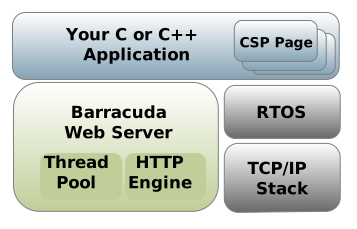
The Barracuda App Server is powered by BWS and adds the Lua engine and Lua Server Pages. You can build applications in C or C++, but BAS is designed so a large part of an embedded application can be developed in Lua without giving up the option to write performance-critical or hardware-specific modules in C.
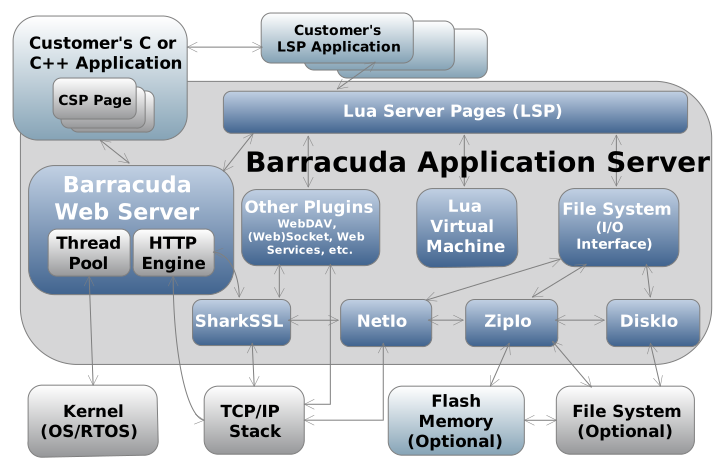
Lua can reduce development time for network-enabled applications because its APIs are higher level than the corresponding C APIs. BAS includes:
- Lua Server Pages, a compact Lua web framework.
- Non-blocking asynchronous sockets.
- Web, IoT, and industrial protocol support.
- The option to add custom Lua bindings in C/C++.
If you already use Lua, you can exclude the bundled Lua source by compiling with -DUSE_BA_LUA=0 and linking BAS with your Lua version.
Include the following files in your build:
- One amalgamated library:
src/BWS.cfor the Barracuda Web Server.src/BAS.cfor the Barracuda App Server.
src/arch/XXX/ThreadLib.c: kernel porting layer.src/arch/NET/XXX/SoDisp.c: TCP/IP porting layer, also called the socket dispatcher.src/DiskIo/XXX/BaFile.c: optional file system porting layer.
BAS and BWS Amalgamated can run efficiently on a Cortex M4 running at 100 MHz and up, but most microcontrollers need external memory. See the memory section in Porting Barracuda to an Embedded System for details.
To compile BAS or BWS, select one amalgamated library and add the required porting layers:
- Use
src/BAS.cfor the Barracuda App Server. - Use
src/BWS.cfor the Barracuda Embedded Web Server. - Add the required
ThreadLib.c. - Add the required
SoDisp.c. - Optionally add
BaFile.cwhen using file system support.
Replace XXX with the required porting layer.
The compiler include path must include:
incinc/arch/XXXinc/arch/NET/XXXinc/DiskIo/XXX, when using a file system porting layer
BAS and BWS can be used in several deployment models:
- Integrated into RTOS-powered monolithic firmware.
- Built and run as a process on a high-level operating system such as embedded Linux.
- Integrated into a standard desktop application.
The amalgamated source is easy to compile from the command line, but you can also add it to any IDE, Makefile, CMake project, or vendor build system.
BAS and BWS are designed for a wide range of devices and programs, from small ASIC-powered gadgets to Windows applications. The main reference builds are:
- Mako Server, a BAS build for high-level operating systems.
- Xedge, a BAS build for RTOS and embedded systems.
- C++ WebSocket Server Example, a BWS example.
- Designing Embedded RESTful Services in C and C++, a BWS example.
BAS examples such as Mako Server and Xedge provide a Lua foundation for rapid development of web, IoT, and business logic. BWS examples show how to implement services directly in C or C++.
The Mako Server example can be compiled for high-level operating systems such as Windows, embedded Linux, QNX, and VxWorks.
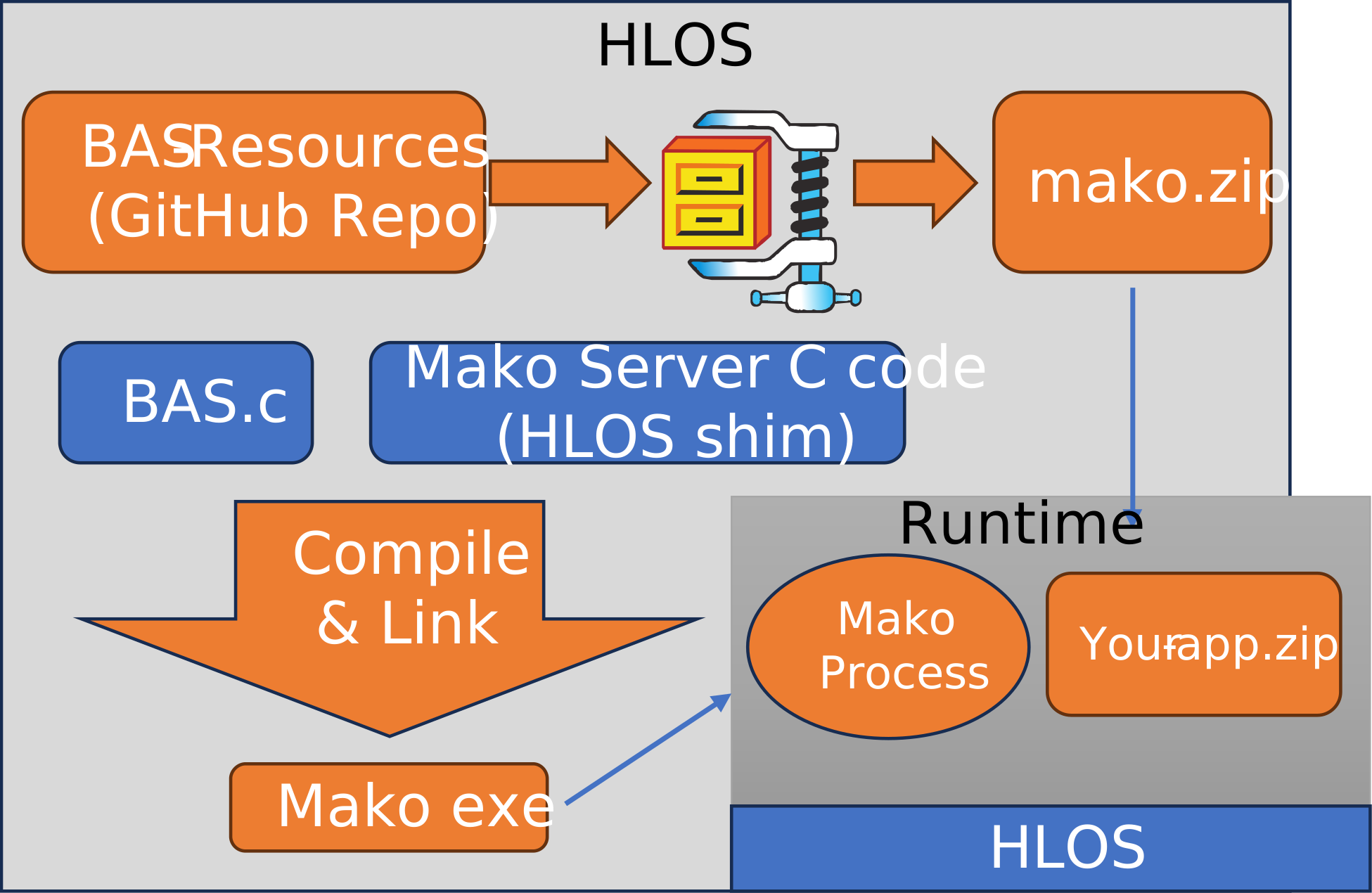
Use the Visual Studio project file in examples/MakoServer/VcMake. Download SQLite before building, or disable the SQLite build in the project file.
For Linux and embedded Linux, see Embedded Linux Web Interface Design. You can download and compile the server as follows:
bash <(wget -O - https://raw.githubusercontent.com/RealTimeLogic/BAS/main/LinuxBuild.sh)For a more robust compilation option, use the included Ansible script. You can also install the server as a systemd service using an Ansible script.
To cross-compile for embedded Linux, set CC to your cross-compiler:
export CC=/opt/gcc-linaro-7.1.1-2017.08-x86_64_arm-linux-gnueabihf/bin/arm-linux-gnueabihf-gcc
bash <(wget -O - https://raw.githubusercontent.com/RealTimeLogic/BAS/main/LinuxBuild.sh)
To cross-compile with Lua GPIO bindings, set CROSS_COMPILE to your toolchain prefix:
export CROSS_COMPILE=/opt/gcc-linaro-7.1.1-2017.08-x86_64_arm-linux-gnueabihf/bin/arm-linux-gnueabihf-
bash <(wget -O - https://raw.githubusercontent.com/RealTimeLogic/BAS/main/RaspberryPiBuild.sh)The following example builds Mako Server without SQLite for a high-level operating system. It works for GCC and derivatives, including cross-compiling for embedded Linux, QNX, and VxWorks 7. Replace gcc with the applicable compiler.
gcc -o examples/MakoServer/mako -fmerge-all-constants -O3 -Os\
    -DUSE_EMBEDDED_ZIP=0 -DBA_FILESIZE64 -DLUA_USE_LINUX -DMAKO -DUSE_SQL=0\
    -Iinc -Iinc/arch/Posix -Iinc/arch/NET/Posix\
    src/BAS.c\
    src/arch/Posix/ThreadLib.c src/arch/NET/generic/SoDisp.c src/DiskIo/posix/BaFile.c\
    examples/MakoServer/src/MakoMain.c\
    -lpthread -lm -ldl
See the Mako Server build documentation for details on macros and other build options. The amalgamated version in this repository differs from the standard SDK layout.
After running the compilation command and building mako.zip, start the server:
$examples/MakoServer/mako

Mako Server. Version 3.7
BAS lib 4920. Build date: Dec  2 2021
Copyright (c) Real Time Logic.

Mounting /tmp/BAS/examples/MakoServer/mako.zip
Server listening on IPv6 port 9357
Server listening on IPv4 port 9357
Loading certificate MakoServer
SharkSSL server listening on IPv6 port 9443
SharkSSL server listening on IPv4 port 9443
The following example compiles and links Mako Server as a 64-bit Windows application using the Visual Studio command-line compiler. It includes two additional files that make it possible to run the server as a Windows service.
The precompiled Mako Server for Windows is compiled as a 32-bit application.
cl /O2^
 /DUSE_EMBEDDED_ZIP=0 /DBA_FILESIZE64 /DMAKO /DUSE_SQL=0^
 /Iinc /Iinc/arch/Windows /Iinc/arch/NET/Windows^
 src/BAS.c^
 src/arch/Windows/ThreadLib.c src/arch/NET/generic/SoDisp.c src/DiskIo/windows/BaFile.c^
 examples/MakoServer/src/MakoMain.c^
 examples/MakoServer/src/Windows/MakoWinMain.c examples/MakoServer/src/Windows/servutil.c^
 ws2_32.lib kernel32.lib User32.lib Gdi32.lib advapi32.lib ole32.lib oleaut32.lib shell32.lib^
 /link /machine:X64 /OUT:examples/MakoServer/mako.exe
This command requires the 64-bit Visual C++ toolset command line.
Mako Server can optionally be linked with SQLite and the Lua SQLite bindings. Before running the command below, download SQLite and copy sqlite3.c and sqlite3.h to src.
gcc -o examples/MakoServer/mako -fmerge-all-constants -O3 -Os\
    -DUSE_EMBEDDED_ZIP=0 -DBA_FILESIZE64 -DLUA_USE_LINUX -DMAKO\
    -Iinc -Iinc/arch/Posix -Iinc/arch/NET/Posix\
    src/BAS.c\
    src/arch/Posix/ThreadLib.c src/arch/NET/generic/SoDisp.c src/DiskIo/posix/BaFile.c\
    examples/MakoServer/src/MakoMain.c\
    src/ls_sqlite3.c src/luasql.c src/sqlite3.c\
    -lpthread -lm -ldl
Xedge is a Lua foundation and interactive development environment for developing Lua code directly on an embedded device. After development, Xedge provides several release options for final products. See the online Xedge documentation for details.
Xedge in Developer Mode (video)
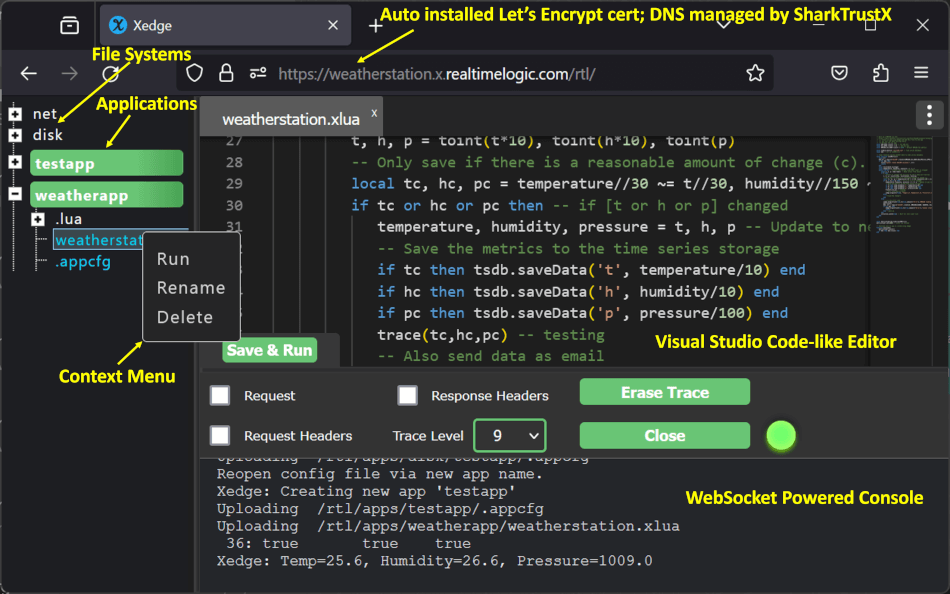
See the Xedge product page for details.
The Xedge IDE includes a single-page web application and supporting server-side code. These resources must be included in the build.
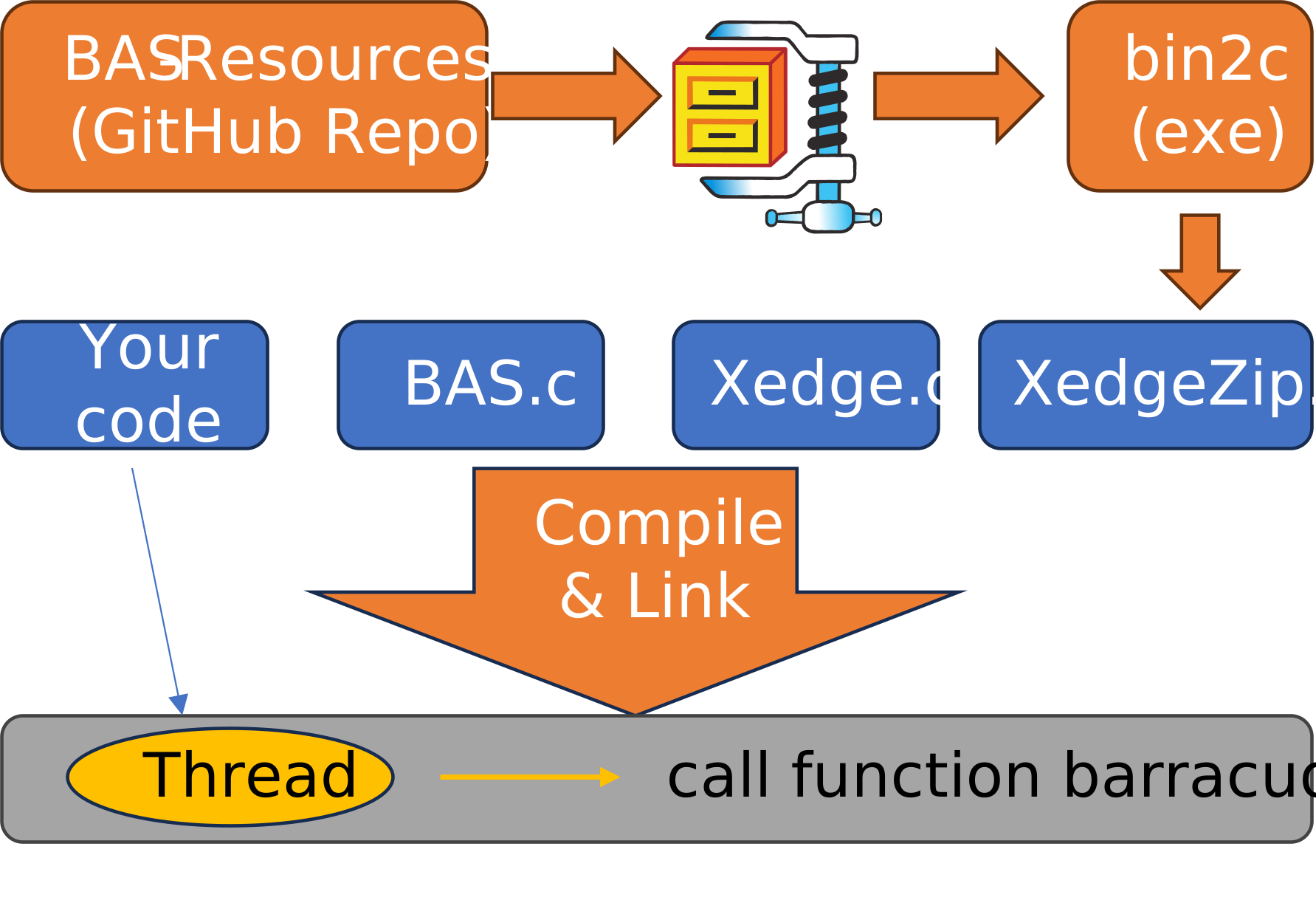
The compilation process below is an example. BAS can support the deployment strategy required by your target. For a quick overview, see Rapid Firmware Development with the Barracuda App Server. The tutorial uses an ESP32, but the same method applies to other CPUs.
Fetch the repositories and build the resource ZIP file:
# Fetch the Barracuda App Server
git clone https://github.com/RealTimeLogic/BAS.git

# Fetch the Barracuda App Server resources
git clone https://github.com/RealTimeLogic/BAS-Resources.git

# Go to the build directory
cd BAS-Resources/build/

# Run the build script. If on Windows, use Xedge.cmd.
# When prompted, initially select n for OPC-UA, s for small cacert.shark,
# and n for compressing the files.
. Xedge.sh

# The ZIP file is converted to a C array by the build script.
# Copy this file to the Xedge directory.
cp XedgeZip.c ../../BAS/examples/xedge/
cd ../../BAS
XedgeZip.c contains the Xedge resources converted to a C file. See the BAS-Resources repository for details.
To compile Xedge, include:
- Required:
BAS.c,xedge.c, Xedge startup code such asMain.candHostInit.c,XedgeZip.c,ThreadLib.c,SoDisp.c, anddlmalloc.cfor most RTOS builds. - Optional:
BaFile.candled.c.
The following example uses Linux to compile Xedge as a standalone application. For embedded devices, include the relevant source files in your build system instead.
gcc -o xedge -Iinc -Iinc/arch/Posix -Iinc/arch/NET/Posix\
    -DLUA_USE_LINUX\
    src/BAS.c\
    examples/HostInit/Main.c examples/HostInit/HostInit.c\
    src/arch/Posix/ThreadLib.c src/arch/NET/generic/SoDisp.c src/DiskIo/posix/BaFile.c\
    examples/xedge/src/xedge.c examples/xedge/src/led.c\
    examples/xedge/XedgeZip.c -lpthread -lm -ldl
Important integration notes:
Main.candHostInit.care designed for a non-embedded host build. For an RTOS build, study these files and set up similar startup code for your environment.- At minimum, your RTOS build needs a dedicated thread that runs
barracuda(void), which does not return. Use stack sizeBA_STACKSZbytes. xedge.cis the Xedge C startup code.led.cincludes example Lua bindings for device control. If you do not need these examples, define-DNO_XEDGE_AUXor remove thexedgeOpenAUX()call inxedge.c.- For embedded builds, consider testing without file system support first. Remove
BaFile.cfrom your build and compile with-DNO_BAIO_DISK, which is used byxedge.c. - If you get a link error that mentions
dlmalloc, includesrc/dlmalloc.cand initialize the allocator as shown inexamples/HostInit/Main.c.
These Xedge instructions are excerpted from the Xedge full SDK build guide, which includes additional release-build details. File locations differ slightly in this repository.
Include the files listed above in your IDE or Makefile. Most embedded systems require an efficient allocator, and dlmalloc is included for this purpose. See the FreeRTOS readme for an example of how to set up the required components. Most embedded RTOS ports use the same pattern.
For a quick RTOS trial, run Xedge on an ESP32 using FreeRTOS and lwIP, even if your final target uses another RTOS or device. The ESP32 is a practical learning target. Use the precompiled ESP32 Xedge binaries.
src/BAS.c includes optional features that are not compiled by default. Enable features with the following macros. Unless stated otherwise, the macros can be used on any platform, including RTOS targets.
USE_DBGMON=1: Include Lua debugger support.USE_REVCON=1: Enable reverse connections for the connection bridge feature in SharkTrustX. Xedge and Mako Server include the Let's Encrypt pluginsacmebotandacmedns.USE_OPCUA=1: Enable OPC-UA support. The OPC-UA stack is implemented in Lua and is found inmako.zip/.lua/opcua. It requires a C module.USE_FORKPTY=1: Enable the advanced process management API, available for Linux and QNX. This API is required for the CGI plugin and the web shell.USE_REDIRECTOR=1: Enable the reverse proxy.USE_UBJSON=1: Enable Universal Binary JSON.NO_LDEBUG: Exclude the Luadebugmodule.
NO_SHARKTRUST: Do not includetokengen.c; disables the built-in SharkTrustX key.USE_LUAINTF: Enables loading external Lua modules. When using source builds, you can alternatively integrate additional Lua bindings directly into your build.
NO_SHARKTRUST: Disable SharkTrustX integration.NO_ENCRYPTIONKEY: Do not includeNewEncryptionKey.h; disables the soft TPM.NO_XEDGE_AUX: Do not callxedgeOpenAUX(), which is where you typically register your own Lua bindings.
Contact Real Time Logic if you have a problem with a porting layer on your target APIs.
| OS + TCP | Include directories | Source files |
|---|---|---|
| Digi | inc/arch/Digi |
src/arch/Digi/ThreadLib.c src/arch/NET/generic/SoDisp.c |
| embOS | inc/arch/NET/embOSIP inc/arch/embOS |
src/arch/embOS/ThreadLib.c src/arch/NET/embOSIP/SoDisp.c |
| FreeRTOS + lwIP | inc/arch/NET/LwIP inc/arch/FreeRTOS |
src/arch/FreeRTOS/ThreadLib.c src/arch/NET/LwIP/SoDisp.c |
| FreeRTOS + TCP | inc/arch/FreeRTOS |
src/arch/FreeRTOS/ThreadLib.c src/arch/FreeRTOS/SoDisp.c |
| INTEGRITY | inc/arch/NET/Posix inc/arch/INTEGRITY |
src/arch/INTEGRITY/ThreadLib.c src/arch/NET/generic/SoDisp.c |
| INtime | inc/arch/NET/INtime inc/arch/INtime |
src/arch/INtime/ThreadLib.c src/arch/NET/generic/SoDisp.c |
| Linux + epoll | inc/arch/NET/epoll inc/arch/Posix |
src/arch/Posix/ThreadLib.c src/arch/NET/epoll/SoDisp.c |
| MQX | inc/arch/NET/MQX inc/arch/MQX |
src/arch/MQX/ThreadLib.c src/arch/NET/MQX/SoDisp.c |
| NuttX | inc/arch/NET/Posix inc/arch/Posix |
src/arch/Posix/ThreadLib.c src/arch/NET/generic/SoDisp.c |
| Nucleus | inc/arch/NET/Nucleus inc/arch/Nucleus |
src/arch/Nucleus/ThreadLib.c src/arch/NET/Nucleus/SoDisp.c |
| POSIX (Linux, Mac, QNX) | inc/arch/NET/Posix inc/arch/Posix |
src/arch/Posix/ThreadLib.c src/arch/NET/generic/SoDisp.c |
| Quadros | inc/arch/Quadros |
src/arch/Quadros/ThreadLib.c src/arch/NET/generic/SoDisp.c |
| SMX | inc/arch/NET/SMX-NET inc/arch/SMX |
src/arch/SMX/ThreadLib.c src/arch/NET/generic/SoDisp.c |
| Azure RTOS | inc/arch/ThreadX |
src/arch/ThreadX/ThreadLib.c src/arch/ThreadX/SoDisp.c |
| VxWorks | inc/arch/VxWorks |
src/arch/VxWorks/ThreadLib.c src/arch/NET/generic/SoDisp.c |
| Windows | inc/arch/NET/Windows inc/arch/Windows |
src/arch/Windows/ThreadLib.c src/arch/NET/generic/SoDisp.c |
| Windows CE | inc/arch/NET/CE inc/arch/Windows |
src/arch/Windows/ThreadLib.c src/arch/NET/generic/SoDisp.c |
| Zephyr | inc/arch/Zephyr |
src/arch/Zephyr/ThreadLib.c src/arch/NET/generic/SoDisp.c |
The generic inc directory must also be in the include path.
See the Mako Server download page for additional platform and compile examples.
Zephyr RTOS, with the Xedge port, provides a lightweight real-time environment for IoT and edge computing. Xedge adds support for networking, secure communication, and remote device management. See the Xedge Zephyr documentation for details.

NuttX is a standards-compliant RTOS with a small footprint, scalable from 8-bit to 64-bit MCUs. With POSIX/ANSI APIs and familiar Unix/VxWorks extensions, it brings powerful functionality to deeply embedded systems. Paired with Xedge, NuttX provides a foundation for secure, connected IoT devices. See the Xedge NuttX documentation for details.

The following example compiles Xedge for Green Hills INTEGRITY. You can also download a ready-to-run Xedge GHS Multi IDE project.
ccintarm -G -c99 -os_dir C:/ghs/int1144 -bsp simarm -o xedge\
    -non_shared -DMAXTHREADS=3\
    -Iinc -Iinc/arch/INTEGRITY -Iinc/arch/NET/Posix\
    --diag_suppress=111,188,550,549,546,223\
    src/BAS.c\
    src/arch/NET/generic/SoDisp.c\
    src/arch/INTEGRITY/ThreadLib.c\
    src/DiskIo/posix/BaFile.c\
    examples/HostInit/Main.c examples/HostInit/HostInit.c\
    examples/xedge/src/xedge.c\
    examples/xedge/XedgeZip.c\
    examples/xedge/src/xedgeInitDiskIo.c\
    examples/xedge/src/led.c\
-lnet -livfs -lsocket\Xedge is recommended for VxWorks. The following example shows how to compile Mako Server for VxWorks. See the Barracuda App Server VxWorks build page for details.
wr-cc -o examples/MakoServer/mako -static -fmerge-all-constants -O3 -Os\
    -DUSE_EMBEDDED_ZIP=0 -DBA_FILESIZE64 -DBA_HAS_ANSI_IO -DMAKO -DUSE_SQL=0\
    -Iinc -Iinc/arch/VxWorks -Iinc/arch/NET/Posix\
    src/BAS.c\
    src/arch/VxWorks/ThreadLib.c src/arch/NET/generic/SoDisp.c src/DiskIo/posix/BaFile.c\
    examples/MakoServer/src/MakoMain.c\
-lnetThe following example compiles the generic BAS library for Azure RTOS using IAR for ARM. The example assumes the directories tx, nx, and BAS.
iccarm -e -c^
  -Itx -Inx^
  -IBAS/inc -IBAS/inc/arch/ThreadX^
  BAS/src/BAS.c
With these compilation settings, also include src/arch/ThreadX/ThreadLib.c, src/arch/ThreadX/SoDisp.c, and optionally src/DiskIo/FileX/BaFile.c.
Download a ready-to-compile and ready-to-run project for i.MX RT1020.
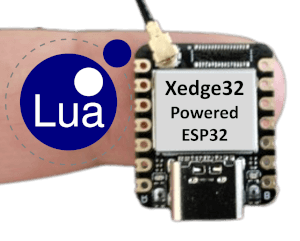
Xedge32 is an Xedge version for ESP32 and ESP32-S3 microcontrollers.