An interpreter for the BrightScript language that runs Roku apps in browser-based platforms.




The BrightScript Simulation Engine provides a complete BrightScript interpreter that runs directly in web browsers, allowing Roku apps to be executed in web applications, PWAs and Electron applications. This package includes a Web Worker library and an Engine API library for embedding the interpreter into web applications.
🚨 Important:
Since v1.9.0, this package no longer brings the CLI app and Node.js libraries for the simulation engine, for those use cases we created the new brs-node package. Check it out!
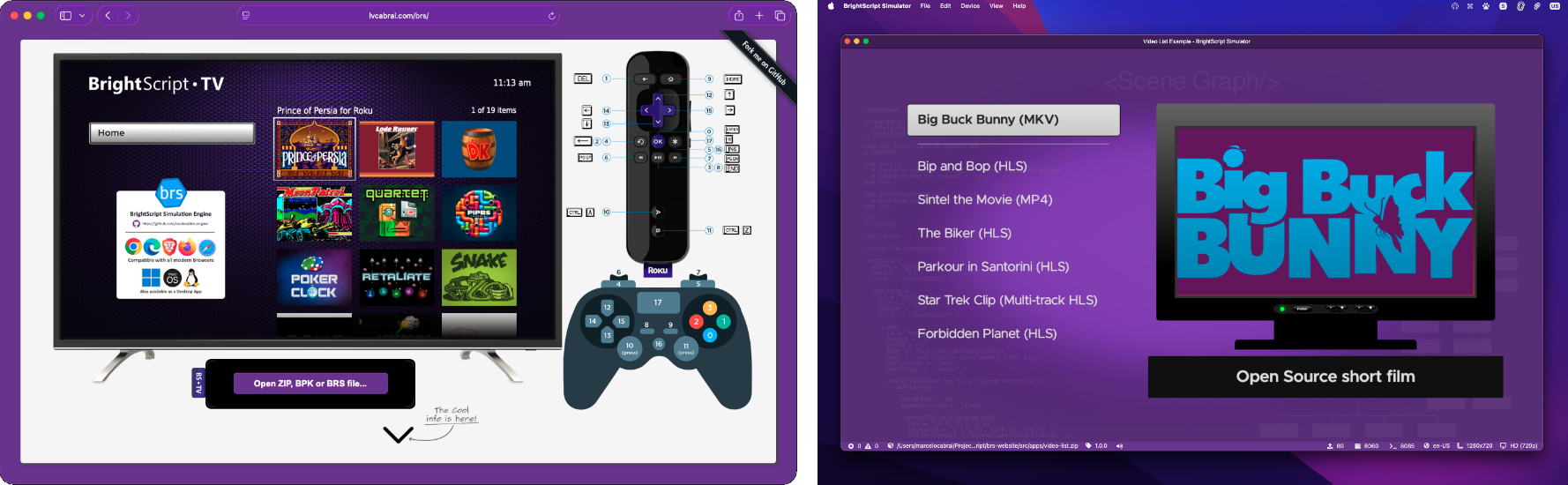
- Client-side only - No server required
- Runs in modern web browsers using Web Workers
- Full HTML5 Canvas rendering support
- Audio and video playback via HTML5 elements
- Release your Roku apps as web applications, PWAs or Electron apps
- Full BrightScript language interpreter, with specs aligned up to Roku OS 15.3
- Draw 2D API - Full support for the BrightScript 2D drawing components
- SceneGraph Framework - Beta support for the BrightScript SceneGraph components (see section below)
- Video Playback - Via
roVideoPlayerandVideonode - Audio Playback - Via
roAudioResources,roAudioPlayerandAudionode - Image Processing - Support for PNG, JPEG, GIF, BMP and WEBP formats
- Screen resolutions - Support for various Roku display modes
- Input Handling - Keyboard and gamepad simulation for remote control input, see docs for more details
- File System Simulation - Including
pkg:/,tmp:/,cachefs:/,common:/andext1:/volumes - Registry simulation - Roku device registry emulation saved on browser local storage
- Micro Debugger - Step-through debugging capabilities, similar to the Roku experience
- Localization - Language and region settings
- Customization - You can customize device features and behaviors, see docs for more details
SceneGraph support is provided by the optional brs-scenegraph extension. When your Roku app bundle contains pkg:/components/, the packaging step automatically instructs the worker to load lib/brs-sg.js so roSGScreen based apps run inside the browser. See extensions guide for deployment details.
⚠️ Note:SceneGraph extension is mostly complete, with beta versions available for testing. See the current state of the SceneGraph implementation and other limitations of the engine in the Current Limitations document.
npm install brs-engine| Library File | Description |
|---|---|
lib/brs.api.js |
The Engine API library to be imported and used by the applications hosting the Simulator. |
lib/brs.worker.js |
A Web Worker library that runs the language interpreter in a background thread on the browser platform. |
lib/brs-sg.js |
The optional SceneGraph extension bundle, loaded by the worker when the app contains pkg:/components/. Must be deployed in the same folder as the worker. |
The Web Worker library require features like SharedArrayBuffer and OffScreenCanvas, that are relatively recent in the browser engines, because of that, it can only be executed on the following versions of the major browsers:
- Chromium/Chrome version 69 or newer.
- Chrome Android version 89 or newer.
- Edge, version 79 or newer.
- Opera, version 56 or newer.
- Firefox, version 105 or newer.
- Safari macOS/iOS/ipadOS, version 16.4 or newer.
- Electron, version 4.0 or newer.
This package repository provides a sample web application you can quickly run and test the engine, check the docs to learn more:
- How to integrate the engine to your app
- How to customize the Engine behavior
- Simulation Engine API Reference
- Remote Control Simulation
- How to build from source
- How to contribute to this Project
- Read the project changelog to view the release notes.
These are the applications already using brs-engine to run apps and help developers to learn coding in BrightScript.
Try the engine in action with these web applications:
- BrightScript TV - A demo web application to run full Roku games and apps: https://lvcabral.com/brs
- brsFiddle - BrightScript playground to test and share code with your friends: https://brsFiddle.net
- Hello World - Shared Link
- Bouncing Square - Shared Link
- Calculate Easter Day - Shared Link
- Download Image and Music - Shared Link
- Video Playback - Shared Link
- API Call Example - Shared Link
- Snake Game - Shared Link
The simulator is also available as a multi-platform desktop application (Windows, Linux & macOS) that uses the package published by this project. The application introduces several additional Roku features, such as the ECP (External Control Protocol) and Remote Console servers to allow integration with tools like Telnet or VSCode BrightScript Extension. You can also change the device configurations such as screen resolution, keyboard control customization, localization, among others. Download the installers and find more information in the links below:
- Source code and documentation: app repository.
- Architecture Overview: diagram picture.
- Installation packages: release page.

- My website: https://lvcabral.com
- My threads: @lvcabral
- My Bluesky: @lvcabral.com
- My X/twitter: @lvcabral
- My podcast: PODebug Podcast
- Check my other GitHub repositories
Copyright © 2019-2026 Marcelo Lv Cabral. All rights reserved.
Licensed under the MIT license.