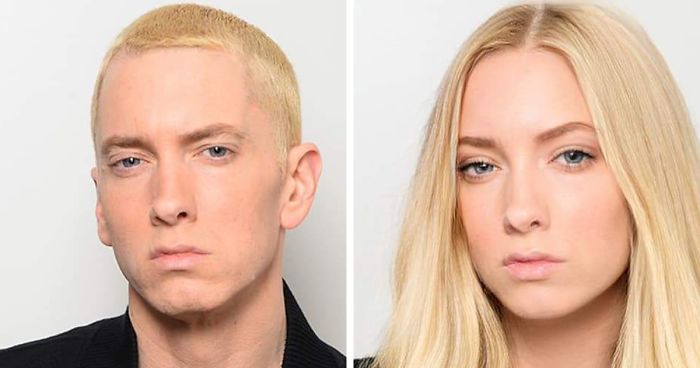
Your ultimate tool for seamless facial transformations in photos and videos, powered by cutting-edge machine learning!
AI Lecture Face Swapper is a versatile, cross-platform application built using Python. It leverages advanced deep learning algorithms to detect, learn, and swap faces in images or videos. Whether you're a developer, hobbyist, or AI enthusiast, this tool provides endless opportunities to explore facial transformations creatively and efficiently.
- Face Detection: Automatically locate and extract faces from input images or video frames with high accuracy.
- Deep Learning Model Training: Build a custom model tailored to deliver precise facial transformations.
- Face Conversion: Seamlessly swap faces in the target media using advanced AI models.
- User-Friendly Interface: Choose between a command-line interface or a sleek graphical interface for easy operation.
- Batch Processing: Effortlessly handle multiple images and video frames in one go for large-scale projects.
- An NVIDIA GPU with CUDA support for optimized performance.
- Software: Python, Node.js, TensorFlow, Keras, and OpenCV libraries.
- Platforms: Windows, macOS, and Linux are fully supported.
-
Clone the Project:
git clone https://github.com/2100031988/AI-Face-Swapper-using-Celebrity.git
-
Navigate to the Project Directory:
cd ai-face-transformer -
Install Dependencies:
- Python dependencies:
pip install -r requirements.txt
- Node.js dependencies:
npm install
- Python dependencies:
-
Run the Project:
- For command-line usage:
python face_transformer.py
- For graphical interface:
npm run start
- For command-line usage:
-
Build the Frontend (Optional):
npm run build
-
Additional Configuration:
- Customize configuration files in the
config/directory as needed for your specific use case.
- Customize configuration files in the
- Model Training: The more diverse and extensive your dataset, the better your transformation results will be!
- Batch Processing: Place multiple images in the input folder to process all in one session.
- Settings: Adjust configurations in the
config/directory to fine-tune performance.
We welcome contributions from the community! Fork the repository, experiment with the tool, and propose new features or improvements via pull requests. Please follow our contribution guidelines in CONTRIBUTING.md.
This project is licensed under the GPL License – see the LICENSE file for details.
© 2024 Sabyasachi Kumar. All rights reserved
We extend our heartfelt thanks to the open-source community and all contributors for their unwavering support and feedback in refining and enhancing this project.
🎉 Happy Coding! 🎉