Stella VSLAM is a modern Visual SLAM (Simultaneous Localization and Mapping) system that supports monocular, stereo, and RGB-D cameras. This repository provides a complete setup for building and running Stella VSLAM with ROS 2 Humble using Pixi for dependency management, eliminating the need for manual dependency installation.

- 🎯 Modern SLAM: Based on ORB-SLAM with improvements and active maintenance
- 🤖 ROS 2 Integration: Full ROS 2 Humble support with topic-based communication
- 📦 Pixi Environment: Reproducible builds with isolated dependencies
- 🎮 Multiple Viewers: Support for Pangolin, Iridescence, and Socket viewers
- 🌐 Multiple Camera Models: Perspective, Fisheye, Equirectangular support
- OS: Linux (tested on Ubuntu 22.04)
- Pixi: Install Pixi
pixi installthen activate the Pixi shell:
pixi shellor run with pixi run <command>.
All required repos are already included under lib/ and ros2_ws/ (no submodules).
pixi run build-deps -- --allTo build only one viewer dependency:
pixi run build-deps -- --iridescence
pixi run build-deps -- --pangolin
pixi run build-deps -- --socketpixi run build -- --allpixi run build-rospixi run datasetThis downloads:
- ORB vocabulary (
dataset/orb_vocab.fbow) - AIST Living Lab dataset (
dataset/aist_living_lab_1) - UZH-FPV dataset (
dataset/indoor_forward_3_snapdragon_with_gt) - UZH-FPV calibration (
dataset/indoor_forward_3_snapdragon_with_gt/indoor_forward_calib_snapdragon)
pixi run check-deps
pixi run check
pixi run check-ros
pixi run check-dataset- Terminal 1: Image Publisher
pixi shell
source ros2_ws/install/setup.bash
ros2 run image_publisher image_publisher_node dataset/aist_living_lab_1/video.mp4 --ros-args --remap /image_raw:=/camera/image_raw- Terminal 2: SLAM Node (Mapping)
pixi shell
source ros2_ws/install/setup.bash
ros2 run stella_vslam_ros run_slam -v dataset/orb_vocab.fbow -c lib/stella_vslam/example/aist/equirectangular.yaml --map-db-out map.msg --viewer pangolin_viewer --ros-args -p publish_tf:=false
File map.msg will be saved after finished.
- Terminal 2: Localization Mode (Load Map)
pixi shell
source ros2_ws/install/setup.bash
ros2 run stella_vslam_ros run_slam --disable-mapping -v dataset/orb_vocab.fbow -c lib/stella_vslam/example/aist/equirectangular.yaml --map-db-in map.msg --viewer pangolin_viewer --ros-args -p publish_tf:=false
Load map.msg that saved from process before.
📡 ROS 2 Topics
/camera/image_raw           # Input image
/run_slam/camera_pose       # Camera pose (Odometry)
/run_slam/keyframes         # Keyframes
/tf                         # Transform tree
All nodes run in a single process to avoid DDS serialization (faster for large videos).
- Terminal 1: Run component container with intra-process communication
pixi shell
source ros2_ws/install/setup.bash
ros2 run rclcpp_components component_container_mt --ros-args -r __node:=slam_container -p use_intra_process_comms:=true- Terminal 2: Load SLAM with Pangolin
pixi shell
source ros2_ws/install/setup.bash
ros2 component load /slam_container stella_vslam_ros stella_vslam_ros::System --node-name run_slam --param vocab_file_path:=dataset/orb_vocab.fbow --param setting_file_path:=lib/stella_vslam/example/aist/equirectangular.yaml --param map_db_path_out:=map.msg --param viewer:=pangolin_viewer --param publish_tf:=false --param encoding:=bgr8 --param qos_reliability:=reliable- Terminal 3: Load video publisher (adjust video path if needed)
pixi shell
source ros2_ws/install/setup.bash
ros2 component load /slam_container stella_vslam_ros stella_vslam_ros::VideoPublisher --node-name video_pub --param video_path:=dataset/aist_living_lab_1/video.mp4 --param topic:=camera/image_raw --param frame_id:=camera --param fps:=0.0 --param loop:=true
Pangolin will appear; this pipeline uses intra-process communications to avoid copy/serialization between processes.
Dataset: dataset/aist_living_lab_1/video.mp4
Run SLAM directly without ROS middleware:
pixi run test-aistManual (inside Pixi shell):
pixi shell
bash scripts/test-aist.sh
This script automatically:
- Builds
stella_vslam_examples - Runs
run_video_slamwith Pangolin Viewer
Direct run_video_slam invocation:
pixi shell
./lib/stella_vslam_examples/build/run_video_slam \
    -v dataset/orb_vocab.fbow \
    -m dataset/aist_living_lab_1/video.mp4 \
    -c lib/stella_vslam/example/aist/equirectangular.yaml \
    --map-db-out map.msg \
    --frame-skip 2 \
    --viewer pangolin_viewer \
--no-sleepDataset: UZH-FPV FPV/VIO dataset — download sequences from https://fpv.ifi.uzh.ch/datasets/
Run monocular image-sequence SLAM:
pixi run test-uzhManual (inside Pixi shell):
pixi shell
bash scripts/test-uzh.sh
What the script does:
- Resolves relative dataset paths (e.g.,
dataset/...) against the repo root - Uses
left_images.txt(cam0/left) to create a temporary ordered symlink sequence (cleaned up on exit) - Image order follows the sequence in
left_images.txt, not filename sorting in<dataset>/img - Uses config
lib/stella_vslam/example/uzh_fpv/UZH_FPV_mono.yamland vocabdataset/orb_vocab.fbow - Runs
run_image_slam(Pangolin viewer, frame-skip 1)
Run SLAM with AirSim simulator as camera input source:
- AirSim simulator running (Unreal Engine or Unity)
- ORB vocabulary:
dataset/orb_vocab.fbow - Camera config: Create appropriate YAML config for your AirSim camera
pixi shell
./bin/run_camera_airsim_slam \
    -v dataset/orb_vocab.fbow \
    -c config/airsim-1280x720.yaml \
    --viewer pangolin_viewer \
    --airsim-host 127.0.0.1 \
--airsim-port 41451--airsim-host arg (=127.0.0.1) AirSim server IP address
--airsim-port arg (=41451) AirSim RPC port
--vehicle arg (=) Vehicle name (empty for default)
--camera arg (=0) Camera name/ID
Note: The executable is available at bin/run_camera_airsim_slam or lib/stella_vslam_examples/build/run_camera_airsim_slam
-v, --vocab arg             vocabulary file path
-c, --config arg            config file path
--mask arg                  mask image path
--map-db-in arg             load a map from this path
--map-db-out arg            store a map database at this path after SLAM
--disable-mapping           disable mapping module
--temporal-mapping          enable temporal mapping
--viewer arg                viewer type (pangolin_viewer, iridescence_viewer, socket_publisher, none)
--log-level arg (=info)     log level

ROS 2 Parameters:
--ros-args -p publish_tf:=<true|false>              publish TF transforms
--ros-args -p odom_frame:=<frame_name>              odometry frame name
--ros-args -p map_frame:=<frame_name>               map frame name
--ros-args -p camera_frame:=<frame_name>            camera frame name
-h, --help                  produce help message
-v, --vocab arg             vocabulary file path
-m, --video arg             video file path
-c, --config arg            config file path
--mask arg                  mask image path
--frame-skip arg (=1)       interval of frame skip
--no-sleep                  not wait for next frame in real time
--auto-term                 automatically terminate the viewer
--log-level arg (=info)     log level (trace, debug, info, warn, err, critical, off)
--map-db-in arg             load a map from this path
--map-db-out arg            store a map database at this path after SLAM
--disable-mapping           disable mapping module
--temporal-mapping          enable temporal mapping
-h, --help                  produce help message
-v, --vocab arg             vocabulary file path
-d, --data-dir arg          directory path which contains dataset
-c, --config arg            config file path
--frame-skip arg (=1)       interval of frame skip
--no-sleep                  not wait for next frame in real time
--auto-term                 automatically terminate the viewer
--log-level arg (=info)     log level (trace, debug, info, warn, err, critical, off)
--eval-log-dir arg          store trajectories + tracking times (TUM format; dir must exist)
--map-db-in arg             load a map from this path
--map-db-out arg            store a map database at this path after SLAM
--disable-mapping           disable mapping module
--temporal-mapping          enable temporal mapping
--equal-hist                apply histogram equalization
--viewer arg                viewer type (pangolin_viewer, iridescence_viewer, socket_publisher, none)
stella-vslam-ros-with-pixi/
├── assets/
│   └── image-stella-vslam.png
├── dataset/
│   ├── orb_vocab.fbow
│   ├── aist_living_lab_1/
│   └── indoor_forward_3_snapdragon_with_gt/
│       └── indoor_forward_calib_snapdragon/
├── lib/
│   ├── AirSim/
│   ├── iridescence/
│   ├── iridescence_viewer/
│   ├── Pangolin/
│   ├── pangolin_viewer/
│   ├── socket.io-client-cpp/
│   ├── socket_publisher/
│   ├── socket_viewer/
│   ├── stella_vslam/
│   └── stella_vslam_examples/
│       └── build/
│           ├── run_camera_airsim_slam
│           ├── run_camera_slam
│           └── ... (other examples)
├── ros2_ws/
│   └── src/stella_vslam_ros/
├── scripts/
│   ├── build-deps.sh           # Build viewer dependencies + AirSim deps
│   ├── build.sh                # Build stella_vslam core + examples
│   ├── build-ros.sh            # Build ROS 2 wrapper
│   ├── check-dataset.sh        # Verify dataset layout
│   ├── check-deps.sh           # Verify build dependencies
│   ├── check.sh                # Verify core build + examples
│   ├── check-ros.sh            # Verify ROS 2 build
│   ├── dataset.sh              # Download dataset
│   ├── test-aist.sh            # Run AIST Living Lab example
│   ├── test-uzh.sh             # Run UZH-FPV example
│   └── clean.sh                # Clean build artifacts
└── pixi.toml                   # Pixi configuration
Note: for this project, all non-build files in vendored libraries have been pruned/deleted.
bash scripts/clean.sh
pixi install
pixi run build-deps -- --all
pixi run build -- --all
pixi run build-ros- Make sure you're running in a desktop environment with GUI support
- Check that the
--viewer pangolin_viewerflag is included
Vendored libraries under lib/:
- AirSim (
lib/AirSim) - iridescence (
lib/iridescence) - iridescence_viewer (
lib/iridescence_viewer) - Pangolin (
lib/Pangolin) - pangolin_viewer (
lib/pangolin_viewer) - socket.io-client-cpp (
lib/socket.io-client-cpp) - socket_publisher (
lib/socket_publisher) - socket_viewer (
lib/socket_viewer) - Stella VSLAM (
lib/stella_vslam) - stella_vslam_examples (
lib/stella_vslam_examples)
Other references:
Original README


NOTE: This is a community fork of xdspacelab/openvslam. It was created to continue active development of OpenVSLAM on Jan 31, 2021. The original repository is no longer available. Please read the official statement of termination carefully and understand it before using this. The similarities with ORB_SLAM2 in the original version have been removed by #252. If you find any other issues with the license, please point them out. See #37 and #249 for discussion so far.
Versions earlier than 0.3 are deprecated. If you use them, please use them as a derivative of ORB_SLAM2 under the GPL license.
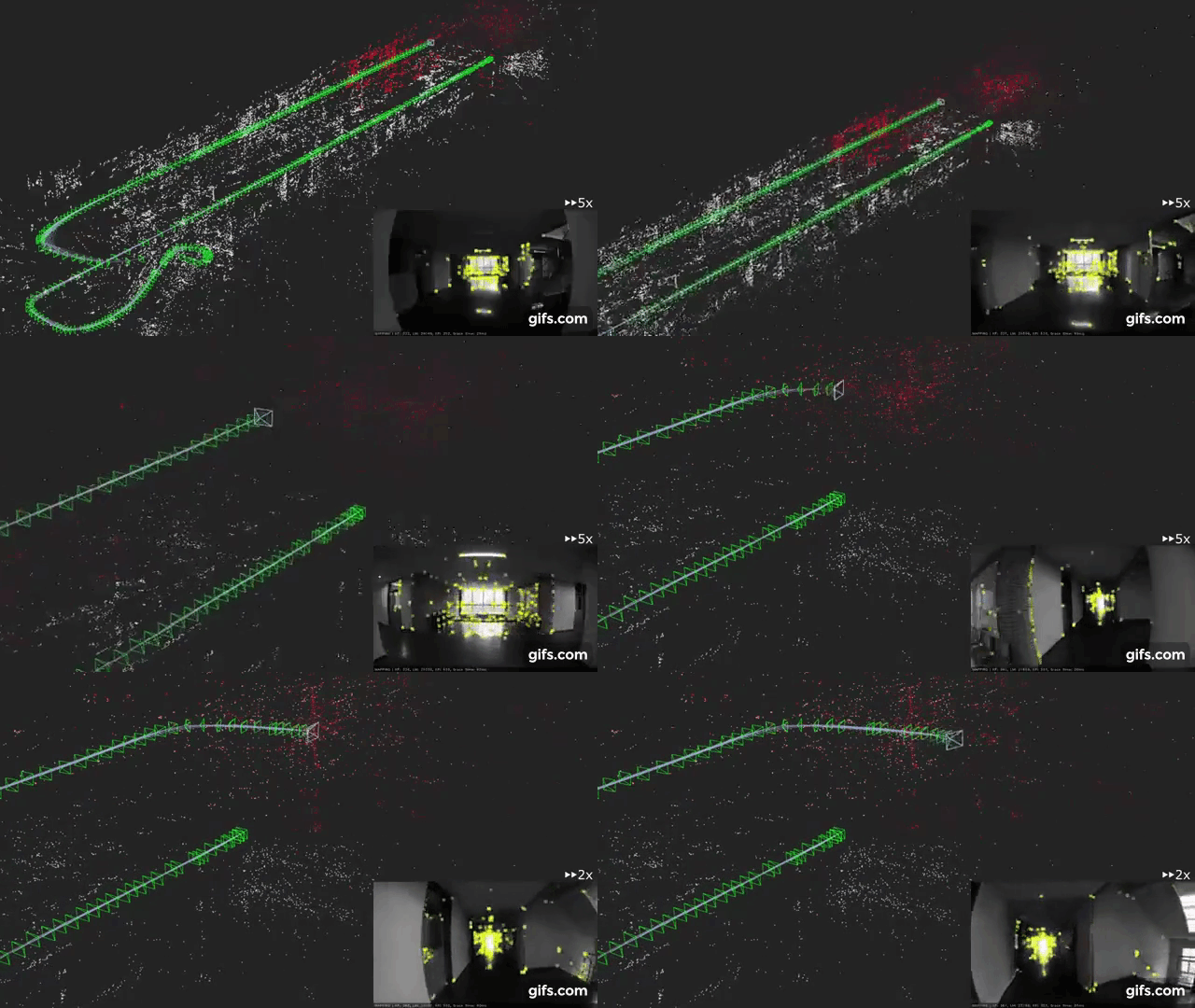
stella_vslam is a monocular, stereo, and RGBD visual SLAM system.
The notable features are:
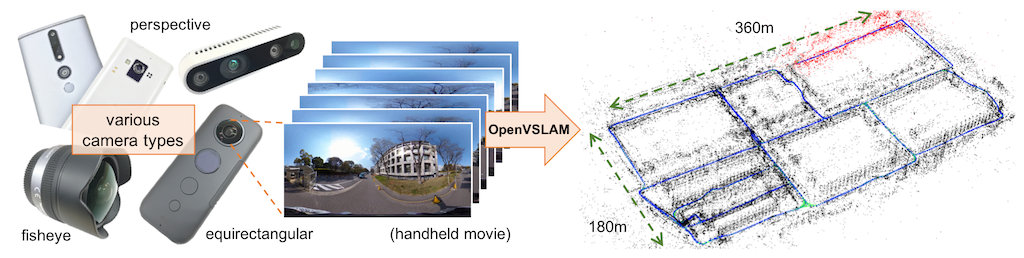
- It is compatible with various type of camera models and can be easily customized for other camera models.
- Created maps can be stored and loaded, then stella_vslam can localize new images based on the prebuilt maps.
- The system is fully modular. It is designed by encapsulating several functions in separated components with easy-to-understand APIs.
- We provided some code snippets to understand the core functionalities of this system.
One of the noteworthy features of stella_vslam is that the system can deal with various type of camera models, such as perspective, fisheye, and equirectangular. If needed, users can implement extra camera models (e.g. dual fisheye, catadioptric) with ease. For example, visual SLAM algorithm using equirectangular camera models (e.g. RICOH THETA series, insta360 series, etc) is shown above.
We provided documentation for installation and tutorial. The repository for the ROS wrapper is stella_vslam_ros.
OpenVSLAM is based on an indirect SLAM algorithm with sparse features, such as ORB-SLAM/ORB-SLAM2, ProSLAM, and UcoSLAM. The core architecture is based on ORB-SLAM/ORB-SLAM2 and the code has been redesigned and written from scratch to improve scalability, readability, performance, etc. UcoSLAM has implemented the parallelization of feature extraction, map storage and loading earlier. ProSLAM has implemented a highly modular and easily understood system earlier.
Some code snippets to understand the core functionalities of the system are provided.
You can employ these snippets for in your own programs.
Please see the *.cc files in ./example directory or check Simple Tutorial and Example.
Please see Installation chapter in the documentation.
The instructions for Docker users are also provided.
Please see Simple Tutorial chapter in the documentation.
A sample ORB vocabulary file can be downloaded from here. Sample datasets are also provided at here.
If you would like to run visual SLAM with standard benchmarking datasets (e.g. KITTI Odometry dataset), please see SLAM with standard datasets section in the documentation.
Please contact us via GitHub Discussions if you have any questions or notice any bugs about the software.
- Refactoring
- Algorithm changes and parameter additions to improve performance
- Add tests
- Marker integration
- Implementation of extra camera models
- Python bindings
- IMU integration
The higher up the list, the higher the priority. Feedbacks, feature requests, and contribution are welcome!
2-clause BSD license (see LICENSE)
The following files are derived from third-party libraries.
./3rd/json: nlohmann/json [v3.6.1] (MIT license)./3rd/spdlog: gabime/spdlog [v1.3.1] (MIT license)./3rd/tinycolormap: yuki-koyama/tinycolormap (MIT license)./3rd/FBoW: stella-cv/FBoW (MIT license) (forked from rmsalinas/fbow)./src/stella_vslam/solver/essential_5pt.h: part of libmv/libmv (MIT license)./src/stella_vslam/solver/pnp_solver.cc: part of laurentkneip/opengv (3-clause BSD license)./src/stella_vslam/feature/orb_extractor.cc: part of opencv/opencv (3-clause BSD License)./src/stella_vslam/feature/orb_point_pairs.h: part of opencv/opencv (3-clause BSD License)
Please use g2o as the dynamic link library because csparse_extension module of g2o is LGPLv3+.
- Shinya Sumikura (@shinsumicco)
- Mikiya Shibuya (@MikiyaShibuya)
- Ken Sakurada (@kensakurada)
OpenVSLAM won first place at ACM Multimedia 2019 Open Source Software Competition.
If OpenVSLAM helps your research, please cite the paper for OpenVSLAM. Here is a BibTeX entry:
@inproceedings{openvslam2019,
  author = {Sumikura, Shinya and Shibuya, Mikiya and Sakurada, Ken},
  title = {{OpenVSLAM: A Versatile Visual SLAM Framework}},
  booktitle = {Proceedings of the 27th ACM International Conference on Multimedia},
  series = {MM '19},
  year = {2019},
  isbn = {978-1-4503-6889-6},
  location = {Nice, France},
  pages = {2292--2295},
  numpages = {4},
  url = {http://doi.acm.org/10.1145/3343031.3350539},
  doi = {10.1145/3343031.3350539},
  acmid = {3350539},
  publisher = {ACM},
  address = {New York, NY, USA}
}
The preprint can be found here.
- Raúl Mur-Artal, J. M. M. Montiel, and Juan D. Tardós. 2015. ORB-SLAM: a Versatile and Accurate Monocular SLAM System. IEEE Transactions on Robotics 31, 5 (2015), 1147–1163.
- Raúl Mur-Artal and Juan D. Tardós. 2017. ORB-SLAM2: an Open-Source SLAM System for Monocular, Stereo and RGB-D Cameras. IEEE Transactions on Robotics 33, 5 (2017), 1255–1262.
- Dominik Schlegel, Mirco Colosi, and Giorgio Grisetti. 2018. ProSLAM: Graph SLAM from a Programmer’s Perspective. In Proceedings of IEEE International Conference on Robotics and Automation (ICRA). 1–9.
- Rafael Muñoz-Salinas and Rafael Medina Carnicer. 2019. UcoSLAM: Simultaneous Localization and Mapping by Fusion of KeyPoints and Squared Planar Markers. arXiv:1902.03729.
- Mapillary AB. 2019. OpenSfM. https://github.com/mapillary/OpenSfM.
- Giorgio Grisetti, Rainer Kümmerle, Cyrill Stachniss, and Wolfram Burgard. 2010. A Tutorial on Graph-Based SLAM. IEEE Transactions on Intelligent Transportation SystemsMagazine 2, 4 (2010), 31–43.
- Rainer Kümmerle, Giorgio Grisetti, Hauke Strasdat, Kurt Konolige, and Wolfram Burgard. 2011. g2o: A general framework for graph optimization. In Proceedings of IEEE International Conference on Robotics and Automation (ICRA). 3607–3613.