At the beginning, big kudos for: related articles to projectgus and some of code help to tenderlove.
So story was that I wanted to try a sequential shifter with my actual simracing setup instead of using shifting paddles as usual. Was looking for some devices on market, but it was not too much available and even if, it was a bit too expensive for me. Idea comes to look for adapting some real automotive shifter knob and from page to page, I have found that BMW has kind of "joystick" shifter knob - means just an electronic gear selector. And that was a good point to start, because I was hoping to adapt it with help of Arduino. So I have found a real BMW 5 F11 MY2012 shifter from UK's car which was totally cheap in my country and additionally it is in really good shape.

I have done all hardware job like connecting Arduino, CanBus module, powering BWM shifter and doing all those wirings. Once shifter became alive, I started working with software. Just wrote a non-complex program to handle all the logic which is required for shifter to work correctly. It required to cooperate with shifter via CanBus messages. To adapt Arduino as a game controller for PC I have used dedicated Joystick library. Arduino is recognized as typical game controller and you just assign any shifter movement as a buttons - works perfectly. There is a strictly technical, but funny thing - Arduino is here acting (faking) a real gear transmission as in real car shifter and transmission are in constant communication, sending repeatable messages about status of each other to each oter and to be in sync. So Arduino is a transmission here.

At the moment shifter works the same way as in real BMW car. It allows you to use a completely automatic transmission mode (right part of shifter pattern - R/N/D) and if you want to use sequential mode, just move shifter to Drive and push it to the left - now you can change your gear semi-manually - the same way like on car. Because for example Assetto Corsa has a built-in controls assigment to change manual/auto gear selector during gameplay, you can change it freely during the race by just moving shifter knob right/left.

There is a demo video.
This project requires following hardware to work:
- BMW shifter possibly from BMW 5 series (all details in section below)
- Arduino Leonardo board
- CanBus SPI MCP2515 TJA1050 module
- additionally: wirings, power sockets, power supply (DC 12V 2-3A)
Be aware that project for now was tested with only those two gear selectors and even between those two there is a difference in code. Otherwise implementation of one is not working with other. Cannot guarantee if it will work with any of simiarly looking selectors with similar MY of BMW 5 series (or any other series).
This project is strictly related to Arduino board, so requirements are:
- Arduino IDE (tested with 2.1.0)
- mcp_can library (1.5.0)
- SPI library (built-in)
- Joystick library by Giuseppe Martini (2.1.1)
Libraries versions are those I have ran my shifter with.
It was mentioned but I would like to precise what BMW selectors are working with this project.
If anybody adapted this project to some other similar BMW shifter, it will be strongly appreciated to share this info with me and I can include it here to be useful for all of us
At the moment project is compatible with following BMW gear selectors:
car model: manufacturer part number
- BMW 5 MY 2010 F10 F11: /P BMW 9 218 102-04
- BMW 5 MY 2012 F10 F11: /P BWM 9 291 527-01
Looks like the only reliable parameter is part number. Do not rely on just how the shifter looks.
This section describes how to set up hardware & software and end up with working gear selector for your PC.
This is how shifter pinout looks like:
- BWM 9 291 527-01
| Pin | Wire Colour | Function |
|---|---|---|
| 1 | Empty / N/A | N/A |
| 2 | Empty / N/A | N/A |
| 3 | Red | CAN Low |
| 4 | Blue/Red | CAN High |
| 5 | White/Blue | CAN2 Low |
| 6 | White/Yellow | CAN2 High |
| 7 | Green/Red | +12V |
| 8 | Brown | Ground |
| 9 | Empty / N/A | N/A |
| 10 | Red/Green | +12V |
- BMW 9 218 102-04
TBD
Notice, that there are two CanBus lines available. According to my testing, both of lines are producing the same messages, so doesn't matter which one will be used.
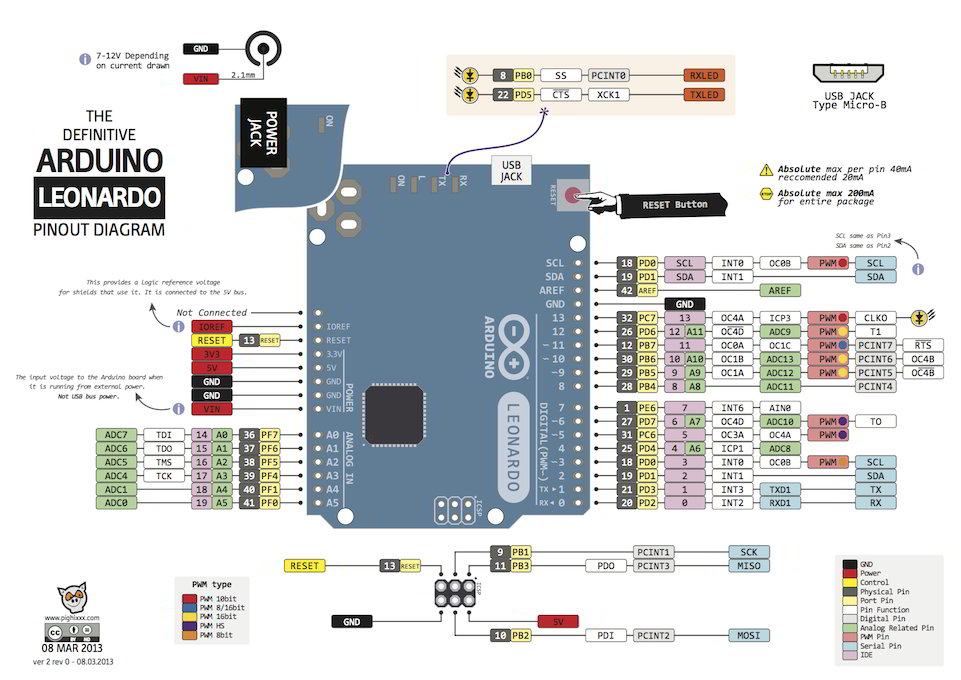
This is how Arduino together with MCP module and shifter has to be connected:
| Source | Destination |
|---|---|
| Arduino PIN 2 | MCP PIN INT |
| Arduino PIN 8 | MCP PIN CS |
| Arduino ICSP SCK | MCP PIN SCK |
| Arduino ICSP MISO | MCP PIN SO |
| Arduino ICSP GND | MCP PIN GND |
| Arduino ICSP MOSI | MCP PIN SI |
| Arduino ICSP VCC | MCP PIN VCC |
| Shifter PT-CAN Low | MCP Low |
| Shifter PT-CAN High | MCP High |
Refer to this image as a helper for Arduino Leonardo.
There is a code directory in this project structure. It is split into more directories named as particular BMW shifter part numbers.
Select Arduino project file from the directory named as your shifter part number and just upload code into Arduino board as usual.
Once shifter is powered on with external power supply as well as Arduino board is connected to PC via USB cable, shifter should blink few times with Parking/Neutral light. Once it blinked, it means that initial CanBus messages were read properly, so it is expected that shifter works correctly. If it didn't happen, then investigation is needed.
Shifter should be recognized as controller in Windows (in Linux potentially the same) and behave as normal controller.
As it was mentioned, shifter is working the same way as in real car. If game allows to assign all handled behaviours of shifter, then it can behave as real in game.
This demo video shows how shifter works with PC.
It has 4 states:
- Reverse (automatic)
- Neutral (automatic)
- Drive (automatic)
- Drive with semi-manual (or manual actuall) gear shifting (lever moved to left)
so it allows to assign following actions (look below also):
- move shifter forward/backward in default (automatic) position
- moving shifter left for semi-manual mode
- moving shifter forward/backward in semi-manual mode
- moving shifter right (from semi-manual) to back to automatic mode
- additionally Parking button is handled and can be assigned as per needs.
Shifter starts with Neutral state. Moving forward/backward will change state to Reverse or Drive. Reverse can be set only if you hold a side button once trying to put Reverse gear (it is forced by shifter soft itself, out of control). Once in Drive state, you can move shifter lever to left and jump into manual gear shifting. Moving shifter left/right is triggering "button", so this movement can be assigned in game. That means, you can switch in-game from automatic to semi-manual mode (for example Assetto Corsa allows it and this is showed on video).
This project presents pretty well how car parts can be adapted as game controllers. Also it brings to sim racing world shifter great quality and feeling of real automotive part. It was a real fun to do this little project. I'm using BMW shifter on every sim sessions and it gives a lot of fun in racing.
If I helped you to build your own one or inspired you, consider leaving me even a little donation, that I can enjoy a small 🍺🍺🍺!