



A fast, lightweight, and powerful CLI tool to track your Antigravity model quota and usage. Works offline with your IDE or online with multiple Google accounts.
Inspired by ccusage
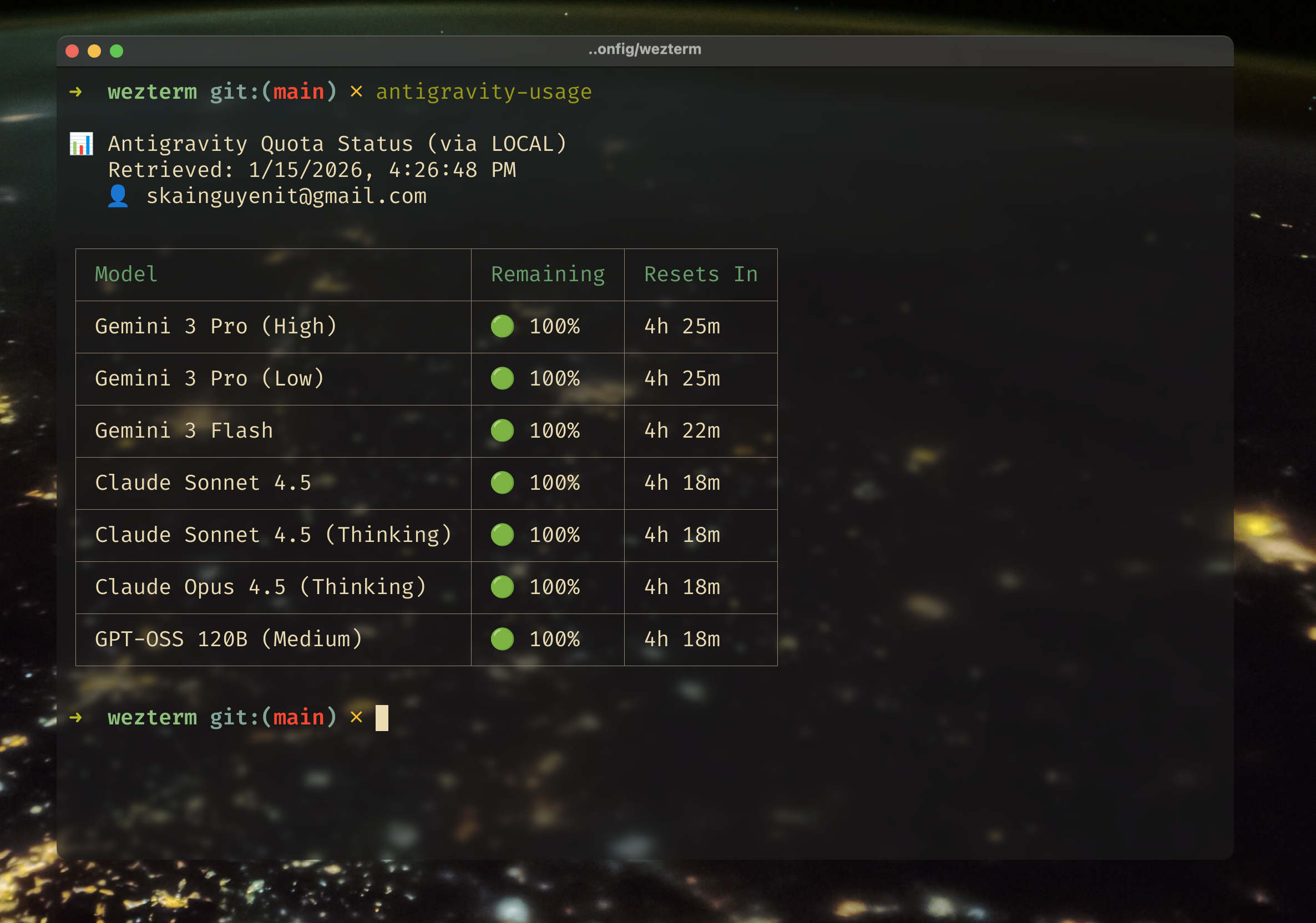
If you have Antigravity running in your IDE (VSCode, JetBrains, etc.), you can check your quota immediately without logging in.
# Install globally
npm install -g antigravity-usage

# Check quota immediately (uses your IDE's connection)
antigravity-usage
That's it! The tool automatically connects to your local Antigravity server to fetch the exact same data your IDE sees.
Want to check quota for multiple accounts or when your IDE is closed?
antigravity-usage loginIf you are on a headless server or cannot open a browser locally:
antigravity-usage login --manualFollow the on-screen instructions to paste the authentication URL into your local browser and copy the result back.
antigravity-usage accounts addantigravity-usage quota --allAntigravity Usage employs a smart "Dual-Fetch" strategy to ensure you always get data:
- Local Mode (Priority): First, it tries to connect to the Antigravity Language Server running inside your IDE.
- Pros: Fast, works offline, no extra login required.
- Cons: IDE must be open.
- Cloud Mode (Fallback): If Local Mode fails (or if managing multiple accounts), it uses the Google Cloud Code API.
- Pros: Works anywhere, supports multiple accounts.
- Cons: Requires one-time login.
By default, antigravity-usage runs in Auto Mode, seamlessly switching between these methods.
Never waste quota again. Automatically wake up your AI models to maximize your daily limits.
- Fully Automatic: Runs in the background via native system scheduler - no need to keep terminal or Antigravity open
- Native Cron Integration: Schedule-based triggers (every N hours, daily, or custom cron)
- Smart Quota-Reset Detection: Zero-waste mode that detects when quota resets
- Multi-Account Support: Trigger all your accounts simultaneously
- Built-in Safety: Cooldown protection, retry logic, detailed history tracking
- Platform Support: Currently available on macOS and Linux (Windows support coming soon)
See the Wakeup Command section for full details.
Manage multiple Google accounts and compare quota across Personal, Work, and other accounts.
- Check All Accounts: Use
--allflag to fetch and compare quota across all logged-in accounts simultaneously - Side-by-Side Comparison: View quota usage and reset times for all accounts in a single table
- Easy Switching: Switch between accounts to use different credentials for API calls
- Privacy Focused: All tokens stored locally on your machine, never sent to third-party servers
Designed for plane rides and spotty wifi.
- Direct IDE Access: Reads directly from the local server loopback.
- Smart Fallbacks: If the internet cuts out, it defaults to the last known state from your local IDE.
To keep the CLI snappy and avoid hitting API rate limits:
- Quota data is cached for 5 minutes.
- Use the
--refreshflag to force a new fetch:antigravity-usage quota --refresh
By default, antigravity-usage hides "autocomplete" models (like gemini-2.5-flash-002) to reduce clutter, as these typically share quota with their main counterparts or are less relevant for tracking.
To see ALL available models, including autocomplete ones:
antigravity-usage quota --all-modelsAlias for quota. Fetches and displays usage data.
antigravity-usage                   # Auto-detect (Local -> Cloud)
antigravity-usage --all             # Fetch ALL accounts
antigravity-usage --method local    # Force local IDE connection
antigravity-usage --method google   # Force google IDE connection
antigravity-usage --all-models      # Show ALL models (including autocomplete)
antigravity-usage --json            # Output JSON for scripts
antigravity-usage --version # Show version numberDisplay the current version of the CLI tool.
antigravity-usage --version # or -VManage your roster of Google accounts.
antigravity-usage accounts list            # Show all accounts & status
antigravity-usage accounts add             # Login a new account
antigravity-usage accounts switch <email>  # Set active account
antigravity-usage accounts remove <email> # Logout & delete dataTroubleshoot issues with your setup. Checks env vars, auth status, and local server connectivity.
Quickly check if your auth tokens are valid or expired.
Never waste quota again. Automatically wake up your AI models at strategic times to maximize your daily limits.
Platform Support: Currently available on macOS and Linux. Windows support (via Task Scheduler) is coming soon.
antigravity-usage wakeup config     # Interactive setup (takes 30 seconds)
antigravity-usage wakeup install    # Install to native system cron
antigravity-usage wakeup status     # Check configuration & next run
antigravity-usage wakeup test       # Test trigger manually
antigravity-usage wakeup history    # View trigger history
Why This Matters: Your Antigravity quota resets every ~5 hours, but if you don't use it, you lose it. The wakeup feature ensures you automatically trigger both Claude and Gemini models to keep your quota flowing.
Zero configuration needed. Automatically wakes up:
claude-sonnet-4-5→ Triggers the entire Claude familygemini-3-flash→ Triggers Gemini flash quota groupgemini-3-pro-low→ Triggers Gemini pro quota group
All three models combined ensure comprehensive coverage and optimal quota utilization across all available AI models and quota groups.
1. Schedule-Based (Native Cron Integration) Runs locally on your machine with zero dependencies:
- Interval Mode: Every N hours (e.g., every 6 hours)
- Daily Mode: At specific times (e.g., 9 AM, 5 PM)
- Custom Mode: Advanced cron expressions for power users
- Portable Design: Auto-detects Node.js path for seamless operation across different machines
antigravity-usage wakeup install
# ✅ Installs to your system's native crontab (macOS/Linux)
# ✅ Runs even when terminal/antigravity is closed
# ✅ Persists across reboots
# ✅ Works on any machine with Node.js installed
2. Smart Quota-Reset Detection (Zero-Waste Mode) The most intelligent trigger mode. Automatically detects when:
- Quota is at 100% (unused)
- Reset time is ~5 hours away (just reset)
- No cooldown conflicts
When triggered, it wakes up ALL your accounts simultaneously, ensuring none of your quota goes to waste.
- Cooldown Protection: Prevents duplicate triggers (1-hour default)
- Multi-Account Support: Trigger for specific accounts or all at once
- Detailed History: Track every trigger with timestamps and results
- Graceful Failures: Automatic retry logic with exponential backoff
- Token Efficiency: Minimal output tokens (just 1 token per request)
antigravity-usage wakeup statusShows:
- ✅ Enabled/disabled status
- 📅 Next scheduled run time
- 🎯 Selected models and accounts
- 📝 Last trigger result
- ⚙️ Cron installation status
Data is stored in your system's standard config location:
- macOS:
~/Library/Application Support/antigravity-usage/ - Linux:
~/.config/antigravity-usage/ - Windows:
%APPDATA%/antigravity-usage/
npm run dev -- quota --all
npm testMIT