
Superfast, multithreaded document generator for MongoDB, operating through CLI.
Generates millions of documents at maximum speed, utilizing all CPU threads.
- Creating big collections (exceeding 500,000,000 documents)
- Generating synthetic data
- Stress testing MongoDB
- Performance benchmarking
- Multithreading — each thread inserts documents in parallel.
- Specify the number of threads for data generation to adjust CPU load, or set it to
maxto utilize all available threads. - Document distribution across threads considering the remainder.
- Precise
created_at/updated_athandling withtime_step_ms. Batchinserts for enhanced performance.- Progress bar in the console with percentage, speed, and statistics, along with other informative logs:
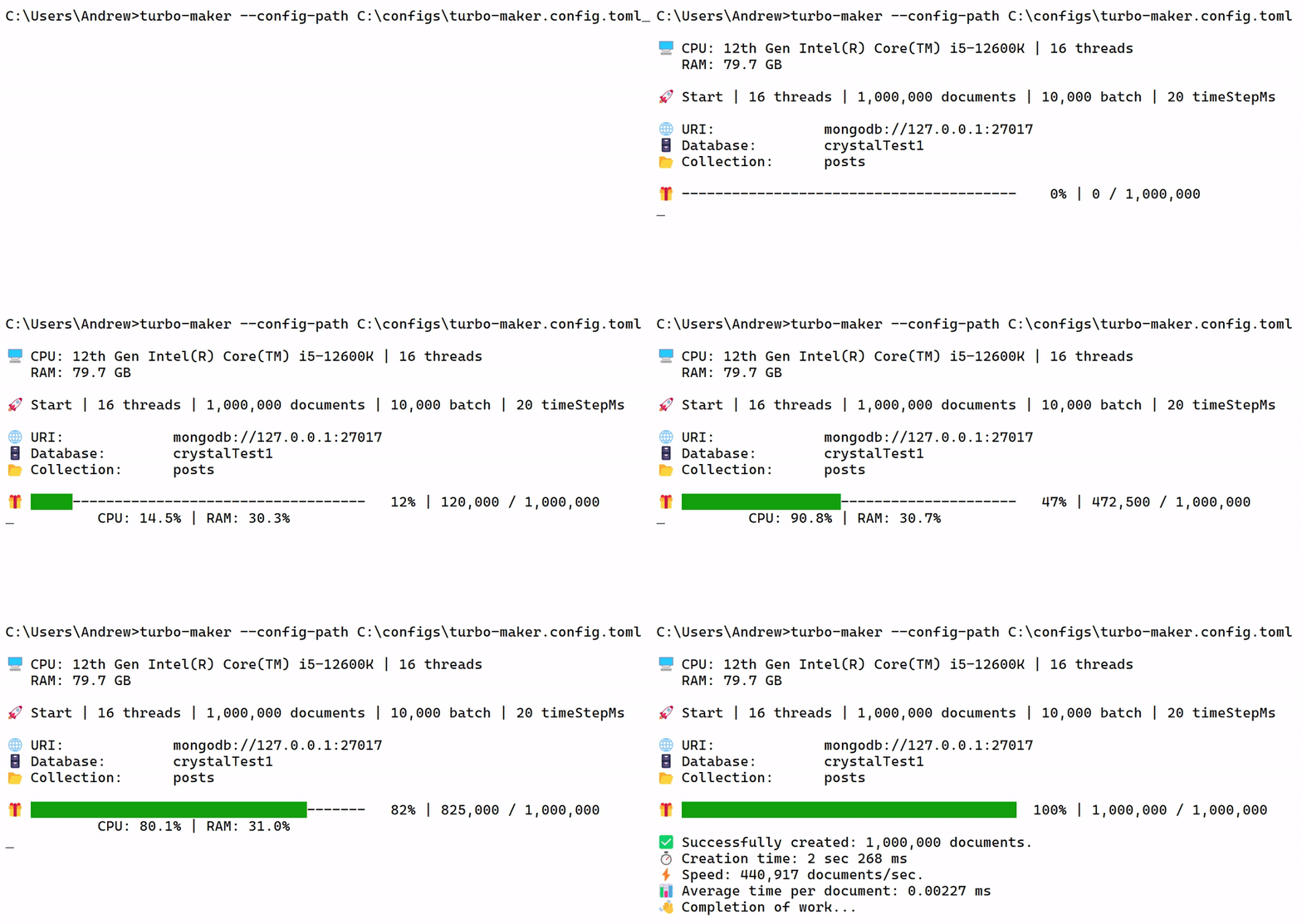
Generation of 1,000,000 documents in 2 seconds, filled with the following content.
PC configuration: Intel i5-12600K, 80GB DDR4 RAM, Samsung 980 PRO 1TB SSD.
- Tokio
- std::sync::atomic
- sysinfo
- clap / serde / toml
The generator works and fully performs its task of multithreaded document insertion. However, additional data generation functions (random text, numbers, etc.) are still under development.
- Install crate:
cargo install turbo-maker-
Create a config file — turbo-maker.config.toml in a convenient location.
-
Run turbo-maker with the path to your config file:
Windows:
turbo-maker --config-path C:\example\turbo-maker.config.tomlLinux/macOS:
turbo-maker --config-path /home/user/example/turbo-maker.config.tomlRequired fields must be specified:
[settings]
uri = "mongodb://127.0.0.1:27017"
db = "crystal"
collection = "posts"
number_threads = "max"
number_documents = 1_000_000
batch_size = 10_000
time_step_ms = 20
number_threads
Accepts either a string or a number and sets the number of CPU threads used.
- for value
"max", all threads are used. - if the
numberexceeds the actual thread count, all threads are used.
number_documents
Accepts a number, specifying how many documents to generate.
batch_size
Accepts a number of documents per batch inserted into the database.
- the larger the batchSize, the fewer requests MongoDB makes, leading to faster insertions.
- however, a very large batchSize can increase memory consumption.
- the optimal value depends on your computer performance and the number of documents being inserted.
time_step_ms
Accepts number and sets the time interval between documents.
- With the value of
0a large number of documents will have the same date of creation, due to a high generation rate, especially in multithreaded mode.
[document_fields]
complex_string = {function = "generate_long_string", length = 100}
text = "example"
created_at = "custom_created_at"
updated_at = "custom_updated_at"
All fields in this section are optional. If there are no fields, empty documents will be created in the quantity specified in the field -number_documents, the documents will contain only - _id: ObjectId('68dc8e144d1d8f5e10fdbbb9').
The complex_string field contains the generate_long_string function, a built-in function created for testing the generator's speed. In length = 100, you can specify the number of random characters to generate.
The text = "example" field is custom and can have any name.
These are special fields that may be missing, in which case the document will not have a creation date. The time step between documents is specified using the time_step_ms field in the [settings] section.
created_at = "custom_created_at" → custom field name.
created_at = "" → use the default field name created_at.
updated_at repeats the value created_at
In comparative hybrid (CPU | I/O) tests, the Rust generator demonstrated 7.87 times (687%) higher performance compared to the Node.js version:
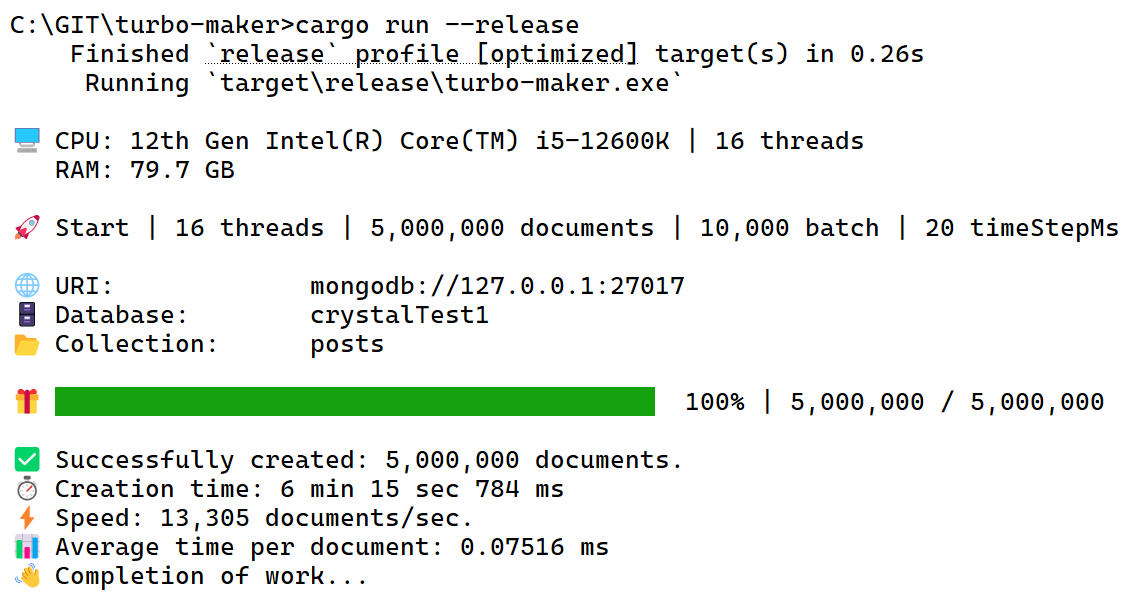
Rust
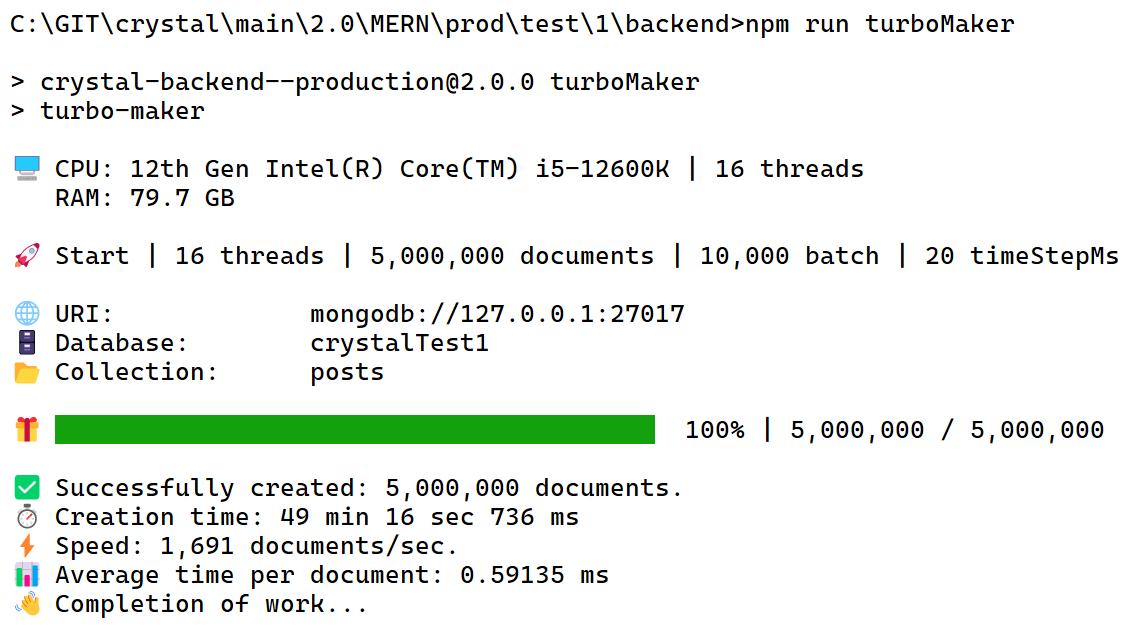
Node.js
PC configuration: Intel i5-12600K, 80GB DDR4 RAM, Samsung 980 PRO 1TB SSD.
The test generated random strings of 500 characters.
It primarily stresses the CPU but also creates I/O load.
Test code for the Node.js version.
Test code for the Rust version:
pub fn generate_long_string(length: usize) -> String {
    let mut rng = rand::thread_rng();
    let mut result = String::with_capacity(length);
    for _ in 0..length {
        let char_code = rng.gen_range(65..91); // Letters A-Z
        result.push((char_code as u8 as char).to_ascii_uppercase());
        for _ in 0..1000 {
            let _ = rng.gen::<u8>(); // Empty operation for load
        }
    }
    result
}