



- Overview
- Key Features
- Tech Stack
- System Architecture
- Prerequisites
- Installation & Setup
- Usage Guide
- Demo Video
- Workflow Breakdown
- API Configuration
- Troubleshooting
- Contributing
- License
- Support
Facebook Ad Manager System is a fully automated ad production pipeline designed for marketing agencies, e-commerce businesses, and small teams. Input your product details, and watch as AI handles everything from market research to final ad creatives.
- 🏢 Marketing Agencies - Scale ad production without scaling headcount
- 🛍️ E-commerce Businesses - Launch campaigns faster with consistent quality
- 👥 Small Teams - Compete with enterprise-level creative output
- 💼 All Business Types - Adaptable to any industry or product category
Traditional ad creation requires:
- Market researchers to understand audiences
- Copywriters to craft compelling messages
- Art directors to create visual concepts
- Designers to produce final assets
- Hours or days per ad set
This system does it all in minutes, with consistent quality and unlimited variations.
- Zero manual intervention from product input to final ad assets
- Intelligent workflow orchestration via n8n
- Automatic error handling and retry logic
- Generate complete ad campaigns in under 10 minutes
- Produce 10+ image variations per ad copy
- Batch processing for multiple products simultaneously
- AI Market Researcher analyzes audience and pain points
- AI Copywriter creates headlines, body text, and CTAs
- AI Art Director generates detailed image prompts
- AI Image Generator produces professional visuals
- Claude AI for strategic thinking and copywriting
- Gemini for high-quality image generation
- Perplexity for real-time market research
- OpenAI for creative variations
- Intelligent model selection based on task requirements
- Four structured Airtable interfaces for process management
- Version control for all generated content
- Centralized asset hosting via ImageKit
- Full audit trail of automation runs
| Category | Technology | Purpose |
|---|---|---|
| Database & UI | Airtable | Product management, content storage, workflow triggers |
| Automation | n8n | Workflow orchestration, API integration, data processing |
| AI Models | Claude AI (Sonnet 4.5) | Market research, copywriting, prompt engineering |
| Google Gemini | Image generation from prompts | |
| Perplexity AI | Real-time market intelligence | |
| OpenAI | Creative variations and fallback generation | |
| Image Hosting | ImageKit | CDN-hosted image storage and delivery |
| Integration | Webhooks | Real-time triggers between Airtable and n8n |
┌─────────────────────────────────────────────────────────────────┐
│                        AIRTABLE INTERFACES                       │
├─────────────────────────────────────────────────────────────────┤
│                                                                  │
│  [1] Product Input → [2] Research Data → [3] Ad Copy → [4] Images│
│                                                                  │
└───────────────────────┬─────────────────────────────────────────┘
                        │ Webhooks
                        ↓
┌─────────────────────────────────────────────────────────────────┐
│                          N8N WORKFLOWS                           │
├─────────────────────────────────────────────────────────────────┤
│                                                                  │
│  Flow 1: Research → Claude AI → Airtable Update                 │
│  Flow 2: Copywriting → Claude AI → Airtable Update              │
│  Flow 3: Prompt Gen → Claude AI → Batch Processing              │
│  Flow 4: Image Gen → Gemini → ImageKit → Airtable               │
│                                                                  │
└───────────────────────┬─────────────────────────────────────────┘
                        │
                        ↓
┌─────────────────────────────────────────────────────────────────┐
│                         AI SERVICES                              │
├─────────────────────────────────────────────────────────────────┤
│                                                                  │
│  • Claude AI (Research, Copy, Prompts)                          │
│  • Gemini (Image Generation)                                    │
│  • Perplexity (Market Data)                                     │
│  • OpenAI (Creative Variations)                                 │
│                                                                  │
└─────────────────────────────────────────────────────────────────┘
Before installation, ensure you have:
- ✅ Airtable Account - Base with appropriate permissions
- ✅ n8n Instance - Self-hosted or n8n Cloud
- ✅ Claude AI API Key - From Anthropic Console
- ✅ Google Gemini API Key - From Google AI Studio
- ✅ Perplexity API Key - From Perplexity Dashboard
- ✅ OpenAI API Key - From OpenAI Platform
- ✅ ImageKit Account - Public/Private keys configured
- Node.js 16+ (for n8n self-hosted)
- Modern web browser
- Stable internet connection
git clone https://github.com/awaisali36/facebook-ad-manager.git
cd facebook-ad-manager-
Import the Base Template
- Navigate to
airtable-templates/folder - copy
https://airtable.com/appiMP69otrP0K89q/shrdOO4CBi6FRHcLEbase into your Airtable workspace
- Navigate to
-
Configure Four Interfaces
- Interface 1: Product Input Table
- Interface 2: Research Data Table
- Interface 3: Ad Copy Table
- Interface 4: Image Assets Table
-
Set Up Automations
- Create webhook triggers for each interface
- Configure button fields to trigger n8n workflows
- Link tables with proper relationships
-
Import Workflows
# Import all 4 workflow JSON files from n8n-workflows/ - flow-1-research.json - flow-2-adcopy.json - flow-3-prompts.json - flow-4-images.json -
Configure Credentials
- Add all API keys in n8n Settings → Credentials
- Test each connection before activating workflows
-
Update Webhook URLs
- Copy production webhook URLs from n8n
- Update Airtable automation triggers with these URLs
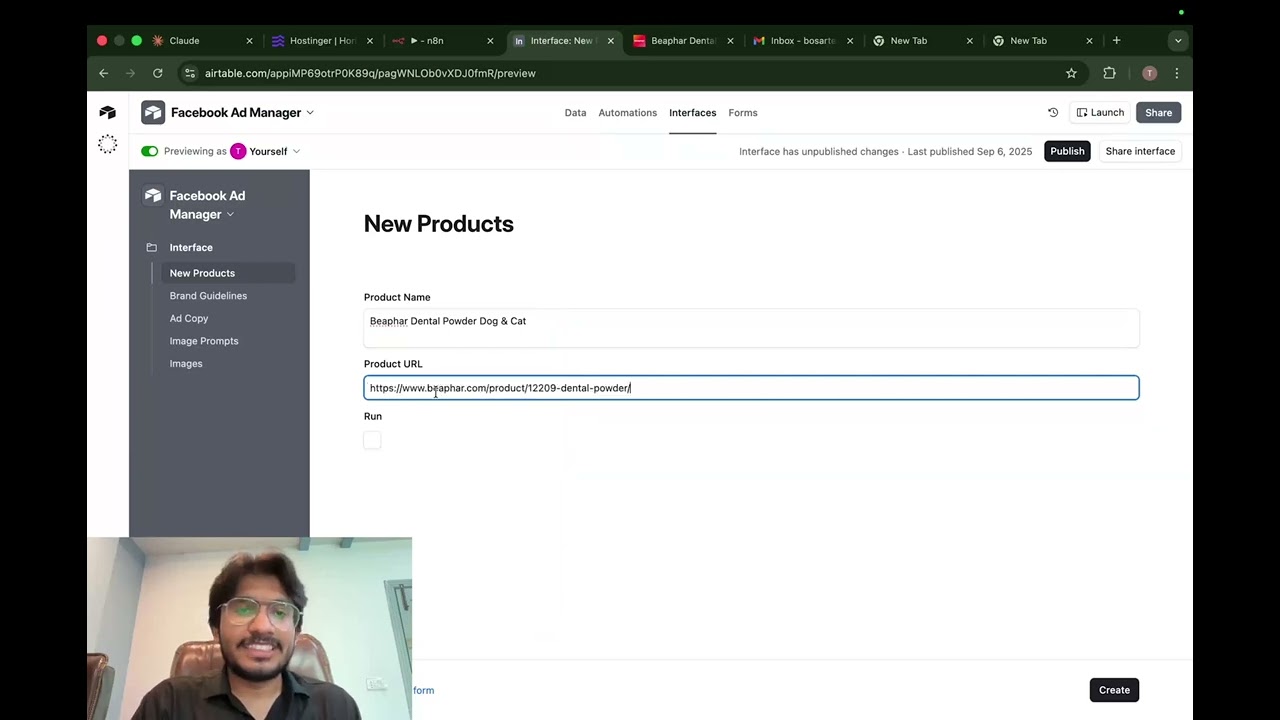
- Open Airtable Interface 1
- Add a test product (name + URL)
- Click "Run and Create"
- Monitor progress through all four interfaces
- Verify final images appear in Interface 4
Navigate to the Product Input interface and enter:
- Product Name: "Ergonomic Office Chair Pro"
- Product URL: https://yourstore.com/office-chair
- Click "Run and Create" button
This triggers Flow 1 automatically.
The system automatically:
- Analyzes your product using Claude AI
- Identifies target audience segments
- Extracts key pain points
- Defines unique solutions
- Generates brand guidelines
Output Example:
Target Audience: Remote workers, 25-45, experiencing back pain
Pain Points: Poor posture, discomfort during long work sessions
Solutions: Ergonomic lumbar support, adjustable height, breathable mesh
Click "Generate Ad Copy" to produce:
- Headline: Attention-grabbing hook (40 chars max)
- Primary Text: Compelling body copy (125 chars)
- Call-to-Action: Action-driven button text
Output Example:
Headline: "Say Goodbye to Back Pain While Working"
Primary Text: "Our ErgoChair Pro supports your spine with medical-grade
lumbar technology. Join 10,000+ pain-free remote workers today."
CTA: "Get 30% Off Now"
Click "Generate Image Prompt" to create 10 variations:
Prompt 1: Professional home office setup with ergonomic chair,
side angle view, natural lighting, modern minimalist aesthetic...

Prompt 2: Close-up of chair's lumbar support mechanism,
highlighting adjustable features, soft blue tones...

[...8 more variations]
Select desired prompts and click "Generate Images":
- System calls Gemini API with each prompt
- Converts base64 responses to image files
- Uploads to ImageKit CDN
- Stores URLs in Airtable with metadata
Result: 10 production-ready ad images linked to your campaign!

Trigger: Airtable button click → Webhook POST to n8n
Process:
- Webhook receives product data
- Claude AI assumes "Market Researcher" role
- Generates structured brand guidelines
- Updates Airtable with research results
Duration: ~30 seconds
Trigger: "Generate Ad Copy" button → Webhook POST
Process:
- Webhook receives research values
- Claude AI assumes "Copywriter" role
- Outputs headline, primary text, CTA
- Updates Airtable with ad copy set
Duration: ~20 seconds
Trigger: "Generate Image Prompt" button → Webhook POST
Process:
- Webhook receives ad copy fields
- Claude AI assumes "Art Director" role
- Generates 10 diverse image prompts
- Batch processes all variations
- Updates Airtable with linked prompts
Duration: ~40 seconds
Trigger: "Generate Images" button → Webhook POST
Process:
- Webhook receives selected prompts
- HTTP Request to Gemini API
- Returns base64 encoded image
- Converts to actual image file
- Uploads to ImageKit CDN
- Creates Airtable record with URL
Duration: ~60 seconds per image
Headers: {
  "Authorization": "Bearer YOUR_CLAUDE_API_KEY",
  "Content-Type": "application/json"
}Headers: {
"Authorization": "Bearer YOUR_GEMINI_API_KEY"
}// Base64 encode your private key
const encoded = Buffer.from("YOUR_PRIVATE_KEY:").toString('base64');
Headers: {
"Authorization": `Basic ${encoded}`
}Headers: {
"Authorization": "Bearer YOUR_AIRTABLE_TOKEN",
"Content-Type": "application/json"
}Problem: Button click doesn't start automation
Solution:
- Verify webhook URL is correct in Airtable
- Check n8n workflow is activated
- Test webhook with manual POST request
- Review Airtable automation execution history
Problem: Image generation fails after multiple requests
Solution:
- Implement exponential backoff in n8n
- Add delay nodes between batch requests
- Monitor API usage in provider dashboards
- Consider upgrading API tier
Problem: ImageKit returns 401 Unauthorized
Solution:
- Verify private key is correctly Base64 encoded
- Check ImageKit account has sufficient storage
- Ensure URL endpoint matches your account
- Test credentials with ImageKit API playground
Problem: Ad copy doesn't parse correctly
Solution:
- Review system prompt in n8n workflow
- Add JSON validation node after Claude
- Check for special characters in prompts
- Enable Claude's response schema validation
We welcome contributions! Here's how you can help:
- Check existing issues first
- Create detailed bug report with:
- Steps to reproduce
- Expected vs actual behavior
- Screenshots/logs if applicable
- Environment details
- Open an issue with
[FEATURE]prefix - Describe the use case clearly
- Explain why it adds value
- Consider implementation complexity
- Fork the repository
- Create feature branch:
git checkout -b feature/amazing-feature - Commit changes:
git commit -m 'Add amazing feature' - Push to branch:
git push origin feature/amazing-feature - Open Pull Request with detailed description
# Clone your fork
git clone https://github.com/yourusername/facebook-ad-manager.git

# Create development branch
git checkout -b dev/your-feature

# Install dependencies (if any)
npm install

# Make changes and test thoroughly
# Submit PR when readyThis project is licensed under the MIT License - see the LICENSE file for details.
✅ Commercial use allowed
✅ Modification allowed
✅ Distribution allowed
✅ Private use allowed
- 📧 Email: letsautomatewithawais@gmail.com
- 🐛 Issues: GitHub Issues
Built with incredible tools from:
- Anthropic - Claude AI
- Google - Gemini
- n8n - Workflow automation
- Airtable - Database platform
- ImageKit - Image CDN
- Perplexity - AI research
- OpenAI - GPT models
Made with ❤️ by Trilles AI
⭐ Star this repo if it saved you time!
📢 Share with marketing teams who need this!
🔗 Fork and customize for your agency!