you can find complete procedure for installation of dlib library in MAC/Ubuntu in https://pyimagesearch.com/2017/03/27/how-to-install-dlib/
Eyes Eyebrows Nose Mouth Jawline
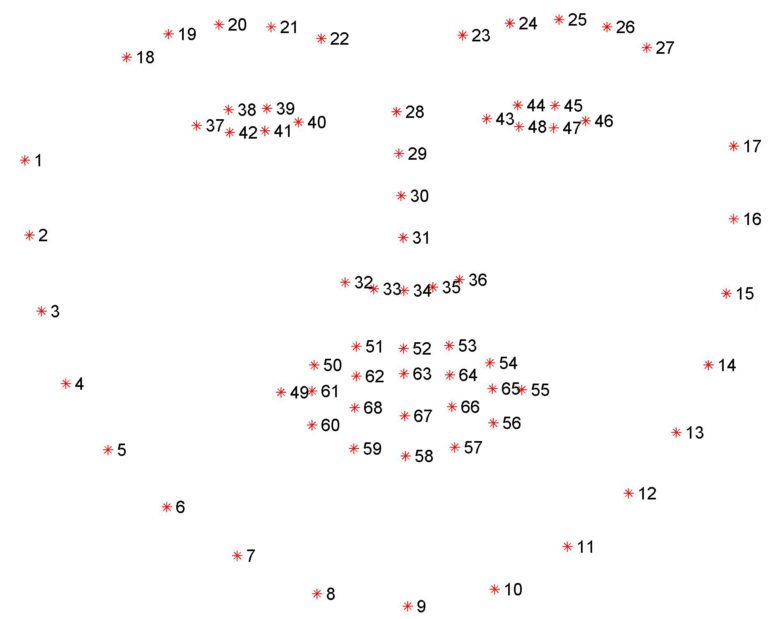
Detecting facial landmarks is therefore a two step process: Step #1: Localize the face in the image. Step #2: Detect the key facial structures on the face ROI.
Lines 34-39 dlib has pre-trained facial landmark detector.It can easily be found at http://dlib.net/files/shape_predictor_68_face_landmarks.dat.bz2 --image : The path to the input image that we want to detect facial landmarks on. Line 43 We have usewd a HOG B=based Detector
Upto Line 52 we have found the (x, y)-coordinates of the faces in the image, we can now apply facial landmark detection to each of the face regions: We start looping over each of the face detections on Line 55.
For each of the face detections, we apply facial landmark detection on Line 59, giving us the 68 (x, y)-coordinates that map to the specific facial features in the image. Line 60 converts the dlib shape object to a NumPy array with shape (68, 2).
Firstly upgrade imutils by $ pip install --upgrade imutils
Save the Facilal_landmark_detector.dat file and images in a folder and name it facial-landmarks.Name image as example_01.Then run
$ python facial_landmarks.py --shape-predictor shape_predictor_68_face_landmarks.dat
--image images/example_01.jpg