| description |
|---|
How does load order work in Cyberpunk? |
Written & Published: Nov 22, 2023 by mana vortex
Last documented update: January 20th, 2026 by minnierylands
This page will explain to you what Load Order is and how it works, then tell you how to influence it.
{% hint style="danger" %} You're not supposed to manage load order conflicts. If you ever feel the need to do that, a modder fucked up. {% endhint %}
In that case you may still influence.archive mods and REDmods. Tweak mods may conflict as well since tweakDB is a database of static values (e.g. two mods both edit the weapon stats of the Masamune).
- For REDmods, see #conflicts-and-load-order
- For .archive mods, rename files in ASCII alphabetical order. Do not use any tools other than your mod manager to change mod load order, as they create more problems than they solve.
- There currently is no tool to check tweak conflicts
- Check #load-order-and-wolvenkit if you are making a mod
Unless two mods are changing the same file, you don't need to bother about this at all. Unfortunately, the moment you're using frameworks or anything body modding related, you will run into this scenario.
In Cyberpunk, conflicts inside .archive mods are one per-file basis, whatever mod modifies a file first will win – unlike e.g. Skyrim, where esps may overwrite each other.
There are two mods that change boob size (and both mods modify the same file, e.g. a rig or mesh):
i_know_nothing_about_back_problems.archive
realistic_boobs_DDDDDDDDD_cup.archive
Since i_know_nothing_about_back_problems will load first, the conflicting file inside realistic_boobs_DDDDDDDDD_cup does nothing.
The game loads mods in the following order (higher wins):
All .archive files in Cyberpunk 2077/archive/pc/mod in ASCII-alphabetical order.
Example: To load the conflicting file from realistic_boobs_DDDDDDDDD_cup.archive before i_know_nothing_about_back_problems.archive you could simply change the capitalisation. This will lead to the following order
Realistic_boobs_DDDDDDDDD_cup.archive
i_know_nothing_about_back_problems.archive
If you change the load order by renaming a file, it is suggested to indicate said change in your mod manager, for example by also renaming the mod in the manager to reflect the change made.
In this case if the mod is named "Backbreaker Boobs", you could change it's name in the manager to "Backbreaker Boobs - renamed to load before Backpain is a myth".
This helps keep an overview about changed file names and load order and minimises confusion later on when adding more mods.
{% hint style="danger" %}
Note: If a file called modlist.txt is found inside archive/pc/mod then the game will load archives according to the order inside that file. Delete this file and save yourself from a world of pain.
If you really need to change where a mod loads, change the name of the file. {% endhint %}
modlist.txt example
The file may contain archive names, one mod archive name in each line. Example:
modb.archive
moda.archive
This means the game will load modb before moda, even though the filenames are not in alphabetical order. This allows for conflict management without renaming the physical files.
Folders in Cyberpunk 2077/mods are loaded strictly after /archive/pc/mod in ASCII-alphabetical order.
The game reads mods in ASCII-alphabetical order (REDmods by folder name, .archive files by archive file name).
This is ASCII ordering:
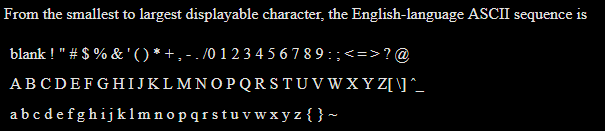
Source: https://www.academia.edu/19644191
| Mod name | Pos | why |
|---|---|---|
| MyMod.archive | 2 | M comes before m |
| myMod.archive | 3 | |
| !myMod.archive | 1 | ! comes before A |
You can re-name your folders and .archive files following the rules under #load-order-ascii-sort to influence in which order the game will load your mods.
{% hint style="danger" %} Prefixing your archive file names with non-alphanumeric characters works fine in case of Cyberpunk, but is a terrible habit that might break file paths in other games or operating systems. {% endhint %}
{% hint style="info" %} You will forget the warning above and re-learn this the hard way. {% endhint %}
By default, installing a mod with Wolvenkit will create an archive mod which is subject to the rules above (see #load-order-ascii-sort). Unless you specifically need to overwrite other modded files, you can completely ignore this.
To re-name your packed files, use Project -> Configure (check also: WolvenKit Projects #Project naming and mod load order)
If you are creating a compatibility mod (something that modifies the files of another installed mod), then yours needs to load first.
For example, if you want to do a custom recolour of the mod _ArchiveXL_Netrunner_Variants.archive, then your Wolvenkit project could be named _00_ArchiveXL_Netrunner_Variants, or _ArchiveXL_Netrunner_00_Recolour.