
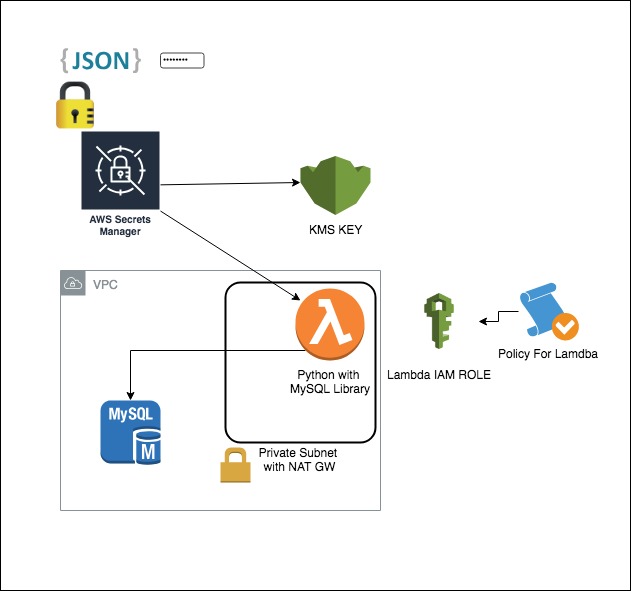
Use the tf-mod-aws-mysql-secret-rotation module to create all the resources to store and rotate a MySQL or Aurora password using the AWS Secrets Manager service.
The tf-mod-aws-rds module will create:
- A RDS MySQL Database Secret stored in AWS Secrets Manager
- An AWS Lambda function with permission to rotate the MySQL secret (VPC & non-VPC enabled)
- The IAM roles and policies to asoociate and grant access for the Lambda function to call the AWS Secrets Manager & KMS Services
- An AWS CloudWatch log group for the associated Lambda Function
IMPORTANT: The master branch is used in source just as an example. In your code, do not pin to master because there may be breaking changes between releases.
Instead pin to the release tag (e.g. ?ref=tags/x.y.z) of one of our latest releases.
The below values shown in the usage of this module are purely representative, please replace desired values as required.
Simple and advanced examples of this project.
TO-DO
| Name | Version |
|---|---|
| aws | ~> 2.0 ~> 2.0 |
| Name | Description | Type | Default | Required |
|---|---|---|---|---|
| availability_zones | (Required) - The AWS avaialbility zones (e.g. ap-southeast-2a/b/c). Autoloaded from region.tfvars. | list(string) |
n/a | yes |
| alias | (Optional) - The display name of the alias. The name must start with the word alias followed by a forward slash |
string |
"alias/secrets" |
no |
| attributes | (Optional) - Additional attributes (e.g. 1) |
list(string) |
[] |
no |
| automatically_after_days | (Required) Specifies the number of days between automatic scheduled rotations of the secret | number |
30 |
no |
| aws_account_id | The AWS account id of the provider being deployed to (e.g. 12345678). Autoloaded from account.tfvars | string |
"" |
no |
| aws_assume_role_arn | (Optional) - ARN of the IAM role when optionally connecting to AWS via assumed role. Autoloaded from account.tfvars. | string |
"" |
no |
| aws_assume_role_external_id | (Optional) - The external ID to use when making the AssumeRole call. | string |
"" |
no |
| aws_assume_role_session_name | (Optional) - The session name to use when making the AssumeRole call. | string |
"" |
no |
| aws_region | The AWS region (e.g. ap-southeast-2). Autoloaded from region.tfvars. | string |
"" |
no |
| deletion_window_in_days | (Optional) - Duration in days after which the key is deleted after destruction of the resource | number |
10 |
no |
| delimiter | (Optional) - Delimiter to be used between namespace, environment, stage, name and attributes |
string |
"-" |
no |
| description | (Optional) - The description of the key as viewed in AWS console | string |
"Parameter Store KMS master key" |
no |
| enable_key_rotation | (Optional) - Specifies whether key rotation is enabled | bool |
true |
no |
| enabled | (Optional) - A Switch that decides whether to create a terraform resource or run a provisioner. Default is true | bool |
true |
no |
| environment | (Optional) - Environment, e.g. 'dev', 'qa', 'staging', 'prod' | string |
"" |
no |
| filename | (Optional) - The path to the function's deployment package within the local filesystem. If defined, The s3_-prefixed options cannot be used. | string |
"" |
no |
| name | (Optional) - Solution name, e.g. 'vault', 'consul', 'keycloak', 'k8s', or 'baseline' | string |
"" |
no |
| namespace | (Optional) - Namespace, which could be your abbreviated product team, e.g. 'rci', 'mi', 'hp', or 'core' | string |
"" |
no |
| policy | (Optional) - A valid KMS policy JSON document. Note that if the policy document is not specific enough (but still valid), Terraform may view the policy as constantly changing in a terraform plan. In this case, please make sure you use the verbose/specific version of the policy. | string |
"" |
no |
| recovery_window_in_days | (Optional) Specifies the number of days that AWS Secrets Manager waits before it can delete the secret. This value can be 0 to force deletion without recovery or range from 7 to 30 days. The default value is 30. | number |
0 |
no |
| secret_config | (Optional) A list of objects that contain RDS information including username, password, port, hostname, and 'arn' to create lambda rotation |
|
|
no |
| secretsmanager_vpc_endpoint | (Optional) The VPC endpoint configured for the AWS Secrets Manager service for private access from within the VPC | string |
"" |
no |
| security_group_ids | (Optional) - List of Security Group IDs that are allowed ingress to the Lambda function | list(string) |
[] |
no |
| subnet_ids | (Required) - A list of subnet IDs associated with the Lambda function. | list(string) |
[] |
no |
| tags | (Optional) - Additional tags | map(string) |
{} |
no |
| Name | Description |
|---|---|
| alias_arn | Alias ARN |
| alias_name | Alias name |
| key_arn | Key ARN |
| key_id | Key ID |
| lambda_arn | The ARN of the Lambda function |
| lambda_ids | The name of the VPC Lambda functions |
| role_arn | The ARN of the IAM role created for the Lambda function |
| role_name | The name of the IAM role created for the Lambda function |
| secret_id | Amazon Resource Name (ARN) of the secret. |
You can find more Terraform Modules by vising the link.
Additionally, check out these other related, and maintained projects.
- %!s() - %!s()
For additional context, refer to some of these links.
- Databases with Fully Configured and Ready-to-Use Rotation Support - Reference AWS Documentation for this module
- AWS RDS MySQL Single User Pattern - Reference AWS Documentation for this module
Got a question? We got answers.
File a Github issue, or message us on Slack
 Callum Robertson |
|---|