Custom blocks 1.2 (old)
-
First, download my plugin :)
-
I have a sample texture pack for you where I create an example ruby ore: https://github.com/CodeDoctorDE/ItemMods/raw/master/%C2%A76ItemMods%20Sample%20Texturepack.zip
-
Put it as a server resource pack or as normal resourcepack in
%APPDATA%/.minecraft/resourecpacks -
There is a ruby ore. You get it with the command
/give @p minecraft:emerald_ore{CustomModelData:1} -
Open the plugin menu with /itemmods
-
Click on the blocks list item . Then on the knowledge book to create a new item
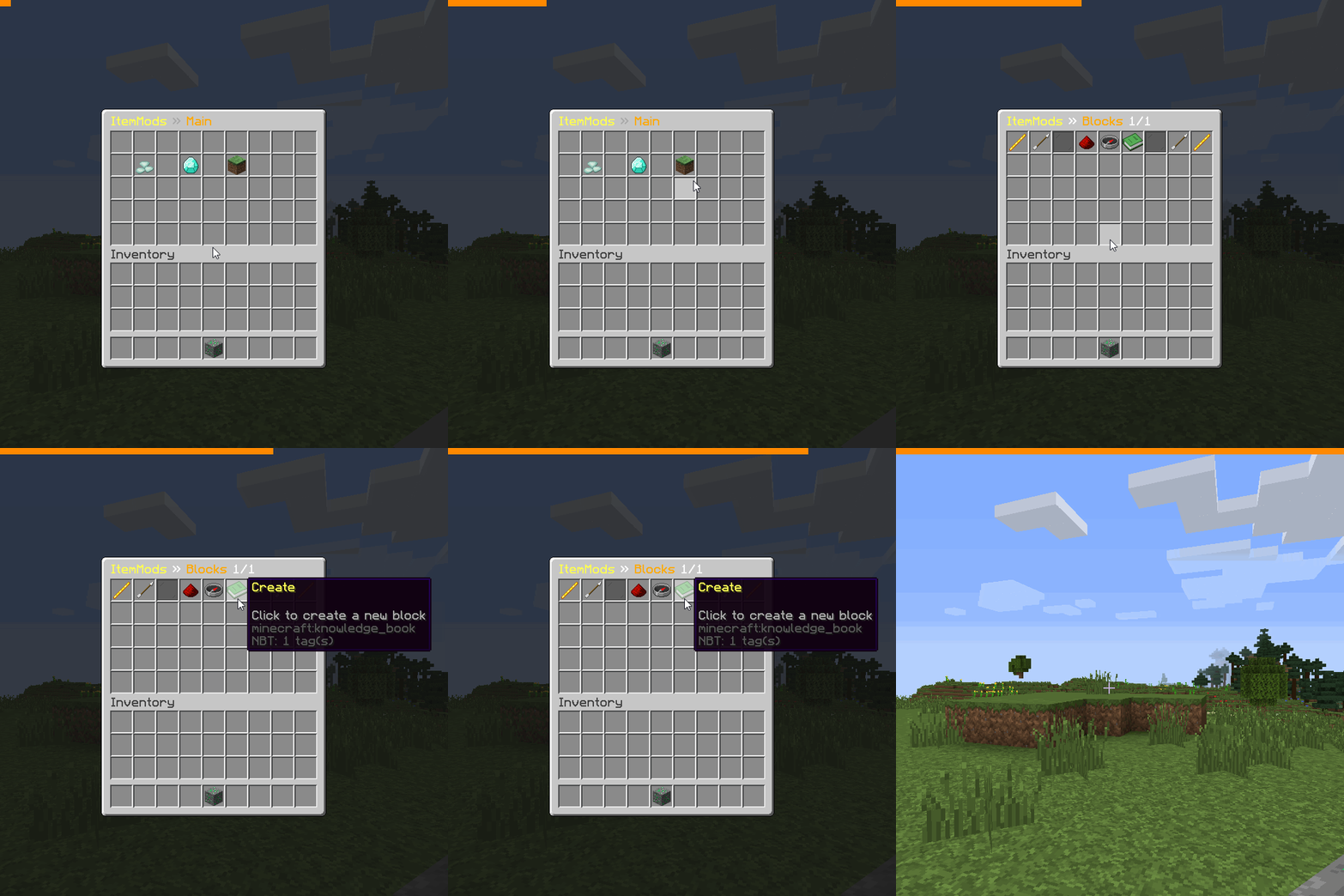
-
After that you give it a name, for example: ruby_ore

-
there is a new item in the list, click it
-
on the right bottom corner is a barrier, it will be a green dye if you finished
-
Drag the ruby ore in the barrier slot in the top center barrier item
-
Then you need to turn on the armor stand
-
Drag the same item as a head
-
now you need to configure the real minecraft block. Click on the grass block in the block gui
-
then you need to break a stone block
-
Now you are finished with the block, now you can configure the drops. Click on the drops gui and then on the knowledge book!
-
Drop the item which you want to drop when the block breaks Now you are finished 😀