Wait Indicator




This helper provides developers with a simple class for adding a wait indicator to terminal output for long running code.
The Indicator class was first introduced in FalconPy v1.5.1.
| Indicator | Example |
|---|---|
| clock |  |
| cylon | 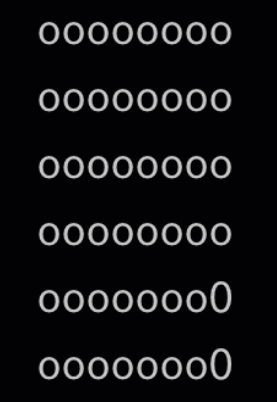 |
| kitt | 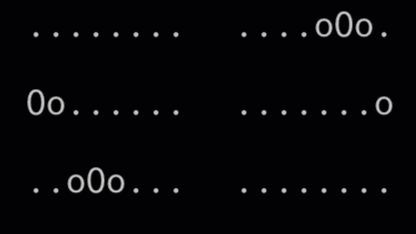 |
| thinking |  |
| moon |  |
This class provides the following properties.
| Property | Returns | Data Type | Mutable |
|---|---|---|---|
| indicator | Current indicator as a list | List of strings | No |
| position | Current position within the indicator list | Integer | Yes |
The default indicator is moon. This can be changed by providing the style keyword argument to the Indicator class when you create an instance of the class.
This example will show the default indicator, moon.
from time import sleep
from falconpy import Indicator

wait = Indicator()
for x in range(0, 30):
    print(f" {wait}", end="\r")
    sleep(.25)
This example will show the clock indicator.
from time import sleep
from falconpy import Indicator

wait = Indicator(style="clock")
for x in range(0, 30):
    print(f" {wait}", end="\r")
    sleep(.25)
An example of this functionality in use can also be found in the source code of the HTTP Event Collector sample, "What the HEC?".

- Home
- Discussions Board
- Glossary of Terms
- Installation, Upgrades and Removal
- Samples Collection
- Using FalconPy
- API Operations
-
Service Collections
- Admission Control Policies
- Alerts
- API Integrations
- ASPM
- CAO Hunting
- Case Management
- Certificate Based Exclusions
- Cloud AWS Registration
- Cloud Azure Registration
- Cloud GCP Registration
- Cloud OCI Registration
- Cloud Policies
- Cloud Connect AWS (deprecated)
- Cloud Security Assets
- Cloud Security
- Cloud Security Compliance
- Cloud Security Detections
- Cloud Snapshots
- Configuration Assessment
- Configuration Assessment Evaluation Logic
- Container Alerts
- Container Detections
- Container Image Compliance
- Container Images
- Container Packages
- Container Vulnerabilities
- Content Update Policies
- Correlation Rules
- Correlation Rules Admin
- CSPM Registration
- Custom IOAs
- Custom Storage
- D4C Registration (deprecated)
- Data Protection Configuration
- DataScanner (deprecated)
- Delivery Settings
- Deployments
- Detects (deprecated)
- Device Content
- Device Control Policies
- Discover
- Downloads
- Drift Indicators
- Event Streams
- Exposure Management
- FaaS Execution
- Falcon Complete Dashboard
- Falcon Container
- Falcon Intelligence Sandbox
- FDR
- FileVantage
- Firewall Management
- Firewall Policies
- Foundry LogScale
- Host Group
- Host Migration
- Hosts
- Identity Protection
- Image Assessment Policies
- Incidents
- Installation Tokens
- Intel
- Intelligence Feeds
- Intelligence Indicator Graph
- IOA Exclusions
- IOC
- IOCs (deprecated)
- IT Automation
- Kubernetes Container Compliance
- Kubernetes Protection
- MalQuery
- Message Center
- ML Exclusions
- Mobile Enrollment
- MSSP (Flight Control)
- NGSIEM
- OAuth2
- ODS (On Demand Scan)
- Prevention Policy
- Quarantine
- Quick Scan
- Quick Scan Pro
- Real Time Response
- Real Time Response Admin
- Real Time Response Audit
- Recon
- Report Executions
- Response Policies
- Sample Uploads
- SaaS Security
- Scheduled Reports
- Sensor Download
- Sensor Update Policy
- Sensor Usage
- Sensor Visibility Exclusions
- Serverless Exports
- Serverless Vulnerabilities
- Spotlight Evaluation Logic
- Spotlight Vulnerabilities
- Spotlight Vulnerability Metadata
- Tailored Intelligence
- ThreatGraph
- Unidentified Containers
- User Management
- Workflows
- Zero Trust Assessment
- Documentation Support
-
CrowdStrike SDKs
- Crimson Falcon - Ruby
- FalconPy - Python 3
- FalconJS - Javascript
- goFalcon - Go
- PSFalcon - Powershell
- Rusty Falcon - Rust