Skip to content

Conversation

@oleglpts
Copy link
Contributor

@oleglpts oleglpts commented Jun 8, 2020

Now, when processing file with defined names, does not occur an exception "External address not supported"

@DissectMalware
Copy link
Owner

DissectMalware commented Jun 8, 2020

Thank you for the pr. Could you please also provide a sample file?

@DissectMalware DissectMalware added the enhancement New feature or request label Jun 8, 2020
@oleglpts
Copy link
Contributor Author

oleglpts commented Jun 8, 2020

Test:

Opening workbook... Done! (0.0014884471893310547 seconds)
Reading sheet SheetRecord(rId='rId1', state=<SheetState.VISIBLE: 0>, sheetId=1, name='VBA Macro & formulas', type='worksheet', loc='worksheets/sheet1.bin', id=0)...
INDEX(B1:B2, MATCH(H2, A1:A2, 0))
GetFormula0 (GET.CELL(6, [@-1, @0]))
A1:A2
B1:B2
C1:C2
INDEX(C1:C2, MATCH(H2, A1:A2, 0))
GetFormula1 (GET.CELL(6, [@-1, @0]))
GetFormula2 (GET.CELL(6, [@1, @-3]))
GetFormula3 (GET.CELL(6, [$H, $4]))
Done! (0.0009677410125732422 seconds)

simple_test.zip

@oleglpts
Copy link
Contributor Author

oleglpts commented Jun 8, 2020

You can modify the test so that relative links are resolved when the cell is known:

`

...
def convert_to_column_name(n):
     string = ""
     while n > 0:
         n, remainder = divmod(n - 1, 26)
         string = chr(ord('A') + remainder) + string
     return string
...

    with wb.get_sheet_by_name(s.name) as sheet:
        for row in sheet:
            for cell in row:
                formula_str = Formula.parse(cell.formula)
                if formula_str._tokens:
                    try:
                        formula = formula_str.stringify(wb)
                        if formula is not None:
                            form = formula.split('[')
                            coordinates = [x.split(']')[0].split(',') for x in form[1:]]
                            if coordinates:
                                formula = ''
                                for i, c in enumerate(coordinates):
                                    pair = [x.strip() for x in c]
                                    abs_column = convert_to_column_name(cell.col + int(pair[0][1:]) + 1) \
                                        if pair[0].startswith('@') else pair[0]
                                    abs_row = cell.row_num + int(pair[1][1:]) + 1 \
                                        if pair[1].startswith('@') else pair[1]
                                    formula += form[i] + abs_column + str(abs_row) + \
                                        form[i + 1].split(']')[-1]
                        print(formula)
                    except NotImplementedError as exp:
                        print('ERROR({}) {}'.format(exp, str(cell)))
                    except Exception:
                        print('ERROR ' + str(cell))
    d = time.time() - a
    print('Done! ({} seconds)'.format(d))

`

There is a better algorithm, this is the first thing that came to mind.

Then the output will be like

Opening workbook... Done! (0.0018291473388671875 seconds)
Reading sheet SheetRecord(type='worksheet', sheetId=1, rId='rId1', loc='worksheets/sheet1.bin', name='VBA Macro & formulas', id=0, state=<SheetState.VISIBLE: 0>)...
INDEX(B1:B2, MATCH(H2, A1:A2, 0))
GetFormula0 (GET.CELL(6, H3))
A1:A2
B1:B2
C1:C2
INDEX(C1:C2, MATCH(H2, A1:A2, 0))
GetFormula1 (GET.CELL(6, H4))
GetFormula2 (GET.CELL(6, H3))
GetFormula3 (GET.CELL(6, $H$4))
Done! (0.0011293888092041016 seconds)

@oleglpts oleglpts closed this Jun 9, 2020
@oleglpts oleglpts deleted the Defined_names_references branch June 9, 2020 07:33
@oleglpts oleglpts restored the Defined_names_references branch June 9, 2020 07:43
@DissectMalware
Copy link
Owner

DissectMalware commented Jun 9, 2020

Thank you for the explanation and also for the sample. I will merge the code shortly.

"GetFormula1 (GET.CELL(6, H4))
GetFormula2 (GET.CELL(6, H3))"

is definitely preferred to:

"GetFormula1 (GET.CELL(6, [@-1, @0]))
GetFormula2 (GET.CELL(6, [@1, @-3]))"

As the later is not a valid macro.

XLMMacroDeobfuscator, an XLM emulator, relies on pyxlsb2 to extract XLM. XLMMacroDeobfuscator's underlying assumption is that pyxlsb2 output is valid XLM and interpretable.

@oleglpts
Copy link
Contributor Author

oleglpts commented Jun 9, 2020

Ok. Then, I think, the best is "GET.CELL(6, H4)" - it is interpretable, not "GetFormula1 (GET.CELL(6, H4)". GetFormula1 is just the name for GET.CELL(6, [@-1, @0]).

@DissectMalware
Copy link
Owner

Yup you are right. It was a copy/pasting mistake. My focus was on H4 and [@-1, @0]

@DissectMalware
Copy link
Owner

Updated cell_address method in Ref3dPtg

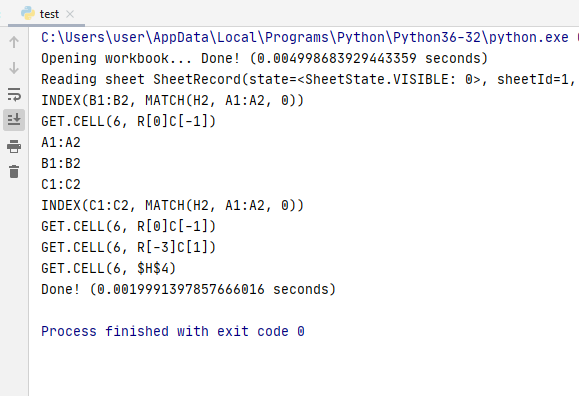
image

Does the output make sense? (mixing r1c1 and a1 notations might be a bad idea but we don't have current cell information so it is hard to stick with a1 addressing when we stringfy the formulas referred by the defined names)

@oleglpts
Copy link
Contributor Author

oleglpts commented Jun 11, 2020

I propose this solution: add the optional parameters row and col to NamePtg.stringify and immediately resolve the relative links to the interpreted form when the cell is known (see here ).

Sign up for free to join this conversation on GitHub. Already have an account? Sign in to comment

Labels

enhancement New feature or request

Projects

None yet

Development

Successfully merging this pull request may close these issues.

2 participants