Desktop App (Windows / macOS / Linux) for Home Assistant built with Electron
This project is fork from iprodanovbg/homeassistant-desktop and mrvnklm/homeassistant-desktop.
As of August 2025, the previous version of this project produced by iprodanovbg has been archived. Given it is unlikely to return to active development, I will continue to maintain my own version here for as long as people wish to use it. The project is currently in a stable iteration, but I would like to leverage this/a future application to more tightly integrate with Home Assistant itself (device sensors etc.) when I have time. This is highly dependent on my availability, but contributions are welcome.
I hope this project can be of some use to others if you like/liked the app! Issues are open to submit if you have any, though please be aware I may not be able to resolve all issues quickly or comprehensively - I will do my best.
Just download the latest version for your platform from the release section and install!
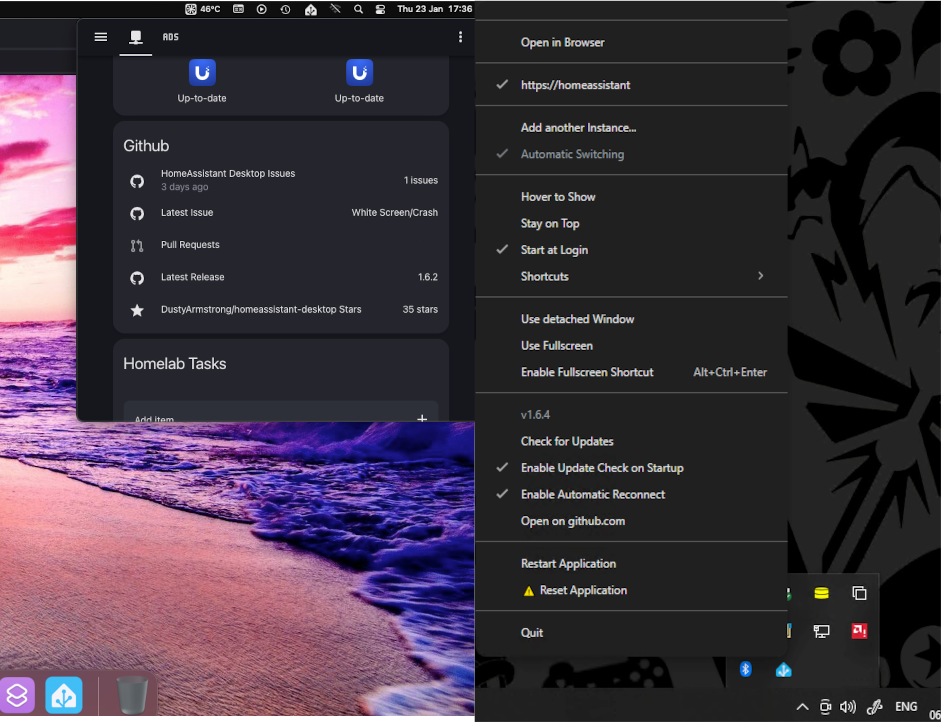
- hover / click the tray icon to open the app
- supports multiple instances of Home Assistant (including automatic switching)
- automatic instance discovery using bonjour
- automatic reconnection to your instance on connection loss
- right-click context menu for settings / reset / quit the app
- global keyboard shortcut (defaults to Cmd/Ctrl + Alt + X but can be changed) can be enabled to show / hide Home Assistant
- fullscreen mode (Cmd/Ctrl + Alt + Return)
- automatic update checks (if not disabled in context menu)
- at present support for self-signed certificates is YMMV (I recommend using Let's Encrypt to resolve this, though it is something I'll try to work on)
- support for Linux distros may vary, app tested on Debian-based flavors (XORG) but detailed feedback is welcome
- support for Wayland is limited - the application will still run however a number of Electron's features aren't implemented yet (e.g. shortcuts, checkbox display)
- if using "detached window" on Windows, instead of dragging, you have to resize it to move it
Per above, Wayland does not support - at least in any straightforward manner for this particular project - programmatic window positioning. Some users have had success with Remember Window Positions - https://github.com/rxappdev/RememberWindowPositions. This tool allows you to manage your window positions for many applications running under Wayland, not just HA Desktop.
This section will be updated to reflect any other solutions as needed. At this time, window positioning on Wayland is not something this project can effectively handle within its own scope.
If you experience visual issues with your Home Assistant dashboards when using Home Assistant Desktop, in particular if these are not consistent with your external web browser, this is most often caused by cached content. A function is present in the application to remove several layers of cache - in most cases the basic (soft) clear should suffice. You can find this and other options under the Clear Application Data menu. Should this fail, a hard clear (includes session storage) is the next best option.
If everything fails, you can manually clear the cache by removing all the content from:
Windows:
%appdata%\homeassistant-desktop\Cache\*
Mac:
/Users/{user}/Library/Application Support/homeassistant-desktop/Cache/*
Linux (may vary on your system):
~/.config/homeassistant-desktop/Cache/*
Additionally, please also clear the cache in your external web browser to confirm the issue only occurs with Home Assistant Desktop.
Pull requests are welcome. For major changes, please open an issue first to discuss what you would like to change.
Copyright 2024-2025, Dusty Armstrong
Copyright 2022-2023, Ivan Prodanov
Copyright 2020-2021, Marvin Kelm
Licensed under the Apache License, Version 2.0 (the "License"); you may not use this file except in compliance with the License. You may obtain a copy of the License at
https://www.apache.org/licenses/LICENSE-2.0
Unless required by applicable law or agreed to in writing, software distributed under the License is distributed on an "AS IS" BASIS, WITHOUT WARRANTIES OR CONDITIONS OF ANY KIND, either express or implied. See the License for the specific language governing permissions and limitations under the License.