






project_description
Explore the docs »
View Demo
·
Report Bug
·
Request Feature
Table of Contents
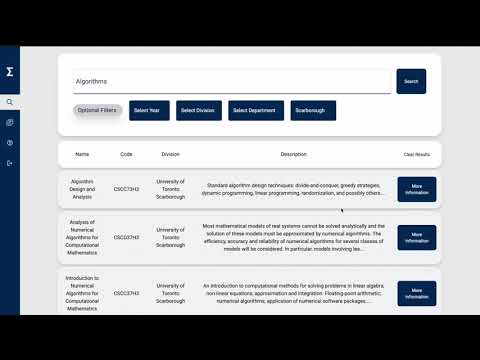
SigmaEducate is a course selection tool for University of Toronto students which supports creating and editing multiple profiles, fast and smooth course navigation, and boasts a modern and easy to use user interface
This is an example of how you may give instructions on setting up your project locally. To get a local copy up and running follow these simple example steps.
To run the project, you will need Docker, please refer to this documentation on how to install Docker
-
WINDOWS USERS: You need to install WSL2 Ubuntu
-
Check if Docker and Docker-Compose exist in your system
docker version
docker-compose --version
-
You also need to download VS Code to run the dev environment, you also need the following VSC extensions:
- Docker
- Remote - Containers
- Remote Development
- FOR WINDOWS: Remote - WSL
The project is fully dockerized, meaning you won't need to install any prerequisite languages or frameworks.
- Clone the repo
git clone [email protected]:ECE444-2021Fall/project1-education-pathways-group-11-sigmalab.git
- Navigate to the project's folder and run
cd project1-education-pathways-group-11-sigmalab docker-compose up --build - Open
frontendoreducation_pathwaysfolders in VS Code:code {folder_name} - VS Code will notify you to re-open the folder in a dev container; if it doesn't, do the following:
- Open the Command Pallete
Cntl+Shift+P - Run
Remote-Containers: Reopen In Container
- Open the Command Pallete
- To shutdown the app, run the following in the project's folder
docker-compose down
In Visual studio code, ensure that the following settings are configured as follows:
- Editor: Default Formatter - Set this to "Prettier - Code Formatter"
- Editor: Format on Save - Enable this
- React Frontend:
http://localhost:3000/- React should auto-reload the page whenever you save a file
- PostgreSQL:
http://localhost:4000/ - Adminer:
http://localhost:4500/- Adminer is used to view the database tables and records
- System: PostgreSQL
- Server: database
- Username: postgres
- Password: postgres
- Flask Backend:
http://localhost:5000/- Whenever you want to rebuild, run
docker-compose restart edu_pathways
- Whenever you want to rebuild, run
- To run a single service:
docker-compose run --service-ports {service_name; ex: frontend} {command; ex: npm start} - To restart a service:
docker-compose restart {service_name; ex: edu_pathways} - To get into the container
docker exec -it frontend bash
Use this space to show useful examples of how a project can be used. Additional screenshots, code examples and demos work well in this space. You may also link to more resources.
For more examples, please refer to the Documentation
- [] Feature 1
- [] Feature 2
- [] Feature 3
- [] Nested Feature
See the open issues for a full list of proposed features (and known issues).
Contributions are what make the open source community such an amazing place to learn, inspire, and create. Any contributions you make are greatly appreciated.
If you have a suggestion that would make this better, please fork the repo and create a pull request. You can also simply open an issue with the tag "enhancement". Don't forget to give the project a star! Thanks again!
- Fork the Project
- Create your Feature Branch (
git checkout -b feature/AmazingFeature) - Commit your Changes (
git commit -m 'Add some AmazingFeature') - Push to the Branch (
git push origin feature/AmazingFeature) - Open a Pull Request
Distributed under the MIT License. See LICENSE.txt for more information.
Adel Aswad - [email protected]
Sam Weninger - @twitter_handle - email@email_client.com
Alex Senn - [email protected]
Youssef Chmait - @twitter_handle - email@email_client.com
Jay Bihola - @twitter_handle - [email protected]
Project Link: https://github.com/ECE444-2021Fall/project1-education-pathways-group-11-sigmalab