Releases: EverestAPI/CelesteTAS-EverestInterop
v3.47.0 (Studio v3.10.0)


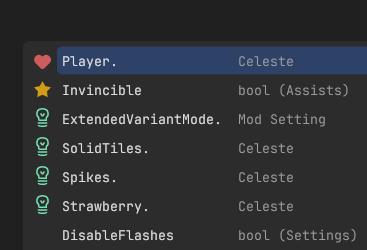
Auto-complete has been has been a big feature of the initial Studio v3 release,
however now with over a year of user feedback, there have been some improvements:
Importancy Ranking
All entries are now ranked, such that the most relevant ones are more likely to be at the top.
This is achived by placed them into 4 different categories, which are listed in the following order:
- Favourites: These are manually chosen by clicking on the heart icon and always appead on top
- Frequently Used: These are your top-5 most used entries (note that an entry is only counted when it is actually selected)
- Suggestions: These are suggestions from the game, based on what could be useful in the current situation
- Uncategorized: This is everything remaining, which doesn't fall into another category
Reduced Clutter
Entries which have seen basically no usage have been removed to reduce visual clutter.
Additionally, the popup window now attempts to take up less space.
Feedback
Please continue to share feedback about the auto-complete feature - but of course everything else too! - so that they can further be improved.
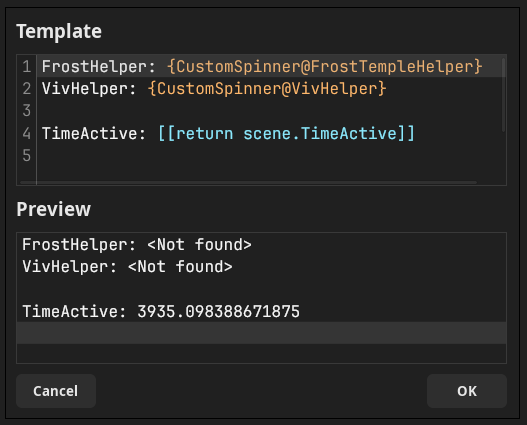
The Custom-Info editor has now been upgraded from a simple textbox into a full proper editor!
That includes auto-completion, syntax-highlighting and a live preview.
With this, it should now be considerably easier to quickly create a Custom-Info template for something specific.
Additionally, the Game Info displayed in Studio is now a proper textfield, meaing you can select and copy anything from it with ease.
New Commands
RequireDependency
This command declares dependencies required for the TAS to run, which can easily be installed with a respective dialog box.
Examples:
RequireDependency, StrawberryJam2021for any versionRequireDependency, StrawberryJam2021, 1.10.0for specifically v1.10.0 or higher
ActivatedLobbyWarps
This command tracks which warp points have been activated during the TAS' execution,
which can be useful for lobby routing or sync-checking.
Example: ActivatedLobbyWarps: [4, 7]
Features
- Add accurate hitbox rendering for CommunalHelper Melvins
- Allow other mods to open a 3rd-party text window in Studio
- Add
RequireDepenencycommand - Add
ActivatedLobbyWarpscommand - Display popup when generated TAS file contains errors
- Add Favourite/Suggestion/Frequently Used entries to auto-complete menus
- Rework Custom-Info Editor into own popup
- Allow for selection of text from the Game Info box
- Add auto-complte support for StateMachine states of Player/Seeker/Oshiro
- Allow setting VirtualButton fields/properties directly
- Add BossesHelper support to
SeedRandomcommand
Bug Fixes
- Inaccuracies in RTA timer
- Deadlock when stepping back into freeze frames
- Inactive timers showing up in Info HUD when TimeRate is zero
- Properly save altered Crouch Dash and Grab modes in savestates
- Desync caused by inconsistant timings for exiting options menu
- Folder path with spaces not being correctly opened Finder on macOS
Integrate Read Commandsincorrectly skipping some lines at the start/end- Light/Dark title bar not being properly applied on Windows
- Properly style bottom-right corner tile of scrollbars on Windows (R.I.P. ugly white square)
- Undo-state getting corruped by fix-up actions
- Don't register mouse inputs while window isn't focused
- Crash if entity has a
nullscene - Use quotes if generated
consolecommand uses spaces - Avoid starting TAS when manually starting recording with TAS Recorder
- Certain entities not being watchable in the Info HUD
Tweaks
- Hide JungleHelper fireflies with Simplified Graphics
- Hide light beams with Simplified Graphics
- Hide KoseiHelper Debug Renderer with Simplified Graphics
- Enable appended Actual Collide Hitboxes by default
- Clear discovered lobby map when 'console load'ing
- Always allow for tab-completion in the auto-complete menu
Removals
- Unused clutter in parameter auto-complete for
Set/Invokecommands
Commit Details
Features
- 71ded1f Add hitbox renderer for Melvin sight lines (@psyGamer)
- 3a0e314 Studio: Display popup with all detected errors when opening a generated file (@psyGamer)
- e840f64 Studio: Track usage count of used auto-complete entries (@psyGamer) #126
- b1ef8e9 Studio: Allow marking auto-complete entries as favourites (@psyGamer) #126
- ddc1605 Studio: Rank frequently used entries higher and display temporary "icon" (@psyGamer) #126
- 6b691c9 Provide type / member suggestions from CelesteTAS (@psyGamer) #126
- a590532 Add initial suggestions, based on current entities (@psyGamer) #126
- bf05e54 Improve auto-complete suggestions for entities (@psyGamer) #126
- 118a493 Provide auto-complete suggestions for state-machine states (@psyGamer) #126
- 916abb9 Provide auto-complete support for accessing components on entities (@psyGamer) #126
- 03dde3d Add auto-complete support for EntityID filters (@psyGamer) #126
- b45748c Studio: Add vector assets for the new popup features (@psyGamer) #126
- ad367aa Studio: Display new custom icons for popup menu entries (@psyGamer) #126
- 4d443b0 Studio: Direct editing hotkeys to respective instance (@psyGamer) #127
- a8d3ff3 Studio: Add initial info-template editor with custom syntax highlighting (@psyGamer) #127
- 0516dd9 Provide auto-complete support for target-queries in the info-template editor (@psyGamer) #127
- 4c9fe61 Studio: Support info-template tables and attempt to auto-close syntax pairs (@psyGamer) #127
- e6049f8 Studio: Setup layout of form for editing info-template (@psyGamer) #127
- 633e89f Studio: Show live-preview of info-template while editing (@psyGamer) #127
- c965d1f Studio: Re-add popout window for game info display (@psyGamer) #127
- fa14efc Add auto-complete support for the 'RequireDependency' command (@psyGamer) #123
- f24bcd5 Add auto-complete support for the 'RequireDependency' command (@psyGamer) #123
- 0a40fd3 Clear map when 'console load'ing into a lobby (@psyGamer) #125
- 651ee6b Allow setting VirtualButton fields/properties directly (@psyGamer)
- 93ca1c0 Hide KoseiHelper DebugRenderer with Simplified Graphics (@psyGamer)
- eb3df87 Integrate BossesHelper's 'set_boss_seed' into 'SeedRandom' command (@psyGamer)
Bug Fixes
- 976d1e1 Inaccuracies in Melvin sight-line hitboxes (@psyGamer)
- f998913 Inconsistencies with RTA timer (@psyGamer)
- e0c39d4 Deadlock when stepping back into freeze frames (@psyGamer)
- 1c2c023 Inactive timers showing up when TimeRate == 0 (@psyGamer)
- 8b19d6a Add savestate support to altered Crouch Dash / Grab Modes (@psyGamer)
- 630e60d Desync caused by saving when exiting options menu (@psyGamer)
- 7282cab Studio: Support opening paths with spaces on macOS (@psyGamer)
- 84665f8 Desync caused by auto-saving (@psyGamer)
- eb6024e Actually macOS directory opening this time (@psyGamer)
- 98daee9 Reference own file for Play-command target line (@psyGamer)
- 9dae14e Use consistent formatting when writing file from CelesteTAS (@psyGamer)
- 02756e1 Studio: Close pop-ups when caret is moved (@psyGamer)
- 2e0fec9 Clean-up stale savestates (@psyGamer)
- 5baa18a Studio: Only skip over start/end row of Read-command if it's a label (@psyGamer)
- 9d5b81c Studio: Sizing issues with popup menu (@psyGamer) #126
- d02e8f7 Studio: Sizing of popup menu (@psyGamer) #126
- 88b39ea Studio: Off-by-one error while calculating visible entries (@psyGamer) [#126](https://api.github.com/repos/EverestAPI/CelesteTAS-EverestIntero...
Contributors


Assets 8
v3.46.2 (Studio v3.9.7)
c3595e5Repository Cloning
You can now easily clone Git repositories directly from Studio!
Simply goto File -> Clone Git Repository... and enter the appropriate URL and target directory.
This has the advantage of always cloning the respective submodules as well, unlike GitHub's "Download .zip" option.
Features
- Utility to clone Git repositories from Studio
Bug Fixes
- Commands like
Set,Player.Speed.X,300not working (anySetcommand referencing value types in value types) - Exception when setting element of collection with
[]indexing syntax - Disable hotkey inputs in modded binding GUIs
- Trim room labels before validating
- Incorrectly rendering various SkinModHelper+ features on skin
Commit Details
Features
Bug Fixes
- 08b9958 TargetQuery: Always propagate-up value type stack (@psyGamer)
- 232960f TargetQuery: Properly resolve type for element types for collecting indexing (@psyGamer)
- 0580ab7 Properly track modded binding GUIs (@psyGamer)
- 1108544 Trim room labels before validating (@psyGamer)
- 6a93d73 Apply SMH+ color grades to visual sprite (@psyGamer)
- 02f8674 Correctly render SMH+ custom hair on visual sprite (@psyGamer)
- 4cf1196 Properly render SMH+ death particles on visual sprite (@psyGamer)
Code Refactoring
Builds
Continuous Integration
Contributors
Assets 8
v3.46.1 (Studio v3.9.6)
bc324b3Features
- Ignore breakpoints inside files accessed with
Readcommands - Add
*spread operator to target-queries, to flatten out collections (e.g.Set,Player.ChaserStates*.TimeStamp,0) - Add
[]index operator to access individual elements of collect (e.g.Get,Player.Sprite.animations[idle].Delay) - Allow specifying custom file name for
StartRecording,FileName
Bug Fixes
- Avali SkinMod not working with "Prevent Skin-Mod Gameplay Changes" option
- Changes in breakpoint playback speed not immediately being respected
- RNG seeding being applied outside of TAS
- Not being able to set statemachine states with names (e.g.
Set,Player.StateMachine.State,Player.StNormal) - Auto-complete with
Invokecommands not being avaiable when mods have unloaded optional dependencies - "Game Settings" menu in Studio not reflecting changes to numeric inputs
- Apply correct theme for changelog popup dialog
Tweaks
- Adjust wording / duration of auto-pause toast message
Commit Details
Features
- 12e2b9c Support custom file names with StartRecording command (@psyGamer)
- acb4bc9 Disable breakpoint parsing in Read-commands (@psyGamer)
- 91725d9 TargetQuery: Add indexing operator with '[]' (@psyGamer)
Bug Fixes
- 4f9223f Add special-case for Non-SMH Avali SkinMod (@psyGamer)
- 853cda5 Immediately account for changes in playback speed (@psyGamer)
- 3e39440 Studio: Ensure document never has no lines (@psyGamer)
- 5e5eacc RNG: Avoid resetting RNG state while not in TAS (@psyGamer)
- ade9b11 RNG: Avoid sending log message when seeding Aurora's Helper random (@psyGamer)
- dd76731 TargetQuery: Resolve value queries after checking handlers but before attempting to parse as primitives (@psyGamer)
- f80522c TargetQuery: Catch exceptions caused by unloaded optional dependencies (@psyGamer)
- 74454ad Remove long outdated Isa's Grab Bag fast-forward optimization (@psyGamer)
- 499ad1a Studio: Reflect decimal point changes in menu (@psyGamer)
- 093e04f Studio: Load theme from settings before showing changelog (@psyGamer)
Styles
Code Refactoring
- c177bb9 Add universal reporting system for warnings/errors in TASes (@psyGamer)
- 4c137ab TargetQuery: Require explicit spread operator ('*') to flatten collections (@psyGamer)
Tweaks
- da38764 Move auto-pause toast message to dialog system and increase duration to 8s for first time (@psyGamer)
Builds
Contributors
Assets 8
v3.46.0 (Studio v3.9.5)
813ea63Universal RNG Seeding
Even though most things in Celeste are deterministic, some are not!
To solve this issue, CelesteTAS now changes all randomness to have deterministic behavior.
Additionally, all (technically) undeterministic randomness can now be seeded with the SeedRandom,[Target],[Seed] command.
You can refer to the wiki page to read about all supported cases and the ethics surrounding them.
Please report any remaining cases of undeterministic behaviour or randomness!
That also includes deterministic behavior which breaks with seemingly unrelated changes.
Features
- Consistent behaviour of randomness when running a TAS
- Universal RNG seeding system with
SeedRandomcommand
Bug Fixes
- Maintain correct
Calc.Randomstate while fast-forwarding - Dust sprites not being created while fast-forwarding
Commit Details
Features
- 72936e7 RNG: Use shared random instance for only Update calls (@psyGamer)
- 771e7c8 RNG: Allow seeding regular 'Update()'-only random instance (@psyGamer)
- 327e1e9 RNG: Allow adjusting Engine.FrameCounter with RNG seeding system (@psyGamer)
- debbfb3 RNG: Allow accessing replaced variables with target-queries (@psyGamer)
- a6f3b75 RNG: Add alias for 'ah_set_seed' console command (@psyGamer)
- 8ac7a94 RNG: Allow seeding randomness used for debris creation (@psyGamer)
- 0ab13c0 RNG: Allow seeding vanilla prologue bridge (@psyGamer)
- b0da352 RNG: Allow seeding Pandora's Box Tile Glitchers (@psyGamer)
- f95c183 RNG: Allow seeding summit launch shaking (@psyGamer)
- 0a054cf RNG: Allow seeding VortexHelper Color Switches (@psyGamer)
- f6e2cd3 RNG: Allow seeding Spekio's Toolbox Bullet Generators (@psyGamer)
- f212bf8 RNG: Allow seeding AuraHelper Lanterns and Generators (@psyGamer)
Bug Fixes
- 717f198 RNG: Maintain correct Calc.Random state while fast-forwarding (@psyGamer)
- d80a398 Dust sprites not being created while fast-forwarding (@psyGamer)
- a0a3a05 RNG: Add savestate support for individual random instances (@psyGamer)
Tweaks
Builds
Contributors
Assets 8
v3.45.4 (Studio v3.9.5)
ce210f4Features
- Allow force-enabling accessibility tools only after doing a casual playthrough
Tweaks
- Better communicate warnings / risks about force-enabling accessibility tools in options
Commit Details
Features
Tweaks
- c7683e3 Move "For Current Session" option between the default and "Always" (@psyGamer)
- 0bd1316 Make warnings about force-enabling accessibility tools more prominent to the user (@psyGamer)
- 259fc88 Wording and presentation of warnings about force-enabling accessibility tools (@psyGamer)
- 11b860e Dialog: Add German translation for "Prevent Skin-Mod Gameplay Changes" option (@psyGamer)
Builds
Contributors
Assets 8
v3.45.3 (Studio v3.9.5)
9edab2bFeatures
- Allow force-enabling accessibility tools only for current session
- Add
--validate-room-labelsCLI option to promote room label validation from a warning to an error
Bug Fixes
- Crash when removing last line in Studio
Project File Formattertool not working correctly for some cased on Windows- Studio requiring the user to manually install .NET 8 on Linux
Tweaks
- Hide in-game popup messages while recording with TAS Recorder
- Require each changelog page to be viewed for at least 1 second, to avoid users skipping over them
- Avoid showing "Unsaved Changes" indicator when using
Auto Save File
Commit Details
Features
- 6818c0f Add
--validate-room-labelsCLI option to promote current warning to an error (@psyGamer) - 5710207 Allow force-enabling accessibility tools only for current session (@psyGamer)
Bug Fixes
- 0214820 SyncCheck: Properly calculate combined hash for all files (@psyGamer)
- 9053822 Studio: Crash caused by removing last line of file (@psyGamer)
- 772c572 Studio: Properly handle errors during file formatting and flush all files to filesystem at once (@psyGamer)
- abdfec4 Studio: Publish self-contained binary for GTK backend (@psyGamer)
- 68512b2 Avoid applying/restoring SkinMod fix when always active (@psyGamer)
Tweaks
- 7c42e2e Hide popup-toasts while recording (@psyGamer)
- 3ba1a64 Studio: Require each changelog page to be viewed for at least 1s (@psyGamer)
- e251772 Studio: Avoid showing unsaved changes indicator when autosaving is enabled (@psyGamer)
Builds
Continuous Integration
Contributors
Assets 8
v3.45.2 (Studio v3.9.4)
e5d768bFeatures
- Automatically fill-in intro animation and first room label for new files if possible
- Expose SkinMod desync fix to RTA gameplay
Bug Fixes
- Breakpoint speed being shown twice in Studio
- Prevent Frame Advance or Slow Forward from triggering auto-pause popup
- Account for potential failure of loading a savestate
- Incorrect classification of various triggers
- Unexpected editing behaviour when using
\nin commands - Not being able to bind number keys to actions in Studio
- Frame Operations not working with AZERTY keyboard layout
- Exception when using Read-command with blank file path
- Crash when running a TAS in a map which isn't structured properly
- Crash when starting game while TAS with errors / warnings is opened
- Crash when commenting-out a blank line
- Misalignment of inputs shown in the Info HUD
- SyncChecker overflowing Windows command line length
Tweaks
- Display infinity instead of
int.MinValuewhen time-rate is zero - Fully disable particles while fast-forwarding
- Show warning when trying to use savestate breakpoints without Speedrun Tool being installed
- Wait 0.1s before saving a file to allow for changes to accumulate and avoid changes not being properly saved when rapidly adjusting inputs
Refactors
- Upgrade .NET 8
- Use Everest's
EntityData/Trackersystems instead of own solutions
Commit Details
Features
- f41058d Expose skin-mod desync fixer to regular RTA gameplay (@psyGamer)
- 79c82c9 Support more intro types with auto-generated new-file template (@psyGamer)
- 80a3459 Display warning message when using savestate breakpoint without SRT installed (@psyGamer)
Bug Fixes
- 9fb5445 Studio: Breakpoint playback speed being displayed twice (@psyGamer)
- 95b8f1d Avoid Frame Advance or Slow Forward triggering auto-pause popup (@psyGamer)
- 58db323 SyncCheck: Pass files to sync-check via additional file (@psyGamer)
- 40e5163 Account for failure when loading savestate (@psyGamer)
- 7311240 SyncCheck: Hash game assembly based on status string instead of file hash (@psyGamer)
- 0107684 Display infinity instead of int.MinValue when time-rate is zero (@psyGamer)
- 4d40b7e Incorrect classification for various unimportant / camera triggers (@psyGamer)
- f8ffa4e Crash when runnning TAS in stay .bin map (@psyGamer)
- d31810f Read-command with blank file path causing exception (@psyGamer)
- 4c03129 Studio: Respect input-sending rules when using Studio-specific binding (@psyGamer)
- 8e63af5 Studio: Escape special characters when formatting command line (@psyGamer)
- 836f547 Crash with toast message trying to render before fonts are loaded (@psyGamer)
- 2075f90 Studio: Number keys being mapped onto alphabetic keys (@psyGamer)
- 2b085db Studio: Support usage of frame operations with AZERTY keyboard layout (@psyGamer)
- 14e0291 don't always try to migrate on same version number (@jakobhellermann) #120
- c65e87f Studio: Caret/Selection being clamped before inputs have been fixed (@psyGamer)
- 9cfaf53 Misalignment of inputs shown in Info HUD (@psyGamer)
Documentation
- ba31672 Clean-up README and move more documentation to the wiki (@psyGamer)
- 39cde94 Mention tools which are integrated into Studio (@psyGamer)
- dfeff43 Refer to the "Getting Started" guides on the wiki from the README (@psyGamer)
- 6d1f7f3 Use lowercase Discord username (@psyGamer)
- 10d5cd5 Mention development versions and ways to properly provide feedback in the README (@psyGamer)
Code Refactoring
- 3b31fb5 Upgrade to .NET 8 (@psyGamer)
- 8312b92 Migrate fast-forward optimizations to new class (@psyGamer)
- 96d211d Replace own EntityID tracking system with Everest's solution (@psyGamer)
- 9b85318 Use Everest's tracker extension system (@psyGamer)
- d3a3956 Studio: Thread-safe delayed file saving (@psyGamer)
Tweaks
- 17f0cb8 SyncCheck: Log individual file/mod hashes (@psyGamer)
- a9defe8 Bump Everest version to 5617 (@psyGamer)
- 3fd5de7 Studio: Force revision of 0 for all version checks (@psyGamer) #120
Performance Improvements
- 9b3b2a0 SyncCheck: Disable file-system-watchers (@psyGamer)
- 5d88508 Fully disable particles while fast-forwarding (@psyGamer)
Builds
Continuous Integration
Contributors

Assets 8
v3.45.1 (Studio v3.9.3)
632183cFeatures
- Allow adjusting repeat count slightly, just like how frame counts can be adjusted (with Ctrl+Shift+Up/Down and Shift+MouseWheel)
- Allow zooming in/out of Studio with Ctrl+Plus/Minus keyboard bindings
Bug Fixes
- Re-saving frame after clearing when paused on savestate breakpoint
- Invalid playback state being set after loading a savestate
- Slightly incorrect logic for determining save point for savestate breakpoint
Tweaks
- Only show auto-pause toast message when playing TAS back normally. Also reduce duration from 5s to 2s
- Change default hotkey for Frame Step Back to Ctrl+[ in order to match the regular Frame Advance default hotkey
- Limit Repeat command at 10 million iterations to avoid accidentally running out of memory
- Use TAS command parsing for
get/set/invokedebug commands to support spaces in arguments
Commit Details
Features
- 186d241 Studio: Support adjusting repeat count with Ctrl+Shift+Up/Down / Shift+MouseWheel (@psyGamer)
- 2827a9b Studio: Allow using Ctrl+Plus/Minus to zoom in/out (@psyGamer)
Bug Fixes
- 082dd17 Avoid re-saving frame if cleared while paused on breakpoint (@psyGamer)
- 949c176 Set TAS state accordingly when loading savestate (@psyGamer)
Tweaks
- c894368 Avoid compiling mod-interop example into release binary (@psyGamer)
- 7496336 Don't show auto-pause toast when fast forwarding into end and reduce duration (@psyGamer)
- dc22531 Change default Frame Step Back hotkey to Ctrl+[ to match Frame Advance default (@psyGamer)
- f57f6ed Limit repeat count to 10 million to avoid accidentally using all available memory (@psyGamer)
- e1d6748 Use TAS command parsing for
get/set/invokedebug commands (@psyGamer)
Builds
Continuous Integration
Commits
- bca2126 fix crash when choosing enum entry in menu (@jakobhellermann) #119
Contributors
Assets 8
v3.45.0 (Studio v3.9.2)
623e601Multiple Savestate Slots
With the release of multiple savestate slots for Speedrun Tool, by Lozen, CelesteTAS follows with exposing that functionally to regular TASes.
Simply use as many savestate-breakpoints as you desire, and it'll use the most appropriate when restarting the TAS.
While there is no hard upper limit, for your own computers sake, try to keep the amount reasonable and only in the area you're currently working in.
NOTE: For backwards compatibility reasons, the minimum required SpeedrunTool version is not v3.25.0. However, you will need it (or later), to be able to use multiple savestates at once, so make sure it's up-to-date.
Frame Step Back
Previously a feature of TAS Helper, this now has been moved over to CelesteTAS itself.
By pressing the hotkey (Ctrl+I by default), you'll be able to step in time to previously executed inputs.
This an accumulative action, allowing you to specify the amount of frames by repeatedly pressing the hotkey (and hotkeys which would usually forward to TAS), before the action is performed.
Since the game does not support going back in time, it has to play back to the target frame from a breakpoint before or the start if none is available. Since that is an expensive operation, it is best to specify the desired frame count once, to avoid re-running the TAS multiple times.
Force-Stop Breakpoints
By placing an exclaimation mark after a breakpoint (***!), it will always cause the TAS to be stopped at the desired location.
This can be useful when wanting to go back without having to comment-out / delete all breakpoints after it.
Improved Runtime Validation
While playing a TAS back, the current level and room will be validated, based on available information such as a console load command or room labels.
This is useful to identify desyncs in the TAS early.
NOTE: Since some projects currently have incorrect room labels, it's only a warning right now. However, it is intended to become an error later on.
Features
- Multiple Savestate Slots support
- Migrate Frame Step Back from TAS Helper
- Force-Stop Breakpoints
- Live-update simplified spinner color when changing the setting
- Validate active level and room labels
Bug Fixes
- Crashes / Desyncs caused by attempting to fix desyncs caused by SkinMods
- Custom Info Template displaying instance instead of value for arrays
- Specifying a
@ModNamesuffix on target-queries returning duplicate results - Command separator placeholder not being replaced when inserted from command menu in Studio
- Not being able to undo past implicit formatting changes
- Studio auto-installer having wrong checksum hardcoded on Linux
- Desync caused by Simplified Graphics with some custom FrostHelper spinners
- Info HUD not accounting delta-time for frame count calculations
- Debug Console commands not allowing same separators, like respective TAS commands
- Crash when launching Studio v3 for the first time
Tweaks
- Display popup-message for various actions during TAS playback
Commit Details
Features
- dce58d9 Validate room labels while executing (@psyGamer)
- c5cf7e1 Validate
Read,...,Startcommand was loaded into the correct level (@psyGamer) - 21174da Add mod-interop exports for checking state of TAS (@psyGamer) #117
- 126e16b Savestate: Add support for multiple savestates at once in TAS (@psyGamer) #117
- 8f033e8 ModInterop: Provide mod-interop exports for working with savestates in TAS (@psyGamer) #117
- 7d8b643 Add force-stop breakpoints (@psyGamer)
- a4a6edb Add legacy support for SRT v3.24.4 (@psyGamer) #117
- ea3c894 Port accumulative Frame Step Back feature from TAS Helper (@psyGamer)
Bug Fixes
- 4b040ec Crash caused by missing CreateFramesMetadata hook invocation (@psyGamer)
- 9322061 Properly copy-over current animation data when applying SkinMod fix (@psyGamer)
- 323e331 Only restore variants of the value actually changed (@psyGamer)
- 3418aed Studio: Replace command separator placeholder when inserting from menu (@psyGamer)
- cb225dd Missing bounds check for level assertion (@psyGamer)
- 760e26b Off-by-one error with room label validation (@psyGamer)
- 1ac5895 Off-by-one error when determining Read-command target lines (@psyGamer)
- 035b72c Crash with invalid sprite-state on start of TAS (@psyGamer)
- 3ca62ca Studio: Not being able to undo past fixup actions (@psyGamer)
- a67b733 Add missing 'TAS.Utils' using directive (@psyGamer) #117
- 8b5a563 Studio auto-installer issues on Linux (@psyGamer)
- 2b0d649 TargetQuery: Duplicate base-type resolving multiple instances (@psyGamer)
- 0a93767 InfoHUD: Custom-Info result array displaying instance instead of value (@psyGamer)
- 68cd70f Studio: Crash on first launch (@psyGamer)
- f8fac9b Savestate: Issues with frame step back interactions (@psyGamer) #117
- a7605da Savestate: Some remaining issues with TAS state management (@psyGamer) #117
- 97216f7 Info HUD timers not accounting for delta-time differences (@psyGamer)
- f7dba73 Incorrectly parsing arguments for 'set'/'invoke' debug commands (@psyGamer)
- 25c8187 Studio: Crash on WPF by accessing UI state from filesystem watcher (@psyGamer)
Styles
- f383c03 Savestate: Disable warning caused by implicit assignment through ModInterop (@psyGamer) #117
Code Refactoring
- af2a27f Savestate: Unify SpeedrunTool mod-interop into single file (@psyGamer) #117
- 6694001 Savestate: Use nameof for type-checked correct save keys (@psyGamer) #117
- 30fe117 SimplifiedGraphics: Live-update spinner color and fix gameplay desyncs (@psyGamer)
- 1325e89 Decouple popup toast system from entity update cycle (@psyGamer)
Tweaks
- ea7a1bb SyncCheck: Reduce invalid room labels to just a warning (@psyGamer)
- 60ed679 Studio: Convert char-hotkeys into native-hotkeys if possible (@psyGamer)
- 405a82c Display various popup toasts for playback actions (@psyGamer)
- 96c1f97 Dialog: Frame Step Back naming (@psyGamer) #117
Removals
- 2dbb5e7 Headless: Optimizations during level loading (@psyGamer)
- 77ddb98 SpeedrunTool assembly reference (@psyGamer) #117
Performance Improvements
- 6108875 Headless: Prevent generation of tile grid (@psyGamer)
- e4b2955 Headless: Prevent backdrops from being loaded (@psyGamer)
Builds
Continuous Integration
- 6f21482 Only replace sync-check cache if checksum changed (@psyGamer)
- ba97209 Only update sync-check cache on master branch (@psyGamer)
Commits
- f68e816 remove obsolete TasHelper modinterop (@LozenChen) #117
- e3b8fdb use mod interop to communicate with speedrun tool (@LozenChen) #117
- d211765 remove SpeedrunTool lib and support SpeedrunTool v3.24.4 (@LozenChen) #117
- d777fa5 leave a comment for future development (@LozenChen) #117
- a3ed1fc add SpeedrunTool input Deregister back (@LozenChen) #117
- 30bb6f9 update font file (@LozenChen) #117
- c54b7b7 add chinese dialog (@LozenChen) #117
- baa3950 interop with SRT to reduce verbose log (@LozenChen) #117
- 9a11e32 provide GroupCounter mod interop (@LozenChen) #117
- 41e7389 change required tashelper verison (@LozenChen) #117
- be68ec6 fix wrong tashelper version (@LozenChen) #117
Contributors
Assets 8
v3.44.1 (Studio v3.9.1)
b21ec6d