Home
Project Pages assembles various image files into "Pages" creating a library "Project".
Projects are created using a zip container ending with *.project_pages.zip and this helps promote good storage management while remaining simple to access even outside Krita with Project Pages.
After installation the docker will present itself empty. Create or connect projects to manage.
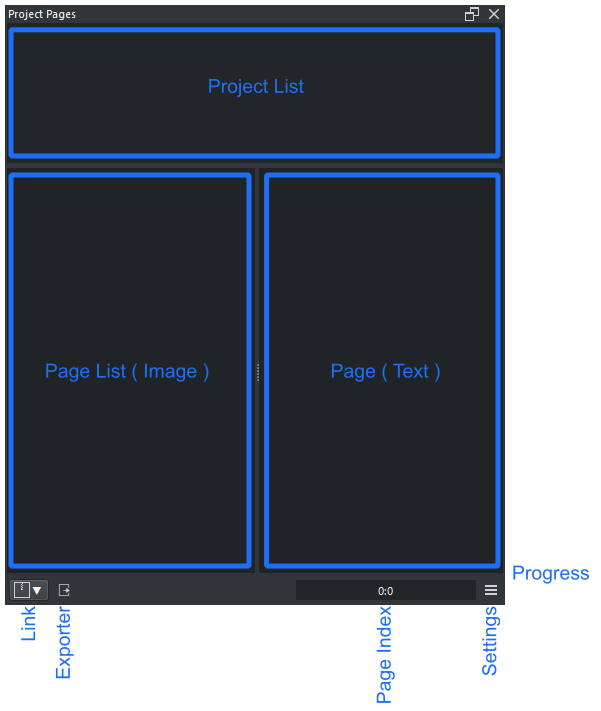
- Project List : List of recent projects
- Page List : List of pages within the project
- Page Text : Text note for the page, this is file format independent
- Progress : Progress of a given operation
- Link : Access to active project folders
- Quick Exporter : Export the pixels inside a selection to a given dimension in Tab System
- Active Project : Active project filename
- Page Index : Page index of the active project
- Settings : Opens the settings dialog
Various options that affect Project Pages.
- Tab Template : Template options for Page creation
- Tab Information : Active document XML information
- Tab Guides : Guide lists and options
- Tab Layers : Check layers name consistency and rename
- Tab System : System options
- Manual : Link to the manual
- License : Link to the license
- kra ( recommend )
- krz
- ora
- bmp
- gif
- jpg
- jpeg
- png
- pbm
- pgm
- ppm
- xbm
- xpm
- tiff
- psd
- webp
- svg
- svgz
- zip