-
Notifications
You must be signed in to change notification settings - Fork 708
VPP g2
- 1 Introduction
- 2 Usage
- 3 Screen Taxonomy
- 4 Mouse Gestures
- 5 Event Selection
- 6 Snapshot Ring
- 7 Chasing Events
- 8 Burying Boring Tracks
- 9 Summary Mode
- 10 Hotkeys
G2 is a fine-grained event-log viewer. It's highly scalable, supporting O(1e7 events) and O(1e3 discrete display "tracks"). G2 displays binary data generated by the vppinfra "elog.[ch]" logger component. G2 also supports for the CPEL file format, described here.
$ cd build-root
$ make g2-install
$ ./install-native/g2/bin/g2 --help
g2 [--ticks-per-us <value>][--cpel-input <filename>] [--clib-input <filename]>
G2 (x86_64 GNU/Linux) major version 3.0
Built Wed Feb 3 10:58:12 EST 2016
When viewing a ".cpel" file, use "g2 --cpel ". When viewing a vppinfra event log, use "g2 --clib ".
The file $HOMEDIR/.g2 contains display preferences, which can be overridden. Simply un-comment one of the stanzas shown below, or experiment as desired.
/*
* Property / parameter settings for G2
*
* Setting for a 1024x768 display:
* event_selector_lines=20
* drawbox_height=800
* drawbox_width=600
*
* new mac w/ no monitor:
* event_selector_lines=20
* drawbox_height=1200
* drawbox_width=700
*
* 1600x1200:
* drawbox_width=1200
* drawbox_height=1000
* event_selector_lines=25
*
* for making screenshots on a Macbook Pro
* drawbox_width=1200
* drawbox_height=600
* event_selector_lines=20
*/
Here is an annotated G2 viewer screenshot, corresponding to activity during BGP prefix download. These data were captured on a Cisco IOS-XR system:
The viewer has two main scrollbars: the horizontal axis scrollbar shifts the main drawing area in time; the vertical axis changes the set of visible process traces. The zoomin / zoomout operators change the time scale.
The event selector PolyCheckMenu changes the set of displayed events.
Using these tools -- and considerable patience -- one can make sense of a given event log.
G2 has three fairly sophisticated mouse gesture interfaces which are worth describing in detail. First, left mouse clicking on a display event pops up a per-event detail box:
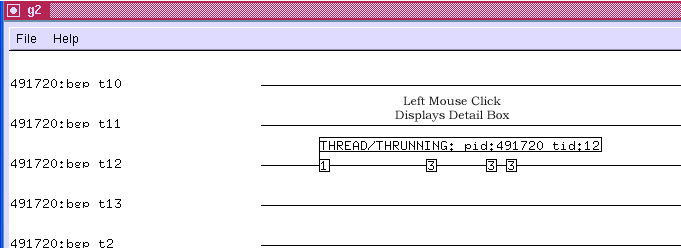
A left mouse click on an event detail box takes it down.
To zoom to a region of the display, press and hold the left mouse button; drag right or left until the zoom-fence pair appears.
When the zoom operation completes, the display is as follows:
To use a time ruler, press and hold the right mouse button; drag right or left until the ruler measures the region of interest. If the time axis scale is coarse, event boxes can have significant width in time, so use a "reference point" in each event box when using the time ruler.
Changing the Event Selector setup controls the set of points displayed in an obvious way. Here, we suppress all events except "this thread is now running on the CPU":
Same setup, with all events displayed:
Note that event detail boxes previously shown, but suppressed due to deselection of the event code will reappear when one reselects the event code. In the example above, the "THREAD/THREADY pid:491720 tid:12" detail box appears in this fashion.
Three buttons in lower left-hand corner of the g2 main window control the snapshot ring. Snapshots are simply saved views: maneuver the viewer into an "interesting" configuration, then press the "Snap" button to add a snapshot to the ring.
The "Next" button restores the next available snapshot. The "Del" button deletes the current snapshot.
See the hotkey section below for access to a quick and dirty method to save and restore the snapshot ring. Eventually we may add a safe/portable/supported mechanism to save/restore the snapshot ring from CPEL and vppinfra event log files.
Event chasing sorts the trace axis by occurrence of the last selected event. For example, if one selects an event which means "thread running on the CPU" the first N displayed traces will be the first M threads to run (N <= M; a thread may run more than once. This feature addresses analytic problems caused by the finite size of the drawing area.
In standard (NoChaseEvent) mode, it looks like only BGP threads 5 and 9 are active:
After pressing the ChaseEvent button, we see a different picture:
The sequence moves the track under the mouse to the end of the set of tracks, effectively burying it. The sequence moves the track under the mouse to the beginning of the set of tracks. The latter function probably isn't precisely right--I think we may eventually provide an "undo" stack to provide precise thread exhumation.
Summary mode declutters the screen by rendering events as short vertical line segments instead of numbered boxes. Event detail display is unaffected. G2 starts in summary mode, zoomed out sufficiently for all events in the trace to be displayed. Given a large number of events, summary mode reduces initial screen-paint time to a tolerable value. Once you've zoomed in sufficiently, type "e" - enter event mode, to enable boxed numeric event display.
G2 supports the following hotkey actions, supposedly (circa 1996) Quake-like according to the feature's original author:
| Key | Function |
| w | Zoom-in |
| s | Zoom-out |
| a | Scroll Left |
| d | Scroll Right |
| e | Toggle between event and summary-event mode |
| p | Put (write) snapshot ring to snapshots.g2 |
| l | Load (read) snapshot ring from snapshots.g2 |
| -q | quit |
- VPP 2022 Make Test Use Case Poll
- VPP-AArch64
- VPP-ABF
- VPP Alternative Builds
- VPP API Concepts
- VPP API Versioning
- VPP-ApiChangeProcess
- VPP-ArtifactVersioning
- VPP-BIER
- VPP-Bihash
- VPP-BugReports
- VPP Build System Deep Dive
- VPP Build, Install, And Test Images
- VPP-BuildArtifactRetentionPolicy
- VPP-c2cpel
- VPP Code Walkthrough VoD
- VPP Code Walkthrough VoD Topic Index
- VPP Code Walkthrough VoDs
- VPP-CodeStyleConventions
- VPP-CodingTips
- VPP Command Line Arguments
- VPP Command Line Interface CLI Guide
- VPP-CommitMessages
- VPP-Committers-SMEs
- VPP-CommitterTasks-ApiFreeze
- VPP CommitterTasks Compare API Changes
- VPP-CommitterTasks-CutPointRelease
- VPP-CommitterTasks-CutRelease
- VPP-CommitterTasks-FinalReleaseCandidate
- VPP-CommitterTasks-PullThrottleBranch
- VPP-CommitterTasks-ReleasePlan
- VPP Configuration Tool
- VPP Configure An LW46 MAP E Terminator
- VPP Configure VPP As A Router Between Namespaces
- VPP Configure VPP TAP Interfaces For Container Routing
- VPP-CoreFileMismatch
- VPP-cpel
- VPP-cpeldump
- VPP-CurrentData
- VPP-DHCPKit
- VPP-DHCPv6
- VPP-DistributedOwnership
- VPP-Documentation
- VPP DPOs And Feature Arcs
- VPP EC2 Instance With SRIOV
- VPP-elog
- VPP-FAQ
- VPP Feature Arcs
- VPP-Features
- VPP-Features-IPv6
- VPP-FIB
- VPP-g2
- VPP Getting VPP 16.06
- VPP Getting VPP Release Binaries
- VPP-HA
- VPP-HostStack
- VPP-HostStack-BuiltinEchoClientServer
- VPP-HostStack-EchoClientServer
- VPP-HostStack-ExternalEchoClientServer
- VPP HostStack Hs Test
- VPP-HostStack-LDP-iperf
- VPP-HostStack-LDP-nginx
- VPP-HostStack-LDP-sshd
- VPP-HostStack-nginx
- VPP-HostStack-SessionLayerArchitecture
- VPP-HostStack-TestHttpServer
- VPP-HostStack-TestProxy
- VPP-HostStack-TLS
- VPP-HostStack-VCL
- VPP-HostStack-VclEchoClientServer
- VPP-Hotplug
- VPP How To Add A Tunnel Encapsulation
- VPP How To Build The Sample Plugin
- VPP How To Connect A PCI Interface To VPP
- VPP How To Create A VPP Binary Control Plane API
- VPP How To Deploy VPP In EC2 Instance And Use It To Connect Two Different VPCs
- VPP How To Optimize Performance %28System Tuning%29
- VPP How To Use The API Trace Tools
- VPP How To Use The C API
- VPP How To Use The Packet Generator And Packet Tracer
- VPP-Howtos
- VPP-index
- VPP Installing VPP Binaries From Packages
- VPP Interconnecting vRouters With VPP
- VPP Introduction To IP Adjacency
- VPP Introduction To N Tuple Classifiers
- VPP IP Adjacency Introduction
- VPP-IPFIX
- VPP-IPSec
- VPP IPSec And IKEv2
- VPP IPv6 SR VIRL Topology File
- VPP Java API
- VPP Java API Plugin Support
- VPP Jira Workflow
- VPP-Macswapplugin
- VPP-MakeTestFramework
- VPP-Meeting
- VPP-MFIB
- VPP Missing Prefetches
- VPP Modifying The Packet Processing Directed Graph
- VPP MPLS FIB
- VPP-NAT
- VPP Nataas Test
- VPP-OVN
- VPP Per Feature Notes
- VPP Performance Analysis Tools
- VPP-perftop
- VPP Progressive VPP Tutorial
- VPP Project Meeting Minutes
- VPP Pulling, Building, Running, Hacking And Pushing VPP Code
- VPP Pure L3 Between Namespaces With 32s
- VPP Pure L3 Container Networking
- VPP Pushing And Testing A Tag
- VPP Python API
- VPP-PythonVersionPolicy
- VPP-QuickTrexSetup
- VPP Random Hints And Kinks For KVM Usage
- VPP Release Plans Release Plan 16.09
- VPP Release Plans Release Plan 17.01
- VPP Release Plans Release Plan 17.04
- VPP Release Plans Release Plan 17.07
- VPP Release Plans Release Plan 17.10
- VPP Release Plans Release Plan 18.01
- VPP Release Plans Release Plan 18.04
- VPP Release Plans Release Plan 18.07
- VPP Release Plans Release Plan 18.10
- VPP Release Plans Release Plan 19.01
- VPP Release Plans Release Plan 19.04
- VPP Release Plans Release Plan 19.08
- VPP Release Plans Release Plan 20.01
- VPP Release Plans Release Plan 20.05
- VPP Release Plans Release Plan 20.09
- VPP Release Plans Release Plan 21.01
- VPP Release Plans Release Plan 21.06
- VPP Release Plans Release Plan 21.10
- VPP Release Plans Release Plan 22.02
- VPP Release Plans Release Plan 22.06
- VPP Release Plans Release Plan 22.10
- VPP Release Plans Release Plan 23.02
- VPP Release Plans Release Plan 23.06
- VPP Release Plans Release Plan 23.10
- VPP Release Plans Release Plan 24.02
- VPP Release Plans Release Plan 24.06
- VPP Release Plans Release Plan 24.10
- VPP Release Plans Release Plan 25.02
- VPP Release Plans Release Plan 25.06
- VPP Release Plans Release Plan 25.10
- VPP Release Plans Release Plan 26.02
- VPP Release Plans Release Plan 26.06
- VPP-RM
- VPP-SecurityGroups
- VPP Segment Routing For IPv6
- VPP Segment Routing For MPLS
- VPP Setting Up Your Dev Environment
- VPP-SNAT
- VPP Software Architecture
- VPP STN Testing
- VPP The VPP API
- VPP Training Events
- VPP-Troubleshooting
- VPP-Troubleshooting-BuildIssues
- VPP-Troubleshooting-Vagrant
- VPP Tutorial DPDK And MacSwap
- VPP Tutorial Routing And Switching
- VPP-Tutorials
- VPP Use VPP To Chain VMs Using Vhost User Interface
- VPP Use VPP To Connect VMs Using Vhost User Interface
- VPP Using mTCP User Mode TCP Stack With VPP
- VPP Using VPP As A VXLAN Tunnel Terminator
- VPP Using VPP In A Multi Thread Model
- VPP-VOM
- VPP VPP BFD Nexus
- VPP VPP Home Gateway
- VPP VPP WIKI DEPRECATED CONTENT
- VPP-VPPCommunicationsLibrary
- VPP-VPPConfig
- VPP What Is ODP4VPP
- VPP What Is VPP
- VPP Working Environments
- VPP Working With The 16.06 Throttle Branch


