https://github.com/lennart-g/blender-md2-importer
Plugin to import Anachronox MD2 (modified Quake 2) 3D models into Blender.
Please note that installing this addon to Blender will also install the pillow module in Blender's Python environment, which is needed for working with the image textures of the MD2 models. This is mentioned because it will pull from the internet.
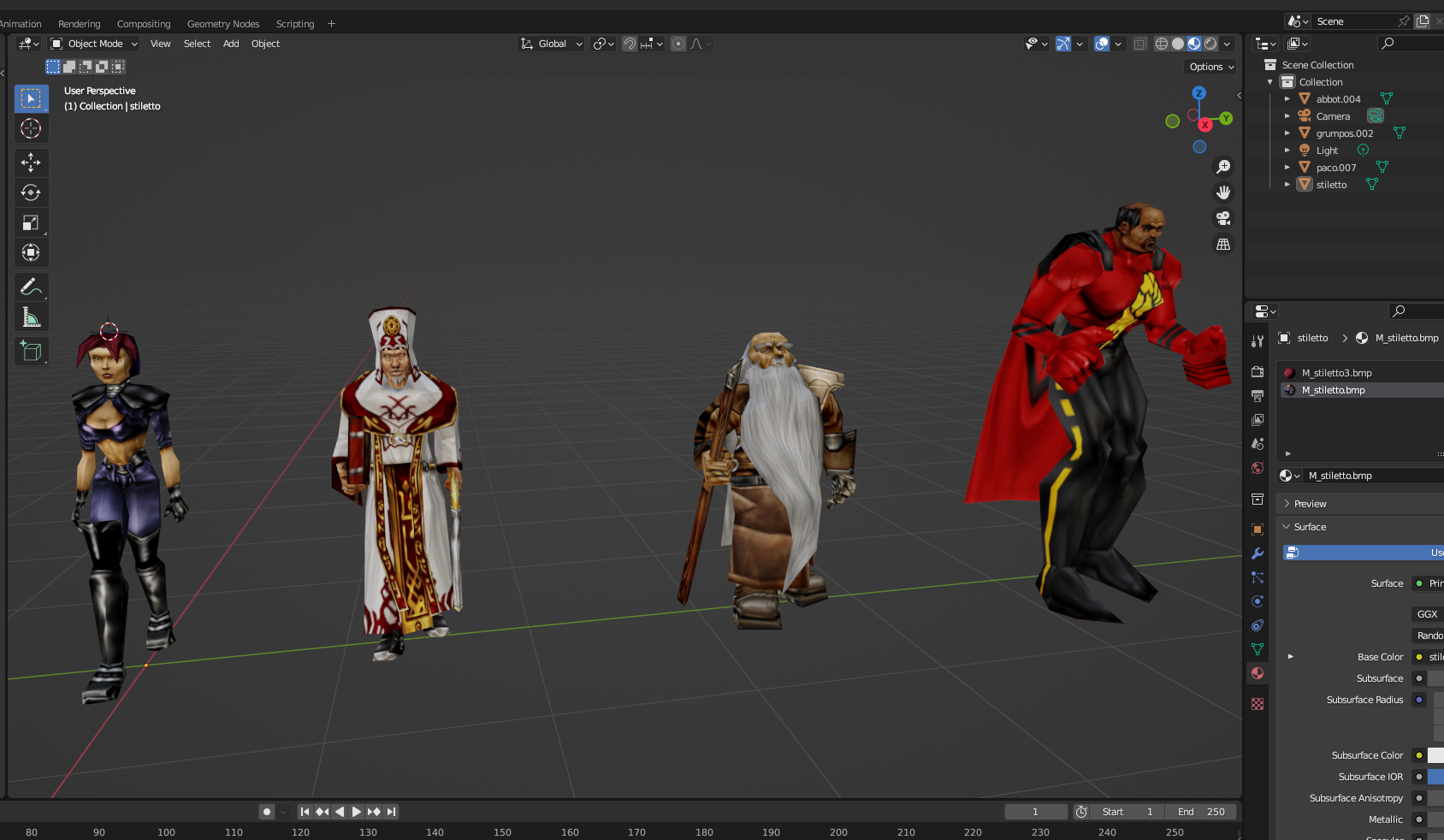
Paco appears to have an slight issue with the UVs mapping a little off in his cape. Since the same model file loads fine in the original tooling, and it's the only case of this I've seen, I believe this could simply be due to a quirk of how open gl would actually load the model. This can be fixed by some quick fiddling in the UV editor, but might be worth a future update to handle this special case.
UPDATE: The plugin now manually handles 2 vertex UV coordinates (vertex 9 & 289) and largely corrects this problem with the exception of a slight seam visible.
When importing Democratus, the texture color comes in inverted. Bizarre, as opening the texture file directly seems to work fine. Easy to fix, but noted as "strange."
The original Anachronox models are stored in anoxdata\MODELS.dat, as found in the installed game folder. They can be extracted with the DATExtract tool as found on the Anachrodox website: https://anachrodox.talonbrave.info/ (Tools section)
UPDATE: Thanks to the open source-ness of the original tool, I have made a more convenient GUI version in Python for extracting the DAT files here: https://github.com/GeneralProtectionFault/AnachronoxDAT
Direct link to the utility (right-click & "Save Link As"--If this does not work, go to the site above, the Downloads Section, then Tools section): https://anachrodox.talonbrave.info/tools/tools/datextract2.zip
In Blender, go to Edit => Preferences, then select Add-ons. Click "Install" and select the .zip file. This will install the plugin. To use, go to File => Import, then select Anachronox Model Import (.md2), then select the model file.
Note that the MD2 file stores the name of the texture file in its header. Therefore, the filename of the texture is important. The extracted filenames from the .DAT file should correlate, but bear the importance in mind. The plugin will search the immediate folders, but if a texture turns up missing, first ensure it is in the directory tree.
When importing, there is a texture scale parameter which can be changed if desired. If, for example, upscaling textures, simply set this to whatever factor they were upscaled by, and ensure that the filenames are the same as the originals.
Update: Plugin will now support loading models with multiple textures. A material is created per texture and correctly assigned to the appropriate parts of the model.
Note: For a breakdown of the header and data lump structure, see the Anachronox_MD2_Structure.ods spreadsheet.
Also, for a visual representation of the structure of the frame bytes (structure varies depending on a flag in the header), specifically, see the draw.io diagram: MD2_FrameResolution.drawio
The original model format (.MD2) is from Quake 2. Anachronox uses a modified version of this model format, the critical difference being support for using multiple textures for 1 model.
The original Quake 2 MD2 format does support multiple skins which are stored in the header. These are simply the names of the texture images. This can be confusing, but the original purpose was to have interchangeable texture images that would essentially act as a palette swap, but still only 1 texture on the model at a time. This is repurposed in the Anachronox format, so that multiple textures can be applied to a single model simultaneously. Instead of these "skins" being a single, swapable texture, they are applied to different regions of the model, corresponding to the gl commands that are used to draw the model. This is the crux of the incompatibility between the Quake 2 & Anachronox models.
This is done by some "extra data." There is a short number (2 bytes) for each "skin," which resides between the end of the gl commands and the tagged surfaces in the file's data. Each short number corresponds to a number of "primitives," in this case, referring to OpenGL (or just "gl") commands. When actually drawing a model in OpenGL, the vertices/polygons are drawn in order according to the gl commands (i.e. draw a triangle with such-and-such vertices, etc...). Not to be confused with the vertex order in the frames. These are specified in the corresponding (gl command) lump of the file. Following that order, the aforementioned "extra data" numbers tell how many gl commands to apply the corresponding "skin"/texture to. Put more simply, this lump of data is a series of numbers for each skin/texture, such as 32, 249. This means the first texture applies to the first 32 gl commands, and the next 2nd texture applies to the next 249 gl commands.
While the gl command order is not the same as the vertex order, the vertex order is an "index," which each gl command refers to. In turn, the triangles (another data lump) also refer to the vertices by this index. This plugin uses that relationship to tie the gl commands to the triangles, and thereby also the different skins/textures according to those numbers in the extra data described above.