
A modern, high-performance C++ library for the Spotify Web API. Designed to be lightweight and intuitive, this library provides comprehensive access to Spotify's ecosystem—from catalog metadata to real-time player controls.
Built for developers who want a "no-nonsense" interface to Spotify without the overhead of heavy frameworks.
This project is not affiliated with Spotify AB
- Full Catalog Access: Deep integration for Albums, Tracks, Artists, Shows, and Episodes.
- Smart Player Controls: Real-time interaction with the Spotify Player (Transfer playback, seek, shuffle, repeat, and volume).
- Automated Auth: Handles the OAuth2 Authorization Code Flow with a built-in local server to capture redirect codes.
- Robust Models: Statically typed C++ objects for all API responses—no more searching through raw JSON strings.
- Paging Support: Simple iterator-like access for large datasets (Top Tracks, Playlists, Search results).
- Error Handling: Granular exception system including
APIException,NetworkException, andRateLimitException.
- Updated the VisualAPI to include a vibrancy option
- Fixed bugs
- Added
VisualAPIfor interacting with my custom API to get the average album cover colour
- Added a
beginfunction which allows a silent login to continue sessions - Added a
getRefreshTokenfunction to accompany this
- Documentation needs finalising
- Some data types need fully implementing
- Final tests
- nlohmann/json - The "JSON for Modern C++" library. We use this for all JSON parsing and serialization. Its intuitive syntax allowed us to keep the library codebase clean and maintainable.
- Credit to Niels Lohmann and contributors for this incredible piece of software.
- yhirose/cpp-httplib - Used for the internal
AuthServerto handle OAuth callbacks. - libcurl - Powers the underlying HTTP network layer.
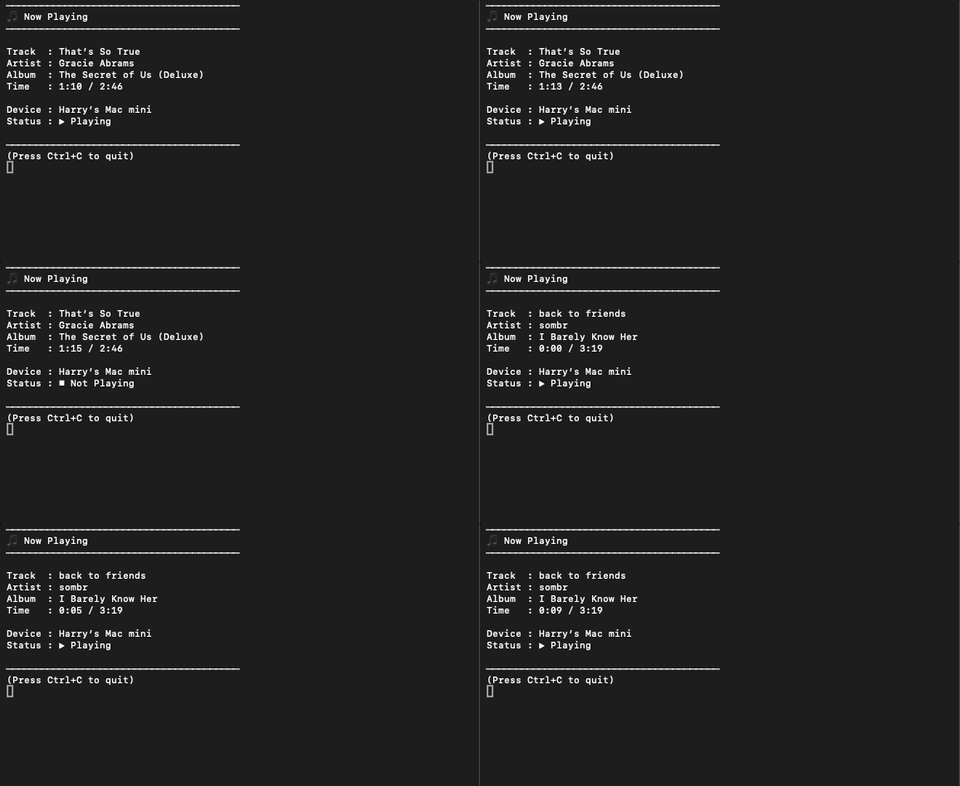
This example was build with the library and can be found here: Now Playing CLI
It is also easy to get started with: Getting Started
- A C++20 compatible compiler (GCC 10+, Clang 10+, or MSVC 19.29+)
libcurlinstalled on your system.CMake3.15 or higher.
SpotifyCPP library provides the following header files that can be included in your project:
spotify.hpp
#include <spotify/spotify.hpp>git clone https://github.com/Harry-Skerritt/SpotifyAPILib.git
cd SpotifyAPILib
mkdir build && cd build
cmake ..
makeInclude in CMakeLists.txt
include(FetchContent)

FetchContent_Declare(
    SpotifyCPP
    GIT_REPOSITORY https://github.com/Harry-Skerritt/SpotifyCpp.git
    GIT_TAG v0.9.2
)

FetchContent_MakeAvailable(SpotifyCPP)

...

target_link_libraries(MyApp PRIVATE SpotifyCPP::SpotifyCPP)
- Open
platformio.ini, a project configuration file located in the root of PlatformIO project. - Add the following line to the
lib_depsoption of[env:]section:
harryskerritt/SpotifyCPP@^0.9.2- Build a project, PlatformIO will automatically install dependencies.
- Open PlatformIO Core CLI
- Change directory (cd) to the PlatformIO project where platformio.ini is located.
- Copy the following pio pkg install command and paste into the CLI shell, press Enter:
pio pkg install --library "harryskerritt/SpotifyCPP@^0.9.2"A more in depth authentication example can be found here.
Using the built-in AuthServer to grab a token in seconds:
#include <spotify/spotify.hpp>

int main() {
    // 1. Setup credentials
    Spotify::Auth auth({ "YOUR_CLIENT_ID", "YOUR_CLIENT_SECRET" });

    // 2. Generate Auth URL & open browser
    auto url = auth.createAuthoriseURL("[http://127.0.0.1:8888/callback](http://127.0.0.1:8888/callback)", {
        Spotify::Scope::UserReadPlaybackState,
        Spotify::Scope::UserModifyPlaybackState
    });
    Spotify::AuthServer::openBrowser(url);

    // 3. Listen for the redirect code
    std::string code = Spotify::AuthServer::waitForCode("127.0.0.1", 8888);
    auth.exchangeCode(code);

    // 4. Start making calls!
    Spotify::Client client(auth);
    auto user = client.users().getCurrentUserProfile();
    std::cout << "Logged in as: " << user.display_name << std::endl;
}// Get an album by ID
auto album = client.album().getAlbum("4aawyAB9vmq7uQrQ7Yp7M4");
std::cout << "Album: " << album.name << " (" << album.release_date << ")" << std::endl;
// List tracks in the album
for (const auto& track : album.tracks.items) {
std::cout << " - " << track.track_number << ". " << track.name << std::endl;
}Distributed under the MIT License. See LICENSE for more information.