






Git の差分からコミットメッセージを AI 生成し、SCM へ即反映する commit / コミット特化ツール
Git の差分を読み取り、最適なコミットメッセージを自動生成して SCM 入力欄へ反映する VS Code 拡張(コミットメーカー / commit message generator)です。
Cursor や Copilot では実現できない、完全カスタマイズ可能な AI コミットメッセージ生成ツール。Git commit を効率化し、チーム全体のコミット品質を向上させます。
キーはすべてローカルの SecretStorage に保存され、サーバー側に記録を残しません。
SecretStorage とは VS Code が提供するローカル暗号化ストレージで、APIキーはPCをまたいで同期されません(Settings Sync も無効)。API キーはこの領域からのみ読み書きします。
(English) VS Code extension that reads your Git diff and auto-fills the SCM commit box with a generated message.
Fully customizable AI commit message generator – beyond what Cursor or Copilot can offer. Streamline your Git commits and elevate your team's commit quality with professional commit messages.
API keys stay in local SecretStorage; nothing is sent to the server side.
SecretStorage is VS Code’s local encrypted store; API keys are not synced across machines (Settings Sync disabled) and are read/written only from there.
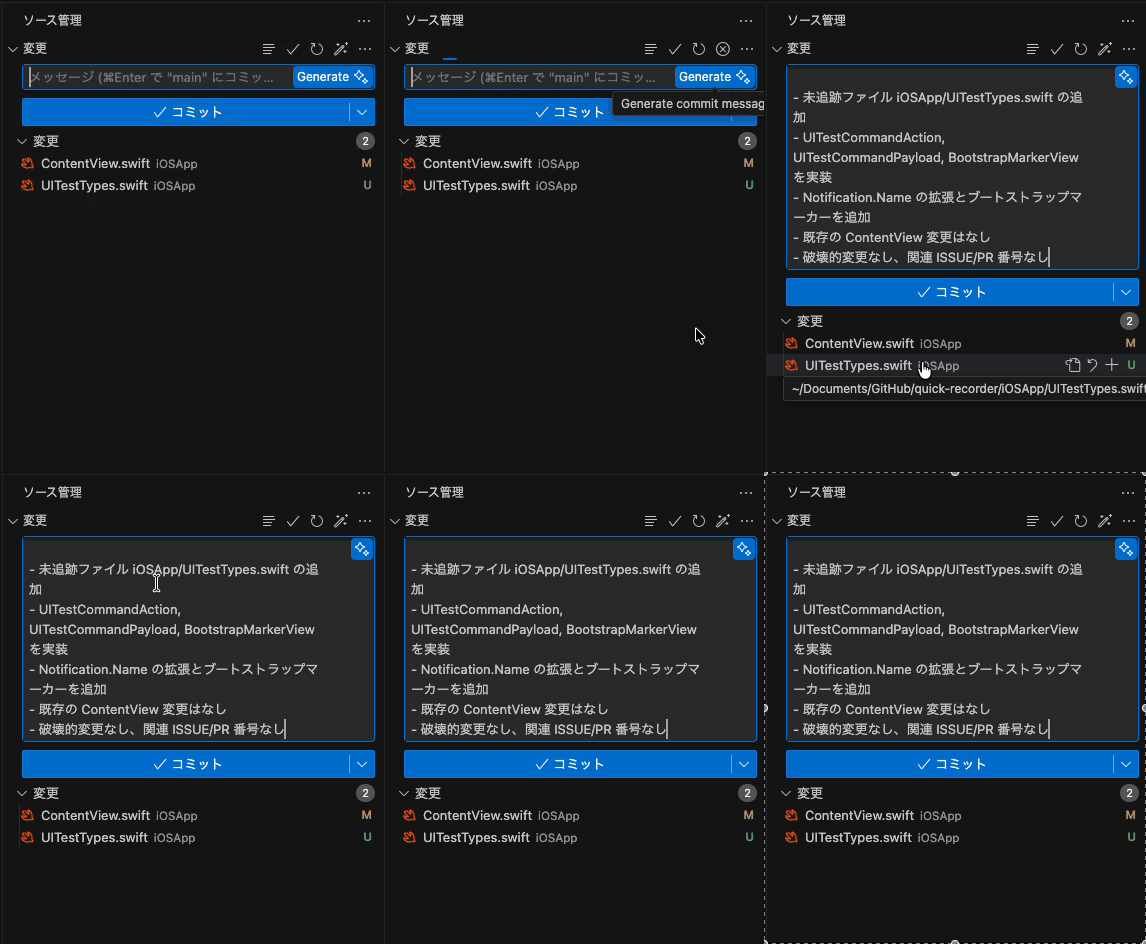
差分読み込みからメッセージ生成、SCM反映までの一連の流れを確認できます
(View the complete workflow from diff loading to message generation and SCM application)
多くの開発者が日常的に使っている Cursor、GitHub Copilot、Windsurf などのツールには、Git commit メッセージ生成機能が標準搭載されています。しかし、以下のような課題はありませんか?
(English) Popular tools like Cursor, GitHub Copilot, and Windsurf come with Git commit message generation. But do you face these issues?
- コミットメッセージでトークンコストがかさんでしまう – 従量課金の AI エディタで、開発やエージェント用の高性能モデルにコミットメッセージまで書かせると、そのぶん高価なトークンを余計に消費してしまう。 (English) Commit messages inflate token cost – On metered AI editors, letting the same high-end model you use for coding or agents also generate commit messages burns extra expensive tokens.
- プロンプトをカスタマイズできない – チームのコミット規約や Conventional Commits に合わせて細かく調整できない
(English) No prompt customization – Can't fine-tune for your team's commit conventions or Conventional Commits standards - 自分の APIキーが使えない – Copilot は個人向けに API キーを提供せず、Cursor も BYOK で一部機能が制限される
(English) Can't use your own API keys – Copilot doesn't offer personal keys; Cursor restricts features even with BYOK - プロバイダー・モデル変更が面倒 – 高速モデルや安価なモデルへの切り替えが簡単にできない
(English) Cumbersome provider/model switching – Hard to quickly try faster or cheaper models - プロンプトを複数保存できない – 案件やシーンごとにコミットスタイルを使い分けたいのに、毎回手動で調整が必要
(English) No preset management – Can't save multiple commit message styles for different projects or scenarios
✅ コミット専用に安価なモデルを使い分けられる – この拡張機能なら、コミットメッセージ生成のときだけ軽量・低コストモデル+カスタムプロンプトに切り替えられるため、開発は高性能モデルのまま、コミットだけコストを抑えられます (English) Use a cheaper dedicated model for commits – This extension switches only commit message generation to a lightweight, low-cost model with a custom prompt, so you keep a powerful model for development while cutting commit costs.
✅ 完全 BYOK(Bring Your Own Key) – OpenAI / Gemini / Claude など、あなたの API キーで動作。ローカルの SecretStorage に暗号化保存され、外部サーバーには一切送信されません。
(English) Full BYOK – Works with your OpenAI/Gemini/Claude keys, stored encrypted in local SecretStorage, never sent to external servers.
✅ プロンプトを複数保存・切り替え – GUI で複数のプロンプトプリセットを保存し、ワンクリックで切り替え可能。チーム規約、個人用、実験用など、用途に応じて使い分けられます。
(English) Save & switch multiple prompts – Store presets in the GUI and switch with one click for team rules, personal use, or experiments.
✅ プロバイダー・モデルを自由に選択 – 同じ UI で Gemini の高速モデル(gemini-2.5-flash-lite)から OpenAI の高精度モデルまで即座に切り替え。コストと速度を最適化できます。
(English) Flexible provider/model selection – Switch instantly between Gemini's fast models and OpenAI's precision models in the same UI to optimize cost and speed.
✅ 差分を完全に把握 – Staged / Unstaged / 未追跡 / バイナリを見出し付きで取得。デフォルトで未ステージ・未追跡も含めるため、Git commit 漏れを防止。
(English) Complete diff coverage – Fetch staged/unstaged/untracked/binary with headings; defaults include unstaged & untracked to prevent commit omissions.
-
ワンクリックで Git commit メッセージ生成: Git の差分から AI が自動生成し、SCM 入力欄へ即反映。プロフェッショナルなコミットメッセージで開発効率を向上
(English) One-click Git commit message generation – AI reads your Git diff and fills the SCM box instantly with professional commit messages -
プロンプトプリセットの保存・管理: GUI で複数保存し、PC 内の全ワークスペースで共通利用(Settings Sync を除く)
(English) Prompt preset management – Save multiple in GUI, shared across local workspaces (except Settings Sync) -
推奨モデルは高速・低コスト: デフォルトで Gemini
gemini-2.5-flash-liteを採用。必要に応じて OpenAI / Claude へ切り替え可能
(English) Fast & low-cost default – Geminigemini-2.5-flash-liteby default; switch to OpenAI/Claude as needed -
追加指示欄でさらにカスタマイズ: 「英語で短く」「絵文字なし」「Conventional Commits 準拠」など、チームのコミットルールに合わせて自由に指定
(English) Custom instructions field – Add rules like "short in English", "no emojis", or "follow Conventional Commits" to fit your team's commit standards -
SCM ツールバーからも実行可能: パネルを開かず、杖アイコンから「差分取得→生成→適用」を一発で完了
(English) SCM toolbar shortcut – Run "fetch diff → generate → apply" with the wand icon, no panel needed -
UI 多言語対応 (32 言語): 日本語・英語・中国語・韓国語・スペイン語など、ワンクリックで切り替え可能
(English) 32 languages supported – Switch between Japanese, English, Chinese, Korean, Spanish, and more with one click対応言語一覧 / Supported Languages:
日本語 (ja) | English (en) | 中文简体 (zh) | 中文繁體 (zh-TW) | 한국어 (ko) | Español (es) | Français (fr) | Deutsch (de) | Nederlands (nl) | Svenska (sv) | Dansk (da) | Norsk (nb) | Tiếng Việt (vi) | ไทย (th) | မြန်မာ (my) | हिन्दी (hi) | বাংলা (bn) | தமிழ் (ta) | Português (pt-BR) | Русский (ru) | Українська (uk) | العربية (ar) | اردو (ur) | עברית (he) | فارسی (fa) | Türkçe (tr) | Bahasa Indonesia (id) | Italiano (it) | Polski (pl) | Română (ro) | Tagalog (tl) | Kiswahili (sw)
- API キーは完全ローカル保存: VS Code の SecretStorage に暗号化保存。PC をまたいで同期されず、Settings Sync も無効。
(English) API keys stay local – Encrypted in VS Code SecretStorage, not synced across machines, Settings Sync disabled. - 差分は選択したプロバイダーのみに送信: 拡張機能自体は外部にログを送信しません。
(English) Diffs sent only to your chosen provider – The extension itself sends no external logs.
1. パネルを開く
アクティビティバーの Commit Maker アイコンをクリック
(Open Commit Maker from the Activity Bar)
2. APIキーを設定
上部でプロバイダーを選択し、APIキーを保存(SecretStorage に暗号化保存)
(Choose a provider and save your API key — encrypted in SecretStorage)
💡 BYOK方式: すべて自分のAPIキーを使用。利用料は各プロバイダーの課金体系に従います。
(BYOK only: bring your own keys; usage is billed by each provider)
3. プロバイダー・モデルを選択
推奨: Gemini → gemini-2.5-flash-lite(高速・低コスト)
必要に応じて追加指示を入力
(Recommended: Gemini gemini-2.5-flash-lite for speed & cost; add custom instructions if needed)
4. コミットメッセージを生成
「変更を読み込んで提案」ボタンをクリックして、プロフェッショナルな commit メッセージを生成
(Click "Load changes & propose" to generate professional commit messages)
5. SCMに反映
生成されたメッセージを確認し、「SCM へ反映」で適用
(Review and click "Apply to SCM" to fill the commit box)
SCM ビューのタイトルバーにある 杖アイコン から、パネルを開かずに「差分取得→生成→適用」を一発実行できます。
(Use the wand icon in the SCM toolbar for one-click "fetch → generate → apply" without opening the panel)
- プリセット機能: 複数のプロンプトを保存・上書き・削除
(Save, overwrite, and delete multiple prompt presets) - 共有範囲: PC 内の全ワークスペースで共通利用(Settings Sync は除外)
(Shared across local workspaces, excluding Settings Sync)
個別にオン・オフ可能(Individually toggleable):
- Staged – ステージ済みの変更
- Unstaged – 未ステージの変更(デフォルト: オン)
- Untracked – 未追跡ファイル(デフォルト: オン、未ステージとセット)
- Binary – バイナリファイル(デフォルト: オン)
- モデル選択: 推奨モデルをプルダウンから選択、または独自モデル名を入力
(Choose recommended models or enter custom model names) - プロンプト長制限: 無制限 / 任意の文字数で設定可能
(Unlimited or custom character limit) - 省略方法: 上限超過時は先頭20% + 末尾80%を残し、中央を省略
(When exceeded: keeps first 20% + last 80%, center-ellipsized)
UIから切り替え可能(Switchable from UI):
reasoningEffort– 推論の深さverbosity– 出力の詳細度
| 設定項目 | デフォルト値 | 保存範囲 |
|---|---|---|
| プロバイダー | Gemini | ワークスペース単位 |
| モデル | gemini-2.5-flash-lite |
ワークスペース単位 |
| プロンプト本体・プリセット | - | PC内共通(globalState) |
| 差分範囲設定 | Unstaged/Untracked/Binary: オン | ワークスペース単位 |
(Defaults & Storage)
- Provider: Gemini, Model:
gemini-2.5-flash-lite(workspace-scoped) - Prompts/Presets: Shared globally on local machine (globalState)
- Diff settings: Unstaged/Untracked/Binary enabled by default (workspace-scoped)
📋 詳細な設定項目を表示 / Show advanced settings
| 設定キー | 説明 |
|---|---|
commitMaker.provider |
プロバイダー設定(Gemini / OpenAI / Claude) |
commitMaker.model |
モデル設定(例: gemini-2.5-flash-lite) |
commitMaker.endpoint* |
カスタムエンドポイント設定 |
commitMaker.apiKeySecret* |
SecretStorage に保存するキー名 |
commitMaker.reasoningEffort |
OpenAI Responses の推論設定 |
commitMaker.verbosity |
OpenAI Responses の出力詳細度 |
commitMaker.requestTimeoutMs |
LLM 呼び出しタイムアウト(ミリ秒) |
commitMaker.logLlm |
LLM リクエスト/リトライのログ記録(デフォルト: off) |
(Configuration keys for provider, model, endpoints, API key storage, OpenAI-specific parameters, timeout, and logging)
保存範囲 / Storage Scope:
- プロンプト本体・プリセット → PC内共通(globalState)
- その他の設定 → ワークスペース単位
(Prompts/presets: globally on local machine; other settings: per workspace)
プロバイダー選択・差分読み込み・生成結果までを一画面で表示
(Provider selection, diff loading, and generation results in one view)
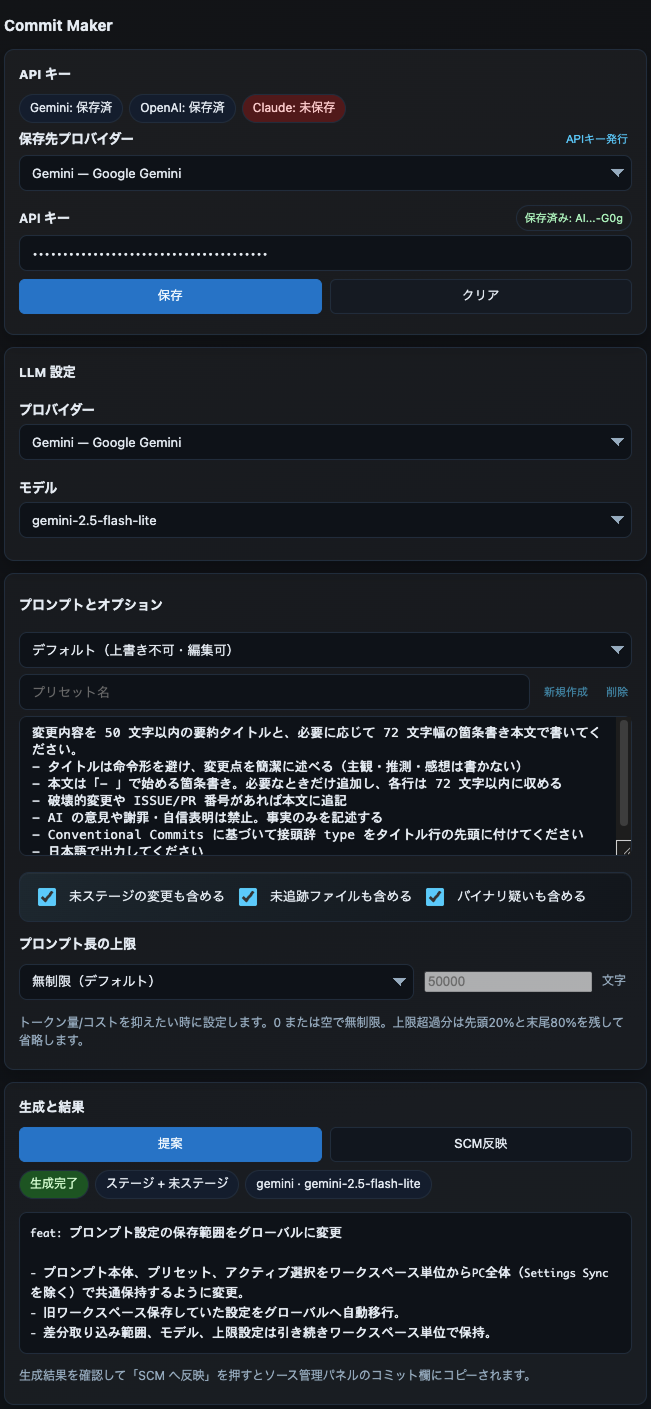
機能 / Features:
- プロバイダー別APIキーの保存・マスク表示
- 複数プロンプトプリセットの保存・切り替え
- 生成結果のリアルタイム確認
(Save & mask API keys by provider, manage multiple prompt presets, review results instantly)
杖アイコンから差分取得→生成→反映を一発実行
(One-click "fetch → generate → apply" via wand icon)
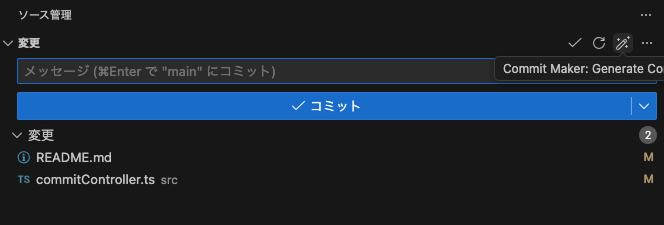
パネルを開かずに、常にこのアイコンからワンクリック実行可能
(Always accessible without opening the panel)
- 基本設定: パネル内で完結
(Most settings available in the panel) - 詳細設定: VS Code設定(
⌘,→「Commit Maker」)
(Advanced settings in VS Code preferences:⌘,→ "Commit Maker")
- VS Code: 1.94 以降(1.94+)
- Git: リポジトリ上で動作(Requires Git repository)
- APIキー: SecretStorageにのみ保存、外部送信なし
(Stored only in SecretStorage, never sent externally) - 差分データ: 選択したLLMプロバイダーのみに送信
(Diffs sent only to your chosen LLM provider) - 拡張機能: ログを外部送信しません
(Extension itself sends no external logs)
GitHub Sponsors でのご支援を受け付けています。サポートいただけると嬉しいです!
(We welcome support on GitHub Sponsors. Thank you for your support!)
| 金額 / Amount | 特典 / Perks |
|---|---|
| $3/月 (mo) | README の Sponsors リストに名前を掲載 (Your name in README Sponsors section) |
| $5/月 (mo) | Sponsors リスト + 次回リリースの Special Thanks に掲載 (Sponsors list + Special Thanks in next release) |
| $10/月 (mo) | Sponsors リスト + 機能要望を優先検討 ※確約不可 (Sponsors list + Priority consideration for requests not guaranteed) |
Note
ご支援はプロジェクトの継続開発に活用させていただきます。
(Support goes directly toward sustainable development.)
ご支援いただいた方々に感謝申し上げます!
(Heartfelt thanks to our supporters!)
まだスポンサーはいません。最初のサポーターになりませんか? / No sponsors yet — be the first!
Apache-2.0