QtPass is a multi-platform GUI for pass, the standard Unix password manager.
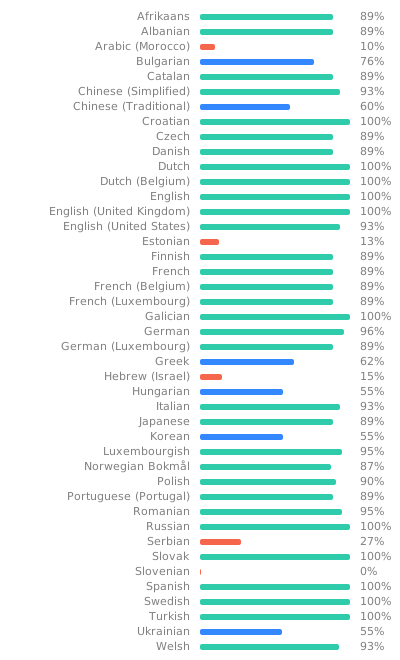
Available in 39 languages
- Using
passorgitandgpg2directly - Cross platform: Linux, BSD, macOS and Windows
- Native widgets and iconography where possible
- Per-folder user selection for multi-recipient encryption
- Multiple profiles support
- OTP (One-Time Password) support
- Password generation with configurable complexity
- Git integration for version control
- Smartcard and USB token support (OpenPGP, YubiKey)
- Configurable shoulder surfing protection
- Experimental WebDAV support
- Easy onboarding for new users
Logo based on Heart-padlock by AnonMoos.
OpenSUSE & Fedora
yum install qtpass
dnf install qtpass
Debian, Ubuntu and derivates like Mint, Kali & Raspbian
apt-get install qtpass
Arch Linux
pacman -S qtpass
Gentoo
emerge -atv qtpass
Sabayon
equo install qtpass
FreeBSD
pkg install qtpass
macOS
brew install --cask qtpass
Windows
choco install qtpass

- QtPass requires Qt 5.12 or later (Qt 6 supported)
- The Linguist package is required to compile translations
- For fallback icons, the SVG library is required
Runtime dependencies:
gpg2(GnuPG 2.2+) - requiredgit- optional, for repository syncpass(1.7+) - optional, can use native GPG/Git
Your GPG must be configured with a graphical pinentry when applicable. Same goes for Git authentication.
On macOS, pinentry-mac from Homebrew works best (gpgtools also works).
On most Unix systems all you need is:
qmake && make && make installProfiles allow to group passwords. Each profile might use a different Git repository and/or different gpg key. Each profile also can be associated with a pass store singing key to verify the detached .gpg-id signature. A typical use case is to separate personal and work passwords.
Hint
Instead of using different git repositories for the various profiles passwords could be synchronized with different branches from the same repository. Just clone the repository into the profile folders and checkout the related branch.
The following commands set up two profile folders:
cd ~/.password-store/
# Replace these with your own repositories (HTTPS or SSH).
PERSONAL_REPO_URL="<your-personal-password-repository-url>"
WORK_REPO_URL="<your-work-password-repository-url>"

# Examples:
# git clone https://git.example.com/you/qtpass-personal.git personal
# git clone git@git.example.com:you/qtpass-work.git work

git clone "${PERSONAL_REPO_URL}" personal && echo "personal/" >> .gitignore
git clone "${WORK_REPO_URL}" work && echo "work/" >> .gitignore
pass init -p personal [personal GnuPG-ID] && git -C personal push
pass init -p work [work GnuPG-ID] && git -C work push
Note:
- Replace
PERSONAL_REPO_URLandWORK_REPO_URLwith repositories you own and control. - Replace
[personal GnuPG-ID]and[work GnuPG-ID]with the ID from the related GnuPG key. - The parts
echo ... >> .gitignoreare just needed in case there is a Git repository present in the base directory.
Once the repositories and GnuPG-ID's have been defined the profiles can be set up in QtPass.
This is done with make check
Codecoverage can be done with make lcov, make gcov, make coveralls and/or make codecov.
Be sure to first run: make distclean && qmake CONFIG+=coverage qtpass.pro
Using this program will not magically keep your passwords secure against compromised computers even if you use it in combination with a smartcard.
It does protect future and changed passwords though against anyone with access to your password store only but not your keys. Used with a smartcard it also protects against anyone just monitoring/copying all files/keystrokes on that machine and such an attacker would only gain access to the passwords you actually use. Once you plug in your smartcard and enter your PIN (or due to CVE-2015-3298 even without your PIN) all your passwords available to the machine can be decrypted by it, if there is malicious software targeted specifically against it installed (or at least one that knows how to use a smartcard).
To get better protection out of use with a smartcard even against a targeted attack I can think of at least two options:
- The smartcard must require explicit confirmation for each decryption operation. Or if it just provides a counter for decrypted data you could at least notice an attack afterwards, though at quite some effort on your part.
- Use a different smartcard for each (group of) key.
- If using a YubiKey or U2F module or similar that requires a "button" press for other authentication methods you can use one OTP/U2F enabled WebDAV account per password (or groups of passwords) as a quite inconvenient workaround. Unfortunately I do not know of any WebDAV service with OTP support except ownCloud (so you would have to run your own server).
- Filtering (searching) breaks the tree/model sometimes
- Starting without a correctly set password-store folder gives weird results in the tree view
- Plugins based on field name, plugins follow same format as password files
- Colour coding folders (possibly disabling folders you can't decrypt)
- Optional table view of decrypted folder contents
- Opening of (basic auth) URLs in default browser? Possibly with helper plugin for filling out forms?
- WebDAV (configuration) support
- Some other form of remote storage that allows for accountability / auditing (web API to retrieve the .gpg files?)
FAQ and CONTRIBUTING documentation. CHANGELOG
AI Assistance
Parts of this project were developed with assistance from AI tools (such as OpenCode). AI-generated code is reviewed and tested before inclusion.