PixelAudio is a Processing Library that maps arrays of audio samples onto arrays of pixel values using space-filling curves such as a zigzag or a Hilbert curve. You can turn a 2D image into an audio signal or turn a 1D signal (including live or recorded audio) into a 2D image. PixelAudio began as a color organ, where sine waves mapped to a Hilbert curve determined the pixel values (RGB colors) in a bitmap traversed by the curve. It later added a real time sampling instrument that can be played by drawing lines. There's a brief video of the drawing/sampling instrument and other features here: https://vimeo.com/1031707765, and a longer example of the color organ here: https://vimeo.com/767814419. These features are part of the examples provided with PixelAudio, which has become a framework for blending images and sound through mapping and transcoding of data and data formats.
To start with, you'll need to have Processing installed and configured. If this is all new to you, go to the Download webpage for Processing and install it. Then check out the Environment documentation with particular attention to setting the location of your Sketchbook folder. The path to the Sketchbook folder is typically something like "/Users/your_home_directory/Documents/Processing/". Once you have the path configured, navigate to the Sketchbook folder. It contains a number of folders, including one called "libraries."
To install PixelAudio, go to the Releases page and download the latest version of PixelAudio. Extract the files from the downloaded archive. You should end up with one folder, "PixelAudio". Move it into the "libraries" folder in your Sketchbook folder. That's all you need to do to install the PixelAudio library, or any other Processing library.
PixelAudio has no dependencies on other libraries, but to run the examples that come with it you will need to install some additional libraries, which you can do from the Processing Sketch->Import Library...->Manage Libraries... menu command. This opens the Contribution Manager dialog. You will need to install the Minim library to use nearly all the sketches in the PixelAudio examples. Other libraries used in the examples are Video Export, by Abe Pazos, oscP5, by Andreas Schlegel, and the G4P library, by Peter Lager. I also recommend you install the Sound library and Video Library for Processing 4, both from the Processing Foundation.
The Minim Audio Library is the library I use for working with audio signals and audio files. I rely on Video Export to save animations to a video file. Video Export depends on ffmpeg. If you don't have ffmpeg installed, see the Video Export page or the official ffmpeg site for more information. MacOS Silicon binaries can be found here. Instructions for installation on MacOS with Homebrew, MacPorts, or manually can be found here. G4P is used wherever I have a GUI for the example: right now for WaveSynthEditor and ArgosyMixer. I use oscP5 in the AriaDemoApp to communicate over a network with the UDP protocol.
In PixelAudio classes, 1D signals and 2D bitmaps are related to each other through lookup tables (LUTs) that map locations in the signal and bitmap arrays onto one another. You could think of the signal tracing a path (the signal path) over the bitmap, visiting every pixel. The signal path may be continuous, stepping from pixel to connected pixel, in which case it is a Hamiltonian Path over a 4-connected or 8-connected grid, the bitmap. It may even be a loop, where the last pixel connects to the first, but it may also skip around, as long as it visits every pixel exactly once. The signalToImageLUTin PixelAudioMapper lists the position index in the bitmap of each pixel the signal visits. Similarly, the imageToSignalLUT tells you what position in the signal corresponds to a particular pixel. This makes it easy to click on the bitmap and play an audio sample corresponding exactly to the location you clicked, or to transcode an audio signal into RGB pixel values and display them in a bitmap.
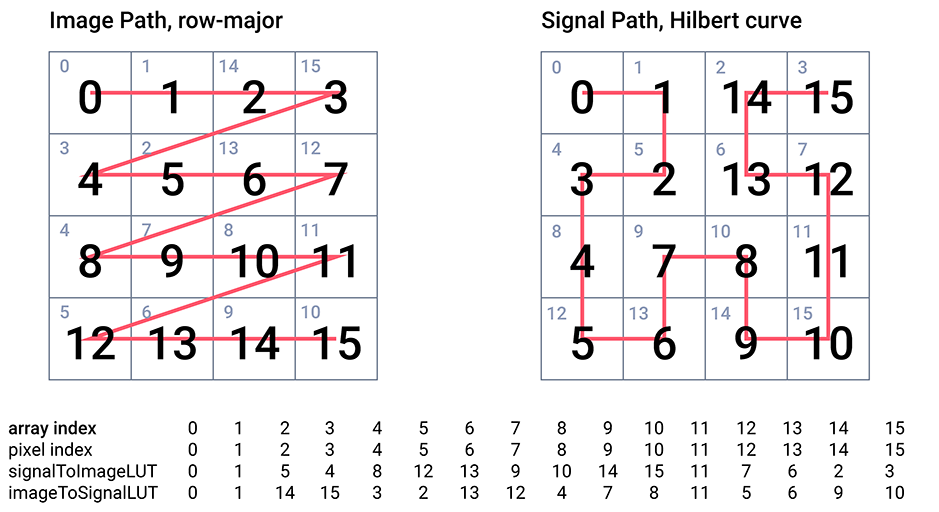
The PixelAudioMapper class and the PixelMapGen class and its subclasses provide the core functionality of the library and are abundantly commented. PixelMapGen provides a lightweight framework for creating mappings between audio sample and pixel data arrays. A PixelMapGen subclass ("gen" for short) generates the (x,y) coordinates of the signal path over the image, and creates the LUTs from the coordinates. PixelMapGen subclasses plug in to PixelAudioMapper, which can read and write pixel and audio data while remaining independent of the mappings and of the actual audio and image formats. The one restriction (at the moment) is that color is encoded in RGB or RGBA format and audio is encoded as 16-bit floating point values over the interval (-1.0, 1.0). Audio values can exceed these limits in calculations, but should be normalized to the interval for playing audio or saving to file. There are several methods for translating between RGB and HSB color spaces, but display and file output are confined to RGB/RGBA.
It should be relatively easy to write your own PixelMapGen child class and have it immediately available to play with through PixelAudioMapper's methods. PixelAudioMapper also provides many static methods for working with audio and pixel arrays. Other notable classes include the WaveSynth class, which uses WaveData objects for additive audio synthesis to create both a playable audio signal and an animated image that are generated in parallel. Some of the coding examples show how you can read and write JSON files of WaveSynth configurations. There is also a small but effective package of classes,net.paulhertz.pixelaudio.curves.* for point-reduction and curve-modeling.
The examples currently provide a survey of features in the PixelAudio library, particularly for mapping audio signals and bitmaps, using JSON files for WaveSynth and PixelMapGen settings, capturing live audio, playing audio samples interactively, and mixing color channels. See the Examples README for descriptions of each example.
PixelAudio is at the beta testing stage, functional but incomplete. You can download it as a Processing library and run the examples and expect them to do interesting things. The first beta release of the PixelAudio library happened November 9, 2024, at Experimental Sound Studio in Chicago, where I was the Spain-Chicago artist in residence. A new workshop and beta release arrived in January, 2025. In early July, I will be presenting PixelAudio at the EVA London Conference—version 0.9.1-beta is the release for the EVA London workshop. Publication of version 1.0 is not far off. V0.9.1-beta includes a complete tutorial in the examples.
Version 0.9-beta, May 31, 2025: Composer Christopher Walczak and I used the WaveSynth, Argosy and Lindenmayer classes to produce the music and animation for Campos | Temporales (2023). These classes are substantially complete and supported by example code: ArgosyMixer and WaveSynthEditor. Notably, these examples support simultaneous audio and image generation, as does the "performance example app," AriaDemoApp.
Version 0.9.5-beta, November 12, 2025: A new package of classes to support digital audio sampling synthesis, net.paulhertz.pixelaudio.voices, is a major addition to PixelAudio and replaces previous audio generation classes, which were mostly created withing Processing. The tutorials provide an introduction to the use of PASamplerInstrument and PASamplerInstruemntPool. The next release will document the use of PASamplerInstrumentPoolMulti.
TODO: The "peel' and "stamp" methods in PixelAudioMapper are still awaiting example code. For the next release, I also expect to add an audio-rate scheduler, probably by modifiying TimedLocation to work in its own thread, independent of the draw() loop. A genuine granular sysnthesis class should round out the library. Other developments will probably arrive after the publication version, PixelAudio 1.0.