Documenting Project
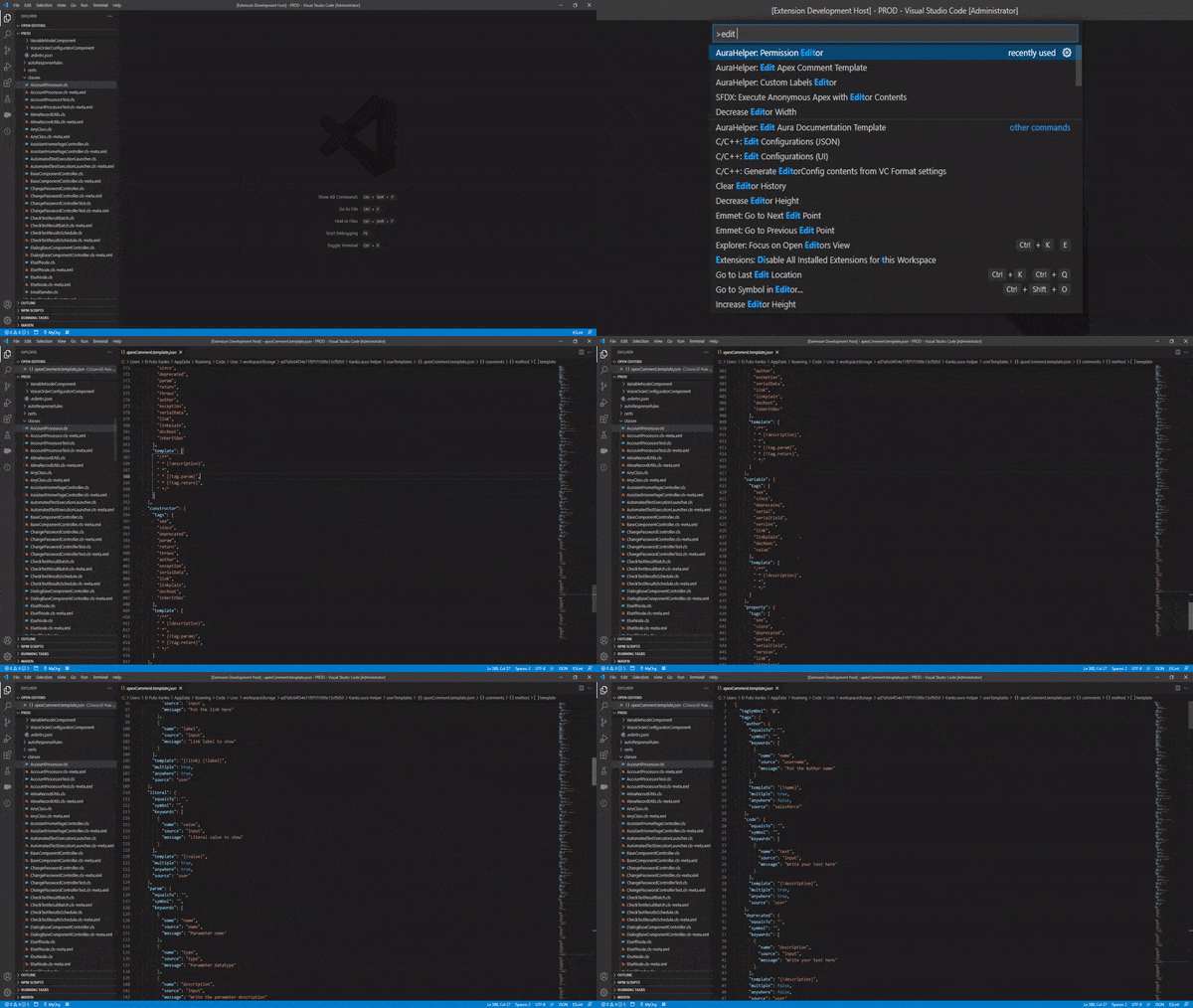
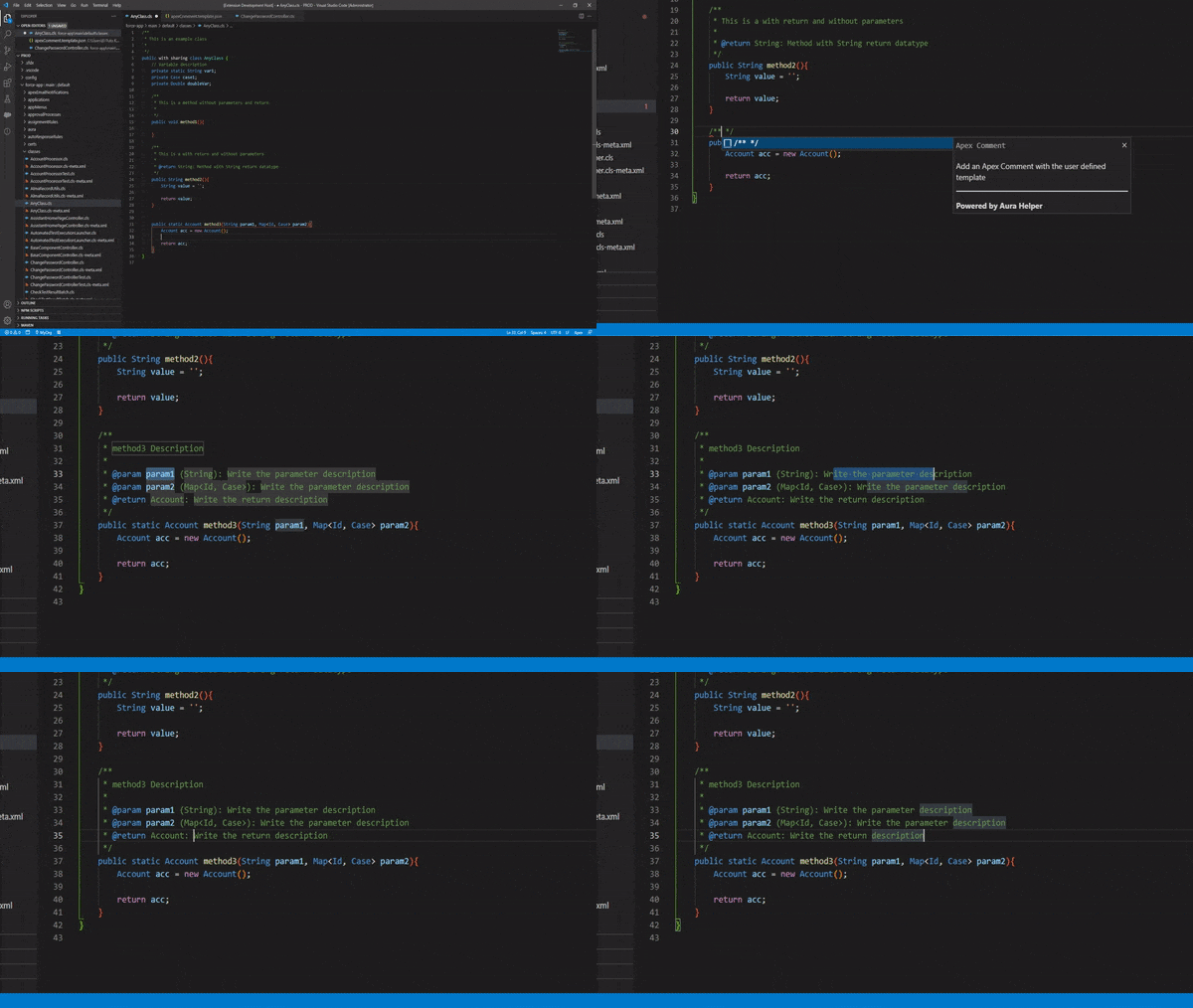
Aura Helper provide the best Apex Comments system because you can define your own comment template to create comments automatically based on the template. You can addapt the template to the preferred format to create the comments only with write /** and Aura Helper will be create the entire comment with the selected information based on the created template.
The Apex Comment Template System is a really powerful tool because allow to the users to create their own custom tags with to many datasources to create the comments and replace the tags with the selected data. For example, you can define your oun @author tag with named @creator, and select Salesforce username as datasource to replace the @creator tag template automatically with the specified data. Work like JavaDoc, but allow to the users to customize the comments.
 |
 |
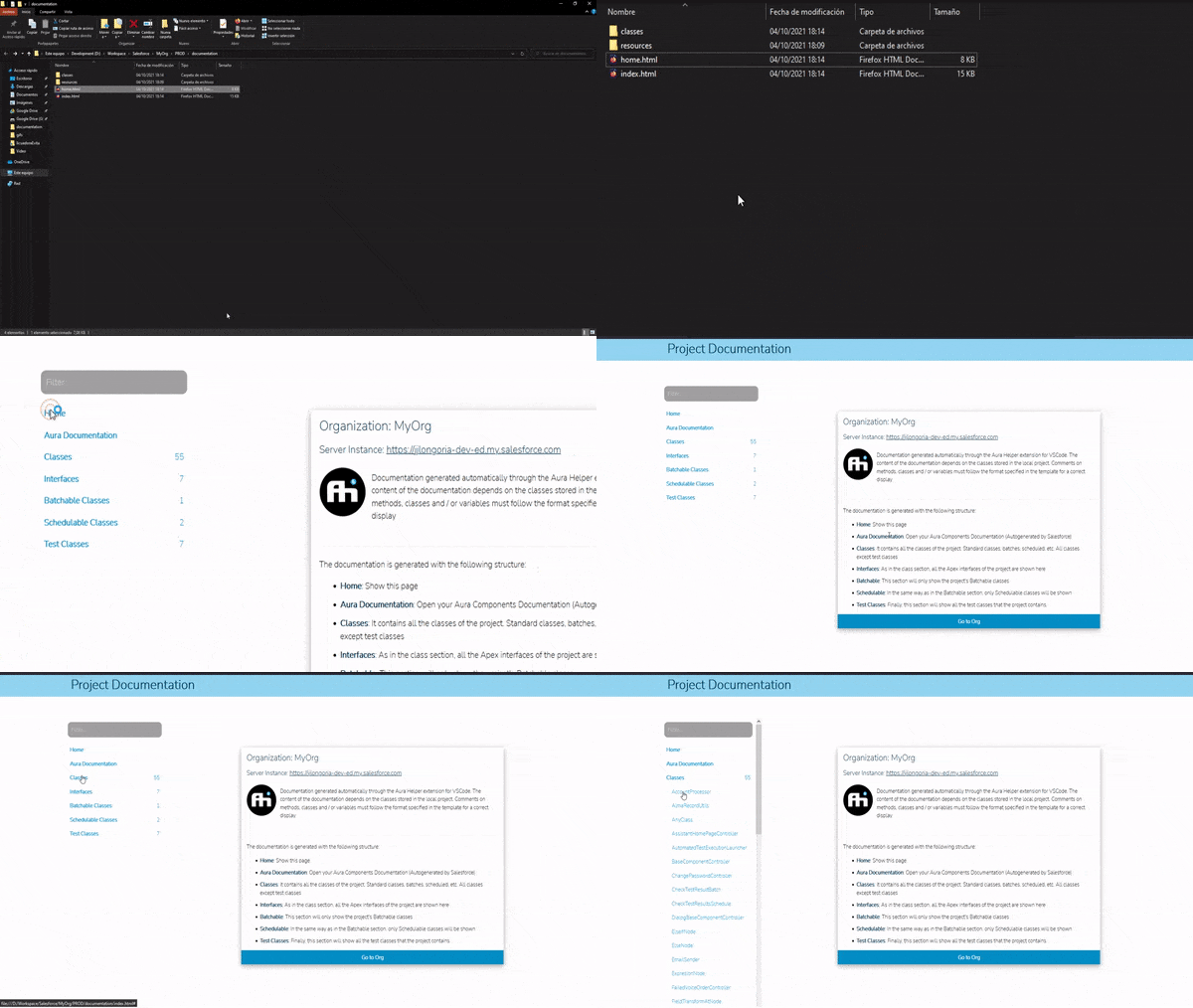
If you write all your Apex Comments following the defined template, Aura Helper can extract all information from the comments and tags to create a Navigable HTML documentation with the Apex Classes data and the comment information.
The documentation will be generated with all classes, and will be grouped into Apex Classes, Test Classes, Interfaces, Enums, Scheduled Classes, Rest Classes, Batch Classes and Queueable Classes to a better organization.
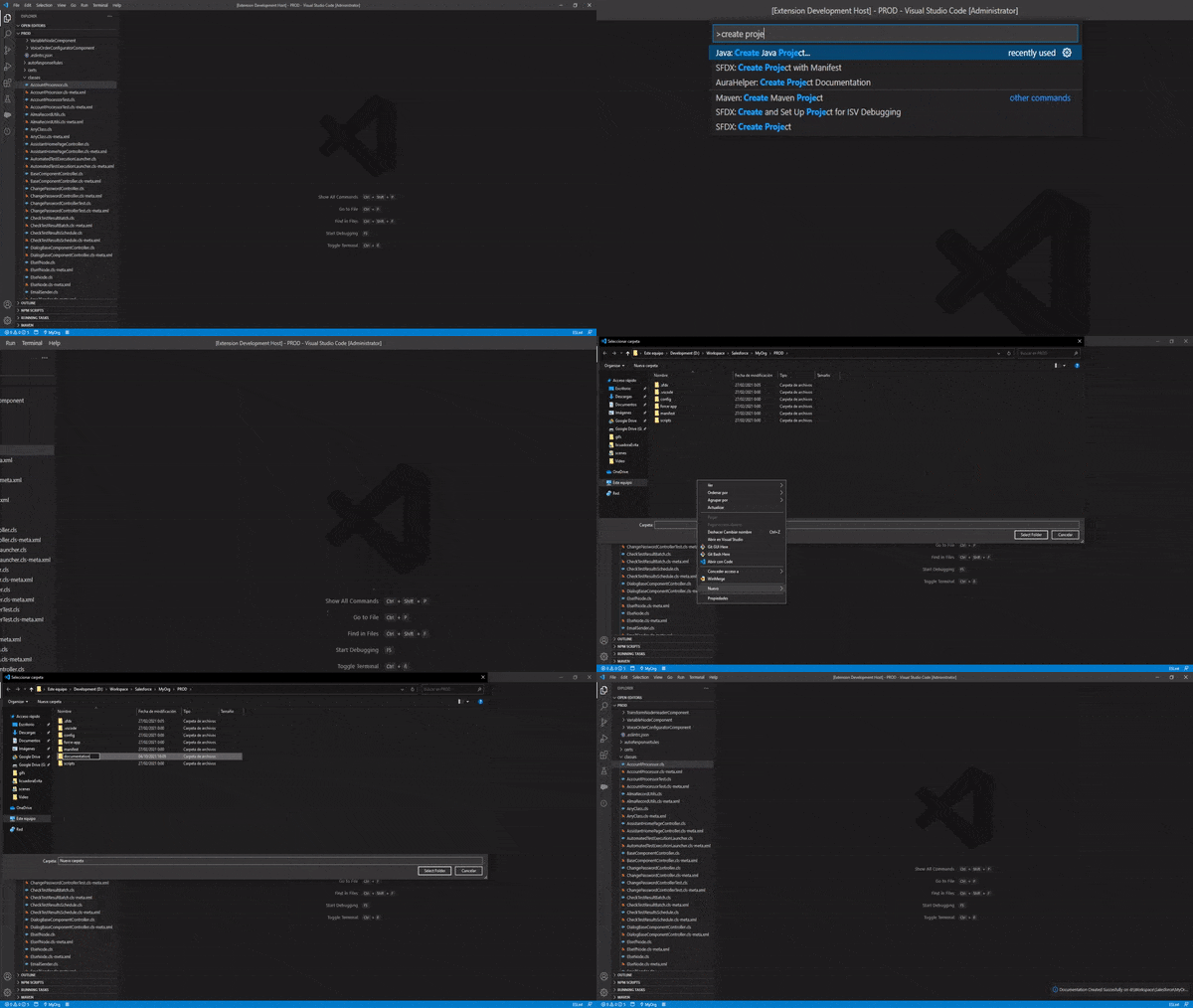
To create the Apex Documentation, only need to run the comment AuraHelper: Create Project Documentation.
 |
 |
Like with Apex Documentation, Aura Helper can create the Aura Documentation file for any component with a few clicks based on a user defined template. If you comment the Controller and Helper files with the Standard Javascript comment schema, Aura Helper can extract the data to include it into the Aura Documentation.
To create the Aura Documentation only need to run the command AuraHelper: Generate Aura Documentation with the Aura doc file active, or can select the file and rigth click to open contextual menu and select AuraHelper: Generate Aura Documentation. When you execute the command Aura Helper: Create Aura File and choose Aura Documentation file, Aura Helper will create the file with the documentation generated.
 |
 |
Main JSON body schema:
Key Datatype Description tagSymbol StringRepresent the general tag symbol to use in all tags tags ObjectTag section. In this section you can definne your custom comment tags comments ObjectComment templates section. In this section you can define the comments template for classes, methods, constructors... and the available tags to every comment
Represent the custom tags collection. Every key must be the name of the tag.
Key Datatype Description tagName ObjectRepresent every custom tag created by the user. The value must be the name of the tag. For example: authorto create a tag name author
Represent every custom tag created for comments.
Key Datatype Description equalsTo StringIf you create two or more tags that are equals to other tag (synonyns). Put the name of the main tag here. Not Requiredsymbol StringYou can define your custom symbols for each tag. Not Required, if not defined, get the general tagSymbolkeywords Array<Object>The tags can have keywords to put or replace it to the selected datasource data. Requiredexcept if equalsTo has valuetemplate StringEvery tag has a template to replace it into the comments. Define the template in this field. Requiredexcept if equalsTo has valuemultiple BooleanTrue if the tag can has multiple occurences in the same comment, like method params, author tags..., false in otherwise. Requiredexcept if equalsTo has valueanywhere BooleanFalse if the tag must be start into new line (like params, author...). True if the tag can be writed everywhere in the comment. Requiredexcept if equalsTo has valuesource StringThe Datasource group to the tag. You has several datasources to replace each tag and keywords with the selected data. Requiredexcept if equalsTo has value
Represent every keyword to define to each tag.
Key Datatype Description name StringThe name of the keyword to put into the tag template and put or replace with data source into the apex comment. Requiredsource StringKeyword Datasource. The selected datasource must be contained into the selected datasource tag group. For example, params datasource group contains name, type and input as datasource. If you select params source group as datasource to the tag, only can select name, type and input as datasource for every tag keyword. Not Requiredmessage Array<Object>The message to put into the tag when replace it on the comments if you select input datasource or the selected datasource has no data. If message is not defined, the keyword name will be used with the same purpose. Not Required
Represet each Apex Node comment template and the available tags to use on each node.
Key Datatype Description nodeName ObjectRepresent each Apex Node to define its custom comment template. Each element key must be the Apex Node name. The available nodes are: class, interface, enum,method,constructor,variable,property,static_constructorandinitializer. At least, you must define class, method and variable templates. The rest of nodes will be use the Required templates if not has its own template. For example, if you not defined constructor template, the method template will be used insted. interface and enum will use class template if not has own. The same with static_constructor, initializer and constructor that use method template if not has own. property will be use variable node if not has its own.
Represent every Apex Node comment template lines and available tags for each node
Key Datatype Description tags Array<String>String array with the available tags names to the Apex Node template Array<String>String array with every template line to create the comments. In addition to the keywords defined in each tag, you can out into the templates a master keyword {!description}to use to put the method, class, enum... description
Aura Helper has several datasources to the comments to create the best apex comment system and adapt comments better to every project styles and requirement.
Datasource Description Group user.name Git User name defined into GIT config file gituser.email Git User email defined into GIT config file gitauthor.name Git Author name defined into GIT config file gitauthor.email Git Author email defined into GIT config file gitcommitter.name Git Commiter name defined into GIT config file gitcommitter.email Git Commiter email defined into GIT config file gitbranch Git Commiter name defined into GIT config file gitinput Special source name to allow the user to write data on the keyword position git
Datasource Description Group username Salesforce Auth Org Username salesforcealias Salesforce Auth Org Alias salesforceinstance Auth Org Instance URL salesforceinput Special source name to allow the user to write data on the keyword position salesforce
Datasource Description Group input Allow to the user to write data user
Datasource Description Group file File absolute path pathfolder File directory absolute path pathroot Project Root absolute path pathinput Special source name to allow the user to write data on the keyword position path
Datasource Description Group file Parent Class or Interface file absolute path parentfolder Parent Class or Interface file directory absolute path parentinput Special source name to allow the user to write data on the keyword position parent
This datasource is only available to use on variable or property comment templates, in otherwise does not take effect and not will be replaced.
Datasource Description Group name Variable or Property name variabletype Variable or Property datatype variableinput Special source name to allow the user to write data on the keyword position variable
This datasource is only available to use on method comment template, in otherwise does not take effect and not will be replaced.
Datasource Description Group type Method return datatype returninput Special source name to allow the user to write data on the keyword position return
This datasource is only available to use on method and constructor comment templates, in otherwise does not take effect and not will be replaced.
Datasource Description Group name Method or Constructor parameter name paramstype Method or Constructor parameter datatype paramsinput Special source name to allow the user to write data on the keyword position params
{
    "tagSymbol": "",
    "tags": {                           // Tags Object
        "tagName": {                    // Tag Object
            "equalsTo": "",
            "symbol": "",
            "keywords": [               // Keywords Array
                {                       // Keyword Object
                    "name": "",
                    "source" "",
                    "description": ""
                }
            ],
            "template": "",
            "multiple": boolValue,
            "anywhere": boolValue,
            "source": ""
        },
    },
    "comments": {                       // Comments Object
        "class": {                      // Comment Object
            "tags": [],                 // Available tag names
            "template": []              // Template lines
        },
        "interface": {
            "tags": [],
            "template": []
        },
        "enum": {
            "tags": [],
            "template": []
        },
        "method": {
            "tags": [],
            "template": []
        },
        "constructor": {
            "tags": [],
            "template": []
        },
        "variable": {
            "tags": [],
            "template": []
        },
        "property": {
            "tags": [],
            "template": []
        }
    }
}
{
    "tagSymbol": "@",
    "tags": {       // Tags Object
        "author": {     // Define an author tag
            "equalsTo": "",
            "symbol": "",
            "keywords": [
                {
                    "name": "name",     // Keyword name
                    "source": "username",   // username datasource from Salesforece group
                    "message": "Put the Author name"    // Message if has no data into datasource
                }
            ],
            "template": "{!name}",  // Template to replace. (name will be replace with salesforce username or keyword name message)
            "multiple": true,
            "anywhere": false,
            "source": "salesforce"      // User Salesforce datasource group
        },
        "param": {  // Define a param tag
            "equalsTo": "",
            "symbol": "",
            "keywords": [
                {
                    "name": "name",     // Keyword name
                    "source": "name",   // method param name datasource
                    "message": "Parameter name"     // Message if has no data into datasource
                },
                {
                    "name": "type",     // Keyword name
                    "source": "type",   // method param datatype datasource
                    "message": "Parameter datatype"     // Message if has no data into datasource
                },
                {
                    "name": "description",      // Keyword name
                    "source": "input",          // method param description datasource
                    "message": "Write the parameter description"    // Message if has no data into datasource
                }
            ],
            "template": "{!name} ({!type}): {!description}",    // Template to replace. (name will be replace with param name, type with datatype and and description with the keyword message and allow the user to write data)
            "multiple": true,
            "anywhere": false,
            "source": "params"      // Params datasource group
        },
        "params": {     // Define a params tag
            "equalsTo": "param"    // equals to param tag (synonym)
        },
        "version": {    // Define a version tag
            "equalsTo": "",
            "symbol": "",
            "keywords": [
                {
                    "name": "value",
                    "source": "input",
                    "message": "Version number"
                }
            ],
            "template": "{!version}",
            "multiple": true,
            "anywhere": false,
            "source": "user"
        },
        "return": {     // Define a return tag
            "equalsTo": "",
            "symbol": "",
            "keywords": [
                {
                    "name": "type",
                    "source": "type",
                    "message": "Return datatype"
                },
                {
                    "name": "description",
                    "source": "input",
                    "message": "Write the return description"
                }
            ],
            "template": "{!type}: {!description}",
            "multiple": false,
            "anywhere": false,
            "source": "return"
        },
        ...
        ...
        ...
        ...
        // Define all tags that you need
    },
    "comments": {           // Comments Object
        "class": {          // Class comment Object
            "tags": [       // Available tag names
               "author",
               "version",
               // add all available tags for class node
            ],
            "template": [   // Template lines
                "/**",
                " * {!description}",    // all comments has master {!description} keyword to replace it to the class, method or other node description
                " *",
                " * {!tag.author}",
                " * {!tag.version}",
                " */"
            ]
        },
        "method": {      // Method comment Object
            "tags": [    // Available tag names
                "author",
                "version",
                "param",
                "params",
                "return"
            ],
            "template": [   // Template lines
                "/**",
                " * {!description}",
                " *",
                " * {!tag.param}",
                " *",
                " * {!tag.return}",
                " */"
            ]
        },
        "variable": {   // Variable comment Object
            "tags": [   // Available tag names
                "author",
                "param",
                "params",
            ],
            "template": [   // Template lines
                "/**",
                " * {!description}",
                " *",
                " */"
            ]
        }
    }
}
The Aura Template Documentation to create documentation automatically has the next format and the template content lines bust be HTML or Aura languages and can be use reserved keywords to replace data:
{
    "documentBody": [       // Represent main template lines
        "Line 1 Content",
        "Line 2 Content",
        "Line 3 Content",
        "...",
        "Line N Content"
    ],
    "methodBody": [         // Method body template lines
        "Line 1 Content",
        "Line 2 Content",
        "Line 3 Content",
        "...",
        "Line N Content"
    ],
    "paramBody": [          // Method param body template lines
        "Line 1 Content",
        "Line 2 Content",
        "Line 3 Content",
        "...",
        "Line N Content"
    ],
    "returnBody": [         // Method return body template lines
        "Line 1 Content",
        "Line 2 Content",
        "Line 3 Content",
        "...",
        "Line N Content"
    ]
}
To customize the template, Aura Helper has to many keywods to replace it to the respective data:
- Description Body Tags: To use into the Description Body template, Aura Helper implements the next tags (Other tags does not take effect in this section):
{!controllerMethods}- Use this tag to replace it to the controller method generated body based onmethodBodytemplate.{!helperMethods}- Use this tag to replace it to the helper methods generated body based onmethodBodytemplate.
- Method Body Tags: To use into the Method Body template, Aura Helper implements the next tags (Other tags does not take effect in this section):
{!method.description}: Tag to replace it to the method description. Aura Helper can get the method description from JavaScript comments.{!method.auraSignature}: Tag to replace it to the method Aura signature.{!method.signature}: Tag to replace it to the standard method signature.{!method.name}: Tag to replace it to the method name.{!method.params}: Tag to replace it to the method params generated body based onparamBodytemplate.{!method.return}: Tag to replace it to the method params generated body based onreturnBodytemplate.
- Param Body Tags: To use into the Params Body template, Aura Helper implements the next tags (Other tags does not take effect in this section):
{!param.description}: Tag to replace it to the param description. Aura Helper can get the params description from JavaScript comments.{!param.name}: Tag to replace it to the method param name.{!param.type}: Tag to replace it to the method param datatype
- Return Body Tags: To use into the Return Body template, Aura Helper implements the next tags (Other tags does not take effect in this section):
{!return.description}: Tag to replace it to the return description. Aura Helper can get the return description from JavaScript comments.{!return.type}: Tag to replace it to the method return datatype
{
    "documentBody": [
        "<aura:documentation>",
        "\t<aura:description>",
        "\t\t<h6><b>Short description</b> of the component</h6>",
        "\t\t<p>",
        "\t\t\tHelper methods:",
        "\t\t\t<ul>",
        "\t\t\t\t{!helperMethods}",
        "\t\t\t</ul>",
        "\t\t</p>\n",
        "\t</aura:description>",
        "\t<aura:example name=\"ExampleName\" ref=\"ExampleComponent\" label=\"ExampleLabel\">",
        "\t\t",
        "\t</aura:example>",
        "</aura:documentation>"
    ],
    "methodBody": [
        "<li>",
        "\t<b>{!method.signature}: </b> {!method.description}",
        "\t<ul>",
        "\t\t{!method.params}",
        "\t<ul>",
        "\t\t{!method.return}",
        "\t</ul>",
        "</li>"
    ],
    "paramBody": [
        "<li><i>{!param.name}<i> ({!param.type}): {!param.description}</li>"
    ],
    "returnBody": [
        "<li><i>{!return.type}<i> {!return.description}</li>"
    ]
}