Converting UML to Csharp classes
For the first half of this project, XSD files were used to generate C# classes. These files were most commonly used when working with railway models and were already widely available. An external conversion tool was used to generate these classes, but soon it proved itself that it was not enough for what we wanted.
The XSD to C# generation tool has inherent problems that we cannot solve. The original tool, Xsd.exe, is an old tool, developed by Microsoft. It is no longer maintained and thus will keep its small functionality. Then we tried another tool, of which we hoped that it would provide us the functionality we needed. This tool was Xsd2code, but it was also limited in functionality.
Eventually, we came up with the solution to convert UML to C# code. This was possible due to the fact that the EULYNX XSDs were generated out of UML, and the program this was done with, also supported the generation of C# code.
When we are faced with complex data structures, software engineers often reach for UML diagrams. We use this tool to visualize our data structures, but we don't use it for anything else.
Model-based system engineering is the act of addressing problems using a visual method first, such as UML, to design complex systems. Then, language-specific syntaxes can be exported into your program automatically. Taken to the extreme, in pure MBSE developers write no code, but instead let the model generate the code.
To generate C# classes from a language-independent UML diagram, a PIM to PSM transformation is needed. When working by model-based engineering standards, a language-independent UML diagram is designed first.
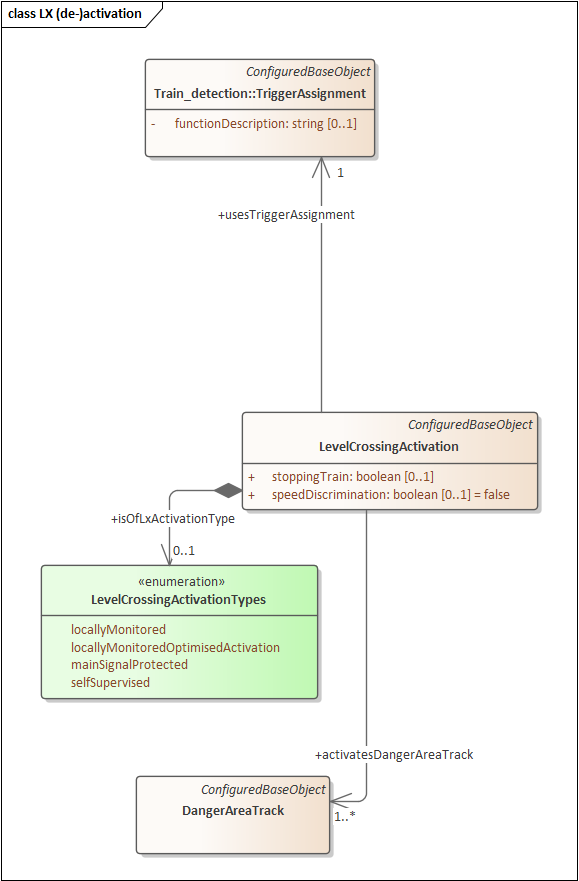
PIM stands for Platform-independent model. This means that it is a model of a software application that is independent of the specific syntax from a certain programming language. UML is usually designed this way.
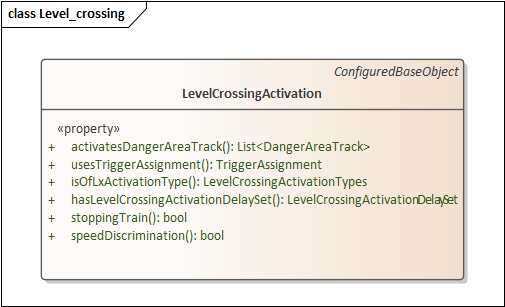
PSM stands for Platform-specific model. This means that it is a model of a software application that depends on the specific syntax of a programming language. In contrast to the PIM, this model can be made executable.
To clarify the differences between PIM and PSM, here's an example of UML diagrams in both formats.
| PIM | PSM |
|---|---|
 |
 |
The transformation is done through Enterprise Architect. This translation is done using templates, which can be edited. These templates use EA's template syntax and are documented on EA's website.
When the C# specific PSM is generated, C# can be generated from it. This too can be done through Enterprise Architect's template system.
Enterprise Architect works with a template system to let users modify the behavior of the PIM to PSM transformation or PSM to C# transformation. These templates implement their own unconventional specific syntax, which may be hard to understand at first. Data models created in UML can be reflected onto templates this way, to generate any kind of syntax out of them.
An example for EA templates:
///////////////////////////////////////////////////////////
//  %fileName%
//  Implementation of the %elemType% %className%
//  Generated by Enterprise Architect
//  Created on:      %eaDateTime%
%if classAuthor != ""%
//  Original author: %classAuthor%
%endIf%
///////////////////////////////////////////////////////////\n

using System;
using System.Collections.Generic;
using System.Text;
using System.IO;

$COMMENT="WARNING: DO NOT MODIFY THIS TEMPLATE BELOW THIS POINT"
\n\n
%ImportSection%
%list="Namespace" @separator="\n\n"%

Template Namespace Body
-------------------------------------
$COMMENT="WARNING: THIS IS AN ADVANCED TEMPLATE"
$COMMENT="DO NOT MODIFY UNLESS YOU ARE AN"
$COMMENT="ADVANCED USER!"
%if packageHasGenClasses != "T"%
%list="Namespace" @separator="\n\n" @indent=""%
%endTemplate%

%if packagePath == "" or genOptCSGenNamespace != "T"%
%PI="\n\n"%
%list="Namespace" @separator="\n\n" @indent=""%
%list="Class" @separator="\n\n" @indent=""%
%endTemplate%

{
%PI="\n\n"%
%list="Namespace" @separator="\n\n" @indent="\t"%
%list="Class" @separator="\n\n" @indent="\t"%
}
Why have we actually chosen to generate partial classes instead of normal ones? The generated classes are delivered in separate files, bundled in a folder. These classes only contain their properties with getters and setters, without constructors for example. We have to manually add the constructors with parameters to use the classes. It is possible to generate these constructors along with the models, but you can't always have it the way you want it. For example, sometimes you want to keep a parameter out in one of the constructors, and another time you need only one parameter in the constructor; The generator does not know how to do this.
We could add constructors to each generated file, which would work fine as nothing changes. But when we generate a new set of classes, all constructors have to be copied manually, because the generation overwrites these changes.
By extending the generated class with a second partial class, we can keep these added constructors intact. If the constructor is in a partial class with the same name, but in a different file, the model can be easily replaced if necessary. If something changes in its structure, we can simply change the constructor parameters, or extend it in another partial class with new constructors.
This is a typical design pattern to separate generated classes from manually written classes.
Could and should you extend partial classes to add functionality?
Now that we know why and how we use partial classes, we could use these partial classes for functionality. This, however, goes against the SOLID principles in most cases.
When adding functionality to a model, it should be written in a different class. Models and functionality should be separated. This is where the Manager comes in. Managers contain functionality for a certain class. It can store different instances of the class in itself in various ways, whichever way is needed. Managers are registered to the InstanceManager, where they can be recalled if needed.
However, classes that are highly unlikely to change, can be populated with some functionality. An example of this is what has been done with the BaseObject and tElementWithIDref classes. The functions that were added to these classes provide possibilities with easy access and aren't subject to change.
Models that are used for railway infrastructure often change. How do we cope with this change of models in the application?
As a precaution for the everchanging models on both ends of the application, models have been split from the logic for an easy exchange. When certain models are changed, it might be good to keep the old properties in there for one other version and make them obsolete. Doing this, developers working with those models are warned about the fact that they are using obsolete properties, before actually losing the functionality directly when they are deleted. The documentation for these obsolete items can also be used to instruct developers what to do instead, using generated documentation.
If logic is dependent on an old model's structure, a new manager will have to be created along with the new model. Due to the use of the InstanceManager, this will not be a huge problem, since the logic can be switched by changing a single line of code. Code that uses the old logic class will have to be changed, either by alternating the original one or creating a duplicate and alternating that one, to keep the old class's functionality as it is.
After having written the above, we had encountered some hiccups with Enterprise Architect and its template system. Instead, we decided to use XSLT transformations. EA is unnecessarily hard to manually adjust to specific needs, while XSLT transformations are a lot easier. [Write some specifics maybe]
XSLT, or XSL transform, is a language for transforming XML documents into other XML documents, but it can also be used to transform XML into other languages.
XSLT works by defining recursive templates for a specific XML document's structure. It works by defining selectors, only applying certain rules when these selectors are met for a certain element. (A bit like CSS selectors) These templates can be combined inside one another to transform more complex XML data.
XSLT transformations can be executed using a processor, such as a C# application. These processors require an XML file and the XSLT file as input and will output the transformed document. Because XSLT supports to output plain text, any kind of data structure can be generated. In our case, C# classes are generated.
Enterprise Architect templates and XSLT essentially do the same, but EA has its template system integrated into its program which makes some things impossible to do, and the syntax is obviously different.
- [Wikipedia contributors. (2020, December 31). XSLT. Wikipedia. https://en.wikipedia.org/wiki/XSLT]