Home
A neural network code fully writen in python
Just download the file "Neural-Network.py" and add it into your project folder
In this case there are two examples to show how to use it
There are five simple steps to use it
- Instantiate an object
- Assign data
- Set model
- Train the network
- Predict
Document "exampleHeightAndWeight.py"
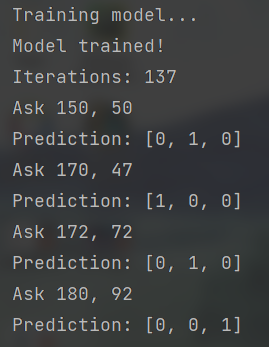
- In this example the neural network will predict if one person is under, normal or over weight
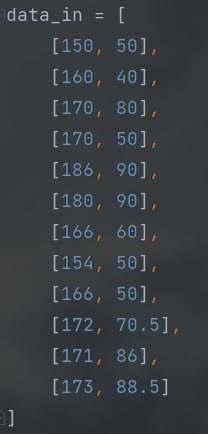
- For input let's given height (cm) and weight (kg)
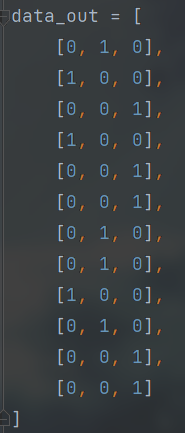
- For output let's given "1 0 0" for under weight, "0 1 0" for normal weight and "0 0 1" for over weight
-
Note: Remember use real data to get better results.
Data input
Data output


- In this case there are 8 input layers, 10 hidden and 3 of output.
- Each layer is separated with a comma.
- For input and hidden layers doesn't matter how much you wan to add.
- The size of output layer must be equals to size of row data output, we want "1 0 0", "0 1 0" or "0 0 1", so the size is 3.

- Limit of iterations for the neural network
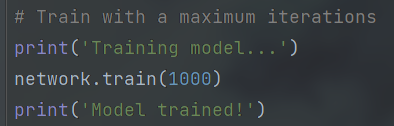
- Receive two values, an array with the data we want predict and a boolean.
- Return an array with solution.
- If boolean is "True" will show a message "Prediction: [values]".
- If boolean is not given or is "False" the message will not be displayed.
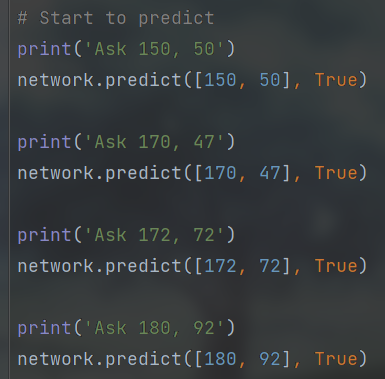
- You can use any BIM calculator to check results.