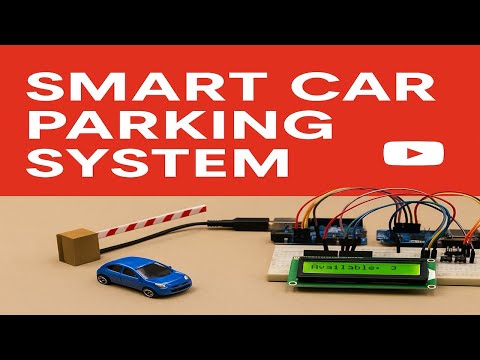
Smart Car Parking is a smart car parking solution that automates parking slot management using Arduino UNO and NodeMCU ESP8266.
It detects cars using IR sensors, controls a servo motor gate, displays availability on an LCD, and sends live updates to the Blynk IoT app.
🧑🔬 Jitesh Santosh Shelke
🎓 M.Sc. Data Analytics — Pillai College of Arts, Commerce and Science (Autonomous)
🛠 Passionate about IoT, AI, Machine Learning, and Smart Infrastructure
🌐 GitHub • LinkedIn
- 🟢 IR-based vehicle detection (Entry/Exit)
- 🚧 Automatic barrier gate using Servo motor
- 📟 Real-time parking status on 16x2 LCD
- 📡 Sends data to Blynk Cloud using NodeMCU ESP8266
- 📱 Live slot updates on mobile via Blynk IoT app
- ✅ Tracks 3 individual parking slots
| 🔧 Component | 📦 Quantity |
|---|---|
| Arduino UNO | 1 |
| NodeMCU ESP8266 | 1 |
| IR Sensors | 5 (2 for gate, 3 for slots) |
| Servo Motor (SG90) | 1 |
| 16x2 LCD with I2C | 1 |
| Jumper Wires | — |
| Breadboard | 1 |
| Power Supply (5V/9V) | 1 |
- 🔌 Arduino IDE
- 📲 Blynk IoT App (Android/iOS)
- 📚 Blynk Libraries for ESP8266
- ⚙️ ESP8266 Board Package for Arduino IDE
- IR1: Detects vehicle at entrance
- IR2: Detects vehicle at exit
- IR3 - IR5: Monitors 3 parking slots
- Servo Motor: Opens/closes entry gate
- LCD: Displays available slots
- NodeMCU: Sends updates to Blynk app
- Controls gate barrier with Servo
- Tracks slot availability
- Displays status on LCD
- Sends slot data to NodeMCU using SoftwareSerial
- Receives data from Arduino via Serial
- Pushes slot info to Blynk Cloud
- Updates Virtual Pins V0, V1, V2
- Install Blynk IoT app
- Create new project → Select ESP8266
- Add 3 Value Display widgets
- Link widgets to V0, V1, V2
- Paste your Auth Token in NodeMCU sketch
| Sensor/Device | Pin |
|---|---|
| IR1 (Entry) | D8 |
| IR2 (Exit) | D9 |
| Slot 1 IR | D5 |
| Slot 2 IR | D6 |
| Slot 3 IR | D7 |
| Servo | D10 |
| TX → NodeMCU RX | D2 |
| RX ← NodeMCU TX | D3 |
| Device | Pin |
|---|---|
| RX ← Arduino TX | D7 |
| TX → Arduino RX | D8 |
⚠️ Use voltage divider/logic level shifter between Arduino TX and NodeMCU RX.
- Displays:
Available: X - If full:
Parking Full - Gate logic is synced with slot availability
- V0: Slot 1 status (Free/Occupied)
- V1: Slot 2 status
- V2: Slot 3 status
- Real-time updates with each car entry/exit
| Condition | Action |
|---|---|
| 🚘 Vehicle at Entry & Slot Free | Gate Opens |
| ✅ Car Parked | Slot Occupied |
| 🚗 Vehicle at Exit | Slot Released |
| ❌ No Slot Available | Gate Closed |
- 💳 Add payment gateway
- 📷 License Plate Recognition (LPR)
- 📊 Firebase or custom dashboard integration
- 🧠 Ultrasonic sensors for better accuracy
- 🔍 AI-based analytics and insights
- 🚗 Car entry/exit animation (GIF)
- 📱 Blynk app UI mockup
- 🧭 Dashboard with live monitoring
- 📸 Camera sensor extensions (future)
PARKEASE is an efficient, low-cost smart parking system using IoT components.
Ideal for college, office, or small mall parking automation.
Get real-time updates and enjoy smart infrastructure benefits with minimal investment.