This Terraform module enables seamless integration between Hetzner Cloud resources and AWS CloudWatch, allowing you to monitor your Hetzner infrastructure using AWS CloudWatch metrics.
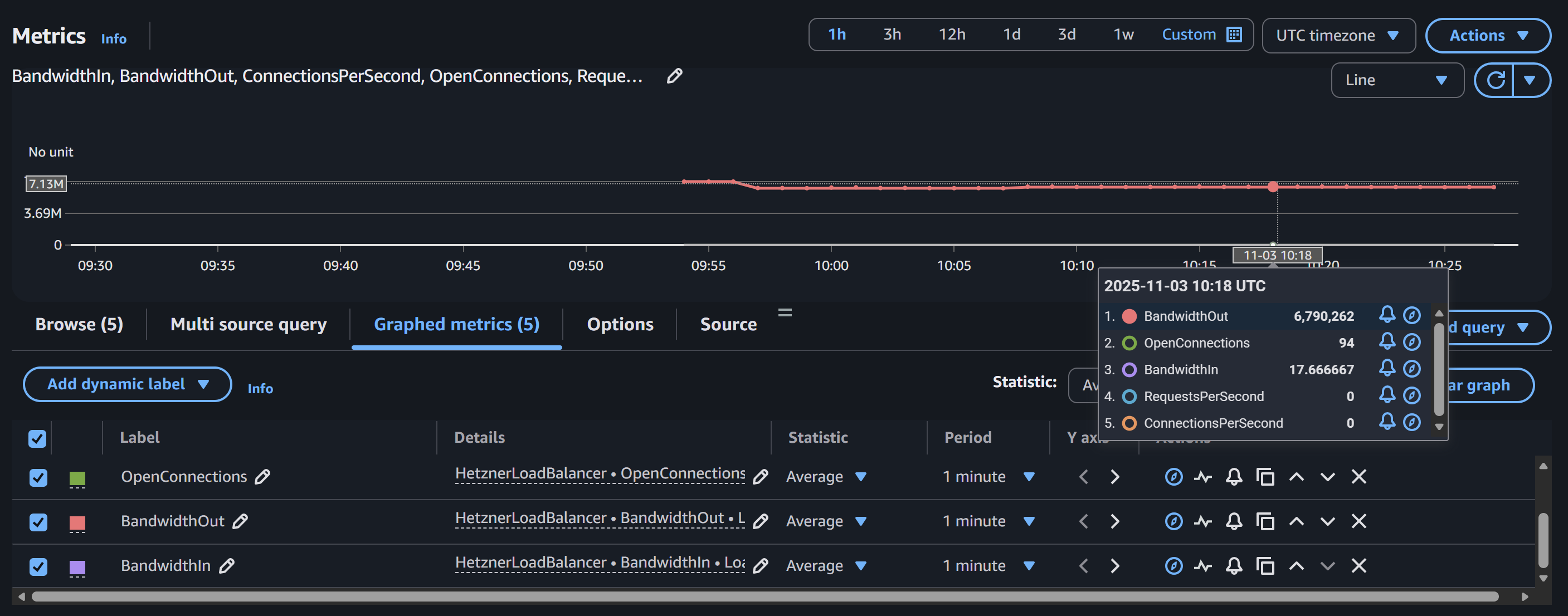
- Fetch metrics from Hetzner Cloud API (Load Balancers and Servers)
- Store metrics in AWS CloudWatch for centralized monitoring
- Uses AWS Step Functions for reliable metric collection
- Supports both Load Balancer and Server metrics
- Configurable IAM roles and EventBridge connections
- Scheduled metric collection via AWS Step Functions
- Open Connections: Number of currently open connections
- Connections Per Second: Rate of new connections
- Requests Per Second: HTTP/HTTPS requests processed per second
- Bandwidth In/Out: Network traffic in bytes per second
- CPU: CPU utilization percentage
- Disk IOPS: Read/write operations per second
- Disk Bandwidth: Disk read/write throughput in bytes per second
- Network Bandwidth: Network traffic in/out in bytes per second
- Network Packets: Packet count in/out per second
This module creates:
- AWS EventBridge Connection: Securely stores your Hetzner Cloud API token
- AWS Step Functions State Machine: Fetches metrics from Hetzner Cloud API
- IAM Role & Policy: Provides necessary permissions for the state machine
- CloudWatch Metrics: Stores metrics in custom namespaces (
HetznerLoadBalancerorHetznerServer)
module "loadbalancer_metrics" {
  source  = "kamranbiglari/hetzner-cloudwatch-integration/aws"
  version = "~> 1.0"

  hetzner_cloud_api_token = var.hetzner_api_token
  metric_type             = "loadbalancer"
  name                    = "hetzner-lb-metrics"

  # Enable automatic metric collection every 5 minutes
  create_scheduler    = true
  schedule_expression = "rate(5 minutes)"

  data = {
    loadbalancer_id = "123456"
  }
}module "server_metrics" {
source = "kamranbiglari/hetzner-cloudwatch-integration/aws"
version = "~> 1.0"
hetzner_cloud_api_token = var.hetzner_api_token
metric_type = "server"
name = "hetzner-server-metrics"
# Enable automatic metric collection every 5 minutes
create_scheduler = true
schedule_expression = "rate(5 minutes)"
data = {
server_id = "789012"
}
}module "server_metrics" {
source = "kamranbiglari/hetzner-cloudwatch-integration/aws"
version = "~> 1.0"
create_event_connection = false
event_connection_arn = "arn:aws:events:us-east-1:123456789012:connection/hetzner-api/abc123"
metric_type = "server"
name = "hetzner-server-metrics"
data = {
server_id = "789012"
}
}module "loadbalancer_metrics" {
source = "kamranbiglari/hetzner-cloudwatch-integration/aws"
version = "~> 1.0"
hetzner_cloud_api_token = var.hetzner_api_token
create_role = false
role_arn = "arn:aws:iam::123456789012:role/custom-sfn-role"
metric_type = "loadbalancer"
name = "hetzner-lb-metrics"
data = {
loadbalancer_id = "123456"
}
}The module includes built-in support for automatic metric collection using AWS EventBridge Scheduler.
Simply set create_scheduler = true and specify your desired schedule:
module "loadbalancer_metrics" {
  source  = "kamranbiglari/hetzner-cloudwatch-integration/aws"
  version = "~> 1.0"

  hetzner_cloud_api_token = var.hetzner_api_token
  metric_type             = "loadbalancer"
  name                    = "hetzner-lb-metrics"

  # Enable automatic metric collection
  create_scheduler    = true
  schedule_expression = "rate(5 minutes)"  # or use cron: "cron(0/5 * * * ? *)"

  data = {
    loadbalancer_id = "123456"
  }
}If you have an existing IAM role for the scheduler:
module "loadbalancer_metrics" {
  source  = "kamranbiglari/hetzner-cloudwatch-integration/aws"
  version = "~> 1.0"

  hetzner_cloud_api_token = var.hetzner_api_token
  metric_type             = "loadbalancer"
  name                    = "hetzner-lb-metrics"

  # Use existing scheduler role
  create_scheduler      = true
  create_scheduler_role = false
  scheduler_role_arn    = "arn:aws:iam::123456789012:role/my-scheduler-role"
  schedule_expression   = "rate(5 minutes)"

  data = {
    loadbalancer_id = "123456"
  }
}If you prefer to invoke the state machine manually or use your own scheduling solution, simply omit the create_scheduler parameter (defaults to false).
Metrics are stored in CloudWatch under custom namespaces:
- Load Balancers:
HetznerLoadBalancer - Servers:
HetznerServer
Each metric includes a dimension identifying the resource:
- Load Balancers:
LoadBalancerId - Servers:
ServerId
Using AWS CLI to query CPU metrics for a server:
aws cloudwatch get-metric-statistics \
  --namespace HetznerServer \
  --metric-name CPU \
  --dimensions Name=ServerId,Value=789012 \
  --start-time 2025-01-01T00:00:00Z \
  --end-time 2025-01-01T01:00:00Z \
  --period 300 \
--statistics Average- API Token: Your Hetzner Cloud API token is securely stored in AWS Secrets Manager via EventBridge Connections
- IAM Permissions: The module follows the principle of least privilege
- Namespace Restrictions: CloudWatch permissions are scoped to specific namespaces
- Step Functions: Charged per state transition (Express Workflows)
- CloudWatch: Charged per custom metric and API requests
- Secrets Manager: Minimal cost for storing the API token
- EventBridge: No additional cost for connections
Typical cost for monitoring one resource with 5-minute intervals: ~$1-2/month
Check CloudWatch Logs for the Step Functions execution to see detailed error messages.
- Verify the Hetzner Cloud API token is valid
- Check that the resource ID (loadbalancer_id or server_id) is correct
- Ensure the Step Functions state machine has been executed
- Review IAM permissions for the state machine role
Ensure your Hetzner Cloud resource has been running long enough to generate metrics (typically 5+ minutes).
See the examples directory for complete working examples:
Contributions are welcome! Please open an issue or submit a pull request.
Apache 2.0 Licensed. See LICENSE for full details.
This module integrates with:
No requirements.
| Name | Version |
|---|---|
| aws | n/a |
No modules.
| Name | Type |
|---|---|
| aws_cloudwatch_event_connection.this | resource |
| aws_iam_role.scheduler | resource |
| aws_iam_role.sfn | resource |
| aws_iam_role_policy.scheduler | resource |
| aws_iam_role_policy.sfn | resource |
| aws_scheduler_schedule.this | resource |
| aws_sfn_state_machine.this | resource |
| Name | Description | Type | Default | Required |
|---|---|---|---|---|
| create | Controls whether resources should be created | bool |
true |
no |
| create_event_connection | Controls whether the event connection should be created | bool |
true |
no |
| create_role | Controls whether the IAM role should be created | bool |
true |
no |
| create_scheduler | Controls whether the EventBridge Scheduler should be created | bool |
false |
no |
| create_scheduler_role | Controls whether the IAM role for the scheduler should be created | bool |
true |
no |
| data | value | map(string) |
n/a | yes |
| event_connection_arn | ARN of the event connection | string |
null |
no |
| event_connection_name | Name of the event connection | string |
null |
no |
| hetzner_cloud_api_token | API token for Hetzner Cloud | string |
null |
no |
| metric_type | Type of the metric | string |
n/a | yes |
| name | Name of application | string |
n/a | yes |
| role_arn | ARN of the IAM role | string |
null |
no |
| role_prefix | Prefix for the IAM role | string |
"hetzner-cloudwatch" |
no |
| schedule_expression | Schedule expression for the EventBridge Scheduler (e.g., 'rate(5 minutes)') | string |
"rate(5 minutes)" |
no |
| scheduler_role_arn | ARN of an existing IAM role for the scheduler. Required if create_scheduler_role is false | string |
null |
no |
| Name | Description |
|---|---|
| event_connection_arn | ARN of the EventBridge connection |
| iam_role_arn | ARN of the IAM role used by the state machine |
| scheduler_role_arn | ARN of the IAM role used by the scheduler |
| scheduler_schedule_arn | ARN of the EventBridge Scheduler schedule |
| state_machine_arn | ARN of the Step Functions state machine |
| state_machine_name | Name of the Step Functions state machine |