An educational app designed to help users learn Punjabi alphabets and numbers in a fun and interactive way. The app offers a variety of games that are not age-specific, making it a great tool for both children and adults.
With its user-friendly interface and engaging gameplay, Akhar: Punjabi Games makes learning an enjoyable experience.
Download now and start exploring the world of Punjabi language!
To run this project, you will need to add the following environment variables to your .env file
The following variables are required to connect Firebase analytics :
API_KEY,
AUTH_DOMAIN,
APP_ID,
PROJECT_ID,
STORAGE_BUCKET,
MESSAGING_SENDER_ID,
MEASUREMENT_ID
Make sure you've git & nodejs installed in your system. We advise using Node version 8 or above, and npm version 5.7 or above.
Open terminal and follow these steps;
- Step 1: Clone the repo.
git clone https://github.com/KhalisFoundation/akhar-punjabi-games/You should now see a Akhar-Punjabi-Games folder in your present working directory. Let's change directory to it.
cd akhar-punjabi-games/- Step 2: Install dependencies.
# `ci` doesn't update package.json, and uses package-lock.json to install intended deps.
# This makes it pretty speedy and doesn't cause unintended updates.
npm ci
This will use npm that is included with nodejs to install project dependencies.
- Step 3: Start the project.
If you are running this project for the first time or did some change, run the following command,
expo startIf you come accross the following error:
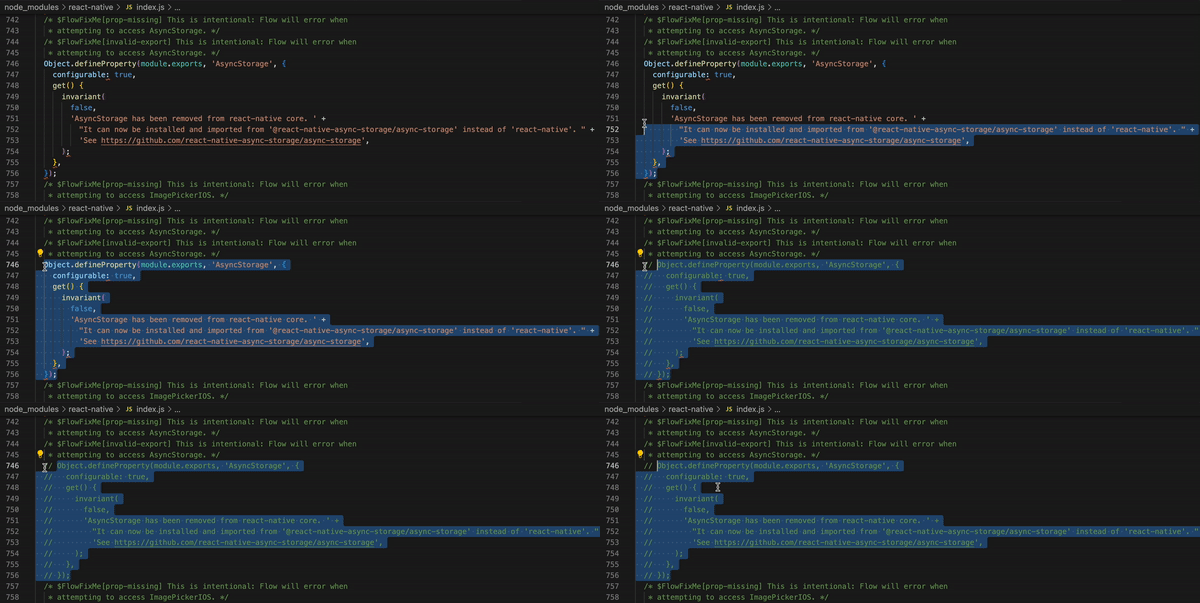
ERROR Invariant Violation: AsyncStorage has been removed from react-native core. It can now be installed and imported from '@react-native-async-storage/async-storage' instead of 'react-native'. See https://github.com/react-native-async-storage/async-storageIt is a well-known issue in react-native which can be resolved by commenting the code shown below in the file at destination 'node_modules/react-native/index.js'. Save and redo step 3 (if the issue persists, feel free to post it)
- Step 4: Access your local dev environment of the Akhar Punjabi Games app
The App can be run in a simulator by using the Expo Go menu.
OR
You can run the app on your device by scanning QR code using Expo Go app. For more info, you can refer to the docs
Contributions are always welcome!
Join our Slack channel to stay tuned and explore other awesome projects by Khalis.
Before raising a pull request, please go through CONTRIBUTING.md. We use dev branch as the development branch, while master is the production branch. You should branch out from dev branch and raise a PR against dev branch.
All images and assets not covered under other licenses are covered under full Copyright © 2023 Khalis Foundation.