こちらは社内で使われている定期観測システムをやや簡易化させたものです
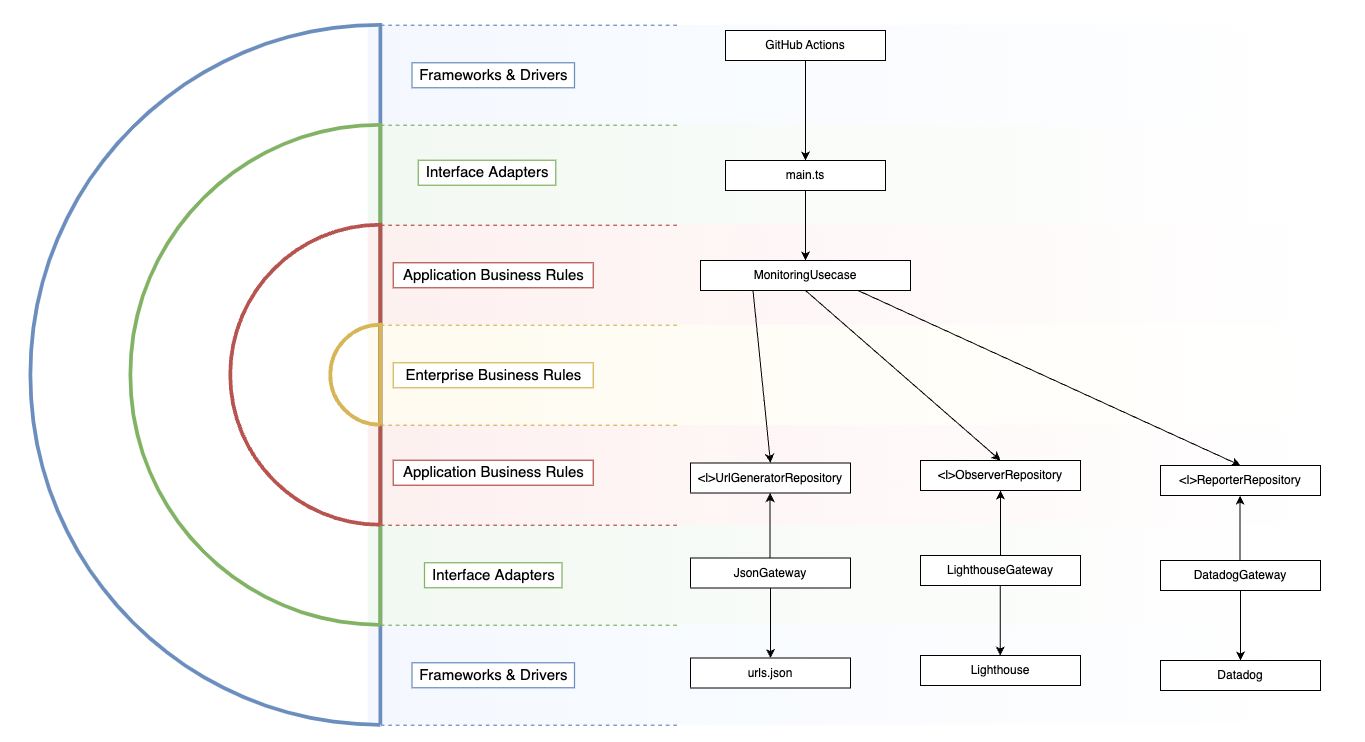
Lighthouse以外のものを入れたり、Datadog以外へ入れたり、本番DBからランダムにページを抜き出して観測するということが将来的にありうるので、Clean Architectureで実装しています。
-
まずDatadogでAPIキーとアプリケーションキーを取得します https://app.datadoghq.com/organization-settings/api-keys https://app.datadoghq.com/organization-settings/application-keys
-
続いて、URLをurl.jsonに登録します
resources/url.json -
以下のコマンドでmain.tsを起動します
DD_APP_KEY=[取得したアプリケーションキー] DD_API_KEY=[取得したAPIキー] npx ts-node main.ts
JSON内のページをLighthouseで測り、結果がDatadog側にenv:developmentで送信されます。
Metric名はwebperf.lighthouse.[ページのタグ].[desktop/mobile].[計測種別(largest_contentful_paintなど)]という形になります