





Visualize, explore, and export structured data files as interactive graphs directly inside VS Code.
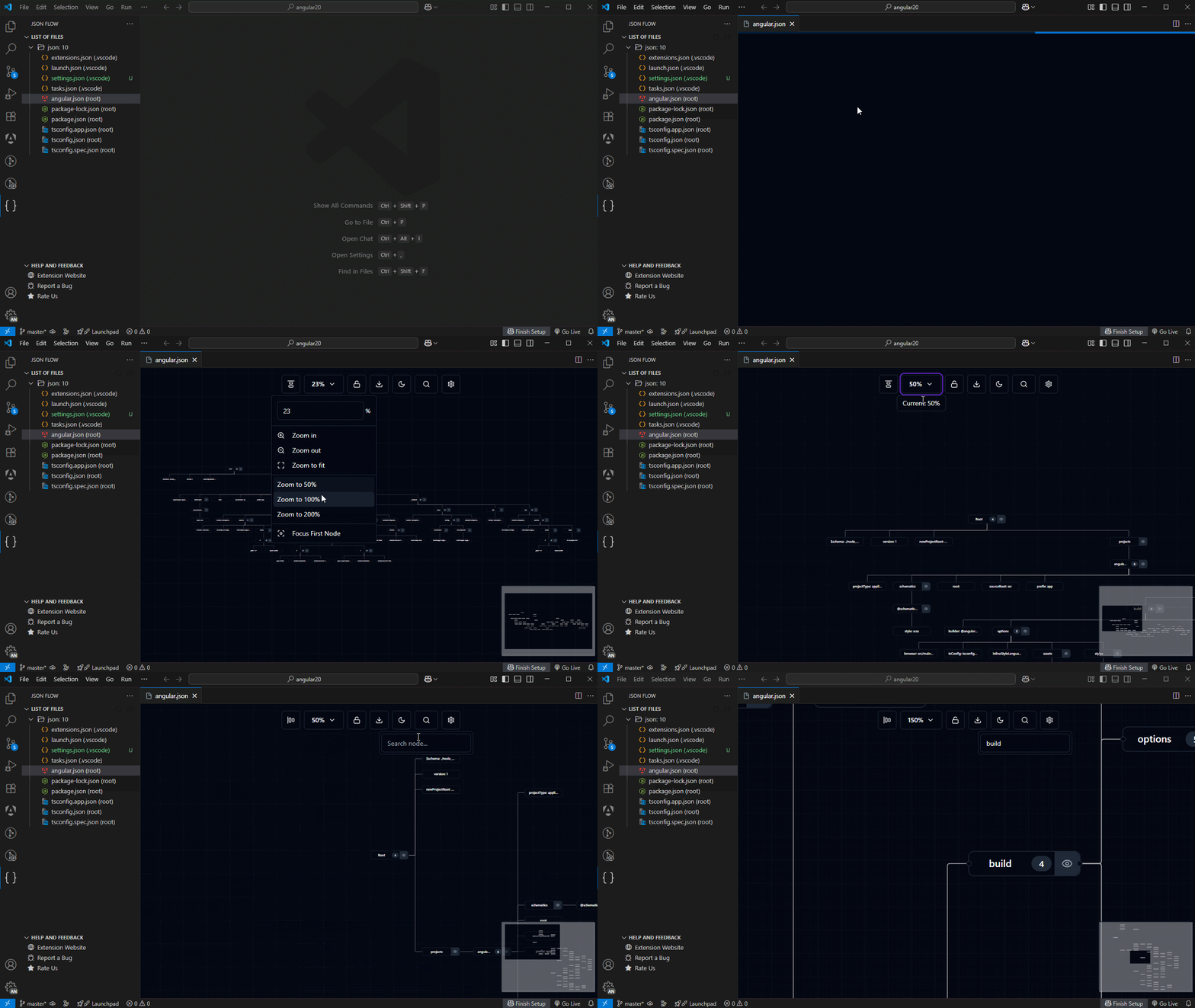
JSON Flow transforms structured data files into an interactive node-based graph view rendered inside a VS Code webview panel.
Stop scrolling through deeply nested structured files. With JSON Flow, you can:
- Navigate relationships visually
- Expand and collapse nested structures
- Search nodes with prev/next navigation
- Sync selections bidirectionally
- Export graphs as PNG, JPG, or SVG
- Convert any supported format to JSON
- Generate strongly-typed code using quicktype
- Fetch and visualize JSON from a remote URL
Runs 100% locally. No telemetry. No uploads. No background network access.
- JSON Flow
- What is JSON Flow?
- Table of Contents
- Supported Formats
- Format Capability Matrix
- Core Features
- Explorer and File Management
- Split View Mode
- Commands
- Configuration
- Architecture
- Identity Model
- How the Graph Is Generated
- Performance Characteristics
- Known Behavior and Limitations
- Security and Privacy
- Internationalization (i18n)
- Requirements
- Troubleshooting
- Contributing
- Code of Conduct
- Changelog
- Support and Contact
- Other Extensions
- Recommended Browser Extension
- License
JSON Flow supports preview, conversion, and graph visualization for:
- JSON / JSONC / JSON5
- YAML (
.yaml,.yml) - TOML
- INI / CFG / Properties
- ENV (
.env,.env.*) - XML
- CSV / TSV
- HCL
- Docker Compose
| Format | Parse | Graph Preview | Convert to JSON | Code Generation | Live Sync | Sync Strategy |
|---|---|---|---|---|---|---|
| JSON | ✓ | ✓ | — | ✓ | ✓ | AST-based |
| JSONC | ✓ | ✓ | — | ✓ | ✓ | AST-based |
| JSON5 | ✓ | ✓ | — | ✓ | ✓ | AST-based |
| YAML (.yaml) | ✓ | ✓ | ✓ | ✓ | ✓ | Line-based |
| YAML (.yml) | ✓ | ✓ | ✓ | ✓ | ✓ | Line-based |
| TOML | ✓ | ✓ | ✓ | ✓ | ✗ | Standard |
| INI / CFG | ✓ | ✓ | ✓ | ✓ | ✗ | Standard |
| Properties | ✓ | ✓ | ✓ | ✓ | ✗ | Standard |
| ENV | ✓ | ✓ | ✓ | ✓ | ✗ | Standard |
| XML | ✓ | ✓ | ✓ | ✓ | ✗ | Standard |
| CSV | ✓ | ✓ | ✓ | ✓ | ✗ | Standard |
| TSV | ✓ | ✓ | ✓ | ✓ | ✗ | Standard |
| HCL | ✓ | ✓ | ✓ | ✓ | ✗ | Standard |
| Docker Compose | ✓ | ✓ | ✓ | ✓ | ✗ | — |
Live Sync is gated in the extension host. Only json, jsonc, json5, yaml, and yml are whitelisted. Formats like toml and dockercompose are explicitly excluded.
- Deterministic layout computed in a Web Worker
- Smooth zoom, pan, and fit-view controls
- Expand/collapse subtrees per node
- Four layout directions: Top-Bottom (TB), Left-Right (LR), Bottom-Top (BT), Right-Left (RL)
- Rotate layout button cycles through directions
- Minimap navigation
- Node detail panel
- Draggable nodes (lockable via interactivity toggle)
Export from the toolbar inside the webview panel.
- Formats: PNG, JPG (2× pixel ratio), SVG, or Clipboard (PNG blob).
- Options: Custom filename, background color (hex/preset/transparent).
- Clean Output: UI chrome (controls, minimap) is automatically excluded.
Label-based navigation control.
- Case-insensitive, debounced text search
- Exact match priority with partial match fallback
- Prev/Next navigation with match counter
- Hidden match indicator for collapsed branches
- Auto-reset on dataset change
Persisted to localStorage.
- Theme: Light, Dark, or System
- Theme Color: Multiple named palettes
- Background: Lines, Dots, or Cross
- Edges: Straight, Step, Smooth Step, Simple Bezier (with optional arrows and animation)
- Reset: Restore defaults button available
Bidirectional synchronization between editor cursor and graph.
Supported (Whitelisted): json, jsonc, json5, yaml, yml
Excluded: toml, dockercompose, and all others.
Behavior:
- Disabled by default: Enable via Title Bar or command.
- Mouse-only: Triggered by clicks, not keyboard/hover.
- Context-aware: Active document must match previewed file.
- Throttled: Configurable delay (default 100ms).
- Optimized: De-duplicates redundant events.
- Safe: Prevents feedback loops and pauses on mapping errors.
Editor → Graph: Click in editor → cursor offset resolved to JSON Pointer → graph focuses node.
Graph → Editor: Click node → ID resolved to text range → editor selection updates.
Single-file mode only. No cross-file sync.
- Convert to JSON: Opens content as new JSON document.
- Convert Partial: Converts selection to new JSON document.
- Copy as JSON: Copies content/selection as JSON to clipboard.
- Copy Content: Copies raw content.
Normalization: Partial selections of JS/TS object literals (single quotes, trailing commas) are automatically normalized to valid JSON.
Available via Editor context menu submenu:
- Show Partial Preview: Graph from selection.
- Convert Partial to JSON: New JSON document.
- Convert Partial to Type: Generate code.
- Copy Partial as JSON: Clipboard.
Generate types/data structures via quicktype.
Supported languages: TypeScript, JavaScript, Flow, Rust, Kotlin, Dart, Python, C#, Go, C++, Java, Scala, Swift, Objective-C, Elm, JSON Schema, Pike, PropTypes, Haskell, PHP, Ruby.
Example: Selecting TypeScript for { "name": "...", "age": 0 } produces:
export interface Person {
  name: string;
  age:  number;
}Prompt for URL and visualize response.
- HTTP GET only. No auth/headers.
- 10s timeout with cancellation.
- Validates URL format before request.
- Falls back to text parsing if content-type isn't JSON.
- No persistent connection.
Adds a dedicated JSON Explorer to the Activity Bar.
- Views: Files list (grouped by type) and Feedback links.
- Discovery: Efficient file discovery with caching.
- Sorting: Groups by size (descending); files alphabetically.
- Settings: Configurable includes/excludes, recursion depth, hidden files,
.gitignore. - Actions: Open, Copy Content/JSON, Get Properties, Convert.
Opens graph panel beside active editor.
- Toggle via Title Bar button or
Ctrl+Alt+F/Cmd+Alt+F. - Live Sync is available only in Split View.
Accessible via Command Palette (Ctrl+Shift+P).
| Command | Description |
|---|---|
JSON Flow: Show Preview |
Open graph panel for the current file |
JSON Flow: Show Partial Preview |
Open graph panel from current text selection |
JSON Flow: Fetch JSON Data |
Fetch JSON from a URL and open graph panel |
JSON Flow: Convert to JSON |
Convert file to JSON in a new document |
JSON Flow: Convert Partial to JSON |
Convert selection to JSON in a new document |
JSON Flow: Convert to Type |
Generate typed code from file using quicktype |
JSON Flow: Convert Partial to Type |
Generate typed code from selection using quicktype |
JSON Flow: Copy Content |
Copy raw file content to clipboard |
JSON Flow: Copy Content as JSON |
Copy file content as JSON to clipboard |
JSON Flow: Copy Partial Content as JSON |
Copy selection as JSON to clipboard |
JSON Flow: Get File Properties |
Show file name, language, line count, version |
JSON Flow: Refresh List |
Refresh the file list in the Explorer view |
JSON Flow: Open File |
Open file from Explorer view in editor |
JSON Flow: Enable Split View |
Open graph panel beside editor |
JSON Flow: Disable Split View |
Close graph panel |
JSON Flow: Enable Live Sync |
Enable editor ↔ graph synchronization |
JSON Flow: Disable Live Sync |
Disable editor ↔ graph synchronization |
Configured via jsonFlow settings.
| Setting | Type | Default | Description |
|---|---|---|---|
jsonFlow.enable |
boolean | true |
Enable or disable the extension |
jsonFlow.graph.layoutOrientation |
TB|LR|BT|RL |
TB |
Initial layout direction |
jsonFlow.liveSync.throttleMs |
number (0–1000) | 100 |
Live Sync throttle delay in milliseconds |
jsonFlow.files.includedFilePatterns |
string[] | 14 extensions | File extensions managed by the Explorer view |
jsonFlow.files.excludedFilePatterns |
string[] | 5 glob patterns | Glob patterns excluded from file search |
jsonFlow.files.maxSearchRecursionDepth |
number | 0 |
Max recursion depth for file search (0 = unlimited) |
jsonFlow.files.supportsHiddenFiles |
boolean | true |
Include hidden files (dot-prefixed) in search |
jsonFlow.files.preserveGitignoreSettings |
boolean | false |
Respect .gitignore rules in file search |
jsonFlow.files.includeFilePath |
boolean | true |
Show relative path alongside filename in Explorer |
JSON Flow uses a strict three-layer separation of concerns.
The extension host is the sole backend. It runs inside the VS Code process and is responsible for:
- Parsing all supported file formats
- Building the tree structure sent to the webview
- Handling all commands and file system operations
- Managing Live Sync state and format gating
- Validating all messages received from the webview
- Handling localization
The extension host never renders UI and never runs layout algorithms.
The webview is a sandboxed iframe. It is responsible for:
- Rendering the interactive graph
- Managing UI state
- Communicating with the extension host exclusively via structured message passing
- Persisting appearance settings
The webview has no access to the VS Code API, the filesystem, or the extension host's state directly.
The Web Worker is the sole layout authority.
- Receives graph data and settings
- Executes the layout pipeline deterministically
- Returns positioned nodes and edges
- Stateless: Processes each request independently
- Lightweight: Contains no DOM dependencies or React runtime
No layout logic runs in the main thread.
Every node in the graph has a deterministic identity based on its structural position in the source data.
- Data nodes: Identified by RFC 6901 JSON Pointer strings (e.g.
/users/0/name). - Graph structural root: Uses a reserved identifier disjoint from the JSON Pointer domain.
IDs are stable across re-renders for the same file content, ensuring reliable state preservation (such as expansion/collapse status) during updates.
- Host: Parses file to object. Sends to Webview.
- Webview: Dispatches data to the Worker.
- Worker: Computes layout using an adaptive strategy.
- Small/Medium graphs use a layout optimized for structure and readability.
- Large graphs automatically switch to a high-performance linear layout.
- Worker: Returns positioned elements.
- Webview: Renders the graph.
JSON Flow utilizes an adaptive layout system to balance readability and performance.
- Standard Layout: Used for most files. Provides optimal edge routing and hierarchical spacing.
- Linear Layout: Automatically activated for large graphs (> 2000 nodes). Switches to a high-performance, O(n) breadth-first strategy to maintain responsiveness.
Performance depends on structural complexity (depth, branching factor), not only file size. There is no hard file size cap.
- Single-file mode only. One file per preview panel. No cross-file graph.
- No cross-file Live Sync. Live Sync only operates on the file currently open in the preview panel.
- No persistent layout cache. Layout is recomputed on every open.
- No background indexing. Files are scanned only when the Explorer view is opened or refreshed.
- State resets on extension reload. No state is persisted between VS Code sessions.
- Live Sync is mouse-only. Keyboard navigation in the editor does not trigger graph sync.
- Fetch JSON from URL is GET-only. No POST, no authentication, no custom headers.
- Docker Compose has no selection mapper. Preview and conversion work; Live Sync does not.
Processing boundary: All parsing, layout, and code generation runs locally inside VS Code. No data leaves the machine unless the user explicitly invokes Fetch JSON from URL.
Webview security:
- Unique nonce per instantiation
- Strict Content-Security-Policy
- No
unsafe-eval - Remote scripts are not loaded
Input sanitization:
- All messages are validated before processing
- HTML sanitization applied to all user-controlled content
Workspace Trust: The extension respects VS Code Workspace Trust. It is declared as supporting untrusted workspaces and virtual workspaces (with limitations).
No telemetry. No analytics. No automatic uploads.
The extension is fully localized.
- Extension Host: Uses VS Code's native localization APIs.
- Webview: Uses a dedicated internal localization layer.
- Worker: Language-agnostic.
- VS Code 1.102.0 or later
- Windows, macOS, or Linux
- Works in untrusted workspaces (with limitations)
- Works in virtual workspaces (with limitations)
- Compatible with VSCodium, Cursor, WindSurf, and any VS Code–compatible platform
Performance is slow:
- Collapse large branches to reduce rendered node count
- Switch to a different layout orientation
- Disable Live Sync temporarily
- Avoid files with extremely wide root objects (hundreds of top-level keys)
Live Sync does not respond:
- Confirm the format is
json,jsonc,json5,yaml, oryml - Confirm Live Sync is enabled (Editor Title Bar button)
- Confirm the active editor document matches the previewed file
- Click (mouse) in the editor — keyboard navigation does not trigger sync
Graph export is blank or clipped:
- Use Fit View before exporting
- Ensure the graph has finished loading (worker completes layout before export)
For issues: https://github.com/ManuelGil/vscode-json-flow/issues
Contributions are welcome.
- Follow project coding standards
- Maintain deterministic behavior
- Do not modify identity logic
- Do not introduce layout computation outside the Web Worker
- Do not alter the adaptive threshold without benchmarking
Architecture stability is prioritized over feature expansion.
We are committed to providing a friendly, safe, and welcoming environment for all, regardless of gender, sexual orientation, disability, ethnicity, religion, or other personal characteristic. Please review our Code of Conduct before participating in our community.
For a complete list of changes, see the CHANGELOG.md.
If you need help, want to discuss ideas, or have questions about the project:
- Submit an Issue
For urgent matters or partnership inquiries, please use the contact information provided in the repository profile.
- Manuel Gil - Owner - ManuelGil
- Santiago Rey - Collaborator - ksreyr
- Andry Orellana - Collaborator - AndryOre
See the list of contributors.
-
Auto Barrel Automatically generates and maintains barrel (
index.ts) files for your TypeScript projects. -
Angular File Generator Generates boilerplate and navigates your Angular (9→20+) project from within the editor, with commands for components, services, directives, modules, pipes, guards, reactive snippets, and JSON2TS transformations.
-
NestJS File Generator Simplifies creation of controllers, services, modules, and more for NestJS projects, with custom commands and Swagger snippets.
-
NestJS Snippets Ready-to-use code patterns for creating controllers, services, modules, DTOs, filters, interceptors, and more in NestJS.
-
T3 Stack / NextJS / ReactJS File Generator Automates file creation (components, pages, hooks, API routes, etc.) in T3 Stack (Next.js, React) projects and can start your dev server from VSCode.
-
Drizzle ORM Snippets Collection of code snippets to speed up Drizzle ORM usage, defines schemas, migrations, and common database operations in TypeScript/JavaScript.
-
CodeIgniter 4 Spark Scaffolds controllers, models, migrations, libraries, and CLI commands in CodeIgniter 4 projects using Spark, directly from the editor.
-
CodeIgniter 4 Snippets Snippets for accelerating development with CodeIgniter 4, including controllers, models, validations, and more.
-
CodeIgniter 4 Shield Snippets Snippets tailored to CodeIgniter 4 Shield for faster authentication and security-related code.
-
Mustache Template Engine - Snippets & Autocomplete Snippets and autocomplete support for Mustache templates, making HTML templating faster and more reliable.
For developers who work with .vsix files for offline installations or distribution, the complementary One-Click VSIX extension is recommended, available for both Chrome and Firefox.
One-Click VSIX integrates a direct "Download Extension" button into each VSCode Marketplace page, ensuring the file is saved with the
.vsixextension, even if the server provides a.ziparchive. This simplifies the process of installing or sharing extensions offline by eliminating the need for manual file renaming.
JSON Flow is licensed under the MIT License. For full license details, please refer to the LICENSE file included in this repository.



{
  "jsonFlow.enable": true,
  "jsonFlow.files.includedFilePatterns": [
    "json", "jsonc", "json5",
    "yaml", "yml",
    "toml",
    "ini", "cfg",
    "xml",
    "csv", "tsv",
    "env",
    "hcl",
    "properties"
  ],
  "jsonFlow.files.excludedFilePatterns": [
    "**/node_modules/**",
    "**/dist/**",
    "**/out/**",
    "**/build/**",
    "**/vendor/**"
  ],
  "jsonFlow.files.maxSearchRecursionDepth": 0,
  "jsonFlow.files.supportsHiddenFiles": true,
  "jsonFlow.files.preserveGitignoreSettings": false,
  "jsonFlow.files.includeFilePath": true,
  "jsonFlow.graph.layoutOrientation": "TB",
  "jsonFlow.liveSync.throttleMs": 100
}