The library solves the problem of interaction between spark applications developed in Scala and Python. This can help out when Spark manipulations need to be performed in Scala and then in Python within a single run. It is possible to observe some need for such functionality:
- Invoking Pyspark script from Scala Spark Code https://stackoverflow.com/questions/68763164/invoking-pyspark-script-from-scala-spark-code
- Running PySpark from Scala/Java Spark https://stackoverflow.com/questions/56132948/running-pyspark-from-scala-java-spark
- Passing sparkSession Between Scala Spark and PySpark https://stackoverflow.com/questions/58185042/passing-sparksession-between-scala-spark-and-pyspark
The need may be caused by the lack of the ability to rewrite the code from one language to another.
For a quick introduction, go to the demo repository: ScalaPySparkDemo
-
Create new Scala project.
-
add the dependency to build.sbt
libraryDependencies ++= Seq(
  "ru.mardaunt"        %% "pysparkwrapper" % "0.1.0",
  "org.apache.spark"   %% "spark-sql"      % "3.3.2"
)
-
Prepare your Scala Spark application. In our example, it looks prosaic:
package ru.example

import org.apache.spark.sql.SparkSession

object PySparkDemo extends App {

  lazy val spark = SparkSession.builder()
                               .master("local[*]")
                               .getOrCreate()

}
-
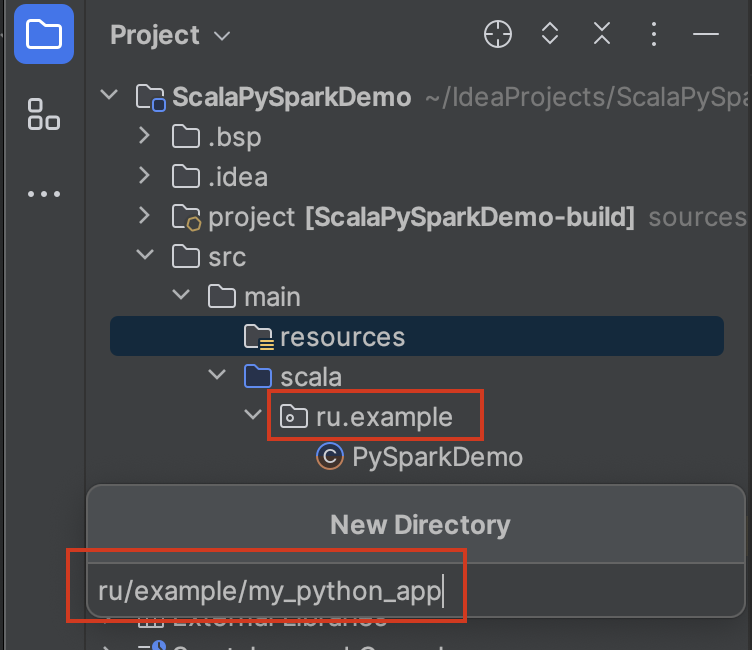
Prepare your PySpark application and place it in the resources.
-
Create a class that will be responsible for preparing the PySpark application for launch. To do this, extend the abstract PySparkApp class. This will be a kind of wrapper class over the python project.
package ru.example

import org.apache.log4j.Logger
import org.apache.spark.sql.SparkSession
import ru.mardaunt.python.PySparkApp
import ru.mardaunt.python.logger.SimpleLogger

class PySparkDemo(spark: SparkSession, logger: Logger)
  extends PySparkApp(mainPyName = "pyspark_main.py", needKerberosAuth = false)(spark, logger) {

  override protected val starterTool: String = "spark-submit"
}
Note that the name of the package where the wrapper class is stored must match the name of the python application package in the resources. In our case, is:
ru.example -
The application is ready to launch:
import ru.mardaunt.python.logger.SimpleLogger

new PySparkDemo(spark, SimpleLogger()).run()
If you are running the application locally in the IDE, make sure that Spark is installed on the computer.
If you want to run the application on the cluster, then build the JAR. You need to make sure that you are building a fat JAR. This is necessary because we have specified an external dependency:
"ru.mardaunt" %% "pysparkwrapper" % "0.1.0"
You can not build a fat JAR if you pass the artifact pysparkwrapper.jar to the
--jarsoption for thespark-submitcommand.Or you can simply drag and drop all the files of the current repository from the package
ru.mardaunt.pythoninto your project.
Congratulations! Now you know how to use the library.
- Override the field of the python wrapper child class of the project:
    override protected val additionalSparkConfList: List[String] =
      List(
        "--conf", "spark.app.name=MY_FAVORITE_APP",
        "--conf", "spark.driver.cores=4"
      )
- You can pass a list of arguments to the "run" method:
Or override the wrapper class field:
  val args = List("a", "b", "c")
  new PySparkDemo(spark, SimpleLogger()).run(args)
override protected val pythonArgs: List[String] = List("a", "b", "c")
- By default, Kerberos authorization is enabled. But you can control authorization using a flag from the wrapper class:
needKerberosAuth = false
- To do this, you should already have a python environment with installed libraries.
Then you can configure your PySpark app by passing the path to the python interpreter to the driver and executors:
    override protected val additionalSparkConfList: List[String] =
      List(
        "--conf", "spark.app.name=MY_FAVORITE_APP",
        "--conf", "spark.driver.cores=4",
        "--conf", "spark.pyspark.python=/your/python/loc/bin/python",
        "--conf", "spark.pyspark.driver.python=/your/python/loc/bin/python"
      )