
Integrate Real-time Messaging, Audio & Video Calling into Android, and iOS apps with MirrorFly React Native SDK.
With support for RTMP and WebRTC, 1000+ communication features, 500+ AI-powered features, MirrorFly lets you build any app with complete customization and control over features and security. Above this, the solution gives full data sovereignty and deployment flexibility (on-premise/ on-cloud).
MirrorFly helps build omni-channel communication apps for any kind of business
💬 In-app Messaging - Connect users individually or as groups via instant messaging features.
🎯 HD Video Calling- Engage users over face-to-face conversations anytime, and from anywhere.
🦾 HQ Voice Calling - Deliver crystal clear audio calling experiences with latency as low as 3ms.
🤖 AI Voice Agent - Build custom AI voicebots that can understand, act and respond to user questions.
🤖 AI Chatbot - Deploy white-label AI chatbots that drive autonomous conversations across any web or mobile app.
🦾 Live Streaming - Broadcast video content to millions of viewers around the world, within your own enterprise app.
The requirements for chat SDK for React Native Mobile App are:
- React-Native >= 0.73.0 <=0.79.5
- Node Version >= 18.20.4
- npm - 10.7.0
iOS
To enable/disable New Architecture in Podfile:
ENV['RCT_NEW_ARCH_ENABLED'] = '0' # Use '1' to enable, '0' to disableAndroid
To enable/disable New Architecture in gradle.properties:
newArchEnabled=false # Use 'true' to enable, 'false' to disableNote: Skip this part if you are already having your license key.
You must obtain an SDK License Key to integrate the MirrorFly Chat SDK into your app. The MirrorFly server uses this key to authenticate your app’s SDK instance.
Step 1: Register here to get a MirrorFly User account.
Step 2: Login to your Account
Step 3: Get the License key from the application Info’ section
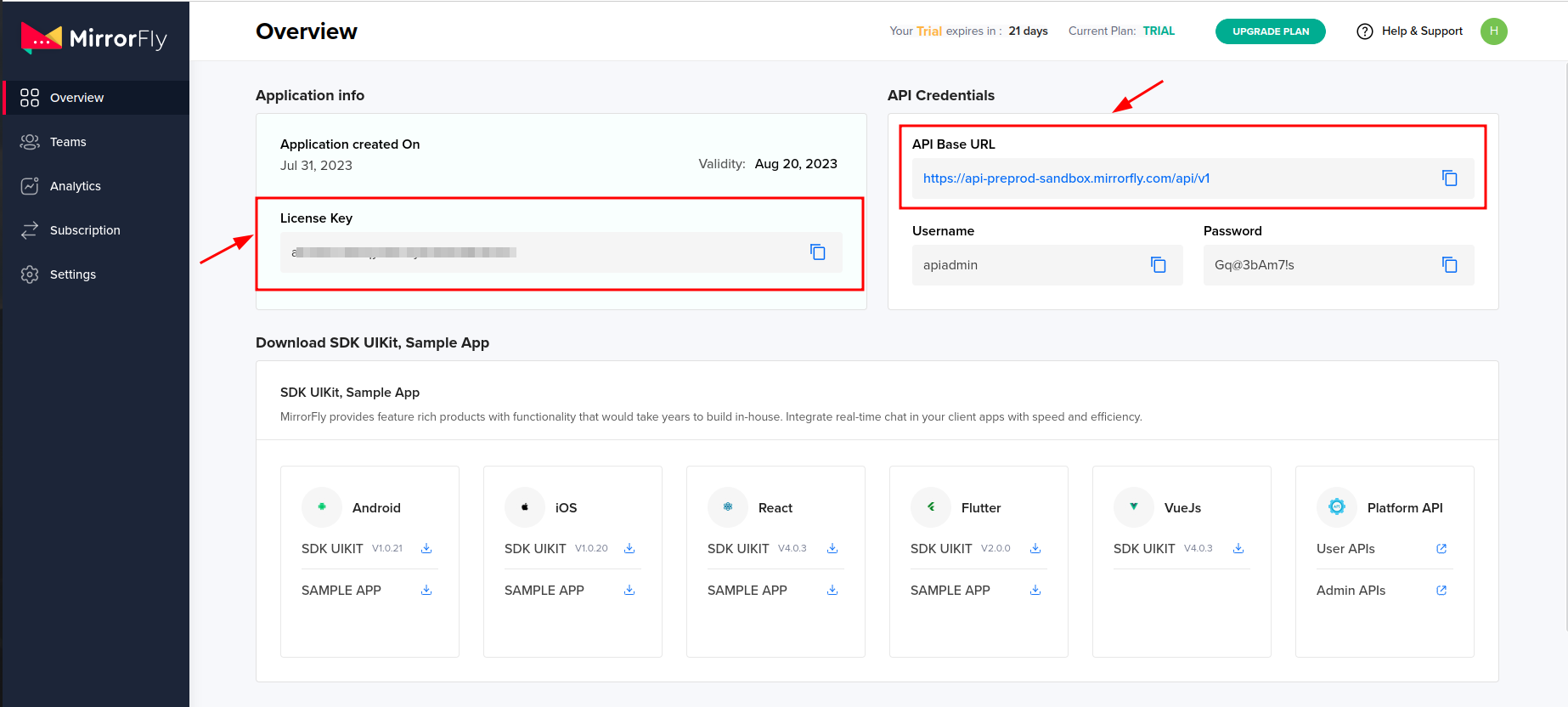


Step 1: Update all your packages.json files.
Step 2: Check your package files for any duplicates if the app isn’t working on iOS.
Step 3: Install MirrorFly SDK in your React Native app.
npm i [email protected]Step 4: Import the SDK into your application where you want
import { SDK } from "mirrorfly-reactnative-sdk";{
"@react-native-community/netinfo": "^11.4.1",
"react-native-get-random-values": "1.11.0",
"realm": "^20.1.0",
"react-native-fs": "^2.20.0",
"moment": "2.30.1",
"react-native-webrtc": "124.0.4",
"react-native-background-timer": "^2.4.1",
"react-native-permissions": "^5.2.1"
}const initializeObj = {
apiBaseUrl: `API_URL`,
licenseKey: `LICENSE_KEY`,
isTrialLicenseKey: `TRIAL_MODE`,
callbackListeners: {},
};
await SDK.initializeSDK(initializeObj);function connectionListener(response) {
if (response.status === "CONNECTED") {
console.log("Connection Established");
} else if (response.status === "DISCONNECTED") {
console.log("Disconnected");
}
}
const initializeObj = {
apiBaseUrl: "https://api-preprod-sandbox.mirrorfly.com/api/v1",
licenseKey: "XXXXXXXXXXXXXXXXX",
isTrialLicenseKey: true,
callbackListeners: {
connectionListener
},
};
await SDK.initializeSDK(initializeObj);{
"statusCode": 200,
"message": "Success"
}const registerObject = {
userIdentifier,
fcmtoken,
voipDeviceToken,
mode,
registerMetaData,
forceRegister,
};
await SDK.register(registerObject);{
statusCode: 200,
message: "Success",
data: {
username: "123456789",
password: "987654321"
}
}await SDK.connect(`USERNAME`, `PASSWORD`);{
message: "Login Success",
statusCode: 200
}await SDK.sendTextMessage(`TO_USER_JID`, `MESSAGE_BODY`, `MESSAGE_ID`, `REPLY_TO`);function messageListener(response) {
console.log("Message Listener", response);
}await SDK.makeVoiceCall(['USER1_JID']);await SDK.makeVideoCall(['USER1_JID']);await SDK.answerCall();await SDK.endCall();await SDK.declineCall();MirrorFly offers full freedom with the hosting options:
Self-hosted: Deploy your client on your own data centers, private cloud or third-party servers.
Check out our multi-tenant cloud hosting
Cloud: Host your client on MirrorFly’s multi-tenant cloud servers.
Check out our multi-tenant cloud hosting
MirrorFly offers a fully-built client SafeTalk that is available in:
- iOS
- Android
- Developer Documentation
- MirrorFly React Native Solution
- MirrorFly React Native Sample App
- MirrorFly React Native UI Kit
- Product Tutorials
- See who's using MirrorFly
Need a tech team to build your enterprise app?
Hire a full team of experts