AssignNameToArgumentRange condition
Assigns a name to an argument range.
This action is useful when manipulating functions that take a variable number or arguments.
| Property | Usage | Description |
|---|---|---|
| Name | Required / Content property | The name of the variable to bind the argument range. The name must be specified as a string with a dollar sign ($) followed by letters. |
| From | Optional | The position of the first argument to include |
| To | Optional | The position of the last argument to include |
Say that we want to convert the Microsoft.Phone.Controls.WebBrowser.InvokeScript method to the WebView.InvokeScriptAsync method. In order to do this we need to take parts of the original expression and assign names to it.
Since the second argument of the Microsoft.Phone.Controls.WebBrowser.InvokeScript method is a params argument, we need to capture all of the arguments as a group so we can move it to another section in the target template.
Here's an implementation of this mapping:
<MapUnit xmlns="clr-namespace:Mobilize.Mappers.Extensibility.Core;assembly=Mobilize.ExtensibleMappers"
         xmlns:map="clr-namespace:Mobilize.Mappers.Extensibility.Code;assembly=Mobilize.ExtensibleMappers">
  <MapUnit.Elements>
    <map:CodeMapPackage Type="Microsoft.Phone.Controls.WebBrowser">
      <map:CodeMapPackage.Maps>
        <map:CodeMap Kind="Type">
          <map:CodeMap.Action>
            <map:ReplaceClassUsage NewNamespace="Windows.UI.Xaml.Controls"
                                   NewClassName="WebView" />
          </map:CodeMap.Action>
        </map:CodeMap>
         ...
        <map:CodeMap Kind="Call" MemberName="InvokeScript">
          <map:Conditional>
            <map:Case>
              <map:Case.Condition>
                <map:WithMethodCall>
                  <map:WithCalledMemberOwner>
                    <map:AssignName>$webView</map:AssignName>
                  </map:WithCalledMemberOwner>
                  <map:WithArgument Position="0">
                    <map:AssignName>$function</map:AssignName>
                  </map:WithArgument>
                  <map:AssignNameToArgumentRange From="1" Name="$argsFromtwo"/>
                </map:WithMethodCall>
              </map:Case.Condition>
              <map:Case.Action>
                <map:ReplaceWithTemplate>
                  await $webView.InvokeScriptAsync($function, new[] {$argsFromtwo})
                </map:ReplaceWithTemplate>
              </map:Case.Action>
            </map:Case>
            <map:Default>
              <map:Keep/>
            </map:Default>
          </map:Conditional>
        </map:CodeMap>
       ...
      </map:CodeMapPackage.Maps>
    </map:CodeMapPackage>
  </MapUnit.Elements>
</MapUnit>
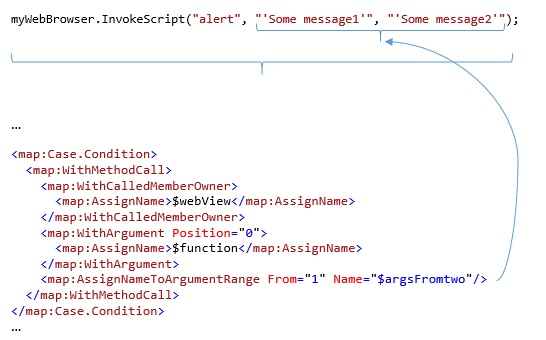
The AssignNameToArgumentRange condition is going to capture the specified arguments as shown in the following picture:
- If the
Fromproperty is not specified, the range will capture starting from the first argument - If the
Toproperty is not specified, the range will capture until the last argument