This example is an Node.js media player application based on the OSE framework showcasing some of its principles and capabilities.
- Playback through VLC of:
- predefined streams
- local files
- items in history
- Icecast directory
- Volume control using PulseAudio
- Remote control of keyboard and pointer through xdotool (xorg)
- Integration with other example applications:
This package is a part of the OSE suite. For more information, see the following links:
Open Smart Environment software is a suite for creating
multi-instance applications that work as a single whole.
Imagine, for example, a personal mesh running on various devices
including HTPCs, phones, tablets, workstations, servers, Raspberry
Pis, home automation gadgets, wearables, drones, etc.
OSE software consists of several npm packages: a framework running on Node.js, an HTML5 frontend, extending packages and a set of example applications.
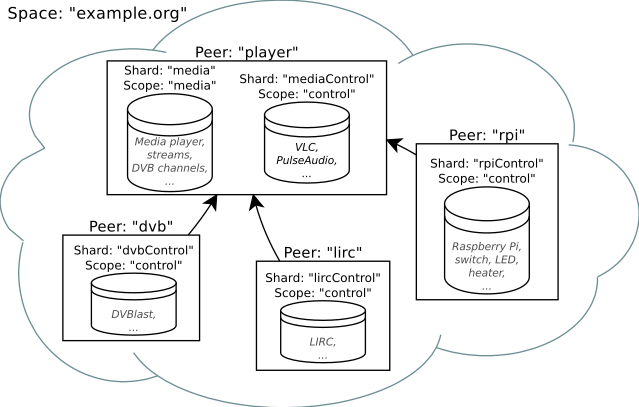
Set-up of current example applications. Here, OSE provides a Media player running on an HTPC that can be controlled by an IR remote through LIRC and is capable of playing streams from a DVB streamer and control devices through GPIO pins on a Raspberry Pi
For more information about OSE see the documentation.
- Pre-alpha stage (insecure and buggy)
- Unstable API
- Patchy documentation
- Low test coverage (1 %)
This is not yet a piece of download-and-use software. It is important to understand the basic principles covered by the documentation.
However, this software has been successfully used continuously since the end of 2013 in a house running 7 OSE instances spread over several Raspberry Pis, notebooks and an HTPC.
OSE has the following prerequisites:
- Node.js (>0.12) running on Debian Jessie and Raspbian
- Recent version of Firefox or Chrome browser
For the Media player application to work, you need the following prerequisites:
- Node.js > 0.12, npm, git
- PulseAudio configured with the D-Bus control interface
pactl load-module module-dbus-protocol - VLC 2.2 or newer
sudo apt-get install vlc
To install the example application, do the following:
sudo apt-get install libdbus-1-dev pkg-config
git clone https://github.com/OpenSmartEnvironment/ose-example-player
cd ose-example-player
npm install
To configure this example, edit ose-example-player/bin/run.js. Find and replace "CHANGE_ME" text with appropriate values.
To start the Media player example application, execute the startup script from an X.Org session.
./ose-example-player/bin/run.js
To access the HTML5 frontend, open the following URL in supported browser
http://localhost:4431
This software is released under the terms of the GNU General Public Licence v3.0 or later.