- ATTENTION! This is already a very old version ..
- I don't have as much time as I would like for this project ..
- so I don't recommend using this project .. use them at your own risk!
- Hey! This code is still a Work in Progress! Files, instructions, and other stuff might change!+ This project includes Marlin FW + DWIN Addon code and DWIN display source code- Small pass through the development of Custom DWIN you can watch on YouTube PC-maniak 🎥.
! Version :
! DWIN Addon / DWIN Source code : 0.3
! Marlin 1.x : 1.1.x "bugfix" snapshot Patches after 1.1.9
- I am looking for a volunteer graphic designer to make graphic adjustments
- and a new graphic background to make the graphic better fit- Working on this project is really hard
 if you want to support me .. you can here 🍕.
+ TODO LIST (please report any identified deficiencies and bugs so I can fix them - add to TODO)- Marlin 2.0 support -> 80%
- Protection -> 100%
- USB flash drive support -> 60%
- ESP32 for email/phone info -> 40%
- DWIN FAN Speed control -> 100%
- DWIN M117 TEXT -> 100%
- DWIN Flow rate control -> 10%
- DWIN Advanced menu -> 100%
- DWIN Editable "Preheat profile" -> 10%
! Write your ideas in the "issues" section- Pre-required :- Creality CR10S PRO
- or
- 3D printer with Marlin FW.
- DWIN Display(With TOUCH!): DMT48270C043_06W.
- Optional :
- JST XH2.54 Wire(6Pin!): JST-Wire-Cable-Plug.
- Crimper Dupont Piler(I recommend the whole set): DuPont-2.54.
+ Installation :- Marlin + Addon :
- I recommend using VScode + PlatformIO !Video tutorial : YouTube PC-maniak.
- Install VSCode
- Open Extension(CTRl+SHIFT+X) a type PlatformIO
- Hit install
- Follow the installation instructions
- Enjoy ;)
++++++++++++++++++++++++++++++++++++++++++++++++++++++- DWIN Display SW :
Video tutorial : YouTube DWIN TUT.
- ! Optional edit DWIN_SET with DGUS Tools
- if you make a change and generate a new DWIN_SET you must run FIX NAME.BAT !!- Copy DWIN_SET to root of SD card
- Put sd card into lcd! sd card slot
- Turn ON Power and wait until on LCD show END process
- take out SD card ..
- Enjoy ;)
++++++++++++++++++++++++++++++++++++++++++++++++++++++- DWIN Display HW (only for use on printers other than the CR10S Pro):
- if communication is not working .. change the RX and TX position
- it must be connected to UART2 on the printer board
- if you must use a UART port other than 2, you must change the port number in the DWIN addon code
- UART2 should be free but in the next update I will modify the code to a simple definition port number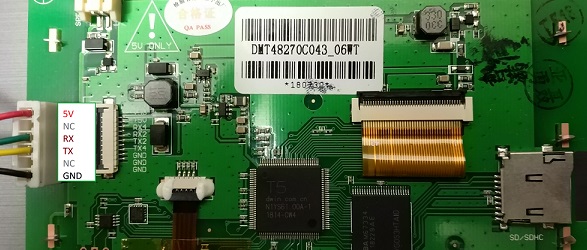
+++++++++++++++++++++++++++++++++++++++++++++++++++++++ Tested on :- Creality CR10S PRO
- Board GT2560 rev a+
- Board GT2560 rev a
+ if you try the code on another board / printer please write your experience in the "issues" section