


GoodGute is a full-stack AI translation system that delivers accurate, professional English-to-German translation through two interfaces: a consumer-facing web application and a developer-focused CLI tool with advanced translation quality scoring.
- Background
- System Architecture
- Tech Stack Used
- Model Selection
- Features
- Engineering Challenges & Design Decisions
- Known Limitations
- Planned Architecture Upgrade
- About
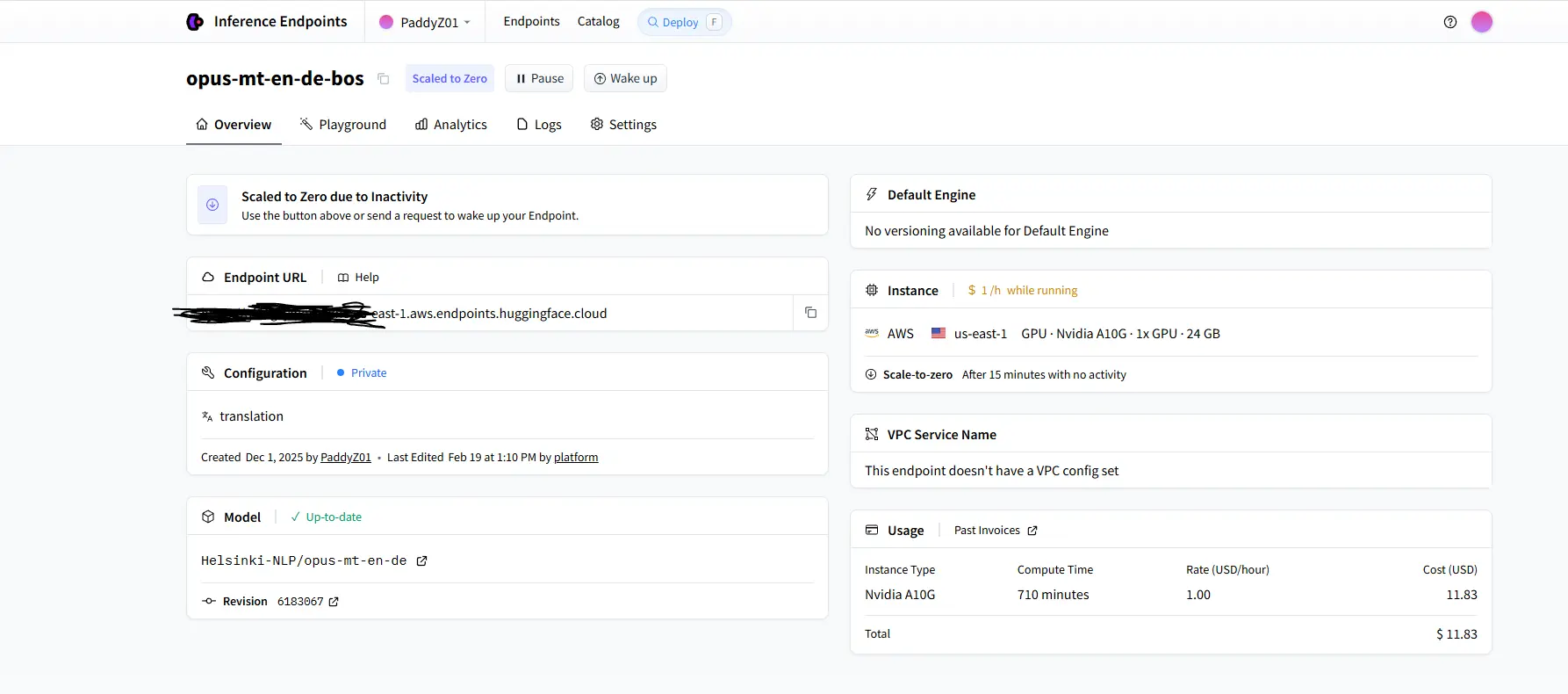
Most general-purpose LLMs (GPT-4, Perplexity, etc.) produce casual, inconsistent translations that are unsuitable for professional or technical documents. GoodGute is built around a domain-specific neural machine translation model — Helsinki-NLP's opus-mt-en-de — that is purpose-trained for English→German translation and produces consistent, formal output every time.
Perplexity API is used separately as a translation quality evaluator, not as a translator. This separation of concerns is a deliberate architectural decision: use the right tool for each job.
┌─────────────────────────────────────────────────────┐
│                    CLIENT LAYER                     │
│                                                     │
│   Web App (Next.js / Tailwind / Vercel)             │
│   CLI Tool (Python / PyPI)                          │
└────────────────────┬────────────────────────────────┘
                     │ HTTP / REST
┌────────────────────▼────────────────────────────────┐
│                  BACKEND LAYER                      │
│                                                     │
│   FastAPI + Uvicorn (Python)                        │
│   Railway deployment                                │
│   SQLite3 (translation cache + history)             │
└────────────────────┬────────────────────────────────┘
                     │ API calls
┌────────────────────▼────────────────────────────────┐
│                   AI LAYER                          │
│                                                     │
│   Helsinki-NLP/opus-mt-en-de (HuggingFace)          │
│   → Core translation engine                         │
│                                                     │
│   Perplexity API                                    │
│   → Translation quality scoring (CLI only)          │
└─────────────────────────────────────────────────────┘
| Layer | Technology | Reason |
|---|---|---|
| Frontend | Next.js, Tailwind CSS, Vercel | Fast deployment, responsive UI |
| Backend | Python, FastAPI, Uvicorn | Async support, clean REST API design |
| Hosting | Railway | Low-cost deployment for prototype |
| Database | SQLite3 | Translation caching and history |
| Translation Model | Helsinki-NLP/opus-mt-en-de (HuggingFace) | Purpose-built NMT model, consistent formal output |
| Quality Scoring | Perplexity API | LLM-based evaluation of translation accuracy and fluency |
Why Python + FastAPI + Railway + SQLite3 + Vercel instead of Java + Spring Boot + AWS + Nginx + Redis + PostgreSQL?
This section documents the engineering rationale behind the current stack from three angles: use-case fit, current trade-offs, and the future upgrade path.
GoodGute's core workload is orchestrating external AI APIs — sending text to HuggingFace's opus-mt-en-de and receiving translated results, then optionally forwarding to Perplexity API for quality scoring. This is fundamentally an I/O-bound, API-proxying workload, not a computation-heavy or transaction-heavy one.
That changes everything about what the right stack looks like.
Python is the natural home for AI/ML API integration. Libraries like nltk (for sentence tokenization and text chunking), pydantic (for request/response validation), and the HuggingFace transformers ecosystem are Python-native. There is no equivalent first-class ecosystem in Java or Node for this kind of NLP preprocessing pipeline. Splitting raw text on \n, detecting sentence boundaries, chunking paragraphs to respect the opus-mt-en-de 1250-character input limit — all of this is handled cleanly by Python's text processing libraries with minimal boilerplate.
FastAPI is performance-competitive with Spring Boot for I/O-bound workloads. For CPU-bound workloads under heavy load, Java + Spring Boot has a real throughput advantage. But for I/O-bound work — where the bottleneck is waiting for external APIs to respond, not executing local computation — FastAPI with Uvicorn (ASGI, async) achieves comparable throughput. The latency difference between the two frameworks is negligible when the dominant cost is an external API round-trip of 500ms–3s. FastAPI also provides automatic OpenAPI documentation generation and Pydantic-native validation out of the box, reducing boilerplate significantly.
Railway provides container-based deployment with zero infrastructure setup. Railway builds from the repo directly, provisions a container, and exposes a fixed external URL. This gives GoodGute a stable, publicly addressable backend endpoint with no manual server configuration, no VPC setup, no security group rules, no AMI management. For a prototype stage product with low traffic, Railway eliminates an entire category of operational overhead. The fixed external API latency to HuggingFace is also more predictable from Railway than from a self-managed EC2 instance with misconfigured networking.
SQLite3 is entirely sufficient for the current traffic volume. GoodGute's database workload is: write a cached translation result, read it back on cache hit, delete stale entries. These are infrequent, low-volume operations with no concurrent write contention at prototype scale. SQLite3 handles this without issue. There are no complex JOIN queries, no high-frequency writes, no need for MVCC. For a single-instance prototype, SQLite3 is not a liability — it is the correct tool.
Vercel handles the frontend with zero configuration. Next.js + Vercel is a first-class combination. CDN distribution, SSL, preview deployments, and edge caching are all handled automatically. The alternative — AWS Amplify or CloudFront + S3 — requires meaningful configuration to achieve the same result.
Economic and development cost. Running this stack costs near-zero in infrastructure fees during prototype validation. The team is small (one developer), iteration speed matters more than horizontal scalability, and the user base is not yet at a scale where infrastructure costs are meaningful. Building on AWS with EC2, RDS (PostgreSQL), ElastiCache (Redis), and an Application Load Balancer would add significant fixed monthly costs before a single paying user exists, as well as requiring substantially more DevOps time to configure and maintain.
The current stack has known failure modes that become real problems as traffic grows.
SQLite3 write-locking under concurrent load. SQLite3 uses a single write lock for the entire database file. Under concurrent multi-user load — multiple users submitting translations simultaneously — write operations queue behind each other. In production, this manifested as translation results failing to propagate correctly: simultaneous users would not see their cached translations because write locks were being held by competing requests. In high-frequency write scenarios (many users translating long documents in parallel), SQLite3 effectively becomes a bottleneck and can stall or stop the translation pipeline entirely. PostgreSQL's MVCC (Multi-Version Concurrency Control) eliminates this — readers never block writers, writers never block readers.
No in-memory caching layer. Currently, all cache lookups hit SQLite3 on disk. For frequently translated phrases (short, common expressions), the cache hit path still involves disk I/O. Redis would serve these lookups from memory at sub-millisecond latency, dramatically reducing per-request overhead under concurrent load. More critically, Redis supports atomic operations and TTL-based expiry natively, which makes distributed caching safe in multi-instance deployments — something SQLite3 cannot support at all across multiple backend pods.
No horizontal scaling. The current deployment is a single Railway container. If traffic spikes, there is no mechanism to add backend instances. There is no reverse proxy (Nginx) to load-balance across instances, and SQLite3 as the database cannot be shared across multiple processes on different machines. The stack is inherently single-instance. This is acceptable at prototype scale but becomes a hard ceiling.
No async message queue. When a user submits a long document for translation, the backend makes sequential blocking calls to HuggingFace's inference endpoint for each paragraph. Under a traffic spike, these API calls stack up in the request handler, increasing response latency for all concurrent users. There is no buffering layer — no way to decouple request intake from translation processing. A message queue (Apache Kafka or AWS SQS) would act as a buffer, absorbing burst traffic and feeding translation jobs to the HuggingFace endpoint at a controlled rate.
No enterprise-grade transaction guarantees. GoodGute currently has no complex transactional requirements, but any future feature involving user accounts, billing, or collaborative session state would require strong ACID transactions. SQLite3's locking model is not suitable for this. Spring Boot + PostgreSQL is the standard enterprise stack for strong transaction guarantees at scale — FastAPI + PostgreSQL achieves the same transactional safety with lower overhead for Python-native deployments.
The current stack is a working, validated prototype. The upgrade path below addresses each identified limitation in a deliberate sequence, ordered by impact-to-cost ratio.
| Component | Current | Upgraded | Problem Solved |
|---|---|---|---|
| Hosting | Railway (single container) | AWS EC2 (multi-instance) | Horizontal scaling, production SLA |
| Reverse proxy / Load balancing | None | Nginx | Distributes traffic across instances, SSL termination |
| Cache | SQLite3 (disk) | Redis (in-memory) | Sub-millisecond cache hits, concurrent-safe, TTL support |
| Database | SQLite3 | PostgreSQL | MVCC eliminates write-lock contention, ACID transactions |
| Async message queue | None | Apache Kafka | Decouples intake from processing, buffers traffic spikes |
| Containerisation | None | Docker + Kubernetes | Auto-scaling, rolling deploys, consistent environments |
Nginx sits in front of the backend as a reverse proxy, terminating SSL, handling connection keep-alive, and distributing requests across multiple FastAPI/Uvicorn instances via round-robin or least-connections routing. This is what enables horizontal scaling without changing application code.
Redis replaces SQLite3 as the primary cache. Translation results keyed by paragraph SHA-256 hash are stored in memory with configurable TTL. Under concurrent load, Redis handles thousands of lookups per second without disk I/O. Redis also enables cache sharing across multiple backend instances — a cache hit in one pod is visible to all pods, which is impossible with per-instance SQLite3 files.
PostgreSQL replaces SQLite3 as the persistent store. MVCC means concurrent reads and writes no longer block each other. Long-running translation sessions with many paragraph writes no longer risk the read-write lock collisions observed in production with SQLite3. PostgreSQL also provides row-level locking, proper index support, and the ability to run complex analytical queries on translation history if that becomes a product requirement.
Apache Kafka decouples the HTTP request handler from the translation execution pipeline. When a user submits a document, the backend writes a job to a Kafka topic and immediately returns a 202 Accepted response with a job ID. A separate consumer service reads from the Kafka topic and executes translations against HuggingFace, writing results back to PostgreSQL. The frontend polls for job completion (or receives updates via WebSocket). This architecture prevents the HuggingFace inference endpoint from being overwhelmed by burst traffic, enables retry logic for failed translation jobs, and makes the system resilient to HuggingFace cold-start latency without blocking the HTTP response cycle.
Docker + Kubernetes wraps the entire backend in containers and manages scaling automatically. Kubernetes HPA (Horizontal Pod Autoscaler) adds FastAPI instances as CPU/memory thresholds are crossed and removes them when traffic drops. Rolling deployments allow zero-downtime updates. The same container image runs in development, staging, and production with identical dependencies.
The upgrade is not a rewrite — it is an incremental migration. FastAPI + Python remains the application layer. The data layer (SQLite3 → PostgreSQL + Redis) and the infrastructure layer (Railway → AWS EC2 + Nginx + Kubernetes) are replaced progressively as traffic and product requirements justify the investment.
The following comparison is based on hands-on testing with literary prose — a deliberately challenging input because it contains figurative language, rhythm, and structure that stress-tests translation consistency.
Input text:
The sun rises quietly over the distant hills, spilling soft golden light across the waking earth.
Long before people awake, the birds fill the air with a gentle chorus.
Bright stars twinkle in the velvet sky, shimmering like scattered diamonds in the quiet of the night.
opus-mt-en-de output:
Die Sonne geht leise über den fernen Hügeln auf und verschüttet sanftes goldenes Licht über die Erde.
Lange bevor die Menschen erwachen, füllen die Vögel die Luft mit einem sanften Chor.
Helle Sterne funkeln am Samthimmel, schimmernd wie verstreute Diamanten in der Stille der Nacht.
GPT-5.2 output:
Yes—your German version is natural and grammatically correct; there isn't a single "only right"
translation for literary lines like these. Here are two polished options...

Option A (very close to yours): Die Sonne geht still über den fernen Hügeln auf...
Option B (a bit more literary): Still steigt die Sonne über den fernen Hügeln empor...

If you tell me whether you want it to sound more "poetic" or more "plain," I can tune word
choices (e.g., samtig vs. samten, ergießt vs. breitet aus).
The difference is immediate and significant from a production engineering perspective:
opus-mt-en-de returned pure translated text — directly parseable, no wrapping, no explanation, consistent format every time. Pipe it into any downstream system and it works.
GPT returned a conversation — commentary, multiple options, follow-up questions, meta-discussion about word choices. For a human reader this is helpful. For a production translation pipeline, it is a parsing nightmare. The actual translation is buried inside prose that varies in structure with every request.
| Dimension | opus-mt-en-de | GPT-4 / Perplexity |
|---|---|---|
| Output consistency | High — pure translated text, fixed format | Unpredictable — may include explanations, options, or follow-up questions |
| Output parseability | Direct string, immediately usable | Requires extra parsing logic; structure varies per response |
| Professional text accuracy | Strong — trained on formal parallel corpora | Prompt-dependent; varies across model versions |
| Inference cost | Low — small dedicated model | High — large model API billed per token |
| Suitable for production pipeline | ✓ | Requires significant additional engineering |
| Role in GoodGute | Core translation engine | Translation quality evaluator (scoring only) |
The problem with GPT/LLMs for translation:
- Output style is inconsistent — sometimes formal, sometimes casual
- Responses may include conversational filler or explanations
- Difficult to guarantee output format in production pipelines
Why opus-mt-en-de fits better:
- Trained specifically on English→German parallel corpora (Opus dataset)
- Deterministic, structured output — pure translated text, no conversational noise
- Lightweight inference compared to large general-purpose models
- Well-suited for professional document translation where formality and accuracy matter
This is why GoodGute uses a two-model architecture:
- opus-mt-en-de handles all translation — deterministic, parseable, cost-efficient
- Perplexity API handles quality evaluation only (CLI
scorecommand) — where conversational, analytical output is actually what you want
Using the right tool for each job rather than one general-purpose model for everything is the core engineering decision behind this architecture.
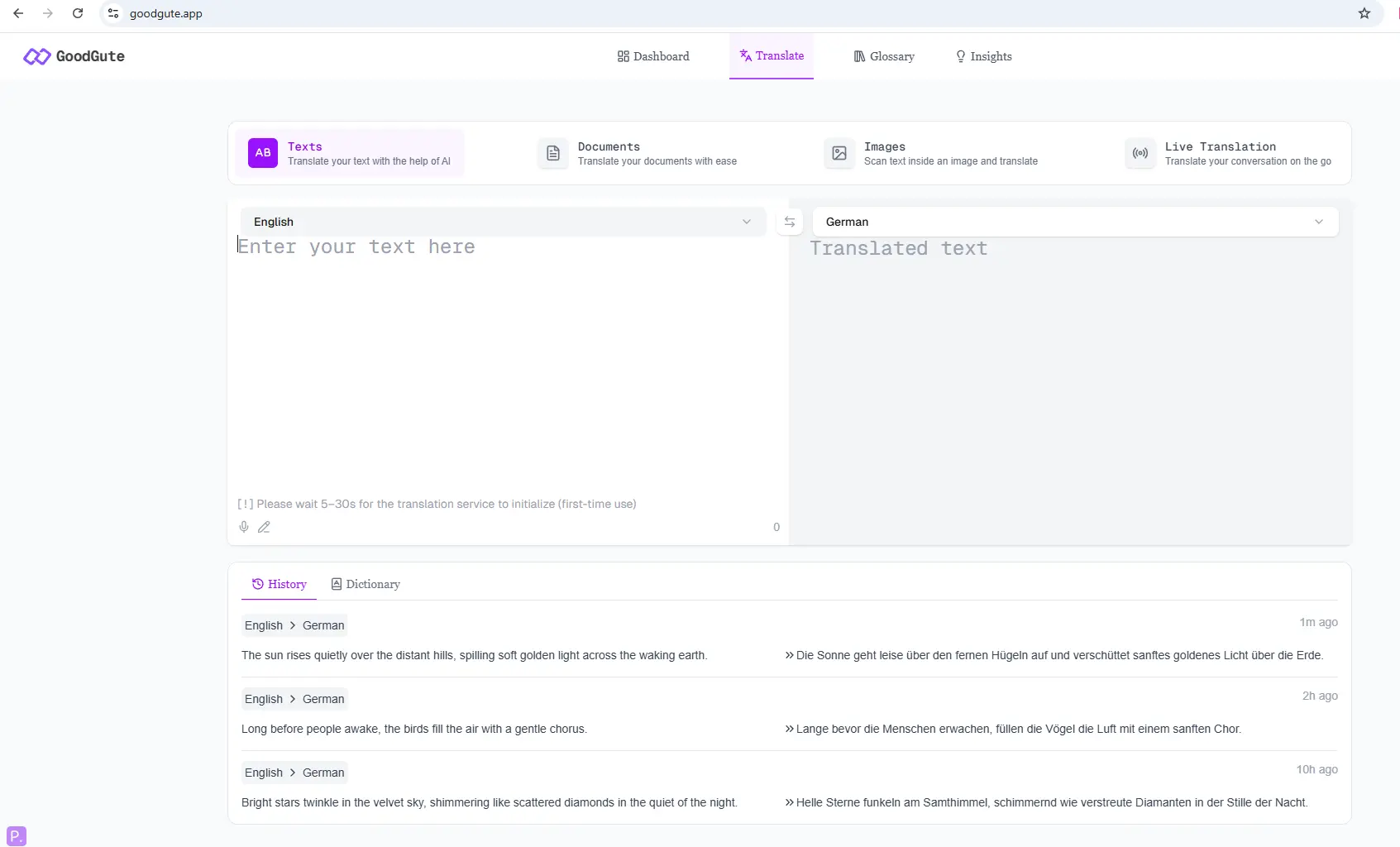
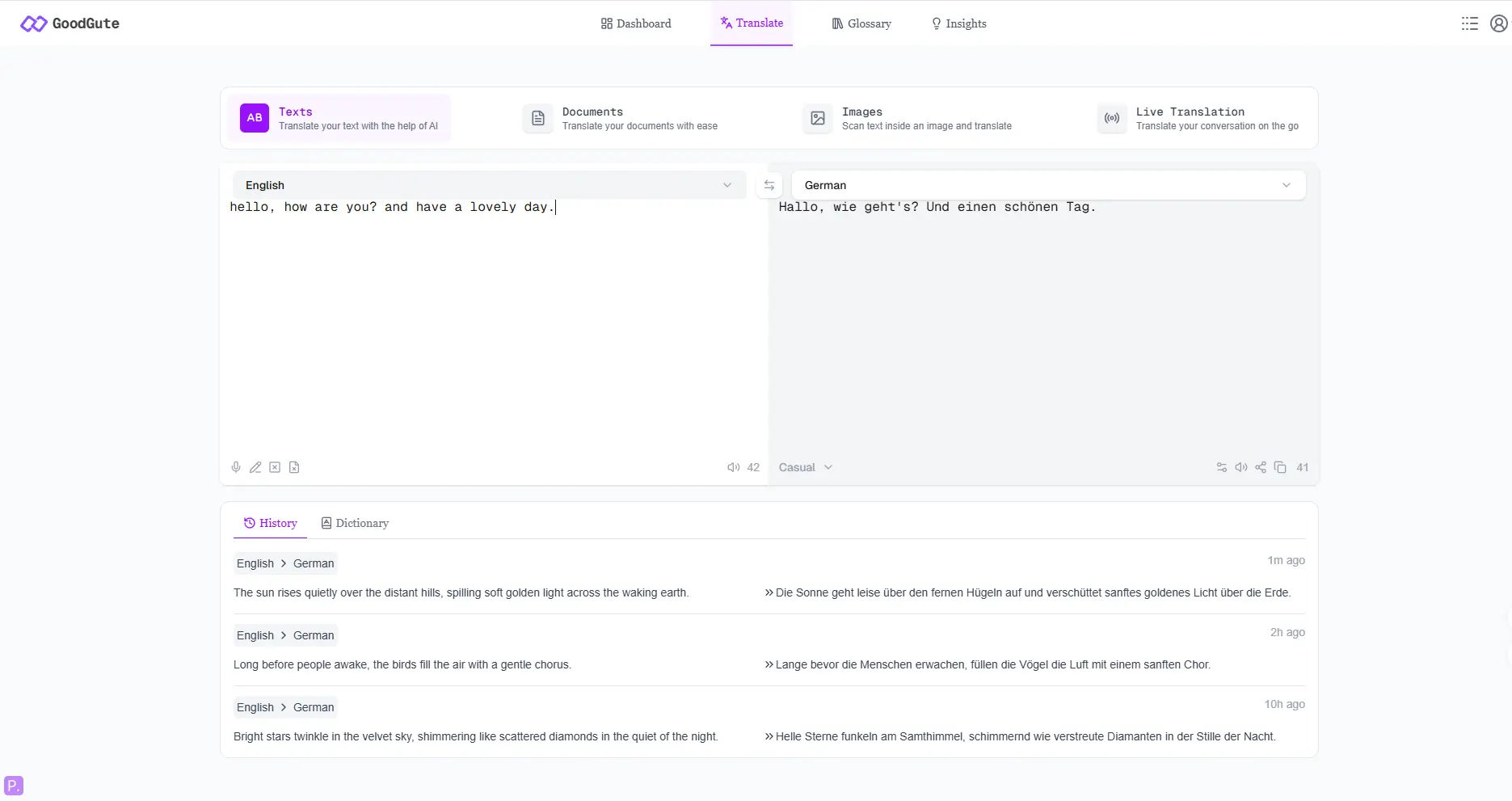
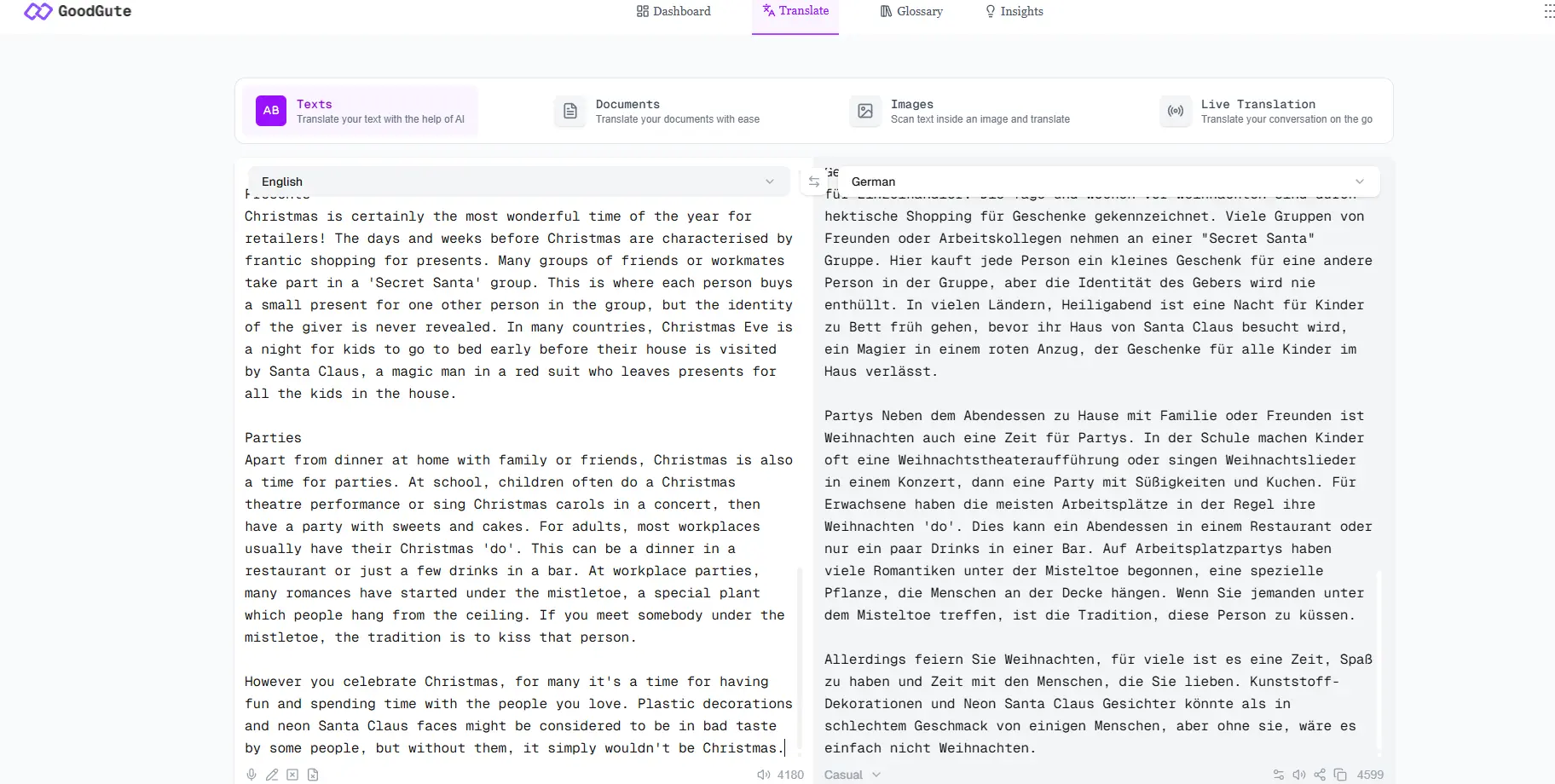
Web Application (goodgute.app)
- Real-time English→German text translation
- Clean, minimal UI designed for non-technical users
- Low wait time - stream loading with typing effects, better user experience
- Cache management system - using cache automatically and users can delete cache manually
CLI Tool (goodgute.dev)
- Real-time English→German text translation
- Document translation support
- Batch loading - Built for translating long, multi-paragraph text in one go
- Cache management system
Pypl (Pypl)
pip install --upgrade --user goodgutecurl -fsSL https://goodgute.dev/install | bashDesigned for developers and power users:

# Commands help
goodgute -h

# goodgute logo+usage+version
goodgute

# goodgute access web ui
goodgute --ui

# goodgute access web-dev ui
goodgute --ui-dev

# Basic translation
goodgute -t "Hello, World!"

# Basic translation with toggling on the cache and verbose mode
goodgute -t "Hello, World!" --cache --verbose

# Translate entire files
goodgute -f --format pdf -i 'contract.pdf' -o 'output.pdf'
goodgute -f --format docx -i 'reports.docx' -o 'output.docx'
goodgute -f --format txt -i 'notes.txt' -o 'output.txt'

# Developer mode: shows translation stats(cmd_config, API_usage, hit_rate, para_num, words_count, etc), latency, whole Translation Execution Time
goodgute --format txt -i 'notes.txt' -o 'output.txt' --cache --verbose -D --time -s

# Quality scoring via Perplexity API
goodgute -q "Hello, World!"

# Cache management
goodgute -t "Hello, World!" -D --cache-clean
Developer mode (-D flag) outputs:
- Source and target token counts
- Inference latency / Translation Execution Time
- Cache hit/miss status
- Runtime diagnostics
Quality scoring sends the original and translated text to Perplexity API, which returns a structured JSON evaluation covering accuracy, fluency, and areas for improvement.
The problem: The first version of TranslatePanel.tsx attempted to handle paragraph splitting, chunk joining, and ordering entirely on the frontend. This created three compounding bugs:
- Translated paragraphs lost their structure — output rendered as one flat wall of text with no line breaks
undefinedappeared at paragraph boundaries because the frontend was joining array elements before async translation results had resolved- When the user appended text to existing input, the entire translated output re-rendered from scratch, duplicating on screen — the user saw the translation printed twice
The root cause: the frontend was trying to manage paragraph identity, ordering, and async state simultaneously, which is fundamentally the wrong layer for this responsibility.
The failed approach (TranslatePanel_ambiguous_logic.tsx):
// ❌ FAILED APPROACH: Frontend managing paragraph state with SentenceMap
// Race conditions between async translation results and array indexing
// caused undefined values and duplicate rendering

type SentenceState = {
  text: string;
  translation?: string;         // optional field = source of undefined bugs
  status: "idle" | "loading" | "done" | "error";
};

type SentenceMap = Record<string, SentenceState>;

// Combining output via Object.values().sort() was fragile:
// if any paragraph hadn't resolved yet, sort order was undefined
const combined = Object.values(paragraphMap)
  .sort((a, b) => a.id - b.id)
  .map(p => p.translation ?? "")  // ?? "" masked bugs rather than fixing them
  .join("\n\n");
The fix — Backend Authority Model: All paragraph identity, ordering, and caching logic was moved to the backend. The frontend became a pure display layer: receive JSON, render in order, animate.
The backend assigns each paragraph a stable para_id (e.g. p01, p02) and an explicit idx (its position in the document). The frontend trusts these values completely.
// ✅ WORKING APPROACH (TranslatePanel.tsx)
// Three separate refs — each with a single responsibility

const paraOrderRef = useRef<string[]>([]);           // ordered list of para_ids
const paraMetaRef  = useRef<Record<string, {          // id → {hash, index}
  hash: string;
  index: number;
}>>({});
const paraOutputRef = useRef<Record<string, string>>({}); // id → translated text

// renderedOutput is derived purely from backend-assigned idx for sort order
const renderedOutput = useMemo(() => {
  return paraOrderRef.current
    .sort((a, b) => paraMetaRef.current[a].index - paraMetaRef.current[b].index)
    .map(id => paraOutputRef.current[id])
    .filter(Boolean)
    .join("\n\n");
}, [tick]);
// Streaming response handler: parse each NDJSON line from the backend,
// update the correct paragraph slot by id, then trigger re-render via tick
for (const line of lines) {
if (!line.trim()) continue;
const msg = JSON.parse(line);
if (msg.type === "paragraph" && typeof msg.translation === "string") {
const { id, idx, source_hash, translation, paras_mode } = msg;
// Register new paragraph slot using backend-assigned identity
if (!paraMetaRef.current[id]) {
paraMetaRef.current[id] = { hash: source_hash, index: idx };
paraOrderRef.current.push(id);
}
// Handle deletion: remove paragraph from all tracking structures
if (paras_mode === "deleted") {
paraOrderRef.current = paraOrderRef.current.filter(pid => pid !== id);
delete paraOutputRef.current[id];
delete paraMetaRef.current[id];
}
// Queue new/updated paragraphs for the typewriter animation
if (paras_mode !== "deleted" && translation.trim() !== "") {
paraMetaRef.current[id].index = idx;
typingQueueRef.current.push({ para_id: id, text: translation });
paraMetaRef.current[id].hash = source_hash;
}
startTyping();
setTick(t => t + 1);
}
if (msg.status === "done") {
setIsLoading(false);
maybeShowFinished();
}
}The problem: The initial version sent the entire input text to the backend, waited for full translation, then rendered the result. For multi-paragraph documents, this meant users stared at a blank output panel for 10–20 seconds before anything appeared.
The fix: The backend now streams translation results paragraph-by-paragraph using Python generator + NDJSON (newline-delimited JSON). Each paragraph is translated and immediately yielded to the frontend as it completes — the user sees output appearing progressively.
The frontend reads the stream with a ReadableStream reader and processes each line as it arrives:
// Fetch with streaming: don't wait for the full response
const res = await fetch(API_URL, {
  method: "POST",
  headers: { "Content-Type": "application/json" },
  body: JSON.stringify({ text, session_id: sessionId, reset_session: false })
});

// Extract session ID from response header for cache reuse
const newSessionId = res.headers.get("X-Session-Id");
if (newSessionId) setSessionId(newSessionId);

// Process stream chunk by chunk
const reader = res.body!.getReader();
const decoder = new TextDecoder("utf-8");
let buffer = "";

while (true) {
  const { value, done } = await reader.read();
  if (done) break;

  // Abort stale requests: if user has typed new input, discard this stream
  if (myRequestId !== requestIdRef.current) {
    reader.cancel();
    return;
  }

  buffer += decoder.decode(value, { stream: true });
  const lines = buffer.split("\n");
  buffer = lines.pop()!; // keep incomplete last line in buffer

  for (const line of lines) {
    // ... parse and render each paragraph as it arrives
  }
}
Typewriter animation: Each arriving paragraph is queued and rendered character-by-character to create a smooth typing effect, making the streaming feel natural rather than jarring:
// Sequential typewriter: process paragraphs one at a time from the queue
async function typeParagraph(id: string, text: string) {
  let current = paraOutputRef.current[id] || "";
  let i = current.length;
  const speed = 5; // characters per animation frame

  while (i < text.length) {
    current += text.slice(i, i + speed);
    i += speed;
    paraOutputRef.current[id] = current;
    setTick(t => t + 1);
    await new Promise(requestAnimationFrame); // yield to browser each frame
  }
}The HuggingFace opus-mt-en-de model has a hard input limit. Long paragraphs sent as a single string produce degraded or truncated translations. The solution is a multi-stage text processing pipeline before any API call is made.
Stage 1 — Smart paragraph splitting (text_chunk.py):
def smart_split_paragraphs(text):
    """
    Split text into translation units with awareness of document structure.
    Rules:
    - Blank lines → end current paragraph block
    - Structural lines (Markdown headers, lists, bullets) → isolated as single units
    - Regular lines → accumulated into a paragraph block
    - Sentence boundary detection → split on terminal punctuation before next sentence
    """
    lines = text.split("\n")
    blocks = []
    current = []

    for line in lines:
        stripped = line.strip()

        if stripped == "":                          # blank line ends current block
            if current:
                blocks.append("\n".join(current))
                current = []
            blocks.append("")
            continue

        if is_structured_line(stripped):            # Markdown/list → own block
            if current:
                blocks.append("\n".join(current))
                current = []
            blocks.append(stripped)
            continue

        # detect sentence boundary within a paragraph
        if current and re.match(r".*[\.\?\!]$", current[-1].strip()):
            blocks.append("\n".join(current).strip())
            current = []

        current.append(line)

    if current:
        blocks.append("\n".join(current))

    return blocks


def is_structured_line(line):
    """Detect Markdown structural elements that should not be merged with prose."""
    stripped = line.lstrip()
    return bool(
        re.match(r"^#{1,6}\s+", stripped) or   # headings
        re.match(r"^(\*|\-|\+)\s+", stripped) or  # unordered lists
        re.match(r"^\d+[\.\)]\s+", stripped) or   # ordered lists
        re.match(r"^[•‣▪◦●]\s+", stripped) or    # bullet points
        re.match(r"^>\s+", stripped) or            # blockquotes
        re.match(r"^(```|~~~)", stripped)          # code fences
    )
Stage 2 — Chunk splitting for long paragraphs:
MAX_CHARS = 1250  # safe limit for opus-mt-en-de input

def chunk_text(text):
    """
    Split a long paragraph into sentence-aware chunks within MAX_CHARS.
    Uses NLTK sent_tokenize with regex fallback for robustness.
    Chunks are joined translations are concatenated with newline.
    """
    sentences = safe_sent_tokenize(text)  # NLTK with regex fallback
    chunks = []
    current = ""

    for sentence in sentences:
        if len(current) + len(sentence) < MAX_CHARS:
            current += " " + sentence
        else:
            chunks.append(current.strip())
            current = sentence

    if current.strip():
        chunks.append(current.strip())

    return chunks
Stage 3 — Paragraph identity and cache system (paras.py):
def stable_hash(text: str) -> str:
    """SHA-256 hash of paragraph text — used as cache key and change detector."""
    return hashlib.sha256(text.encode("utf-8")).hexdigest()

def diff_paragraphs(new_paragraphs, old_hashes: set):
    """
    Compare incoming paragraphs against previously translated ones.
    Returns each paragraph tagged as: 'new', 'unchanged', or 'deleted'.
    - 'unchanged' paragraphs are served from SQLite cache (no API call)
    - 'new' paragraphs are sent to HuggingFace for translation
    - 'deleted' paragraphs are removed from the frontend via para_id
    """
    results = []
    new_paragraphs = split_paragraphs(new_paragraphs)
    new_hashes = set()

    for p in new_paragraphs:
        source_hash = stable_hash(p)
        new_hashes.add(source_hash)
        status = "unchanged" if source_hash in old_hashes else "new"
        results.append({"status": status, "source": p, "source_hash": source_hash})

    # paragraphs present in old session but absent in new input → deleted
    for h in (old_hashes - new_hashes):
        results.append({"status": "deleted", "source": "", "source_hash": h})

    return results
Stage 4 — Streaming response to frontend (translator.py):
def handle_longText(text: list, session_id: str):
    """
    Generator: translate each paragraph and yield NDJSON immediately.
    Frontend receives and renders results as they arrive — no waiting for full completion.
    """
    old_hashes = load_previous_paragraphs(session_id)
    diffed = diff_paragraphs(text, old_hashes)

    yield json.dumps({"session_id": session_id, "status": "started", "mode": "long_text"}) + "\n"

    for para_index, item in enumerate(diffed):
        status = item["status"]
        source_hash = item["source_hash"]

        if status == "new":
            para_id = set_para_id(session_id, source_hash)       # assign stable ID
            translation = translate_preserve_paragraphs(item["source"])  # call HF API
        elif status == "unchanged":
            para_id = get_para_id(session_id, source_hash)
            translation = load_existing_translation(session_id, source_hash)  # cache hit
        else:
            para_id = get_para_id(session_id, source_hash)
            translation = ""

        if para_id:
            save_paragraph_info(session_id, source_hash, translation, status, para_index, para_id)

        # Yield this paragraph immediately — frontend renders it without waiting
        yield json.dumps({
            "session_id": session_id,
            "idx": para_index,       # frontend uses this for sort order
            "id": para_id,           # stable identity across edits
            "cache_hit": status == "unchanged",
            "mode": "long_text",
            "type": "paragraph",
            "paras_mode": status,
            "source": item["source"],
            "source_hash": source_hash,
            "translation": translation
        }) + "\n"

yield json.dumps({"session_id": session_id, "status": "done"}) + "\n"Cold start latency (5–30 seconds): The HuggingFace inference endpoint scales to zero after 15 minutes of inactivity to control hosting costs. This means the first request after an idle period triggers a container restart. This is a cost/UX tradeoff inherent to the current prototype architecture.
SQLite concurrency: SQLite3's write-locking behaviour causes translation results to fail to propagate correctly under concurrent multi-user load. This was observed in production — simultaneous users would not see each other's translation outputs correctly. This is a known limitation of SQLite for concurrent web applications.
No image OCR: Image translation (scanning text within images) is listed as a planned feature but is not currently implemented.
Built by Paddy Zhao — Software Engineer based in Sydney, Australia.