


A Multi-Agent System for Automated Paper Tracking and Research Assistance
Features • Architecture • Installation • Quick Start • Usage • License
PaperTrack-Agent is an AI-powered research assistant that leverages a multi-agent architecture to automate the entire research paper analysis workflow. From discovering the latest papers on arXiv to generating research ideas and experiment plans, this system provides comprehensive support for researchers.
- Automatic Paper Discovery: Track latest papers from arXiv based on your research fields
- Deep Paper Analysis: Extract structure, methodology, and key findings from PDFs
- Comparative Analysis: Compare multiple papers and identify common approaches
- Trend Analysis: Identify emerging research trends and hot topics
- Research Gap Finder: Discover unexplored research opportunities
- Writing Assistance: Generate paper outlines and related work sections
- Experiment Planning: Create detailed experiment plans with baseline recommendations
| Phase | Agent | Description |
|---|---|---|
| Discovery | Field Tracker | Search arXiv, expand queries with LLM, score relevance |
| Discovery | Paper Retrieval | Download PDFs, store metadata in SQLite |
| Analysis | Paper Reader | Parse PDFs, extract structure, analyze figures |
| Analysis | Code Extractor | Extract algorithms, formulas, find GitHub repos |
| Comparison | Comparative Analysis | Compare methods, results, identify themes |
| Comparison | Trend Analyzer | Analyze temporal trends, keyword evolution |
| Comparison | Citation Network | Build citation graphs, analyze impact |
| Innovation | Research Gap Finder | Identify gaps, generate research ideas |
| Writing | Writing Advisor | Generate outlines, related work sections |
| Writing | Experiment Planner | Create experiment plans, suggest baselines |
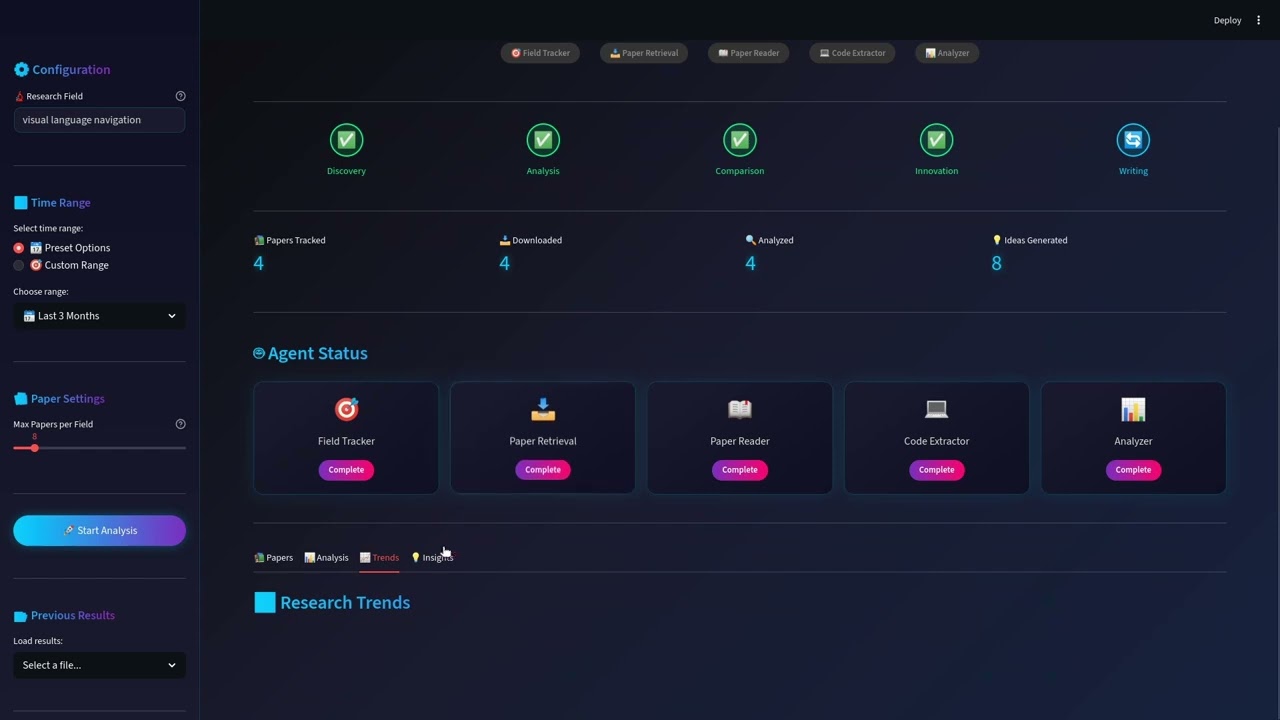
A beautiful Streamlit-based UI with:
- Real-time pipeline progress tracking
- Interactive paper exploration with detailed analysis
- Trend visualization charts
- Research insight dashboard
┌─────────────────────────────────────────────────────────────────┐
│                     PaperTrack-Agent System                      │
├─────────────────────────────────────────────────────────────────┤
│  Phase 1: Discovery        Phase 2: Analysis                    │
│  ┌─────────────────┐       ┌─────────────────┐                  │
│  │ Field Tracker   │──────▶│ Paper Reader    │                  │
│  │ Paper Retrieval │       │ Code Extractor  │                  │
│  └─────────────────┘       └────────┬────────┘                  │
│                                     │                            │
│  Phase 3: Comparison               ▼                            │
│  ┌─────────────────────────────────────────────┐                │
│  │ Comparative Analysis │ Trend Analyzer │ Citation Network    │
│  └─────────────────────────────────────────────┘                │
│                            │                                     │
│  Phase 4: Innovation      ▼           Phase 5: Writing          │
│  ┌─────────────────┐       ┌─────────────────┐                  │
│  │ Research Gap    │──────▶│ Writing Advisor │                  │
│  │ Finder          │       │ Experiment Plan │                  │
│  └─────────────────┘       └─────────────────┘                  │
└─────────────────────────────────────────────────────────────────┘
- Python: 3.8 or higher
- Operating System: Linux, macOS, or Windows
- API Keys: DeepSeek API key (required), DashScope API key (optional, for vision analysis)
git clone https://github.com/Pandakingxbc/PaperTrack-Agent.git
cd PaperTrack-Agent# Using venv
python -m venv venv
source venv/bin/activate # Linux/macOS
# or
venv\Scripts\activate # Windows
# Or using conda
conda create -n papertrack python=3.10
conda activate papertrackpip install -r requirements.txt
# Additional dependencies for PDF processing
pip install PyMuPDF dashscopeCreate a .env file in the project root:
cp .env.example .envEdit .env and add your API keys:
# Required: DeepSeek API for text analysis
DEEPSEEK_API_KEY=your-deepseek-api-key-here
DEEPSEEK_BASE_URL=https://api.deepseek.com/v1

# Optional: DashScope API for vision analysis (figure understanding)
DASHSCOPE_API_KEY=your-dashscope-api-key-here| Provider | Purpose | How to Get |
|---|---|---|
| DeepSeek | Text analysis (DeepSeek-V3) | DeepSeek Platform |
| DashScope | Vision analysis (Qwen-VL) | Aliyun DashScope |
streamlit run app.pyThen open your browser at http://localhost:8501
# Demo mode - run full pipeline with default settings
python main.py --mode demo

# Quick mode - only run Phase 1 (paper discovery)
python main.py --mode quick

# Interactive mode - step-by-step execution
python main.py --mode interactive

# Custom run with specific parameters
python main.py \
    --fields "Multi-Agent Systems" \
    --time-range last_month \
    --max-papers 10 \
--phases 1 2 3 4 5- Configure Search: Enter your research field in the sidebar
- Set Time Range: Choose preset (7 days, 1 month, etc.) or custom range
- Start Analysis: Click "Start Analysis" to run the pipeline
- Explore Results:
- Papers Tab: Browse discovered papers, click to expand details
- Analysis Tab: View comparative analysis and method comparisons
- Trends Tab: Explore keyword trends and technology evolution
- Insights Tab: Discover research gaps and generated ideas
from main import run_full_pipeline

# Run the complete pipeline
state = run_full_pipeline(
    research_fields=["Multi-Agent Systems", "LLM Agents"],
    time_range="last_month",
    max_papers_per_field=10,
    phases=[1, 2, 3, 4, 5]
)

# Access results
print(f"Found {len(state['tracked_papers'])} papers")
print(f"Generated {len(state['research_gaps']['research_ideas'])} research ideas")from src.agents import FieldTrackerAgent, ResearchGapFinderAgent
# Track papers in a field
tracker = FieldTrackerAgent(max_papers=10)
papers = tracker.track_papers(
field="Multi-Agent Systems",
time_range="last_month"
)
# Find research gaps
gap_finder = ResearchGapFinderAgent()
gaps = gap_finder.analyze(papers["papers"], field="Multi-Agent Systems")
# Print generated research ideas
for idea in gaps["research_ideas"]:
print(f"- {idea['title']}")
print(f" Feasibility: {idea['feasibility']}")# LLM Models
models:
text_analysis:
provider: deepseek
model: deepseek-chat
temperature: 0.1
max_tokens: 8192
vision_analysis:
provider: qwen
model: qwen3-vl-flash
# arXiv Settings
arxiv:
max_results_per_field: 20
sort_by: submittedDate
# Agent Settings
agents:
field_tracker:
enabled: true
expand_query: true
paper_reader:
extract_figures: true
max_figures_per_paper: 10
research_gap_finder:
generate_ideas: true
max_ideas: 8PaperTrack-Agent/
├── papers/ # Downloaded PDFs and metadata
│ └── {arxiv_id}/
│ ├── paper.pdf
│ └── metadata.json
├── paper_analysis/ # Deep analysis results
│ └── {arxiv_id}/
│ └── analysis.json
├── code_extracts/ # Extracted algorithms and code
├── comparative_analysis/ # Method and result comparisons
├── trend_analysis/ # Keyword and technology trends
├── citation_network/ # Citation graph data
├── research_gaps/ # Identified gaps and ideas
├── writing_outputs/ # Generated outlines and drafts
├── experiment_plans/ # Experiment configurations
├── reports/ # Field tracking reports
└── outputs/ # Pipeline state snapshots
| Component | Technology |
|---|---|
| Multi-Agent Framework | LangGraph |
| Text Analysis LLM | DeepSeek-V3 |
| Vision Analysis LLM | Qwen-VL-Flash |
| PDF Processing | PyMuPDF |
| Metadata Storage | SQLite |
| Vector Database | ChromaDB |
| Citation Data | Semantic Scholar API |
| Web Interface | Streamlit |
| Visualization | Plotly |
- Phase 1: Paper Discovery (Field Tracker + Paper Retrieval)
- Phase 2: Deep Analysis (Paper Reader + Code Extractor)
- Phase 3: Comparative Analysis (Comparison + Trends + Citations)
- Phase 4: Research Innovation (Gap Finder)
- Phase 5: Writing Assistance (Writing Advisor + Experiment Planner)
- Web Interface with Streamlit
- Multi-language support
- PDF export for reports
- Integration with reference managers (Zotero, Mendeley)
- Real-time paper alerts
Contributions are welcome! Please feel free to submit a Pull Request.
- Fork the repository
- Create your feature branch (
git checkout -b feature/AmazingFeature) - Commit your changes (
git commit -m 'Add some AmazingFeature') - Push to the branch (
git push origin feature/AmazingFeature) - Open a Pull Request
This project is licensed under the MIT License - see the LICENSE file for details.
Yang Zhi - @Pandakingxbc
- DeepSeek for the powerful LLM API
- arXiv for the open access to research papers
- Semantic Scholar for citation data
- All the open-source libraries that made this project possible
Made with ❤️ for the research community