-
Notifications
You must be signed in to change notification settings - Fork 763
first draft of in-app surveys comparison #15193
New issue
Have a question about this project? Sign up for a free GitHub account to open an issue and contact its maintainers and the community.
By clicking “Sign up for GitHub”, you agree to our terms of service and privacy statement. We’ll occasionally send you account related emails.
Already on GitHub? Sign in to your account
Merged
Merged
Changes from all commits
Commits
Show all changes
26 commits
Select commit
Hold shift + click to select a range
4a5bb6f
first draft of in-app surveys comparison
jina-yoon ab6b71f
Merge branch 'master' into survey-tools
jina-yoon 308e1fc
Update contents/blog/best-inapp-survey-tools.mdx
jina-yoon aa1bb7f
Update contents/blog/best-inapp-survey-tools.mdx
jina-yoon 1cffe6e
Update contents/blog/best-inapp-survey-tools.mdx
jina-yoon f8ef3b4
Update contents/blog/best-inapp-survey-tools.mdx
jina-yoon c47fc73
Update contents/blog/best-inapp-survey-tools.mdx
jina-yoon 262ca98
Update contents/blog/best-inapp-survey-tools.mdx
jina-yoon e5ab4f4
Update contents/blog/best-inapp-survey-tools.mdx
jina-yoon 34b1363
Update contents/blog/best-inapp-survey-tools.mdx
jina-yoon cd636b3
Update contents/blog/best-inapp-survey-tools.mdx
jina-yoon f29a7bb
Update contents/blog/best-inapp-survey-tools.mdx
jina-yoon e78b08c
Update contents/blog/best-inapp-survey-tools.mdx
jina-yoon 548a482
Update contents/blog/best-inapp-survey-tools.mdx
jina-yoon b1c5ee7
Update contents/blog/best-inapp-survey-tools.mdx
jina-yoon a6c8dfe
Update contents/blog/best-inapp-survey-tools.mdx
jina-yoon f561223
Update contents/blog/best-inapp-survey-tools.mdx
jina-yoon 95cf8a4
pricing fixes and small edits
jina-yoon 8f1a8ad
Merge branch 'master' into survey-tools
jina-yoon 287e260
add screenshots
jina-yoon 973be2f
Merge branch 'master' into survey-tools
jina-yoon 9a12bb3
Merge branch 'master' into survey-tools
jina-yoon cedd9e2
Merge branch 'master' into survey-tools
jina-yoon d101740
Merge branch 'master' into survey-tools
jina-yoon d1a2641
FAQ fix
jina-yoon 5aa50bf
Merge branch 'master' into survey-tools
jina-yoon File filter
Filter by extension
Conversations
Failed to load comments.
Loading
Jump to
Jump to file
Failed to load files.
Loading
Diff view
Diff view
There are no files selected for viewing
This file contains hidden or bidirectional Unicode text that may be interpreted or compiled differently than what appears below. To review, open the file in an editor that reveals hidden Unicode characters.
Learn more about bidirectional Unicode characters
| Original file line number | Diff line number | Diff line change |
|---|---|---|
| @@ -0,0 +1,351 @@ | ||
| --- | ||
| title: The best in-app survey tools for product teams, compared | ||
| date: 2026-02-23 | ||
| rootPage: /blog | ||
| sidebar: Blog | ||
| showTitle: true | ||
| hideAnchor: true | ||
| author: | ||
| - jina-yoon | ||
| featuredImage: >- | ||
| https://res.cloudinary.com/dmukukwp6/image/upload/v1720536764/posthog.com/contents/surveys-hog.png | ||
| featuredImageType: full | ||
| category: General | ||
| tags: | ||
| - Comparisons | ||
| seo: | ||
| { | ||
| metaTitle: 'The best in-app survey tools for product teams, compared', | ||
| metaDescription: 'Compare the top in-app survey tools. See how PostHog, Hotjar, Sprig, Survicate, Pendo, and SurveyMonkey stack up for collecting user feedback.', | ||
| } | ||
| --- | ||
|
|
||
| import { CalloutBox } from 'components/Docs/CalloutBox' | ||
|
|
||
| Most in-app survey tools look roughly the same on paper: a basic NPS widget here, a few question types there, some targeting options. | ||
|
|
||
|  | ||
|
|
||
| But when you need to get into the nitty gritty like triggering a survey after a user kicks off a certain event, or connecting their response to the [session replay](/blog/best-session-replay-tools) so you can investigate _why_ someone gave you a 3 out of 10... That's when different tools start to diverge real fast. | ||
|
|
||
| In this guide, we'll compare the best in-app survey tools for product teams including what each one does well, where they fall short, and how to pick the right fit. | ||
|
|
||
| ## What features do you need in your in-app survey tool? | ||
|
|
||
| A good in-app survey tool lets you ask the right users the right questions at the right moment, without making them leave your product. | ||
|
|
||
| Most solid tools include: | ||
|
|
||
| - Survey widgets that embed directly in your web or mobile app | ||
| - Pre-built templates for NPS, CSAT, and [PMF surveys](/newsletter/what-weve-learned-about-product-market-fit) | ||
| - Basic targeting by page URL or user property | ||
| - Response dashboards with simple reporting | ||
|
|
||
| Teams who want more precise feedback will go further with: | ||
|
|
||
| - **Event-triggered surveys** so you ask right after a meaningful user action, not just on page load | ||
| - **Mobile app support** with native iOS and Android SDKs | ||
| - **Multi-step branching logic** to show different questions based on previous answers | ||
| - **AI-powered analysis** to surface themes across hundreds of open-text responses without manual tagging | ||
| - **Integration with session replay and analytics** so you can connect what users say with what they actually did | ||
|
|
||
| Here's a quick overview how the most popular tools in the market compare: | ||
|
|
||
| <p> | ||
| <ProductComparisonTable | ||
| competitors={['posthog', 'hotjar', 'sprig', 'survicate', 'pendo', 'survey_monkey']} | ||
| rows={[ | ||
| { | ||
| label: 'Mobile app surveys', | ||
| description: 'Embed surveys natively in iOS and Android apps', | ||
| values: [true, false, 'No Flutter', true, true, true], | ||
| }, | ||
| { | ||
| label: 'Event-triggered surveys', | ||
| description: 'Trigger surveys based on specific user actions or events in your product', | ||
| values: [true, true, true, true, true, false], | ||
| }, | ||
| 'surveys.targeting.custom_targeting', | ||
| 'surveys.branching.multi_step_surveys', | ||
| { | ||
| label: 'AI analysis', | ||
| description: 'AI-powered summarization or analysis of survey responses', | ||
| values: ['Beta', true, true, true, true, true], | ||
| }, | ||
| { | ||
| label: 'Built-in session replay', | ||
| description: 'Session replay integrated into the same platform', | ||
| values: [true, true, true, false, true, false], | ||
| }, | ||
| { | ||
| label: 'Built-in product analytics', | ||
| description: 'Product analytics tools integrated into the same platform', | ||
| values: [true, false, false, false, true, false], | ||
| }, | ||
| { | ||
| label: 'Free tier', | ||
| description: 'Offers a free plan or free survey responses', | ||
| values: ['1,500 responses/mo', '20 responses/mo', '25 responses/mo', '25 responses/mo', 'NPS only', false], | ||
| }, | ||
| 'platform.deployment.open_source', | ||
| ]} | ||
| /> | ||
| </p> | ||
|
|
||
| ## What's the best in-app survey tool for product teams? | ||
|
|
||
| ### 1. PostHog | ||
jina-yoon marked this conversation as resolved.
Show resolved
Hide resolved
|
||
|
|
||
| <br /> | ||
|
|
||
|  | ||
|
|
||
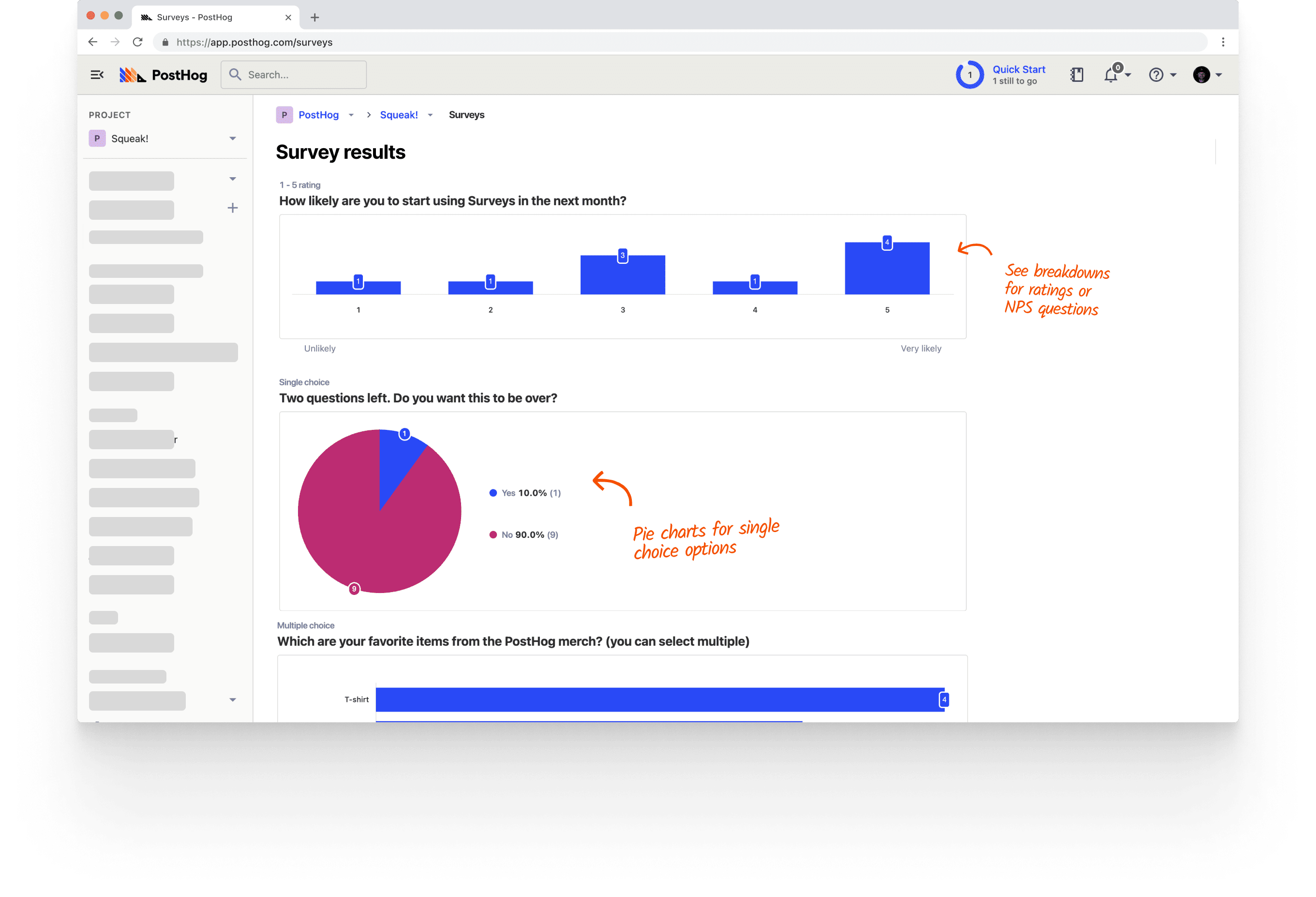
| PostHog (that's us, hi 👋) is an all-in-one developer platform that includes [surveys](/surveys) alongside [product analytics](/product-analytics), [session replay](/session-replay), [feature flags](/feature-flags), [experiments](/experiments), [error tracking](/error-tracking), and much, much more. | ||
|
|
||
| This means you can do more than just collect feedback. When a user submits an NPS response, you can [pull up their session replay](/docs/session-replay) to see exactly what experience preceded it, join the response to their event history, or use a feature flag to [target them with a follow-up experiment](/docs/experiments/creating-an-experiment). Everything lives in one place, and all the products are designed to work well together. | ||
|
|
||
| [Surveys](/docs/surveys) in PostHog support web and mobile apps, can be triggered by events or feature flags, and include [templates for NPS, PMF, CSAT, and more](/templates). This lets teams get very granular with when and how to send surveys to users, and do complex analysis with other product tools. | ||
|
|
||
| PostHog is also investing heavily in [AI features](/ai). Built-in AI summaries and the ability to get deeper survey analysis in the PostHog AI chat interface are both currently in Beta. | ||
|
|
||
| The free tier includes 1,500 responses per month with no credit card required. | ||
|
|
||
| **Strengths:** | ||
|
|
||
| - Surveys part of a unified suite, linked to session replay, analytics, feature flags, and more | ||
| - Highly customizable event-triggered and feature flag-targeted surveys | ||
| - Web and mobile support (iOS, Android, React Native, Flutter) | ||
| - AI analysis: summarize responses and dig deeper via chat (in Beta) | ||
| - 1,500 free responses/month with usage-based pricing | ||
|
|
||
| <CalloutBox icon="IconStarFilled" title="PostHog is best for..." type="fyi"> | ||
|
|
||
| Product and engineering teams who want to connect survey feedback directly to technical details related to user behavior, analytics, and experimentation without adding another tool to their stack. | ||
|
|
||
| </CalloutBox> | ||
|
|
||
| --- | ||
|
|
||
| ### 2. Hotjar | ||
|
|
||
|  | ||
|
|
||
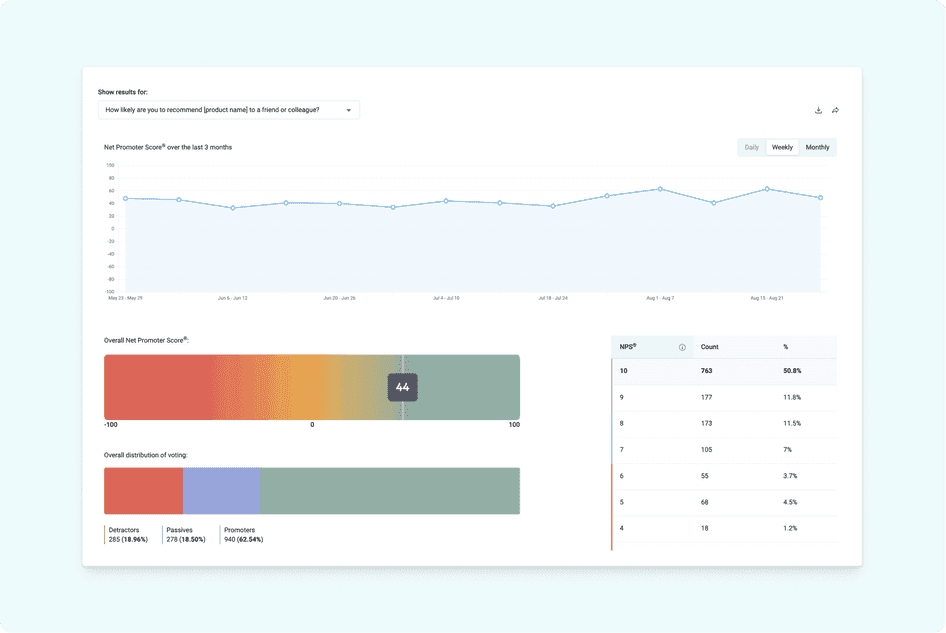
| [Hotjar](/blog/posthog-vs-hotjar) (now part of Contentsquare) is one of the most widely deployed tools for understanding user behavior on websites. Its surveys sit inside a broader toolkit that includes heatmaps, session recordings, and user interviews, making it easy to triangulate between what users say and what they do. | ||
|
|
||
| Surveys in Hotjar support NPS, CSAT, and open-ended questions, and can be triggered by exit intent, scroll depth, or specific events. AI-powered sentiment analysis is available on paid plans. You can also recruit and schedule [user interviews](/newsletter/talk-to-users) directly through Hotjar Engage. | ||
|
|
||
| See our [PostHog vs Hotjar](/blog/posthog-vs-hotjar) comparison for a deeper breakdown. | ||
|
|
||
| **Strengths:** | ||
|
|
||
| - Simple setup and intuitive interface | ||
| - Surveys paired with heatmaps and session replay | ||
| - Exit-intent and event-triggered surveys | ||
| - AI-powered sentiment analysis on responses | ||
| - Built-in user interview scheduling | ||
|
|
||
| <CalloutBox icon="IconStarFilled" title="Hotjar is best for..." type="fyi"> | ||
|
|
||
| Product, UX, and marketing teams focused who want qualitative feedback paired with visual behavior insights. | ||
|
|
||
| </CalloutBox> | ||
|
|
||
| --- | ||
|
|
||
| ### 3. Sprig | ||
|
|
||
|  | ||
|
|
||
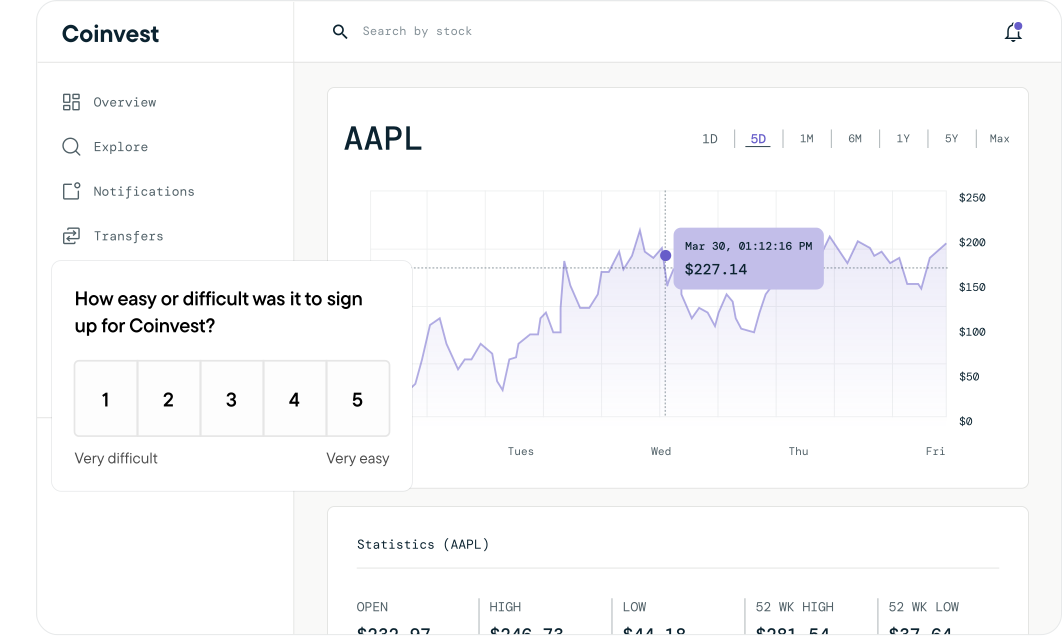
| Sprig is a purpose-built user research platform that links in-product surveys and session replays together into what it calls "studies." The core idea is that you should see not just what users said, but what they were doing when they said it. | ||
|
|
||
| In Sprig, you trigger a study in response to a user action, users answer your survey, and the session recording captures the context. AI then analyzes responses across participants to surface common themes automatically so you don't have to manually tag hundreds of open-text answers. | ||
|
|
||
| Sprig supports web and most mobile platforms (iOS, Android, but not Flutter). Their free tier plan is limited to 25 survey responses per month, and pricing is usage-based without public information on rates. | ||
|
|
||
| **Strengths:** | ||
|
|
||
| - Surveys and session replays linked in a single workflow | ||
| - AI analysis that surfaces themes across responses automatically | ||
| - Web and mobile support (iOS, Android – no Flutter) | ||
| - Designed for [continuous product discovery](/newsletter/how-to-uncover-your-users-real-problems) | ||
|
|
||
| <CalloutBox icon="IconStarFilled" title="Sprig is best for" type="fyi"> | ||
|
|
||
| UX researchers and product teams running continuous discovery who need survey responses and session context side-by-side, with AI to handle analysis at scale. | ||
|
|
||
| </CalloutBox> | ||
|
|
||
| --- | ||
|
|
||
| ### 4. Survicate | ||
|
|
||
|  | ||
|
|
||
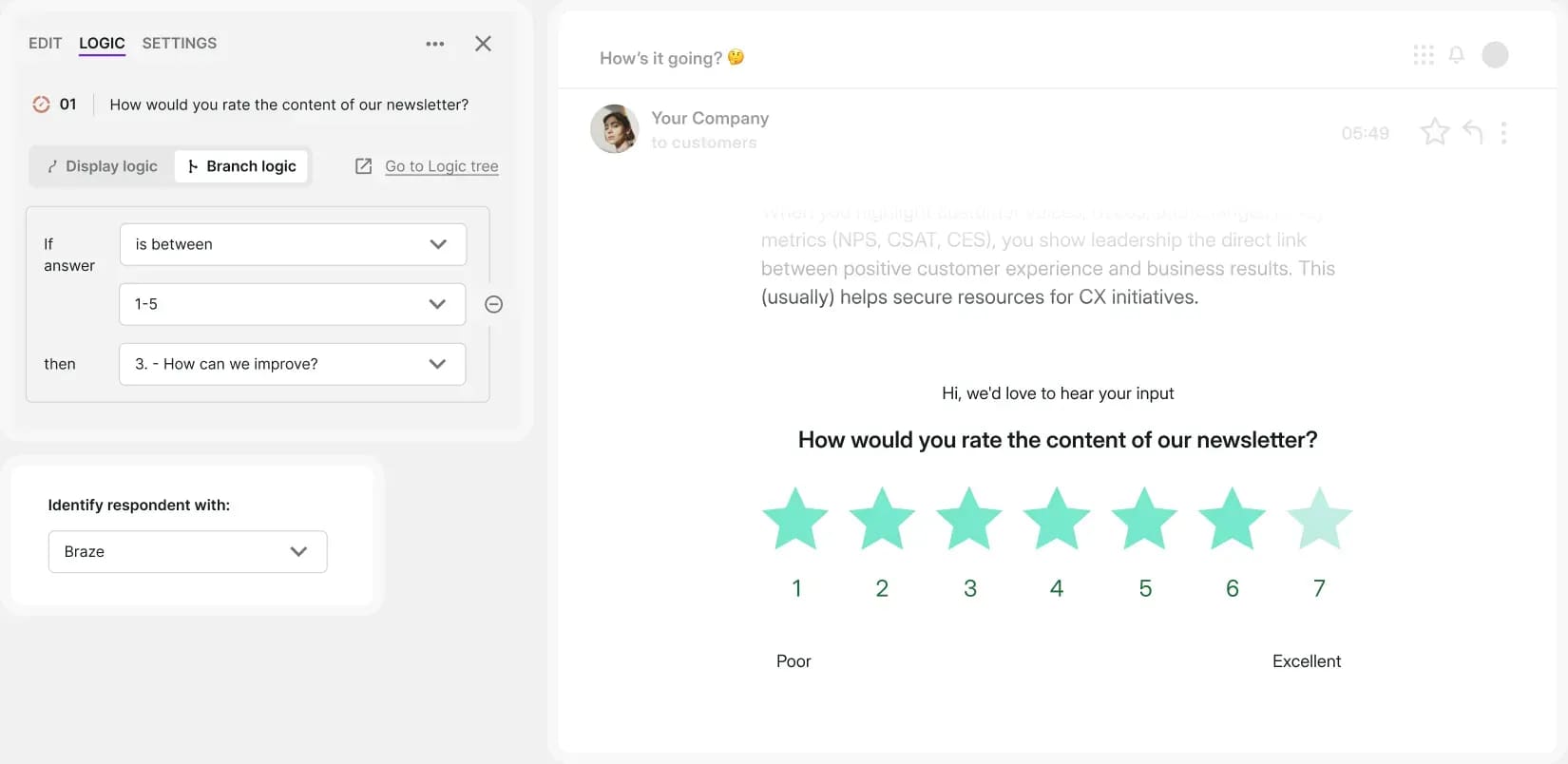
| Survicate is a dedicated customer feedback platform built for multi-channel survey distribution. It specializes in reaching users everywhere: inside your web app, inside mobile apps via native SDKs, in email, and via shareable links. See our [best Survicate alternatives](/blog/best-survicate-alternatives) if you're already evaluating other options. | ||
|
|
||
| The survey builder supports 13+ question types with branching logic and no code required. An AI-powered Insights Hub groups open-text responses by topic and sentiment, cutting down on manual analysis. Native integrations with HubSpot, Intercom, Salesforce, Zapier, and Slack make it easy to push responses into existing workflows. | ||
|
|
||
| The free tier allows 25 responses per month, with paid plans starting at $56/month (billed annually). | ||
|
|
||
| **Strengths:** | ||
|
|
||
| - Multi-channel surveys (web, mobile, email, shareable links) | ||
| - Native iOS and Android SDKs | ||
| - 30+ integrations including HubSpot, Intercom, and Salesforce | ||
| - AI-powered Insights Hub for grouping open-text responses | ||
|
|
||
| <CalloutBox icon="IconStarFilled" title="Survicate is best for..." type="fyi"> | ||
|
|
||
| Customer success and product teams who need to collect feedback across multiple channels and route responses directly into their CRM or support tools. | ||
|
|
||
| </CalloutBox> | ||
|
|
||
| --- | ||
|
|
||
| ### 5. Pendo | ||
|
|
||
|  | ||
|
|
||
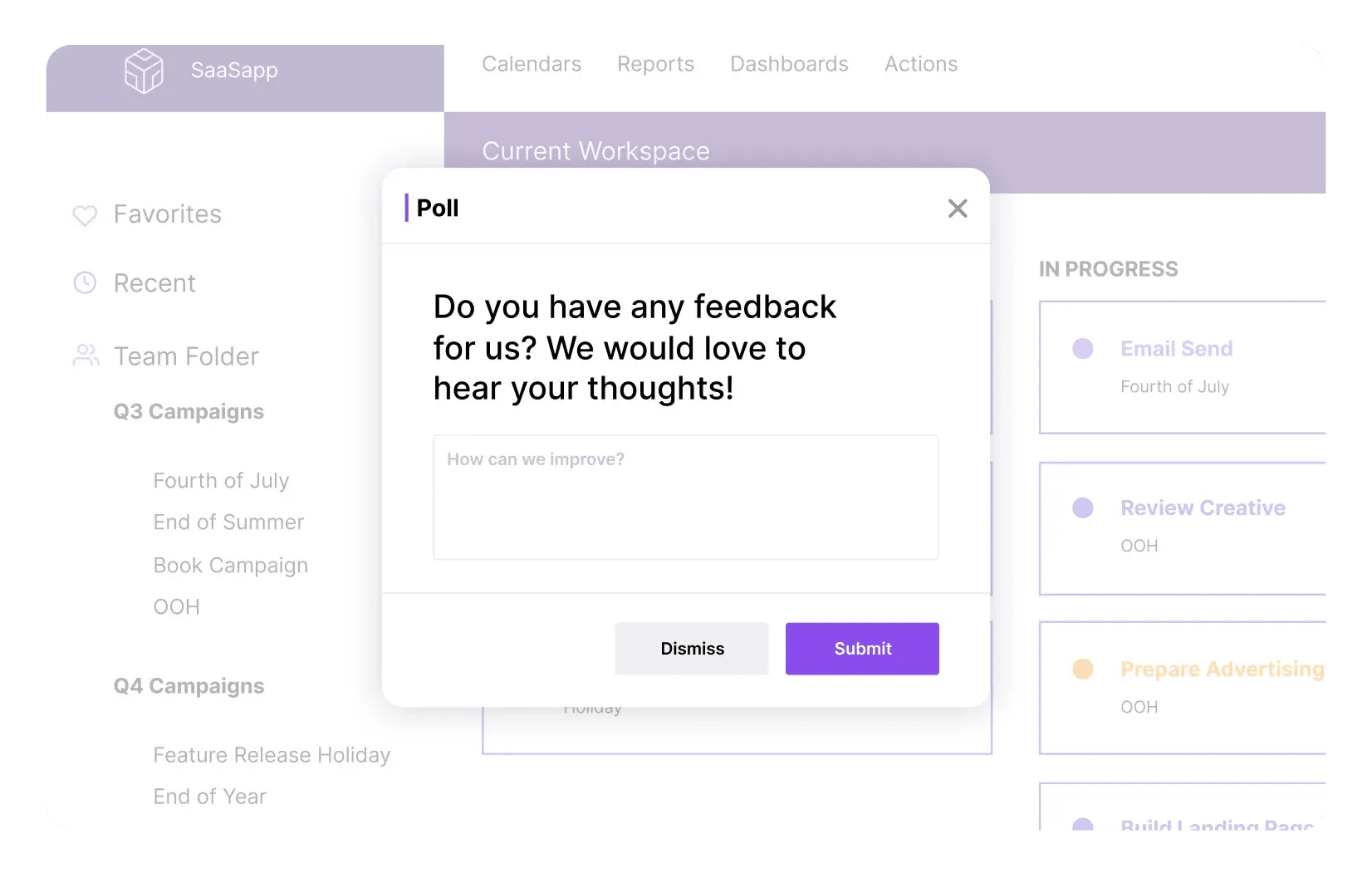
| [Pendo](/blog/posthog-vs-pendo) is a product experience platform that combines in-app surveys with analytics, session replay, in-app guides, and product roadmaps. It's primarily aimed at product managers and customer success teams at mid-to-large companies. | ||
|
|
||
| Surveys in [Pendo](/blog/best-pendo-alternatives) are targeted by user segment or behavior, support web and mobile, and connect to its broader analytics model. The free plan includes Pendo-branded NPS surveys for up to 500 monthly active users, but full survey functionality requires a paid plan. | ||
|
|
||
| Pendo's pricing is very opaque and quite hefty, which puts it out of reach for most smaller teams and startups. See our [PostHog vs Pendo](/blog/posthog-vs-pendo) comparison for more detail. | ||
|
|
||
| **Strengths:** | ||
|
|
||
| - Surveys bundled with in-app guides, analytics, and session replay | ||
| - Web and mobile support | ||
| - Powerful user segmentation for survey targeting | ||
| - Deep integrations with Salesforce, HubSpot, and data warehouses | ||
|
|
||
| <CalloutBox icon="IconStarFilled" title="Pendo is best for" type="fyi"> | ||
|
|
||
| Mid-to-large product teams that need surveys as part of a broader adoption and analytics platform, and have the budget for an enterprise tool. | ||
|
|
||
| </CalloutBox> | ||
|
|
||
| --- | ||
|
|
||
| ### 6. SurveyMonkey | ||
|
|
||
|  | ||
|
|
||
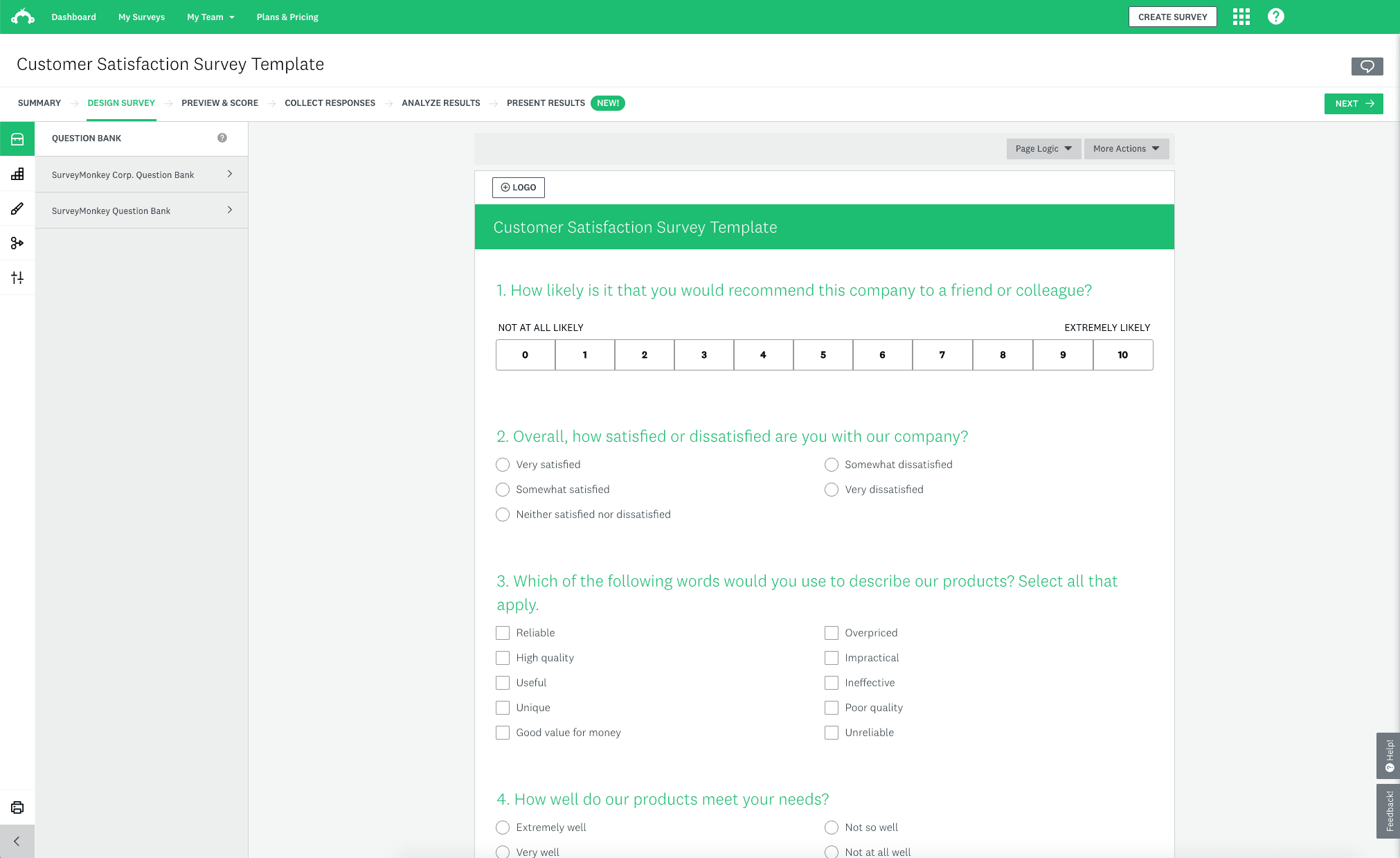
| SurveyMonkey is one of the world's most popular survey platforms. It covers a wide range of survey types – NPS, CSAT, market research, employee feedback – and supports deployment via web embed, mobile SDK, email, and shareable links. | ||
|
|
||
| It's the most feature-rich pure survey tool on this list. You get 15+ question types, advanced branching logic, quota controls, and optional access to a respondent panel if you need external data. Reporting and benchmarking features are strong, especially for market research use cases. | ||
|
|
||
| The trade-off is depth of product integration. SurveyMonkey doesn't connect to session replay or analytics, so linking feedback to user behavior requires manual data exports and joins. | ||
|
|
||
| **Strengths:** | ||
|
|
||
| - Comprehensive survey builder with 15+ question types | ||
| - Multi-channel distribution (web, mobile, email, links) | ||
| - Optional respondent panel for external market research | ||
| - Strong reporting and industry benchmarking | ||
| - 100+ integrations | ||
|
|
||
| <CalloutBox icon="IconStarFilled" title="SurveyMonkey is best for" type="fyi"> | ||
|
|
||
| Teams that need a standalone, full-featured survey platform, especially for market research use cases that require external respondent panels. | ||
|
|
||
| </CalloutBox> | ||
|
|
||
| --- | ||
|
|
||
| ## Which in-app survey tool should you choose? | ||
|
|
||
| - Want surveys integrated with other analytics tools that are easy to trigger from custom events? **[PostHog](/surveys)** | ||
| - Need surveys alongside heatmaps and session replay with AI summaries? **Hotjar** | ||
| - Want in-depth research with AI, surveys, and session replays linked together? **Sprig** | ||
| - Need multi-channel surveys with direct CRM integrations? **Survicate** | ||
| - Want surveys bundled with in-app guides and product analytics? **Pendo** | ||
| - Need a standalone platform with advanced question logic or respondent panels? **SurveyMonkey** | ||
|
|
||
| ### Recommendations by team type | ||
|
|
||
| #### For high-growth startups | ||
|
|
||
| - **PostHog** for a generous free tier, transparent [pricing](/pricing), and an all-in-one platform that [replaces multiple tools](/products) | ||
| - **Survicate** if you specifically need multi-channel feedback distribution early on | ||
|
|
||
| #### For enterprise and large product teams | ||
|
|
||
| - **Pendo** for surveys bundled with in-app guides, analytics, and roadmap tools | ||
| - **SurveyMonkey** for complex research use cases with external panels and advanced reporting | ||
|
|
||
| #### For product and engineering teams | ||
|
|
||
| - **PostHog** to connect survey responses to session replays, feature flags, and analytics in one workflow | ||
| - **Sprig** if continuous product discovery with AI analysis is the primary use case | ||
|
|
||
| #### For UX and customer success teams | ||
|
|
||
| - **Hotjar** for quick qualitative feedback alongside heatmaps and session recordings on web | ||
| - **Survicate** for multi-channel feedback with tight CRM integrations | ||
|
|
||
| ## FAQ | ||
|
|
||
| <details> | ||
| <summary>What's the difference between in-app surveys and standalone survey tools?</summary> | ||
|
|
||
| In-app surveys are embedded in your product and triggered by user behavior – you catch users in the moment, which leads to higher response rates and more relevant feedback. Standalone tools like SurveyMonkey are primarily distributed via shared links or email, which adds friction and loses the in-product context. | ||
|
|
||
| </details> | ||
|
|
||
| <details> | ||
| <summary>How do I trigger surveys at the right time?</summary> | ||
|
|
||
| The best time to trigger a survey is right after a meaningful user action – [completing onboarding](/blog/how-to-find-and-fix-app-onboarding-drop-off), using a key feature, hitting an error, or reaching a milestone. Tools like **PostHog**, **Sprig**, and **Hotjar** all support event-triggered surveys so you can configure this without hardcoding survey logic into your app. | ||
|
|
||
| </details> | ||
|
|
||
| <details> | ||
| <summary>Which in-app survey tools support mobile apps?</summary> | ||
|
|
||
| **PostHog**, **Survicate**, **Pendo**, **Hotjar**, and **SurveyMonkey** all offer native mobile SDKs. **Sprig** supports iOS and Android but not Flutter. | ||
|
|
||
| </details> | ||
|
|
||
| <details> | ||
| <summary>Can I link survey responses to user behavior and analytics?</summary> | ||
|
|
||
| Yes, if you use the right tool. **PostHog** links every survey response to the user's event history, session replay, and feature flag state automatically. **Sprig** ties surveys directly to session recordings. **Pendo** connects survey data to its broader analytics model. Standalone tools like **Survicate** and **SurveyMonkey** don't have built-in analytics, so you'd need to export and join data yourself. | ||
|
|
||
| </details> | ||
|
|
||
| <details> | ||
| <summary>Which in-app survey tools have a free plan?</summary> | ||
|
|
||
| - **PostHog**: 1,500 responses/month free | ||
| - **Hotjar**: 20 responses/month free (Ask Basic plan) | ||
| - **Sprig**: 25 responses/month free | ||
| - **Survicate**: 25 responses/month free | ||
| - **Pendo**: NPS surveys only, up to 500 MAU | ||
|
|
||
| **SurveyMonkey** doesn't offer a meaningful free tier for in-app survey use. | ||
|
|
||
| </details> | ||
|
|
||
| <details> | ||
| <summary>What question types do in-app survey tools support?</summary> | ||
|
|
||
| Most tools support NPS, CSAT, multiple choice, and open text. More capable tools also include rating scales, emoji reactions, multi-select, and interview scheduling. **PostHog** and **Survicate** both support a broad range of question types with branching logic and no code required. | ||
|
|
||
| </details> | ||
|
|
||
| <details> | ||
| <summary>How is PostHog different from dedicated survey tools?</summary> | ||
|
|
||
| **PostHog** is more than a survey tool. It combines surveys with the full context needed to understand and act on feedback: | ||
|
|
||
| - **All-in-one toolkit:** [Product analytics](/product-analytics), [web analytics](/web-analytics), [session replay](/session-replay), [feature flags](/feature-flags), [experiments](/experiments), [surveys](/surveys), and [error tracking](/error-tracking) | ||
| - **Developer-first:** Transparent APIs, [SQL query builder](/docs/product-analytics/sql), open source, and a [public roadmap](/roadmap) | ||
| - **Transparent pricing:** Generous free tiers and [usage-based billing](/pricing) | ||
| - **Trusted by teams:** Used by [Supabase, Lovable, ElevenLabs, ResearchGate](/customers), and more | ||
|
|
||
| </details> | ||
|
|
||
| <br /> | ||
|
|
||
| <ArrayCTA /> | ||
Add this suggestion to a batch that can be applied as a single commit.
This suggestion is invalid because no changes were made to the code.
Suggestions cannot be applied while the pull request is closed.
Suggestions cannot be applied while viewing a subset of changes.
Only one suggestion per line can be applied in a batch.
Add this suggestion to a batch that can be applied as a single commit.
Applying suggestions on deleted lines is not supported.
You must change the existing code in this line in order to create a valid suggestion.
Outdated suggestions cannot be applied.
This suggestion has been applied or marked resolved.
Suggestions cannot be applied from pending reviews.
Suggestions cannot be applied on multi-line comments.
Suggestions cannot be applied while the pull request is queued to merge.
Suggestion cannot be applied right now. Please check back later.
There was a problem hiding this comment.
Choose a reason for hiding this comment
The reason will be displayed to describe this comment to others. Learn more.
Curious on why you chose to frame this "for product teams" instead of for developers? The reason I'm asking is because I can see competitor tools being better than us for non-technical use cases, so just wondering why the pivot
There was a problem hiding this comment.
Choose a reason for hiding this comment
The reason will be displayed to describe this comment to others. Learn more.
yeah! product teams felt more accurate because i think surveys are usually a PM, researcher, or designer tool. developers/our ICP might be in charge of rigging them and sometimes using them, but i don't think they'd be the ones to make the purchase decision
competitors definitely seemed better for less technical users but sort of in different use case, outside of product. like, market research focused ones (i.e. they ask "how do people feel about nordstrom" rather than "what issues are people facing with the nordstrom.com experience")
that's my thinking but given this is my first article of this type, totally open to changing it to developers if that's what you recommend!