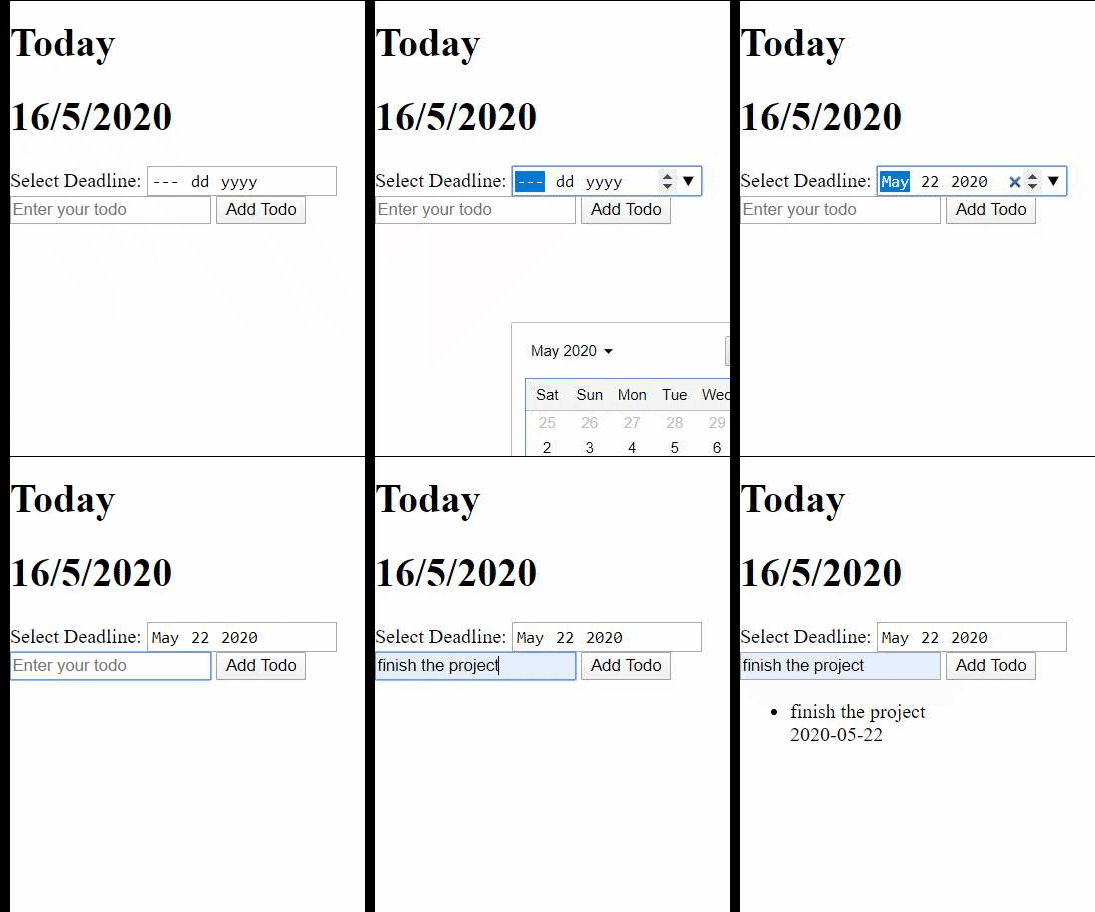
Yes, it is the list of tasks on the peice of paper that we usually use in our real life to not forget to do things and on their time, but we are basically converting the piece of paper to a website so you don't have to spend more paper 😉, also, if you still don't know what a todo list is see wikipedia.
Please don't split the code. Write every line of code together. In each group, every person should understand every line of code.
In this project, you will be using HTML, CSS, and JS in order to create a todo list website of your choice.
These requirements will basically update each version and you will add to the work you did the previous version so make sure you write clean code, also, this is why you see requirements titled Version N.
- an
h1with the date of today that is updated everyday dynamically - a
formwith aninputfield thats required to not be empty for the task description. - user should be able to select a deadline date for the task which is also a required
input. - user should be able to use the Tab key to jump from one input to the next one.
- a
buttonthat when clicked performs the action of adding a newliitem to a todo listul. - empty the input fields after adding the task to the list.
- you will have a list of items that each item should display the title and deadline date of the task.
- show a text if there is no tasks informing the user about that.
- add a list of priorities that consist of (1, 2, 3) and user should be able to select a priority to add to the task.
- there should be a check button on each task item in the list and when the user click it, it should add a line-through on the task title (basically making this task checked).
- make sure to display the each task priority along its title and deadline
- pass the task as an object to add it to your task list.
PS: if you are not storing tasks in an array and you feel you are having problems checking (adding line-through over task title) the task, try to make the tasks as an array or just checkout how to render the tasks as an array of objects.
- tasks should be stored in an array of objects
- user can now delete tasks from the list
- separation of concerns (there should be a separate function to add, delete and check the task)
- you should have a date formatting function that returns the date in this format (MMMM DD, YYYY) for example (May 20, 2020).
- if the task due date or deadline has passed make the tasks title have a red background or indicate that this task due date has passed and have a function to do that too
PS: if you want to store the tasks into your storage so you can still have them when you refresh your page google localstorage and how to store array of objects inside localstorage 😉
Feel free to use whatever CSS framework or just CSS as long as it looks nice and make sure its responsive too.