Releases: SAP/macOS-enterprise-privileges
Privileges 2.5.0

What's new?
This release of Privileges introduces a powerful system extension, designed to prevent unauthorized modifications, deactivation, or uninstallation of Privileges and its components. This is a major step forward in making Privileges even more secure.
You can enable or disable the system extension either by using the new -e or --extension argument in PrivilegesCLI or by a configuration profile using the new EnableSystemExtension key. Once enabled, it prevents Privileges from being renamed, copied, or deleted. It also prevents the unloading of the Privileges launchd plists with the commands launchctl unload or launchctl bootout.
Privileges 2.4.2
What's new?
-
In addition to the
RequireBiometricAuthenticationoption introduced in Privileges 2.4.0, the newBiometricsFallbackTypeoption now allows you to configure how to handle cases where biometric authentication is unavailable. By default, users are prompted to enter their username and password if biometric authentication is not configured or is unavailable. However, this may not be the desired behavior in all environments. It can be changed as follows:-
0:If biometric authentication is unavailable or not configured, the user will be prompted to enter their username and password. (default) -
1:If biometric authentication is unavailable, the user will be prompted to enter their username and password. If biometric authentication is available but has not been configured, authentication will fail. -
2:If biometric authentication is unavailable or not configured, authentication will fail.
-
-
The app now includes icons for macOS 26.
Unfortunately, there is currently no supported way to use the new icons in a Dock Tile plugin. Therefore, we have built a workaround that enables the use of the new icons. However, there is currently a bug in the Dock that causes programmatically set icons to display incorrectly under certain conditions. This is particularly noticeable in theTinted/LightandClear/Lightappearance modes. We have opened a support ticket with Apple regarding this issue.
Privileges 2.4.1
What's new?
-
After careful consideration, we have decided to add an optional timer to the Privileges status menu. While we still recommend leaving it disabled for efficiency reasons, you can now enable it in the app's settings and using the key
ShowRemainingTimeInMenuBarin a configuration profile. -
As requested in issue 237, we changed the behavior of the Dock Tile and the status item. Rather than disabling the
Request Privilegesmenu entry when the user is required to provide a reason for becoming an admin, we now launch the Privileges app, which improves the user experience. -
The new version better addresses the very rare case where Privileges is unable to identify the current console user. This only occurs with corrupt user accounts, and is now properly handled and logged.
-
We added another three new preference keys
ForceUpdatePrebootVolume,RenewalNotificationIntervalandRevokePrivilegesAfterSystemTimeChange:- When
ForceUpdatePrebootVolumeis set to true, the PrivilegesDaemon runs the command/usr/sbin/diskutil apfs updatePreboot /whenever a user's privileges change. You should normally never have to enable this function because the preboot volume is updated automatically after a while. However, we implemented this feature because it seems to be needed in some environments. RevokePrivilegesAfterSystemTimeChangemakes sure the user's administrator privileges are revoked if the system time did change. This feature should prevent users from extending their admin time by adjusting the time on their Mac. If you enable this feature, please be aware that users with admin rights can extend or retain their admin rights in various other ways. Therefore, this feature offers no protection against users misusing their admin rights.RenewalNotificationIntervalallows you to specify when Privileges should notify your users to renew their administrator privileges. By default, Privileges notifies users one minute before their admin rights expire but now you can change this interval to whatever works best for you.
You can find more information about the new keys in our wiki.
- When
-
Besides of this we fixed some minor issues and added some additional logging.
Privileges 2.4.0
What's new?
-
If you've configured Privileges with a maximum expiration interval, there is now a new key
MaxIntervalInitialthat allows you to define the initial interval to use. So you could now define a maximum interval of 60 minutes and set the initial interval to 10 minutes. This will only work as long as the user has not selected an expiration interval. So it's good for the initial setup of a Mac. -
Unsent syslog or webhook events can now be queued. So if a user does not have an internet connection, these events are not lost as in previous versions of Privileges, but are queued. To enable event queueing, set the new
QueueUnsentEventskey to true. Additionally, you can configure the maximum number of events that should be queued by using theQueuedEventsMaxkey. Here's how event queueing works:- If an event (syslog or webhook) cannot be sent, it will be stored locally in
/Library/Application Support/Privileges/QueuedEvents.plist. - The app attempts to send unsent events at the next privilege change, as well as at various intervals. Retries will occur after approximately 5, 15, 30, and 60 minutes, followed by retries every other hour.
- If, due to configuration changes, webhook and syslog events are mixed in the event queue, only the events that match the currently configured logging type are resent. Events of a different logging type are discarded.
- We make sure that the events are sent in the correct order. So the current event will be sent after the queued events.
- Webhook events have a new
delayedkey, that is set totruefor queued events. This makes it relatively easy for the receiver to identify these events. - Events that still could not be sent are returned to the event queue. If the number of unsent events is greater than
QueuedEventsMax, the oldest events are discarded. SettingQueuedEventsMaxto0means that an unlimited number of events will be queued (not recommended).
- If an event (syslog or webhook) cannot be sent, it will be stored locally in
-
A new configuration key
RequireBiometricAuthenticationhas been added. IfRequireAuthenticationis enabled, this new key can be used to force biometric authentication. If Touch ID is configured, the user can only authenticate using Touch ID and cannot use a username and password as a fallback. If the machine does not support biometric authentication or is not configured for it, the user will still be asked for a username and password. -
Fixed an issue where a misconfiguration of the
RevokeAtLoginExcludedUserscould cause unwanted application behavior. -
We also optimized the mTLS code to improve its handling of certain certificates.
Privileges 2.3.0
What's new?
-
mTLS is now supported for webhooks. So if you configure your web server to require a client certificate, Privileges will present it if it's found in one of the keychains. Please make sure PrivilegesAgent has access to the corresponding private key to avoid being prompted for access.
If you want to learn more about mTLS, I highly recommend our colleague Henry Stamerjohann's session "What about mutual TLS?" from the 2021 MacSysadmin conference. -
Managed settings are now clearly marked as managed as you know it from System Settings.
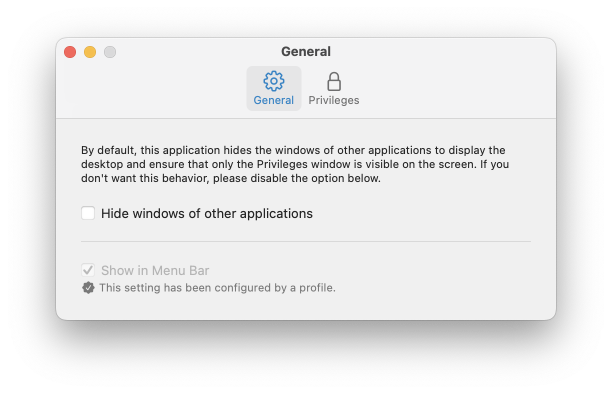
- For those who don't like notifications, a new management key
RenewalCustomActionhas been added, that allows you to run a script or binary before administrator privileges expire. So you can inform your users with a dialog or whatever works best in your environment. Please see the Wiki for detailed information about the new key. - Privileges now notices when privileges are changed by another process. To do this, it includes a new daemon called
PrivilegesWatcher. The daemon is started whenever the file/var/db/dslocal/nodes/Default/groups/admin.plistis changed. It notifies thePrivilegesAgentof the change, and the agent then determines whether the change was expected or not. Unexpected changes are logged and the UI of all Privileges components are updated to reflect the change. The log message will look like this:
SAPCorp: Administrator privileges for user xxxx have been changed by another process
- Added some code to verify group membership after changing it.
- PrivilegesCLI got a new command line argument
-vor--versionwhich displays version information. - The syslog code has been rewritten and improved. Now syslog messages can also be sent using octet counting (instead of just non-transparent framing). In addition to this you can now include structured data elements in your syslog message. To configure all this, we introduced the new management keys
MessageFormatandStructuredData. Please see the Wiki for detailed information about these new keys. - Created a new and improved dynamic JSON Schema manifest for Jamf Pro.
- Fixed some minor issues.
Privileges 2.2.0
What's new?
- If you require your users to provide a reason for requesting administrator privileges, you can now pass the reason to PrivilegesCLI as an argument (using
--reasonor-n). - Smartcard/PIV token support can now be enabled using the new
EnableSmartCardSupportkey. So if your users need to authenticate in order to get admin rights, they can now do so using their paired token. Just setEnableSmartCardSupporttotrue.
- Fixed an issue where the Dock Tile and Status Item would allow users to renew their privileges even if they had set the expiration interval to
Never. - Fixed an issue where the Status Item did not disappear if it was enabled using a configuration profile and the configuration profile was removed.
- The installer package is provided for the first time in two different versions. One containing launch constraints, and one without launch constraints. This is due to some reports we got about issues running the app in macOS 13, als macOS erroneously reports a launch constraint violation. So if you have problems running the regular version of Privileges on macOS 13, please use the
noLCpackage. Nevertheless, we recommend using the version with launch constraints whenever possible.
Privileges 2.1.0
New in Privileges 2.1
- For those of you who don't want to have Privileges in your Dock, this version comes with a status item that can be displayed in the menu bar. It provides the same functionality as the Dock Tile plugin. To see the remaining time you have admin rights, just move the mouse over the status item.
- You can now renew expiring administrator privileges. You can either wait for the notification that appears one minute before administrator privileges expire, or you can renew administrator privileges at any time using the Privileges app, the Dock tile, the status item, or PrivilegesCLI as follows:
-
Make sure privilege renewal is enabled in the app's settings.
-
Privileges app: Run the app while you have administrator privileges. If the Revoke Privileges dialog appears, simply hold down the Option key and the Revoke Privileges button will change to Renew Privileges. Press the button while still holding the Option key to renew privileges. -
Dock Tileand the newStatus Item: Right-click the Dock tile while you have administrator privileges. When the menu appears, hold down the Option key and the menu item Revoke Privileges will change to Renew Privileges. To renew privileges, click the menu item while still holding the Option key. -
PrivilegesCLI: As long as you have administrator privileges, run PrivilegesCLI with the-aor--addargument, and your privileges will be renewed.
-
Specific users can now be excluded from having administrator privileges revoked at login using a configuration profile.
-
The help button (?) can now be hidden or can be configured to open a custom url. So you can now direct your users to an internal support page instead of our GitHub page.
-
Custom data can now be passed to a webhook. Include information such as the machine's serial number, computer name, or any other information that is relevant to your environment.
-
To make integration with some 3rd party solutions easier, we have added an
eventfield to the webhook's JSON. -
If your environment requires people to enter a reason to become an admin, and you have configured an executable to run when privileges change, the reason can now be passed to that executable as argument $3.
-
Introduced the new management keys:
AllowPrivilegeRenewal,HelpButtonCustomURL,HideHelpButton,HideSettingsFromStatusItem,PassReasonToExecutable,RenewalFollowsAuthSetting,RevokeAtLoginExcludedUsers,ShowInMenuBar,WebhookCustomData. See the wiki or the sample profile in the app's Resources folder for details. -
The app's settings window has been redesigned.
-
Especially for our friends and colleagues in Bulgaria, we have added a Bulgarian localization.
-
Made some changes in order to comply with the European Accessibility Act.
-
Fixed an issue that caused admin accounts to lose their admin privileges under certain circumstances.
-
If the Privileges app is open and privileges are changed while the app is still open (expired or changed using PrivilegesCLI), this is now properly reflected in the app.
-
Implemented a workaround for issue #128.
Privileges 2.0.0
Changes
- Privileges now uses a unified expiration interval. So whether you request privileges using the application, the Dock Tile, or the command-line tool, they all have the same expiration interval, and administrator privileges expire after the time you configured.
- Touch ID is now also available in the command line tool. This makes using it more convenient, even in environments with complex password requirements.
- Administrator privileges can now be automatically revoked at login, so users can always be sure to start as a standard user.
- An application or a script can be executed whenever privileges change. This allows you to create custom workflows that fit perfectly in your environment.
- Privileges can now call a webhook whenever privileges change. This allows administrators to set up complex workflows and seamlessly integrate Privileges into their existing landscape.
- AppleScript can now be used to get information about the status of the current user's privileges. Especially for scripts, this new feature makes it easier than ever to determine if a user has administrator privileges and when they expire.
- Privileges now comes as a signed and notarized macOS installer package to make the deployment of the app easier than ever before.
- Localized in 40 languages, to make it even more useful for a wider audience.
- Stunning new app icon.
Privileges 2.0.0 runs on macOS 11 or newer.
Privileges 1.5.4

Changes
- Includes security updates to address CVE-2023-40307.
For additional details, please see the following security advisory:
Privileges Memory Corruption (Out-of-bound write)
Privileges 1.5.4 has been tested and verified to run on the following OS versions:
- macOS 11.7.9
- macOS 12.6.8
- macOS 13.5.2
- macOS 14 beta 7
Privileges 1.5.3
Changes
-
Added support for the following keys associated with the
ReasonRequiredkey:ReasonMaxLengthReasonPresetList
For more details, please see the Managing Privileges documentation in the wiki.
The following issues were addressed as part of this release:
Privileges 1.5.3 has been tested and verified to run on the following OS versions:
- macOS 10.12.6
- macOS 10.13.6
- macOS 10.14.6
- macOS 10.15.7
- macOS 11.6.7
- macOS 12.4
- macOS 13 beta 1
Note: Xcode 13.2 or later is required to build Privileges 1.5.3 from source.