(100% Free, Private (No Internet), and Local PC Installation)
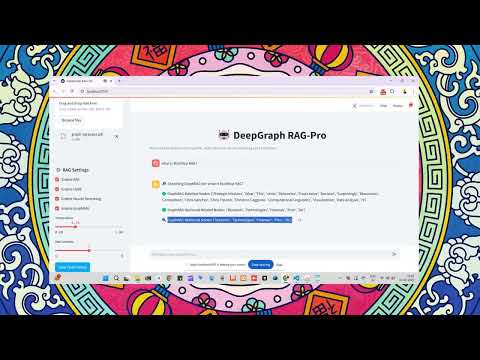
🔥 DeepSeek + NOMIC + FAISS + Neural Reranking + HyDE + GraphRAG + Chat Memory = The Ultimate RAG Stack!
This chatbot enables fast, accurate, and explainable retrieval of information from PDFs, DOCX, and TXT files using DeepSeek-7B, BM25, FAISS, Neural Reranking (Cross-Encoder), GraphRAG, and Chat History Integration.
- GraphRAG Integration: Builds a Knowledge Graph from your documents for more contextual and relational understanding.
- Chat Memory History Awareness: Maintains context by referencing chat history, enabling more coherent and contextually relevant responses.
- Improved Error Handling: Resolved issues related to chat history clearing and other minor bugs for a smoother user experience.
Example: Users can choose between models like mistral, gemma, or llama3 from a dropdown menu.
Example: If the document is about "Machine Learning Basics," suggested questions could be: What is supervised learning? How does gradient descent work? What are the common evaluation metrics for ML models?
Example: Basic RAG Pipeline: Uses FAISS for retrieval and a simple prompt format. Advanced RAG Pipeline: Uses ChromaDB with metadata filtering for more precise document retrieval.
Example: Data Stores: PostgreSQL, Pinecone, Weaviate, ChromaDB. Similarity Search Techniques: Cosine similarity, Euclidean distance, Jaccard similarity.
There are a few ways to install and run the DeepSeek RAG Chatbot:
- Simplified Installation (Recommended using
install.sh) - Traditional (Manual Python/venv) Installation
- Docker Installation (ideal for containerized deployments)
This is the easiest way to get started. The install.sh script automates the setup process.
-
Clone the Repository:
git clone https://github.com/SaiAkhil066/DeepSeek-RAG-Chatbot.git cd DeepSeek-RAG-Chatbot -
Run the Installation Script: Make sure the script is executable, then run it:
chmod +x install.sh
./install.sh
This script will:
- Check for Ollama and install it if it's not found.
- Install Python dependencies from
requirements.txt. - Create or update a
.envfile with the necessary environment variables, including the modelhuihui-ai/Qwen3-1.7B-abliterated. - Pull the specified Ollama model.
-
Activate Environment Variables: After the script completes, source the
.envfile to load the environment variables into your current shell session:source .env -
Run the Chatbot: Launch the Streamlit app:
streamlit run app.py
Open your browser at http://localhost:8501 to access the chatbot UI.
git clone https://github.com/SaiAkhil066/DeepSeek-RAG-Chatbot.git
cd DeepSeek-RAG-Chatbot

# Create a virtual environment
python -m venv venv

# Activate your environment
# On Windows:
venv\Scripts\activate
# On macOS/Linux:
source venv/bin/activate

# Upgrade pip (optional, but recommended)
pip install --upgrade pip

# Install project dependencies
pip install -r requirements.txt
- Download Ollama → https://ollama.com/
- Pull the required models:
Note: The
ollama pull huihui-ai/Qwen3-1.7B-abliterated ollama pull nomic-embed-textinstall.shscript handles model pulling automatically. If installing manually and you want to use a different model, updateMODELorEMBEDDINGS_MODELin your environment variables or create a.envfile accordingly.
- Make sure Ollama is running on your system:
ollama serve - Launch the Streamlit app:
streamlit run app.py - Open your browser at http://localhost:8501 to access the chatbot UI.
If Ollama is already installed on your host machine and listening at localhost:11434, do the following:
- Build & Run:
docker-compose build docker-compose up - The app is now served at http://localhost:8501. Ollama runs on your host, and the container accesses it via the specified URL.
If you prefer everything in Docker:
version: "3.8"

services:
  ollama:
    image: ghcr.io/jmorganca/ollama:latest
    container_name: ollama
    ports:
      - "11434:11434"

  deepgraph-rag-service:
    container_name: deepgraph-rag-service
    build: .
    ports:
      - "8501:8501"
    environment:
      - OLLAMA_API_URL=http://ollama:11434
      - MODEL=huihui-ai/Qwen3-1.7B-abliterated
      - EMBEDDINGS_MODEL=nomic-embed-text:latest
      - CROSS_ENCODER_MODEL=cross-encoder/ms-marco-MiniLM-L-6-v2
    depends_on:
      - ollama
Then:
docker-compose build
docker-compose up
Both Ollama and the chatbot run in Docker. Access the chatbot at http://localhost:8501.
- Upload Documents: Add PDFs, DOCX, or TXT files via the sidebar.
- Hybrid Retrieval: Combines BM25 and FAISS to fetch the most relevant text chunks.
- GraphRAG Processing: Builds a Knowledge Graph from your documents to understand relationships and context.
- Neural Reranking: Uses a Cross-Encoder model for reordering the retrieved chunks by relevance.
- Query Expansion (HyDE): Generates hypothetical answers to expand your query for better recall.
- Chat Memory History Integration: Maintains context by referencing previous user messages.
- DeepSeek-7B Generation: Produces the final answer based on top-ranked chunks.
| Feature | Previous Version | New Version |
|---|---|---|
| Retrieval Method | Hybrid (BM25 + FAISS) | Hybrid + GraphRAG |
| Contextual Understanding | Limited | Enhanced with Knowledge Graphs |
| User Interface | Standard | Customizable + Themed Sidebar |
| Chat History | Not Utilized | Full Memory Integration |
| Error Handling | Basic | Improved with Bug Fixes |
- Fork this repo, submit pull requests, or open issues for new features or bug fixes.
- We love hearing community suggestions on how to extend or improve the chatbot.
Got feedback or suggestions? Let’s discuss on Reddit! 🚀💡
Enjoy building knowledge graphs, maintaining conversation memory, and harnessing powerful local LLM inference—all from your own machine.
The future of retrieval-augmented AI is here—no internet required!