A secure SOC-2 compliant PowerShell module to manage and protect your passwords with industry-grade cryptography and integrity verification.
• Database passwords are secured via PBKDF2-based key derivation, salted and hashed with SHA-256, but are never stored.
• Master passwords are secured similarly using PBKDF2 with salt and SHA-256 hashing, and validated via a separate authentication mechanism.
• User registry passwords are processed using PBKDF2, then salted, hashed, and Base64 encoded. These passwords differ fundamentally from database passwords because they are never decrypted, reflecting a one-way authentication model.
• Each password entry within a database, each password database at the file level, and the user registry at the file level are all encrypted with AES-256-CBC using unique, random IVs after which, HMAC validation is appended in order to ensure integrity and detect tampering.
• After database passwords are individually AES-encrypted, they are then Base64-encoded, before per-entry HMAC is appended.
• The database is serialized to JSON, compressed with GZIP, then encrypted at rest, at which point the file-level HMAC is appended.
• The user registry is serialized to JSON, then encrypted at rest and features file-level HMAC.
• Since the user registry always remains small, per entry HMAC and file level GZip compression would provide no appreciable security or size benefits, which is why it differs in implementation from the database and entries stored therein.
• This layered approach ensures robust security through strong KDFs, encryption, integrity verification, compression, and encoding.
• Designed with zero-trust principles; keys, secrets, and databases are securely wiped multiple times using diverse methods after critical operations.
• Role-Based Access Control (RBAC) enforces two-factor authentication and three privilege levels.
• Brute-force protection mechanisms safeguard both the master password and individual user accounts.
• External NTP time synchronization and hash verification enable trusted source execution.
• Comprehensive, timestamped activity logs record both standard and administrative user actions.

• v4.5 introduces at rest encryption and compression for the module. By using a loader script, the module is decrypted and executed exclusively in memory, providing one more layer of security.
• v4.6 introduces chained HMAC logs, log validation function and improved authentication logging.

Usage: pwmanage <database.pwdb> <keyfile.key> -noclip
If no database/keyfile are specified, the defaults "paschwords.pwdb" and "paschwords.key" will be used.
When a password is retrieved, it will automatically be copied to the clipboard for 30 seconds, unless the -noclip option is used at launch time.
You can configure a number of options by modifying the entries in the "Paschwords.psd1" file located in the same directory as the module, or by using F9 to view and F10 to edit these configuration items.
Expiration dates only present the entries in a separate browse entries screen for easy identification. No changes are made to the entries.
The initial configurations of the directories within the PSD1 file point to:
"DefaultPowerShellDirectory\Modules\Secure\keys" and "DefaultPowerShellDirectory\Modules\Paschwords\databases".
The term "DefaultPowerShellDirectory" is a placeholder that is evaluated within the module, redirecting these to a user's personal PowerShell directory, but these should be moved once setup is complete.
|
I started this project when I realized that it was possible to create a JSON database with encrypted entries within PowerShell.
From there, it just made sense to create a full-fledged password manager.
The options required were obvious and the need for a master password was, as well.
I know this has very practical applications, because I work for clients who have systems that are extremely well locked down.
That means however, that they do not let you install unapproved software, but most will let you install PowerShell modules.
So, I created this module to be able to fill that niche and it just keeps growing.
The inital databases were plaintext, but those have been replaced with encrypted and compressed files, and several other advanced security features have been added along the way, including RBAC and HMAC integration. A setup wizard and full help text is provided inline. |
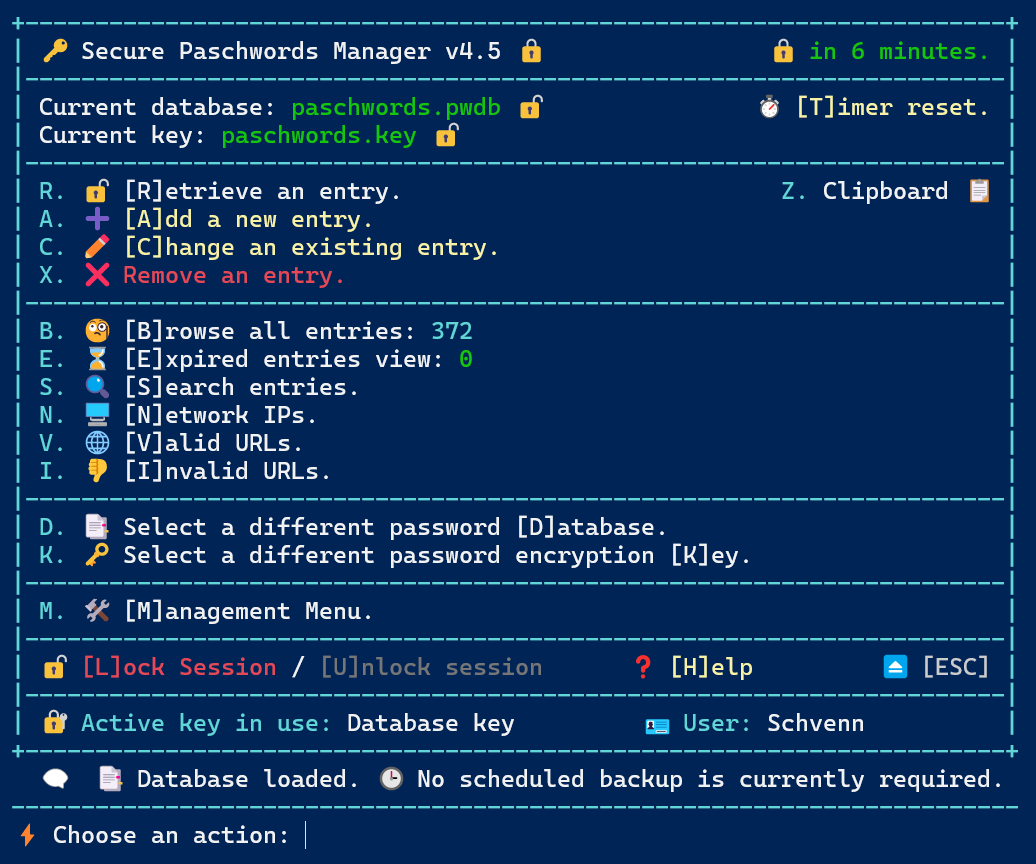 |
# Core module details
@{RootModule = 'Paschwords.psm1'
ModuleVersion = '4.63'
GUID = 'd4f71764-0e43-4632-8b35-0f0a79b36f62'
Author = 'Schvenn'
CompanyName = 'Plath Consulting Incorporated'
Copyright = '(c) Craig Plath. All rights reserved.'
Description = 'Secure password manager using AES encryption and key-based protection.'
PowerShellVersion = '5.1'
FunctionsToExport = @('paschwords')
CmdletsToExport = @()
VariablesToExport = @()
AliasesToExport = @()
FileList = @('Paschwords.psm1', 'license.txt')

PrivateData = @{PSData = @{Tags = @('aes','clipboard','cybersecurity','encryption','hmac','manager','password','rbac','security')
LicenseUri = 'https://github.com/Schvenn/Paschwords/blob/main/license.txt'
ProjectUri = 'https://github.com/Schvenn/Paschwords'
ReleaseNotes = 'Full AES password management system with secure storage, clipboard integration, HMAC validation, RBAC mechanisms, brute force protection and full event and authentication logging.'}

delayseconds = '30'
privilegedir = 'DefaultPowerShellDirectory\Modules\Paschwords\.top'
archiveslimit = '5'
databasedir = 'DefaultPowerShellDirectory\Modules\Paschwords\databases'
keydir = 'DefaultPowerShellDirectory\Modules\Paschwords\keys'
backupfrequency = '7'
expirywarning = '365'
logretention = '30'
timeoutseconds = '900'
defaultkey = 'paschwords.key'
useragent = 'Mozilla/5.0 (Windows NT 10.0; Win64; x64) AppleWebKit/537.36 Chrome/120.0.0.0 Safari/537.36'
dictionaryfile = 'common.dictionary.gz'
logdir = 'DefaultPowerShellDirectory\Modules\Paschwords\logs'
timetobootlimit = '60'
defaultdatabase = 'paschwords.pwdb'}}
The script checks itself against a set of valid SHA256 hashes to ensure the file has not been modified. A script "CheckNTPTime.ps1", ensures the system time hasn't been tampered with, in order to avoid user account expirations. Another separate script "ValidateURLs.ps1" is included to test a file containing a list of URLs for connectivity. This is designed to be used with the Valid URLs search and export function within the module, but I am keeping it separate in order to ensure the Paschword manager remains completely offline and thereby limits its security exposure.