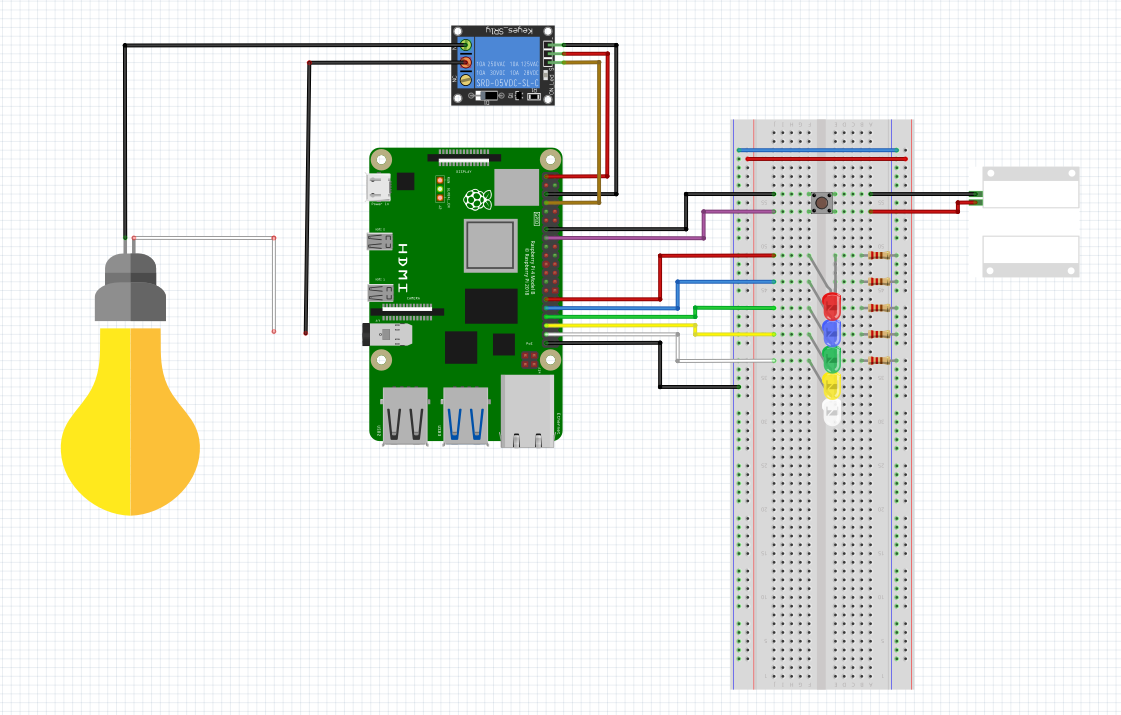
This is the sample code that Scott Klement uses when presenting about using a Raspberry Pi together with RPG.
- Raspberry Pi running Raspberry Pi OS (buster or newer)
- Node.js version 10 or newer (14 recommended) on the Raspberry Pi
- IBM i V7R2 or newer (V7R4 recommended)
- ILE RPG Compiler
- IBM HTTP Server (powered by Apache)
Download the code to a directory such as rpg-raspi-demo on the Raspberry Pi, and install dependencies by typing the following:
git clone https://github.com/ScottKlement/rpg-raspi-demo.gitcd rpg-raspi-demonpm install- Update the URL in start.js so that it is appropriate for your enviroment
cd rpg-raspi-demonpm start
All of the IBM i code is in the rpg subdirectory.
- Create an Apache server instance (using the IBM wizard)
- Edit the configuration file and replace with the code provided in the
httpd.conffile. - Change the library in the
httpd.conffile to the one where to plan to install the RPG programs. - Start the HTTP server.
- Upload the RPG and DDS code to the appropriate files. Typically this would be:
raspid.dspf->QDDSSRC,RASPIDraspir.rpgle->QRPGLESRC,RASPIRdoorswitch.rpgle->QRPGLESRC,DOORSWITCH- Update the URL in RASPIR with the proper one for your environment
- See the DOORSWITCH and RASPIR sources for information on how to compile them.
The code in this program is expecting the circuit to be built as follows: